


 Video Converter Ultimate
 Gravador de ecrã
 Reparo de vídeo
Como converter 3GP para WMV de maneira profissional [online e offline]
3GP is a popular mobile format that transfers data through mobile phones without causing us much bandwidth while saving some space. Also, this format is standardized on taking a video on 3rd generation mobile phones, but rest assured, you can play the video on the 2nd and 4th generation. Although it is excellent on phones, it is limited only to smartphones. So, it is not a surprise if the .3gp file isn't great on the desktop. Nevertheless, you can learn to convert 3GP into a format that has much broader supports on a desktop, like WMV. Want to learn how to convert 3GP to WMV in a professional way? In that case, let's cast an eye over it and not waste any time.

Parte 1. O que é 3GP
É um formato baseado em ISO que armazena fluxos de mídia como H.263 ou H.264 para vídeo e AMR ou AAC para áudio, perfeito para compactação com perdas. Além disso, este formato de 3ª geração é fácil de armazenar para armazenar dados em unidades portáteis em nossos telefones, mesmo no IOS. Embora o 3GP ainda esteja disponível, a taxa de eficácia desse formato começou a cair e, por isso, o 3GPP entrou em cena e se tornou uma versão melhor dele.
Parte 2. O que é WMV
É um formato multimídia proprietário desenvolvido pelo Windows para streaming de vídeos online. Diferente de qualquer outro formato, como o 3GP, o WMV usa um codificador multifold para tornar o arquivo ainda mais compactado. Devido à capacidade de usar muitos codificadores, é mais acessível compartilhar vídeos com eficiência nesse formato. No entanto, há uma desvantagem de usar muitos codificadores, especialmente na edição e reprodução, porque nem todos os reprodutores e editores de mídia suportam uma ampla variedade de codecs. Embora o formato use um compressor, a qualidade da mídia não será alterada ou reduzida.
Parte 3. Maneira Profissional de Converter 3GP para WMV com o Video Converter Ultimate
Do you want to attain a professional converter 3GP to WMV free download on your platform? FVC Video Converter Ultimate offers an expert converting procedure without exerting too much effort. This converter takes you to another conversion level that any converters online or offline couldn't provide to you. Moreover, the ultimate tool supports 200+ media formats to choose from, unlike any other tool.
Contanto que você tenha este conversor, sempre espere uma saída profissional em seu formato de mídia convertido. Quer usar o conversor profissional para converter seus arquivos 3GP? Se for esse o caso, você pode seguir as etapas abaixo para converter com a melhor ferramenta com sucesso.
Steps on How to Convert 3GP file to WMV with the FVC Video Converter Ultimate
Step 1. Presented below are the download buttons; respectively, choose the platform you are using. For example, click the Windows download button if you are a Windows user. But if you are a Mac user, click the other one. After the downloading process, install the converter next and run the converter by clicking Start Now. More importantly, after launching, you will need to get familiarized with its interface before proceeding to the next steps.
Free DownloadFor Windows 7 or laterSecure Download
Free DownloadFor MacOS 10.7 or laterSecure Download
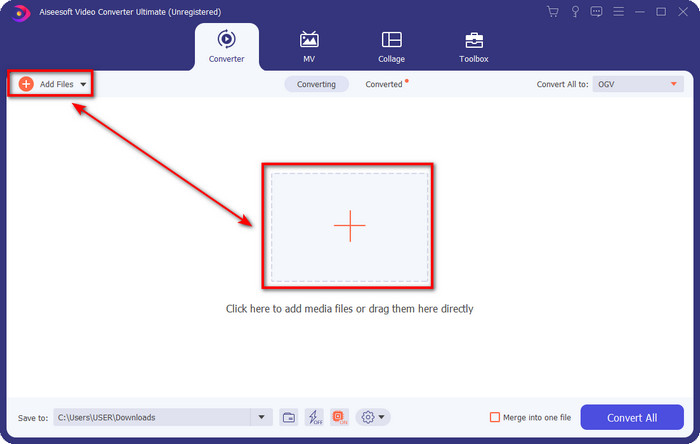
Step 2. You will see Add Files at the upper left part of the interface; click that, and a folder will show. Browse the .3gp file on your computer drive, then upload it by pressing Open.
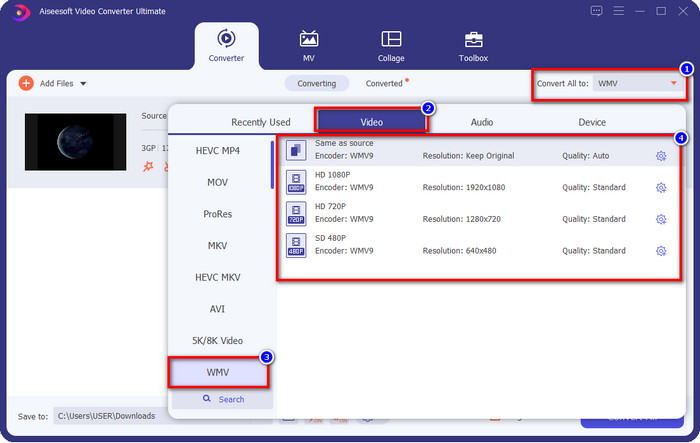
Step 3. Click Convert All to choose the WMV format you want or the WMV as the final output.
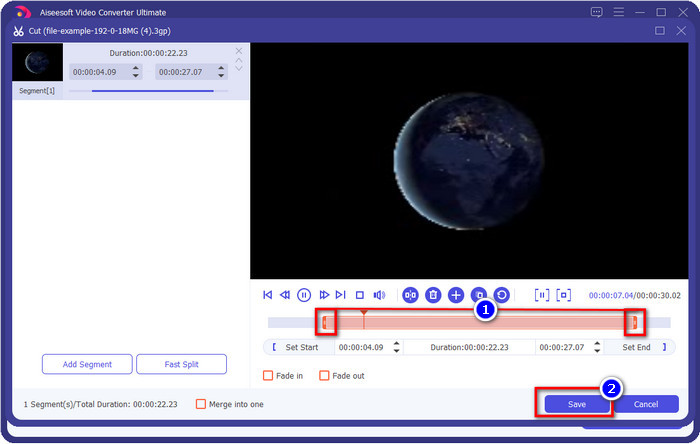
Optional. Before we convert 3GP file to WMV, let's briefly discuss the other features this tool offers. Need to cut? No problem. Hit the scissor button, drag the slide bar on both sides if you want, and press Save to apply the cutting you've made.
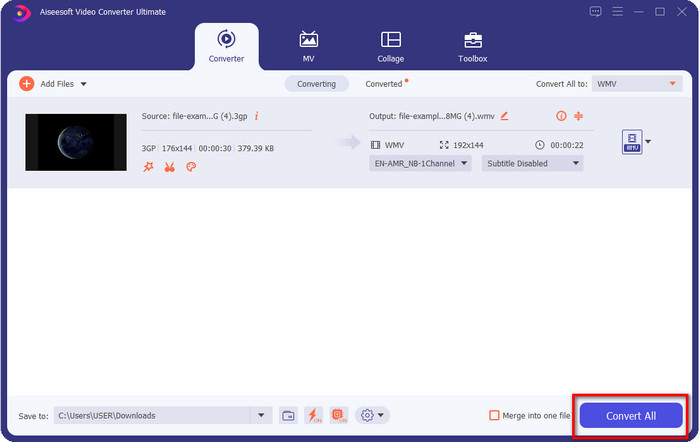
Step 4. Start the converting process by clicking the Convert All button. The converting will end within a short period, and voila, the WMV file will save on your computer drive.
Parte 4. Maneira Online de Converter MXF para WMV com o Free Video Converter Online
Another FVC product but an online solution time is the FVC Free Video Converter Online. This online professional converter provides a neat and clean interface compared to the other web converters. Furthermore, you won't need to download the converter on your device before using it; instead, you can open your browser and open the converter. Although the web converter is great, there is much expertise this tool can't provide. However, this is the choice if you want to convert 3GP to WMV online; copy the steps below to use this tool.
Steps on How to Convert 3GP to WMV Online Free with the FVC Free Video Converter Online
Step 1. Click this link to open the online converter.
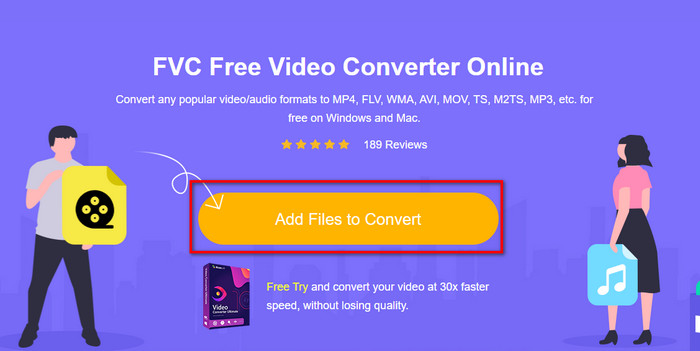
Step 2. After clicking it, press the Add Files to Convert to launch the converter. If this is your first time using this converter, you need to install the launcher by clicking Add Files to Convert, but it is not as big as the ultimate tool. Search the 3gp file you want to convert and hit Open.
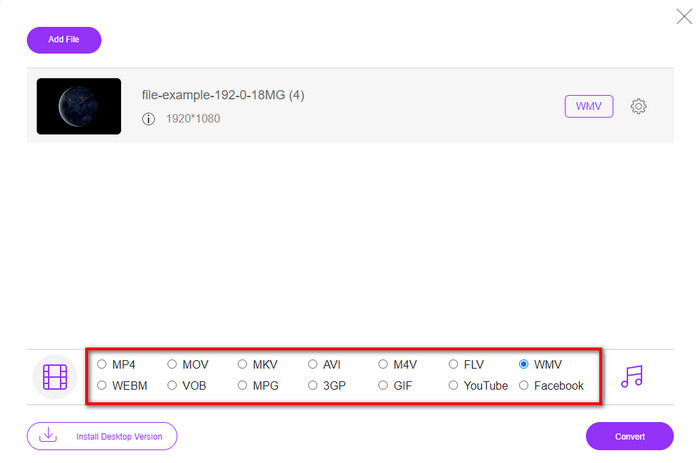
Step 3. After uploading the 3GP file, it is now time to choose the formats presented below or click WMV.
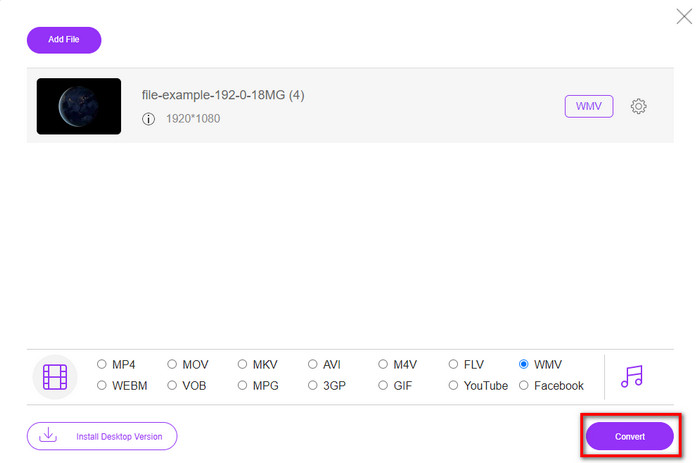
Step 4. Already choose a format? If so, click Convert to begin the process of converting the file.
Parte 5. Perguntas frequentes sobre a conversão de 3GP para WMV
É uma ótima ideia usar um conversor 3GP para WMV online?
Se você não quiser baixar um conversor no seu dispositivo, o ideal é usar um conversor online. Mas lembre-se, nem todos os conversores online ou offline são seguros de usar. Na maioria das vezes, eles têm vírus se você os instalar ou não fizer a tarefa de forma eficaz. Mas se você quiser garantia de sua conversão, recomendamos o uso dos produtos conversores FVC porque este é 101% livre de malware e garante o sucesso do seu processo de conversão.
É possível mesclar vários vídeos 3GP?
Yes, with the help of the FVC merger tools, that can help you combine multiple videos that are in a 3GP format. So now, if you want to know how to merge your several 3GP videos, you must read this article to know how to do it.
Os vídeos 3GP têm boa qualidade?
3GP tem boa qualidade, mas não pode armazenar qualidade de alta definição, então espere que a qualidade de vídeo de um 3GP seja baixa.
Conclusão
To conclude, the converters enlist in this article selectively pick while following a certain standard of professional output. In addition to that, we also used the tools here to present and state only facts about their characteristics. Moreover, suppose you don't want to download a converter on your desktop to save some space and still have a professional output, we greatly recommend you use the FVC Free Video Converter Online. But if you want to transcode your 3GP in a much professional manner, we strongly suggest using the FVC Video Converter Ultimate. Still not satisfied with the statement we provide? In that case, you must try it for yourself to experience an expert conversion this tool offers and learn how to convert 3GP to WMV.
-
 As 4 maneiras mais eficazes de converter 3GP para o formato AVI [2025]
 Posso converter meus arquivos 3GP para AVI? Bem, você pode convertê-lo facilmente se experimentar essas ferramentas disponíveis, pois reunimos todas as soluções possíveis para o seu problema de conversão de 3GP em AVI.
-
 Melhor conversor 3GP para FLV para usar na conversão de 3GP para FLV [2025]
 Você já tentou converter 3GP para FLV, mas não sabe que tipo de conversor usará? Leia este artigo para saber todos os detalhes sobre a conversão de 3GP em FLV.
-
 2 melhores maneiras possíveis de converter 3GP sem suporte para DivX [2025]
 Muitos usuários perguntam como converter 3GP para DivX. Então, agora, nós fornecemos um artigo para ajudá-lo a converter seu arquivo .3gp sem problemas.
