


 Video Converter Ultimate
 Gravador de ecrã
 Reparo de vídeo
Melhor conversor gratuito de MPEG para MKV que você nunca deve perder
MPEG is one of the most common encoders of media content that provides a high-quality video output. Although it is a standardized video compression, you will still need to convert your MPEG into a new format like the MKV to make it widely supported. In that case, we make searching for the perfect tool for you easier as we handpick the converters that only provide success for you. So now, if you want to know what are these five free MPEG to MKV converters available on all platforms, you must buckle up and read the details next.

Parte 1. Os 5 principais conversores de MPEG para MKV em Windows/Mac/Online/Celulares
Topo 1. FVC Video Converter Ultimate (Windows e Mac)
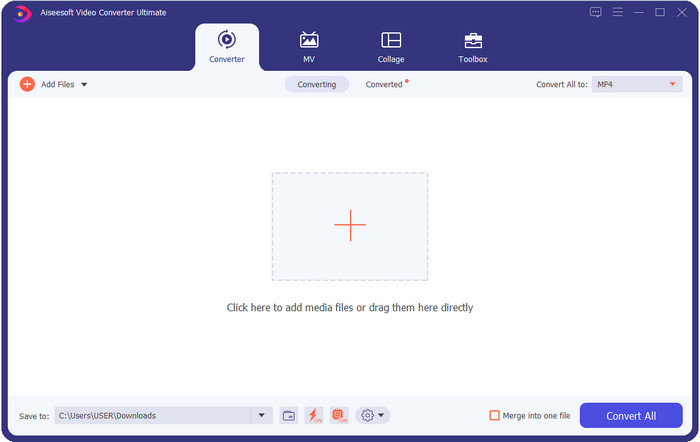
FVC Video Converter Ultimate offers a complete converting process on any lossless or lossy media conversion you will need. This converter provides a professional output but is within reach of beginners or those who aren't technology-oriented, so if you choose this converter, anticipate that it is hassle-free. Furthermore, it is notorious for converting 200+ format into a new version, but it can also be your user-friendly editor —even the complicated editing such as video enhancer, audio boost, color correctness, and more; name it, this tool can perform it. Moreover, if you want to use this converter to convert MPEG to MKV, read the tutorial in the next part.
Prós
- Converter vários MPEG para MP4, MKV, AVI, MOV, WMV ou outros formatos de forma descontraída.
- Recursos de edição estão disponíveis para tornar seu vídeo impressionante.
- A conversão ultra-rápida é suportada aqui para uma conversão na velocidade da luz.
- Disponível em todas as plataformas como Windows e macOS.
Contras
- Compre a ferramenta antes de usá-la.
Topo 2. Conversor de Vídeo TalkHelper (Windows)
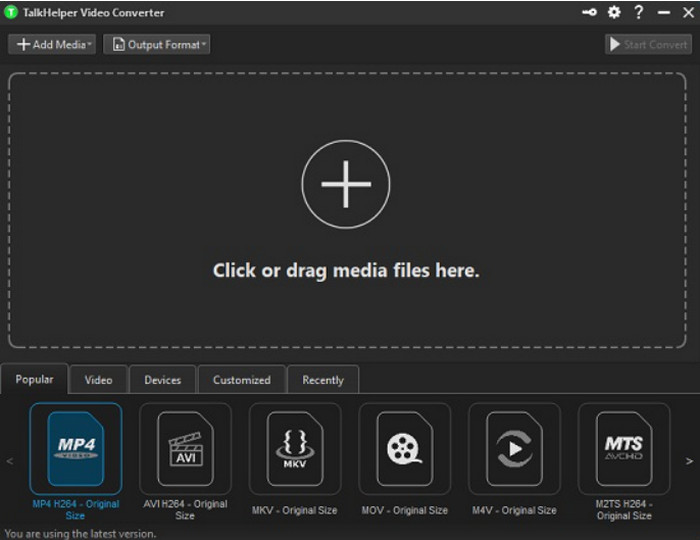
Another free MPEG to MKV converter you can use is the TalkHelper Video Converter. This converter enables the users to convert MPEG into the supported format in the list, such as MP4, MKV, AVI, MOV, and WMV. Moreover, if you are using Windows Vista/8/8.1/10 versions, you can easily download this tool; however, if your Windows is not on the said version, you can't use it, also; if you are a Mac user, you can't download it either. Although the tool is far different from the ultimate tool at the top, it is worth mentioning because of how good it is as a converter.
Prós
- Suporta múltiplas conversões de MPEG para MKV.
- Permite ajustar o vídeo e definir a qualidade de vídeo específica.
- Disponível no Windows Vista/8/8.1/10.
Contras
- Limitado apenas ao Windows.
- A compra é necessária.
Top 3. iConv - Conversor de Vídeo e PDF (iOS)
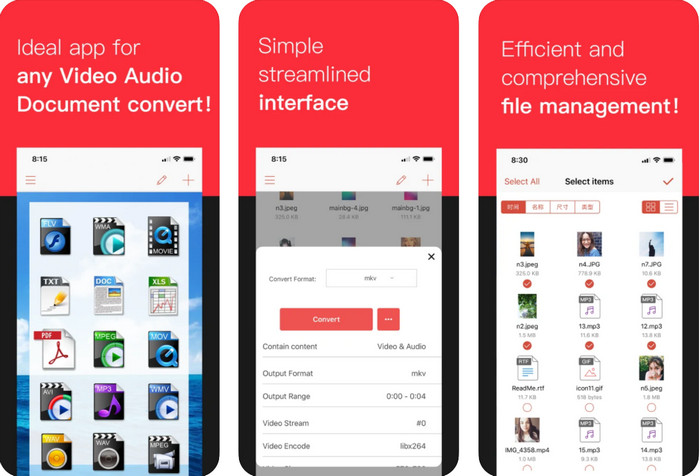
If you're looking for a MPEG to MKV converter free download on iOS, we present to you the iConv. This tool is mainly for converting the video format into a new format within reach of iOS users. Moreover, this iOS converter can convert images, PDF, audio, etc. Also, it works on both iPhones and iPad well, with the same features included. However, the users who have already used this converter say that this tool crashes most of the time. So, if you download and use this, expect to encounter some crashes or bugs that are very common on every mobile app.
Prós
- Converta seu MPEG para MKV facilmente com este conversor baseado em iOS.
- Fácil de usar.
- Edite vídeos facilmente.
Contras
- Bugs e falhas ainda estão acontecendo após a atualização.
- Os anúncios estão em toda parte se você não comprou a ferramenta.
Top 4. Conversor de Vídeo, Compressor MP4, 3GP, MKV, MOV, AVI (Android)
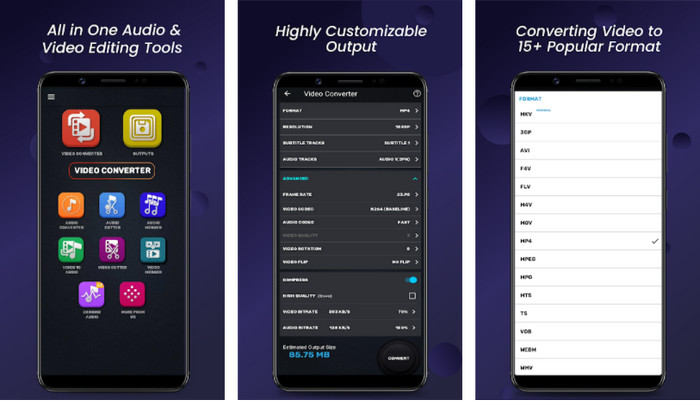
You shouldn't be worried if you are an Android user because we also present a MPEG to MKV converter that is free to download on Playstore. Video Converter, Compressor MP4, 3GP, MKV, MOV, and AVI can convert your MPEG files on your Android phones anytime you need them. Unlike any converters app we use on Android, we found out that this app is far different in how it handles the converting process. Also, it supports much wide range of formats you can choose and upload on. Moreover, you can also do basic compressing, manipulating FPS, and changing resolution if you need it. Although it has these features, you will need to wait for a long time because the converting process will take time.
Prós
- Eficaz em converter seu MPEG em MKV no seu Android.
- Confiável e intuitivo.
- Grátis para baixar.
Contras
- O processo de conversão do arquivo leva muito tempo.
- Os anúncios estão matando o aplicativo se você não o comprou.
Top 5. Conversor de Vídeo Grátis FVC Online
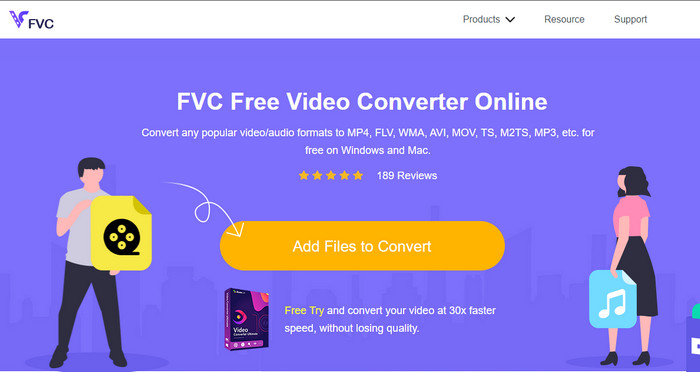
FVC Free Video Converter Online can convert MPEG to MKV online without downloading a converter on your drive. With this converter, you can convert your format without limitation and free based on your requirements. This converter online can easily encode most of the format on any given day. However, this converter can't do a batch conversion to convert more formats at one go. Also, it is internet-dependent, which means the converting process will depend on how fast your internet is. Nevertheless, this tool already helps millions of internet users with their converting problems, and maybe the next will be you.
Prós
- Converta vídeo facilmente na web com este conversor.
- Não é necessário baixá-lo.
- Disponível em todas as plataformas para ajudá-lo em seu problema de conversão.
Contras
- Precisa de conexão com a internet para funcionar.
- Ele suporta um formato limitado que você pode escolher.
Parte 2. Como converter MPEG para MKV com o Video Converter Ultimate
Os detalhes a seguir serão os passos para usar com sucesso a ferramenta definitiva como um conversor gratuito de MPEG para MKV.
Step 1. Click the download button below to download the converter on your desktop. Follow the installation process next and launch it.
Free DownloadFor Windows 7 or laterSecure Download
Free DownloadFor MacOS 10.7 or laterSecure Download
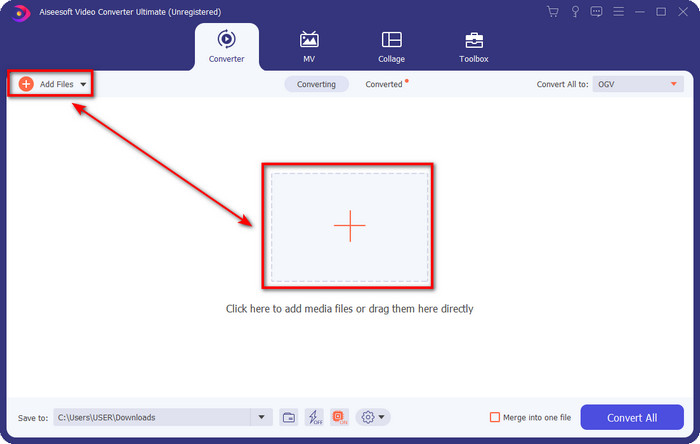
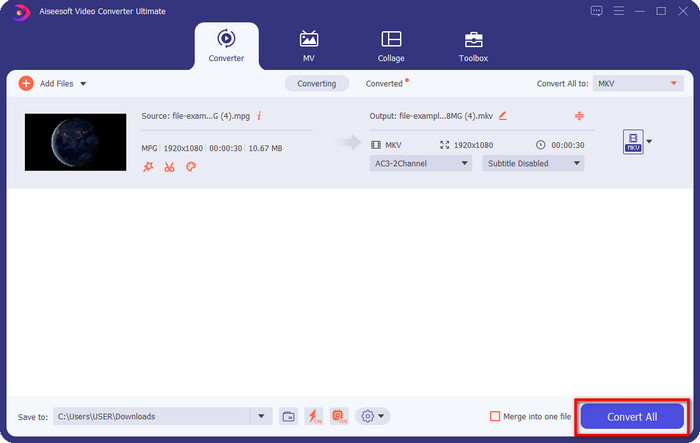
Step 2. After launching the converter, you can now upload the .mpeg or .mpg file here by clicking the Add File or the + button. Locate the file on the folder that will show on your screen and press Open to proceed to the next steps.
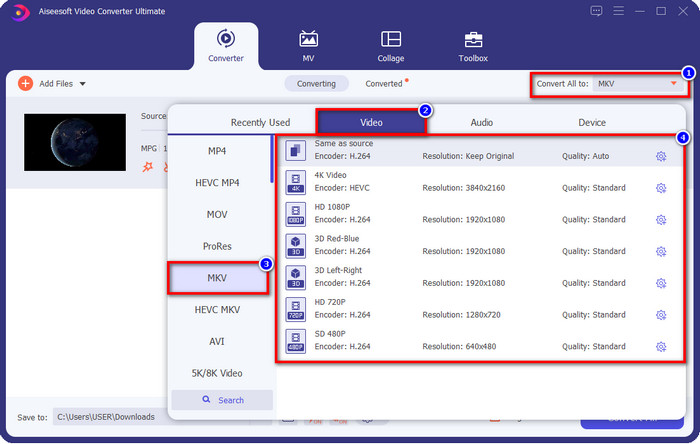
Step 3. To change the format, click Convert All to at the upper right side of the interface. Under the options, choose the MKV format based on your wants. There are several options and different video quality, encoder, and more.
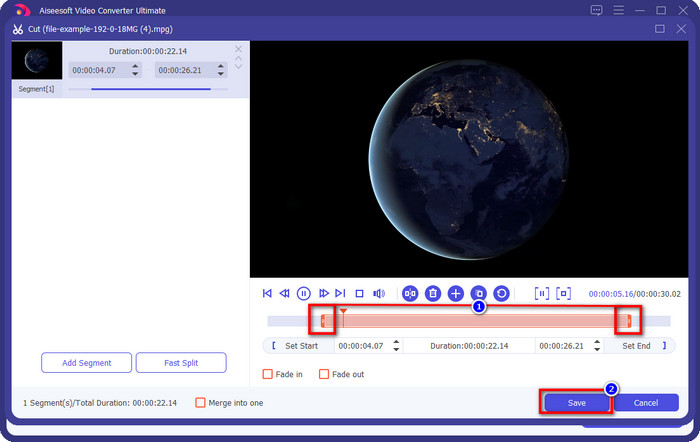
Optional. If you need to cut unnecessary clips on your video, click the scissor-like button. Adjust the length of your video by dragging the play head. Once you've already wanted to save the changes, click Save.
Step 4. Now, this is the last step where you are about to convert the file by clicking Convert All. The file is ready instantly; you now have transformed your .mpeg into .mkv format with that steps.
Parte 3. Gráfico de comparação
| Recursos | FVC Video Converter Ultimate | Conversor de Vídeo TalkHelper | iConv – Conversor de Vídeo e PDF | Conversor de Vídeo, Compressor MP4, 3GP, MKV, MOV, AVI | FVC Free Video Converter Online |
| Converta MPEG para MKV com eficiência |  | | | | |
| Conversão em lote | | | |  | |
| Recursos de edição | | | | | |
| Conversão ultrarrápida | | | | | |
| Baseado em plataforma | Baseado em computador | Baseado apenas no Windows | Baseado em iOS | Baseado em Android | Baseado na Web |
Parte 4. Perguntas frequentes sobre conversão de MPEG para MKV
Qual é a vantagem do MPEG?
O MPEG torna nossa transferência, download e streaming online mais rápido do que o outro formato de vídeo pode fornecer. Além disso, este formato de vídeo usa MPEG-1 e MPEG-2 para compactar o formato de vídeo, mas sua qualidade permanecerá a mesma, o que significa que não será afetada. Portanto, se você precisa de um ótimo formato de vídeo para distribuir filmes, o MPEG é uma escolha.
Qual é melhor, MPEG ou MKV?
Em relação ao desempenho dos formatos, ambos são excelentes. Mas se você deseja conter vários conteúdos e elementos em um arquivo, o MKV tem um ponto forte nessa área. No entanto, o tamanho do arquivo é enorme por causa do conteúdo e dos componentes. Suponha que você queira um formato de arquivo menor para transferir vídeo, então o MPEG irá ajudá-lo. Embora possa conter metadados, não é tão detalhado quanto o MKV.
Por que meu arquivo MPEG é tão grande?
There are many reasons why your MPEG file size is big; one of the reasons is that the length of the video is approximately long. It explains why your MPEG files are large; although MPEG has an encoder, you will still need to compress it if you want to save space on your storage or deliver it faster. Want to know how to compress MPEG? Click and read this article.
Conclusão
This article got your back covered if you want or need to convert MPEG to MKV. We tried all converters to ensure that they all do work perfectly. But if we compare these five-tool, we can see that the FVC Video Converter Ultimate performs better. So now, if you want to add a professional touch to your conversion, the ultimate tool is the choice according to the details we provided above. Need to know more about the ultimate tool? Or do you want to test it out yourself? In that case, downloading it is the only way to see if it works, according to our review.
-
 [2021] Melhores ferramentas e maneiras fáceis de converter MPEG para MP3
 Este artigo fala principalmente sobre como você pode converter seus vídeos MPEG em MP3 com o uso das ferramentas mais confiáveis da lista.
-
 As 5 melhores opções para converter MPEG para formato AVI [Online e Offline]
 Você tem dificuldade em procurar um conversor para MPEG? Então tente ler este artigo enquanto aprendemos como alterar o formato MPEG para AVI com etapas detalhadas.
-
 As 3 melhores técnicas para converter MPEG em FLV no PC e Mac
 Precisa converter arquivos MPEG para o formato FLV? Se for esse o caso, leia este artigo para entender como converter o arquivo e quais conversores você pode usar.
