


 Video Converter Ultimate
 Gravador de ecrã
 Reparo de vídeo
[Revisão completa] 5 mais recentes cortadores de MP3 disponíveis no Windows/Mac/Online
We often wish to cut the audio we listen to and set it as a ringtone, highlighting the vital part or trim the unnecessary detail of the sound. Although there are sets of cutters you can use on all platforms still some aren't trustworthy. So today, we will present to you the cutters we found on the market where you can trust because we try all of these tools ourselves to ensure that it is malware-free and reliable. Before we pick them out, we follow a strictly high standard for the audience who needs a dependable cutter. To make your browsing on the internet at full tilt, we presented below the five MP3 cutters we found ready to take the task of cutting any audio format.

Parte 1. 2 Softwares de corte de MP3 offline Windows e Mac
1. Video Converter Ultimate – Melhor cortador de MP3 [Fortemente recomendado]
The best audio MP3 cutter in this list is the Video Converter Ultimate, which lets users cut any audio effortlessly. With the help of this ultimate tool, you can trim the sound to remove the unwanted audio, even merge multiple cut audio files into a single file and boost the audio if you feel that the sound is a bit low. Furthermore, this software provides an ultra-fast process while taking care of the original quality of the sounds.
Ao contrário de qualquer cortador, esta ferramenta suporta um amplo espectro de formatos, não apenas MP3, mas também FLAC, M4R, M4A, OGG, MKA, WAV, WMA e muito mais, e seu arquivo de áudio é suportado aqui para ser cortado. Talvez você não saiba como cortar seu arquivo de áudio e usá-lo para suas necessidades agora. Hoje é seu dia de sorte, porque vamos ensinar você a usar o cortador de MP3 e o criador de toques gratuitamente seguindo o tutorial abaixo.
Step 1. Download the audio cutter on your desktop by clicking the download button below. Pick whether you are using a Windows or Mac, install the software promptly, and launch it. Remember, you will need to be familiarized with the tool's interface to be easy for you to follow the following steps.
Free DownloadFor Windows 7 or laterSecure Download
Free DownloadFor MacOS 10.7 or laterSecure Download
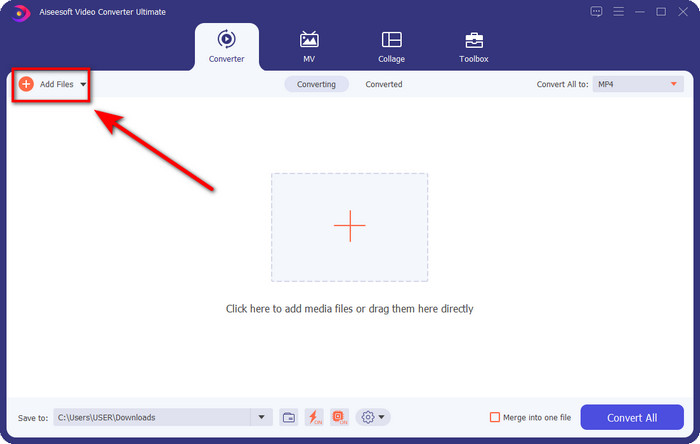
Step 2. Drag the audio file you want to cut on the interface, or you can click Add Files and locate the audio on the computer folder that will show. Hit Open to proceed to the next step.
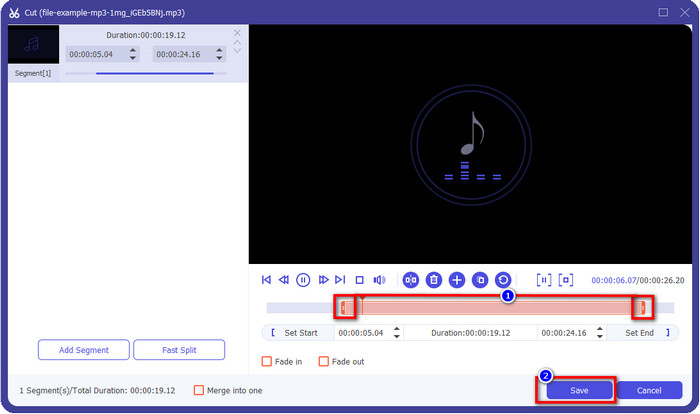
Step 3. After inserting the audio file, it is now time to click the scissor-like button. Drag the play in and out to your desired length of the audio you want. Remember that the highlighted audio in the middle of play in and out is the only audio kept. Then press Save to cut the audio.
Optional. Need to boost your audio? If that is the case, click the wand button, adjust the volume slider by dragging it up, and press OK to save.
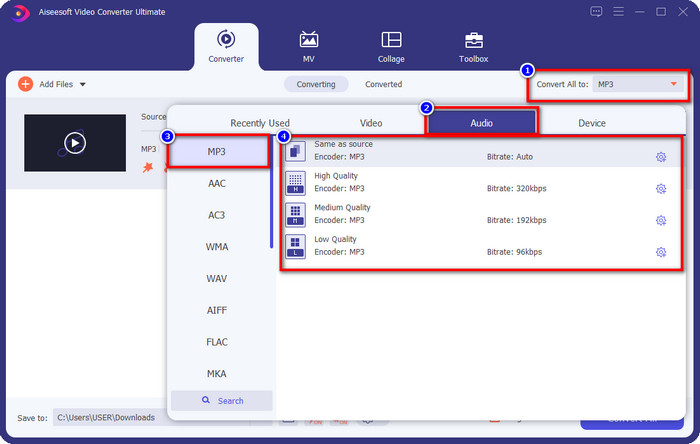
Step 4. Go to Convert All to, Audio and set the format to MP3. Although you aren’t converting, make sure that the name under Convert All to is MP3 or not another format to avoid changing the format to another format.
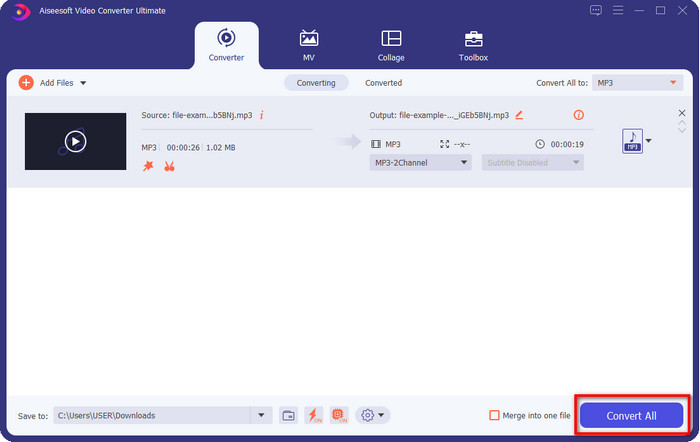
Step 5. By clicking Convert All, saving the audio cut will begin. You now have the audio cut with the best free MP3 cutter as easy as that.
Prós
- Ele pode cortar seu áudio o mais rápido possível e processá-lo em menos de um segundo.
- Recursos avançados estão disponíveis para aumentar a potência do volume.
- Ele suporta todos os sistemas operacionais, como Windows ou Mac.
- Mesclar vários arquivos de áudio é possível com a fusão de áudio desta ferramenta.
Contras
- A compra da ferramenta é necessária.
2. Audácia
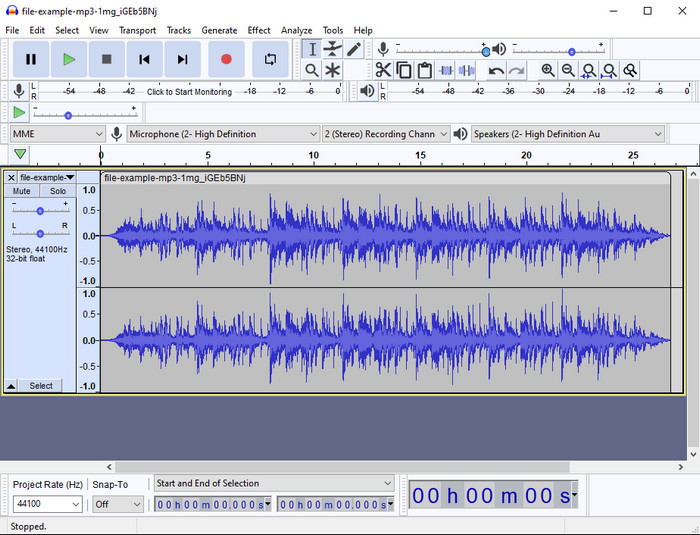
Audacity has provided pro editing features for your audio thru the years. This app is free to download and offers users do a multiple-track mixing. It is known to be used by podcasters to edit and record podcasts easily. However, some of its features are hard to understand, especially if you are not fond of using specialized software like this one.
Embora você ainda possa aprender a usá-lo, levará tempo para usar todo o potencial deste aparador de áudio MP3 e, para cortar áudio, é justo dizer que ele corta instantaneamente e sem esforço, se você precisar.
Prós
- Gratuito para download em todos os programas como Windows e Mac.
- Editores de áudio avançados e profissionais estão disponíveis para tornar seu áudio ótimo.
- É melhor para gravar podcasts e muito mais.
Contras
- Muitos concorrentes fornecem uma interface de usuário amigável.
- Não é a melhor escolha para iniciantes para um resultado imediato de corte e outros fins de edição.
- Alguns relatórios mostram que seus dados são coletados se você usar essa ferramenta, mas ainda não há evidências fortes.
Parte 2. 3 Cortadores de MP3 Online Acessíveis na Web
1. mp3cut.net
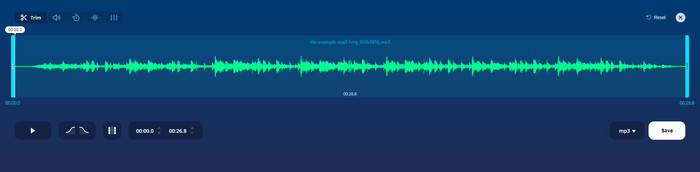
Você pode usar o mp3cut.net se precisar de um cortador de MP3 online para o trabalho. Depois de carregar o arquivo neste cortador online, agora você pode remover o som que deseja desenhar em seu arquivo de áudio. Além disso, a ferramenta também possui alguns recursos de edição menores para alterar a velocidade e o tom do áudio, se necessário.
Apesar de possuir esse tipo de habilidade, a ferramenta trava na maioria das vezes e não consegue reproduzir o áudio para ouvir se você o cortar corretamente. Portanto, para usá-lo novamente, você precisará atualizar seu navegador e repetir o ajuste que fez novamente.
Prós
- Amigável e acessível através da internet.
- No ponto, recursos para ajudá-lo a cortar o áudio.
- Recursos básicos de edição estão disponíveis.
Contras
- Tem anúncios na interface web.
- Às vezes, ele trava e precisa ser recarregado novamente para usá-lo.
2. audiotrimmer. com
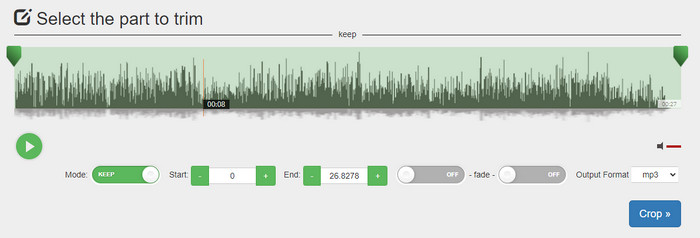
Another free mp3 cutter online is audiotrimmer.com. This tool provides easy-to-understand and straightforward trimming features; all of the function of this tool is on point. With it, you can choose whether you want to keep the audio or remove the audio. Also, it has a fade-in and out effect like the other trimmer mentioned here. However, when we did try to use the fade-in and out the effect, it didn't work; there were no added effects to our audio. But if you want to do easy cutting, this is a must-try web tool.
Prós
- Gratuito e disponível em todos os navegadores para acesso.
- Fácil de usar para cortar áudio.
- Possui efeitos de fade in e out.
Contras
- Fade-in e out não estão funcionando bem.
- Existem muitos anúncios irritantes se você acessá-los. Portanto, tome cuidado para não clicar neles.
3. Clídeo

One of the best online MP3 cutters and joiners you can use is the Clideo. Most users enjoy and prefer using this tool because of its editing capabilities. Moreover, you can also add fade in and out on your audio file if you need it. But after exporting it and listening to it, there is no fade in and out added to our audio file. We encounter one slight problem with this tool: uploading and downloading the file. Unlike the first-mentioned tool, uploading audio on its cutter takes time, and there are times that we failed to upload the audio file here because of unknown reasons.
Embora encontremos alguns problemas, ainda é o melhor cortador online e também é seguro de usar.
Prós
- Melhor cortador online online.
- Interface de usuário profissional.
- Fácil de usar.
Contras
- O processo de upload e download tomará muito do seu tempo.
- Fade in e out funciona, mas não bem.
Parte 3. Perguntas frequentes sobre os cortadores de MP3
Qual é o melhor aparador de MP3 no Mac?
FVC Video Converter Ultimate is available on Mac as well. So, if you need to trim your audio on Mac, you better download the ultimate tool to handle your audio file appropriately. The ultimate tool presents not only best for cutting your audio, but you can also enhance the audio by boosting it. Moreover, if you need help in converting, merging, syncing the audio, etc. ultimate tool is to the rescue. If you need to know more about the ultimate tool, you better read the details presented above.
Cortar o áudio reduz seu tamanho?
O tamanho do arquivo do áudio é reduzido após você cortá-lo. Ao compararmos o arquivo de áudio original com o arquivo de corte, vimos algumas mudanças na altitude. Portanto, significa que quanto menor o arquivo de áudio, menor o tamanho, mas se o arquivo de áudio for muito longo, espere que o tamanho também seja significativo.
Posso usar o Audacity para mesclar vários áudios?
Yes, you can, Audacity supports merging multiple-audio tracks into one file. However, it is hard, especially if you don't have a relevant tutorial to follow. So, if you need to merge audio via Audacity, you can click this link and learn from it.
Conclusão
The MP3 cutters presented here already pass the standards we set to provide only the best trimmer for you. This article shows how important to choose the right and suitable cutter based on your needs. Even though the trimmers here do the same function, the FVC Video Converter Ultimate provides a much more efficient cutting audio. According to our research, the ultimate tool surpasses all the standards we set. So, if you want to have a top cutter on your hand, this is the best choice among the rest cutters available on the market. Too good to not believe? Well, you better download the tool and test it out yourself.
-
 Como recortar e mesclar músicas online - 4 maneiras que você deve conhecer
 Quando você deseja cortar e mesclar músicas online para criar uma peça musical, você pode aprender mais sobre as 4 melhores ferramentas online para recortar as músicas e combinar os arquivos do artigo.
-
 Descubra o Melhor Aparador MP4 com Procedimento e Informações
 Quer aprender a cortar vídeos como os vloggers que você assiste? Então continue lendo este post para saber quais aparadores de MP4 você pode usar.
-
 Download do MP3 Player – 10 melhores MP3 Players de música grátis de 2025
 Qual é o melhor reprodutor de música MP3? Como coloco música em um MP3 player? Como fazer o download do reprodutor de música MP3? Esta postagem oferece uma análise detalhada dos 10 melhores MP3 players gratuitos para Windows PC e Mac.
