


 Video Converter Ultimate
 Gravador de ecrã
 Reparo de vídeo
 Converta MOD para qualquer formato como MP4, MOV, AVI, MP3, etc.
7 Conversores MOD gratuitos disponíveis em sua plataforma para transformar o formato MOD facilmente
Need to change your MOD file? If that is the case, you don't need to worry anymore and have a hard time trying different converters. Do not stress out because today, we got you covered. Right away, we will give you the best ways to convert MOD to MP4, MOV, MPEG2, DVD, or any video format you want with steps to help you follow.

Parte 1. Top 7 Conversores MOD gratuitos para converter arquivos MOD online e offline
1. FVC Video Converter Ultimate – Melhor Conversor MOD no Windows e Mac
First on our list is the most picked MOD converter available across the platform, the FVC Video Converter Ultimate. This converter offers the ultra-accelerated converting process to its customers, and as always, it never lets them down. Even though converting with the tool is fast, its quality isn't changed because it is protected while altering the format.
O que é mais do que seu processo de velocidade relâmpago? Ele também suporta os formatos massivos que você pode importar ou exportar, como MOD, MP4, MOV, MKV, FLV, WMV e muitos mais. Por causa do formato suportado, os clientes gostaram da ferramenta e muitos deles recomendam isso para outros usuários que precisam converter seu formato. Portanto, se você precisar de ajuda para converter MOD para MP4 ou qualquer formato de vídeo que desejar, esta ferramenta é uma excelente ajuda seguindo as etapas indicadas abaixo.
Step 1. To download the converter on the desktop, kindly click the download button below, choose what platform you are currently using. Next, follow the installation process quickly, and run the software. If you're new to converting, don't be afraid because the steps provided here will assure you to convert the MOD file properly.
Free DownloadFor Windows 7 or laterSecure Download
Free DownloadFor MacOS 10.7 or laterSecure Download
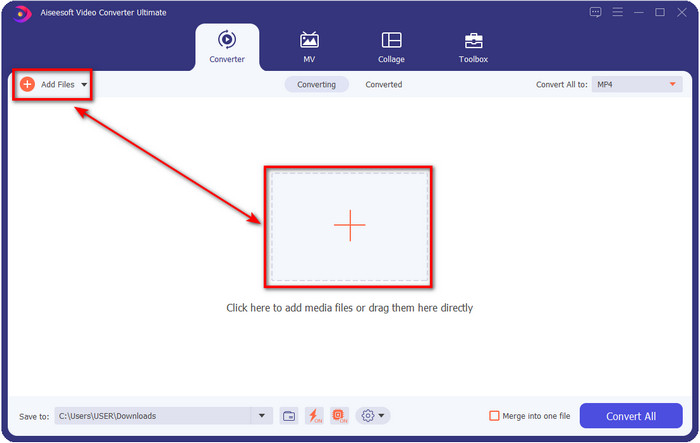
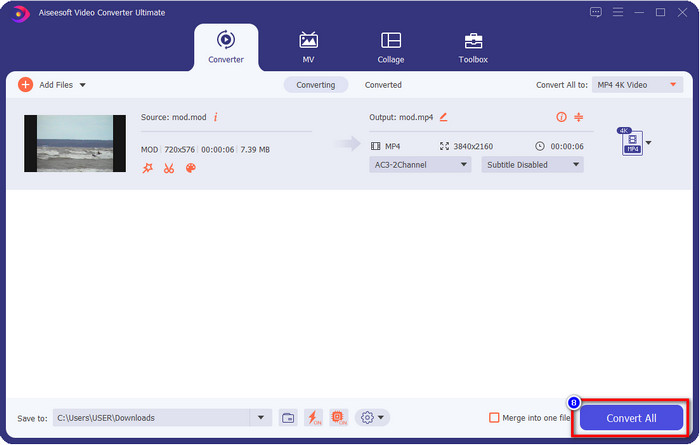
Step 2. Upload the MOD file by clicking the Add Files, or you can press the big + button at the middle of the interface. After that, a computer folder will show on your screen; this time, browse and click the MOD file and press Open to proceed to the next step.
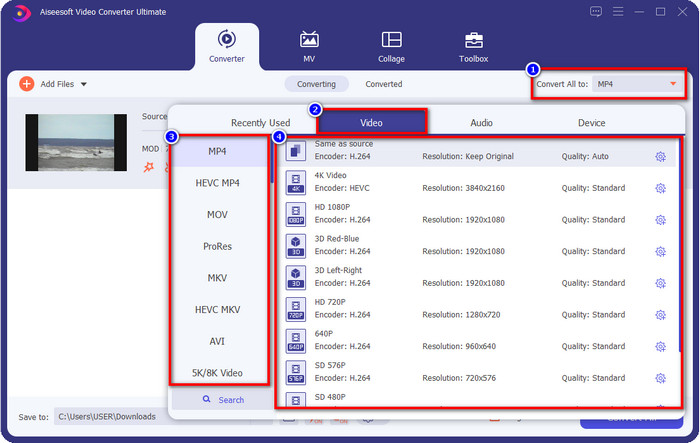
Step 3. To alter the format to MP4, MOV, MKV, or whatever format you need, hit the Convert All to and choose.
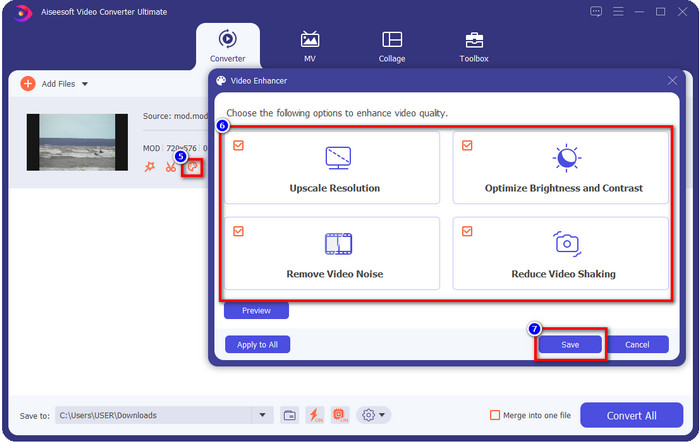
Optional. One of the fantastic features this tool provides is the enhancer. If you click the paint tray, a new mini interface will show; you can now make a significant adjustment to your video by ticking the boxes. Click Save to apply the changes you've made on your MOD video.
Step 4. After all the procedures, it is now time to convert MOD by clicking Convert All. As easy as 1-2-3, you already learn to convert MOD format into a new format.
Prós
- Converta MOD para MP4, MOV, MKV, FLV, AVI ou em mais de 200 formatos disponíveis de forma eficaz.
- Os recursos avançados de edição incluem aparar, cortar, recortar e muito mais.
- É seguro e livre de malware para download.
- Disponível para download em todas as plataformas de desktop como Windows e Mac.
Contras
- Para aproveitar todos os recursos avançados, você precisará adquirir a ferramenta.
2. Conversor TOD gratuito do iMovieSoft
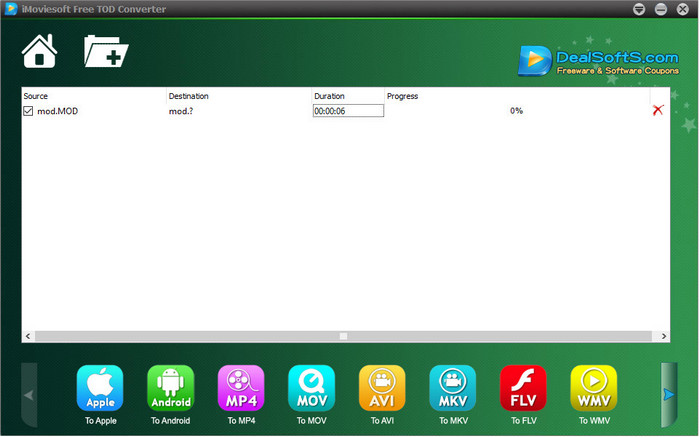
Another converter you can download on your desktop is the iMoiveSoft Free TOD Converter. You can easily convert your MOD format into the available formats with it. However, the format this tool supported is not that many, but the known format is available. Moreover, the main website of the tool is not connection secured; although there is a warning, we did try to download it on our system to provide steps to convert MOD files to MOV, MP4, AVI, etc.
Step 1. Download the converter on your desktop and open it.
Step 2. Click the Folder and look for the MOD files to insert.
Step 3. Hit the format below and press Convert.
Prós
- É gratuito para download no Windows e Mac.
- Fácil de usar.
- Recursos básicos de edição estão disponíveis.
Contras
- O site principal não é seguro para conexão.
- Tem uma opção de formato que você pode escolher.
- A interface do usuário precisa de melhorias.
3. Conversor iOrgSoft
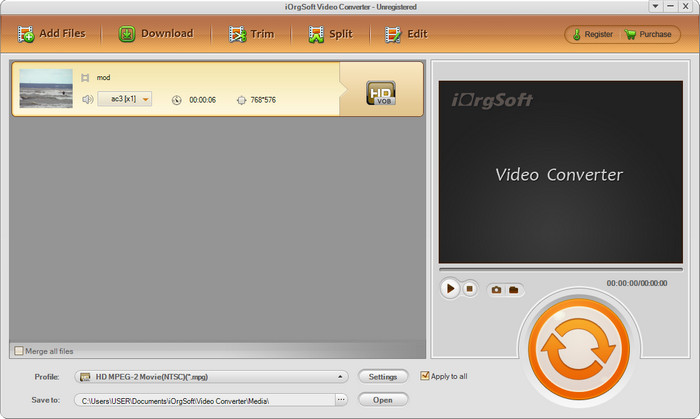
iOrgSoft Converter is a choice if you need to convert MOD to MPEG2 easily. This converter's main website also has an unprotected connection like the iMovieSoft. You can also use an external link to download the video here. Although the tool offers some options, its user interface has less priority, which means expect not as good-looking UI. Also, crashes and glitches happen when you are about to convert.
Step 1. Search the main webpage of the converter and download it there.
Step 2. Open the converter, click Add Files to insert MOD files, click the format tray and choose the format you want.
Step 3. Hit the convert button to start converting.
Prós
- Ele suporta mais formatos que o iMovieSoft.
- Simples de usar e fácil de entender.
- Faça o download no Windows e no Mac.
Contras
- Conexão não segura ao seu site principal.
- A interface dos usuários é terrível.
4. FFmpeg
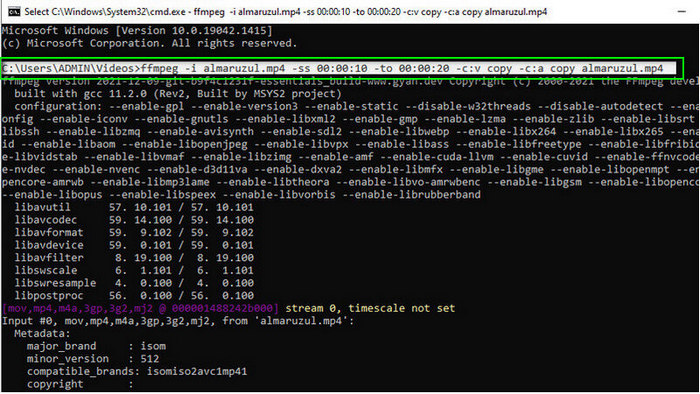
Suppose you need a free MOD to MOV converter, then FFmpeg is here to help you. Unlike other converters in this list, it uses a CLI-based interface to communicate with the tool you will use text. Even though it is not so familiar to us, some users still use this as their converter. So now, if the converter caught your attention, follow the steps below.
Step 1. Download the FFmpeg and run the exe file.
Step 2. Open the CMD; you can now communicate with the tool with it.
Step 3. Look for the location of the file using the command prompt. After that, copy and paste this text, ffmpeg -i input.mod -vn -ar 44100 -ac 2 -b:a 192k output.mp4 as MP4. You can also change the format into MOV, MKV, AVI, and more. To start the process, click Enter on your keyboard.
Prós
- Conversor de vídeo exclusivo disponível na maioria das plataformas.
- Seguro de usar.
- É confiável na conversão de seu formato.
Contras
- Não é muito fácil de usar.
- Não é a melhor escolha para iniciantes ou iniciantes para converter o formato.
5. CloudConvert
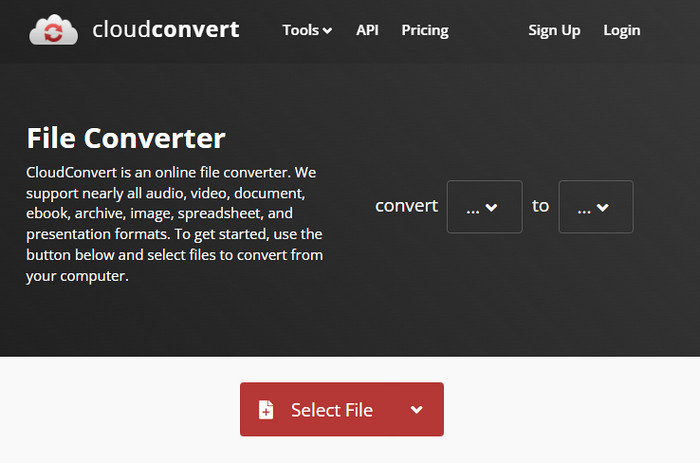
Doesn't want to download a converter on your desktop? If so, you can still convert MOD format with CloudConvert online. This online tool provides a simple yet effective converting process to its users. It also supports converting another file type like PDF, Archive, E-books, and others into a new format.
Step 1. Search the CloudConvert on your favorite browser.
Step 2. Click Select File and upload the MOD file. Hit the drop-down button and choose your ideal format. Next, click Convert.
Step 3. After uploading, click Download to save the new file format on your drive.
Prós
- Não é necessário baixar a ferramenta.
- Ferramenta online gratuita.
- Amigo do usuário.
Contras
- Dependente da rede.
- O curso do processo vai depender da velocidade da sua internet.
6. Conversor 365
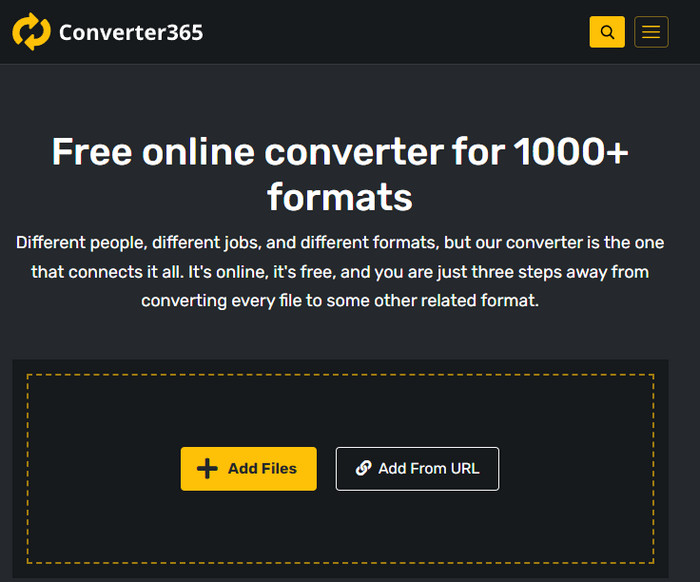
Another online free MOD to MP4 converter you can use is the Converter365. It is one of the online tools we can say has an elegant vibe interface. Because of that, using this tool looks professional; however, we have trouble converting video files here because it crashes. Moreover, if you need to convert your MOD file easily, this might help you.
Step 1. Open your browser and search for Converter365.
Step 2. Tick Add Files, then find the .mod file. Once you've found the file choose the format by clicking the drop-down button.
Step 3. Press Start Conversion, and the converting will begin.
Prós
- O conversor é acessível através da web.
- Ele fornece uma conversão simples, mas eficaz.
- A interface do usuário parece profissional.
Contras
- Ele precisa de uma conexão com a internet para usar.
- Às vezes, ocorrem erros durante a conversão do formato.
7. Zamzar
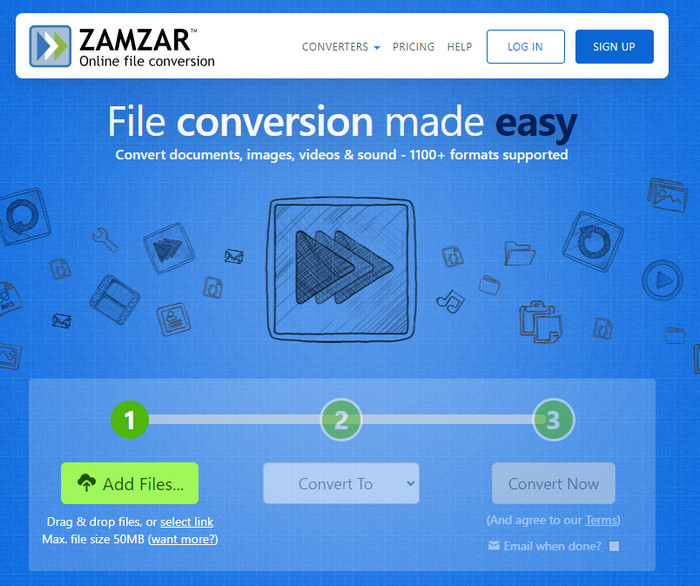
If you need an easy and practical online MOD converter, then Zamzar is a help. This tool provides an on-point process of converting your .mod files. Moreover, it is undoubtedly one of the safest converters available on the web. So, if you want to try this tool, you can follow the steps below.
Step 1. Access the Zamzar by searching it on your favorite browser.
Step 2. Press Add File to insert the MOD file you need to convert. Click Convert To and choose the format you need.
Step 3. Click Convert Now and wait for the process. Next, hit the Download to save it on your computer drive.
Prós
- Uma das melhores opções se você precisar converter um formato.
- Ele fornece um processo direto de conversão.
- Disponível em todos os navegadores da web.
Contras
- Dependente da Internet, sem internet, você não pode usá-lo.
- Ele suporta menos opções de formato.
Related:
Parte 2. Perguntas frequentes sobre conversores MOD
O que é MOD?
MOD é um formato bidirecional que pode ser usado como áudio para aplicativos de rastreamento de música digital padrão. Ele contém padrões de notas, números de instrumentos e controladores de mensagens com diferentes faixas para sons de amostra. Como é mencionado, é bidirecional; você também pode usá-lo como um formato de vídeo para filmadoras digitais fabricadas pela Panasonic e JVC. Embora este formato tenha suporte de marcas conhecidas, está um pouco desatualizado se formos compará-lo com o outro contêiner de vídeo.
Os players de mídia suportam a extensão .mod?
Nem todos os players de mídia suportam esse formato, especialmente se o player não tiver um codec de vídeo MPEG-2 interno. É um grande problema para todos; você pode baixar uma extensão de vídeo MPEG-2 se precisar dela para reproduzir. Mas você também pode converter o arquivo em um formato suportado em suas plataformas, até agora é a maneira mais fácil e segura. Então agora, se você precisar converter seu arquivo MOD, talvez queira usar o FVC Video Converter Ultimate. Não tem nenhuma idéia sobre a ferramenta? Nesse caso, leia os detalhes acima.
O MOD é compatível com o DVD player?
Não é compatível com o DVD player; no entanto, você pode gravá-lo em DVD para torná-lo compatível com o DVD player.
Conclusão
These seven tools are the best choice if you need a MOD converter because of their performance and efficiency. We carefully tried all the software, and we found out that the FVC Video Converter Ultimate provides a phenomenal output and features that the other tool can’t beat. So now, if you need to experience the greatness of the tool you can download it first on your desktop and use it as you want.

FVC Video Converter Ultimate
Mais de 2.999.368 downloads- Converta MOD para qualquer formato popular.
- Melhore a qualidade do vídeo naturalmente
- Faça a colagem de vídeo sem problemas com saída de alta qualidade
- Edite vídeos como um profissional, incluindo cortar, girar, adicionar filtro etc.
Free DownloadFor Windows 7 or laterSecure Download
Free DownloadFor MacOS 10.7 or laterSecure Download
-
 2 conversores finais de MPG para converter MPG para WMV gratuitamente
 Deseja converter MPG para WMV gratuitamente? Nesse caso, você tem sorte porque descobrimos que existem duas ferramentas que você pode usar para converter seus arquivos MPG.
-
 Como alterar o iTunes M4V para MKV no Mac e Windows Maneira mais rápida
 Se você precisar converter M4V para MKV no Mac, leia este artigo. Como fornecemos fatos sobre os conversores que o ajudarão em seu processo de conversão.
-
 Os 5 principais conversores gratuitos de MPEG para MKV disponíveis em todas as plataformas
 Quais são os conversores de MPEG para MKV disponíveis? Precisa saber mais sobre os conversores MPEG disponíveis em sua plataforma? Então esse artigo é para você.
