


 Video Converter Ultimate
 Gravador de ecrã
 Reparo de vídeo
Descubra como aumentar o volume nos AirPods e no Aid Pods Pro com etapas
Com os AirPods e AirPods Pro, você pode comandar a Siri, ouvir suas músicas favoritas, atender chamadas telefônicas e muito mais. Outra grande vantagem de ter um Air Pod é que ele é sem fio, o que significa que você não terá dificuldade em remover o fio com nós de seus fones de ouvido. Além disso, você pode alterar facilmente o volume do áudio comandando a Siri para aumentar ou diminuir o volume.
But there are times that Siri can't detect your voice, so the best to change the volume is to do it manually. Below are the best ways to turn your volume up and the steps indicated between the functions. All of these functions are tested and do great on changing the volume of the sound. Let's learn how to turn up the volume on AirPods or AirPods Pro without further ado.
Parte 1. Como aumentar o volume em AirPods/AirPods Pro em seus dispositivos iOS
All these techniques that we provide will help you if you need to increase the audio on your AirPods. Although some of them are not new to us, we still include them. But before anything else, ensure that your AirPods or Air Pod Pro is connected to your phone via Bluetooth. If you don't know how to connect it, you can bring your AirPods or AirPods Pro next to your iOS device; make sure that it is under 30 meters. Open the case, press and hold the button on the case's back. Immediately a prompt will be on your screen; tap Connect. Once connected, the light on the case will blink, then permanently turn into solid. You can now play the sound on your AirPods after that.
Maneira 1. Use o botão Aumentar volume
É a maneira mais comum de aumentar o volume de qualquer áudio reproduzido no seu iOS, usando as teclas de volume físico. Essas teclas de hardware estão na parte esquerda de seus dispositivos iOS. Vamos aprender como aumentar o volume no Aird Pods Pro ou nos AirPods sem atrasos.
Step 1. Once the AirPods or AirPods Pro is connected, you can play the sound on your iOS. After playing, click the volume up key on your phone to increase the audio.
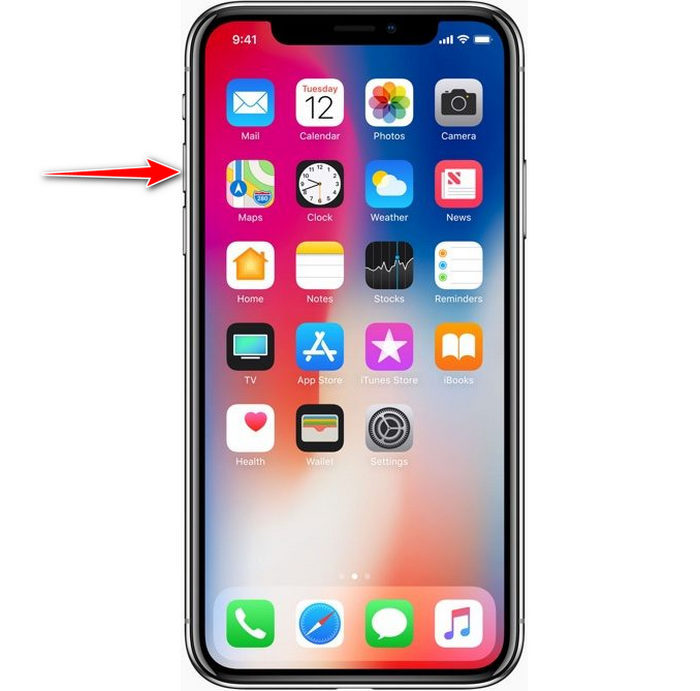
Step 2. If you feel that the sounds became high, click the volume down key to balance it.
Maneira 2. Use o Centro de Controle
A técnica a seguir é como a primeira; no entanto, é incomum usar isso porque a primeira técnica é muito mais fácil. Mas isso é útil se as teclas de volume estiverem quebradas ou incapazes. Portanto, se você quiser tentar usar essa técnica, siga as etapas a seguir.
Step 1. Click the System Touch presented on your iOS devices, and click Control Center.
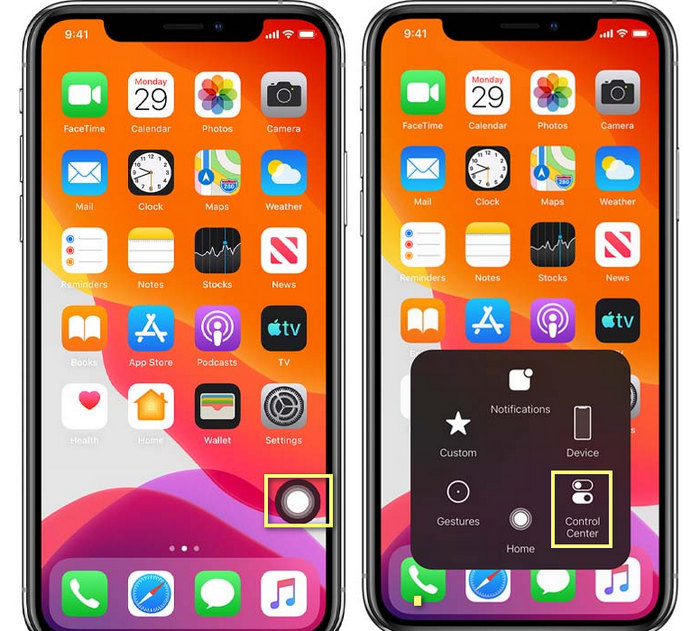
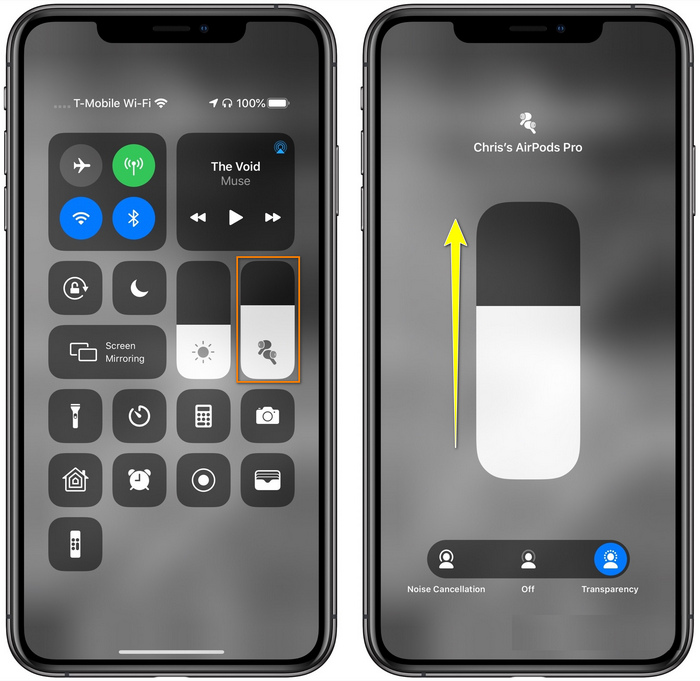
Step 2. At the Control Center, tap and hold the audio slider, adjust the slider up on the next function you will see on the screen, in this area, you can turn on the noise cancellation and transparency if you need.
Maneira 3. Use as Configurações
Did you know you can make a major adjustment on your volume if you go to the Settings of your iOS. However, this step only works if you stream music on your AirPods. Also, the volume will change a little bit, but it will increase. So, if you are ready to dig into how to turn up the volume on AirPods thru Settings, you can follow the steps below.
Step 1. Open the Settings, find Music, and click it.
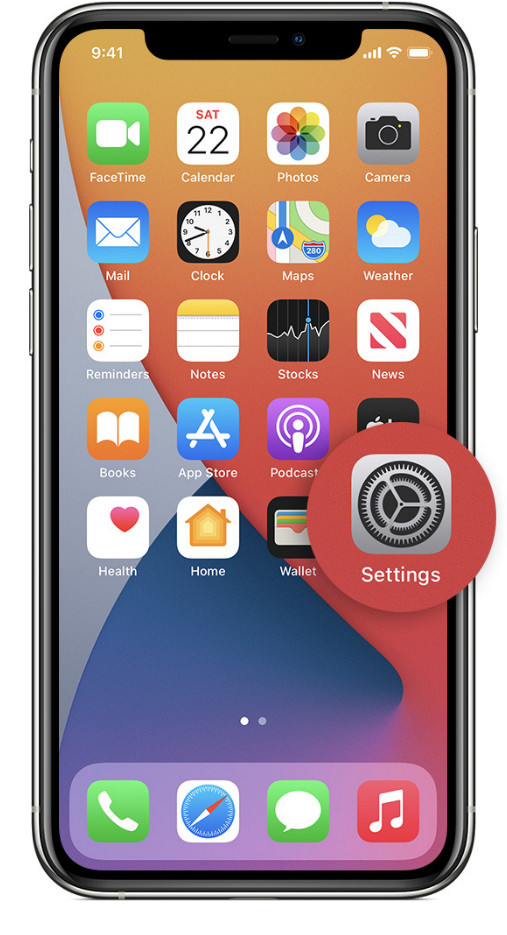
Step 2. Under Playback options, click the EQ choose one of the equalizers you want to add to your music.
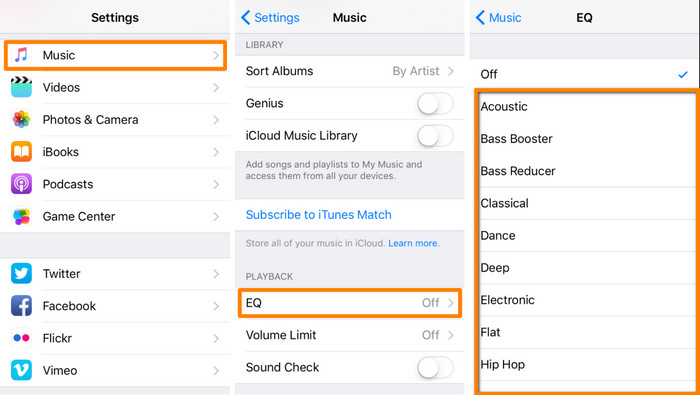
Step 3. After choosing, you can now click the volume key up on your phone to increase.
Bônus: Como aumentar o volume de seus vídeos com o melhor impulsionador de volume no Windows e Mac
Not satisfied with the volume techniques we taught above? In that case, you can use the FVC Video Converter Ultimate to increase the volume of the file to hear it loud and clear. With this tool, you can extend the volume of the video file before you watch it first. But the downside of it is that it is not available on any mobile devices, and it can only increase one file audio.
Além disso, se você precisar aumentar o volume aqui, ouvirá a diferença entre o áudio original e um aprimorado; você pode seguir as etapas fornecidas. Mas antes de mais nada, lembre-se de transferir o arquivo de áudio que deseja aumentar o volume. Por favor, siga as etapas ditadas abaixo para saber como aumentar o volume nos AirPods.
Step 1. Download the software on your desktop, install it, then follow the installation process, and press Start Now to run the tool on your system.
Free DownloadFor Windows 7 or laterSecure Download
Free DownloadFor MacOS 10.7 or laterSecure Download
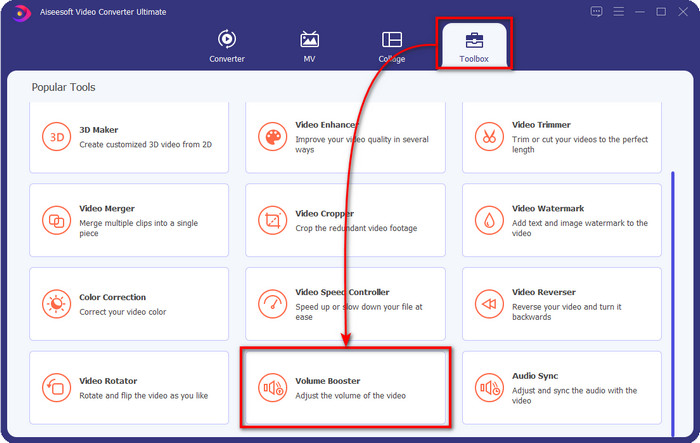
Step 2. Go to the Toolbox tab, look for the Volume Booster, and click it.
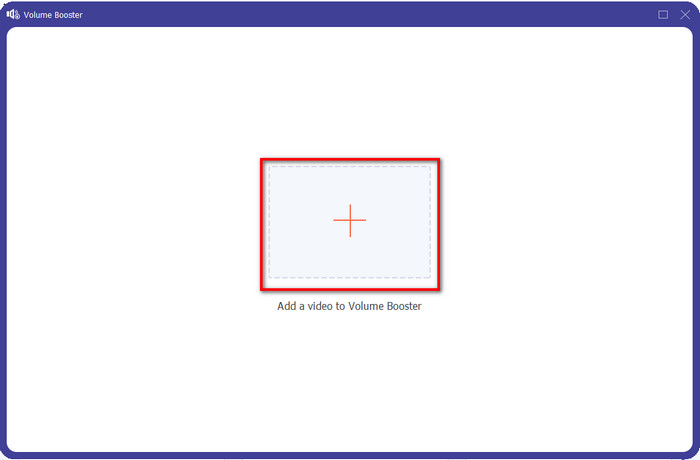
Step 3. A new window will show; click the add button to insert the file to increase the volume. Browse for the file, and press Open.
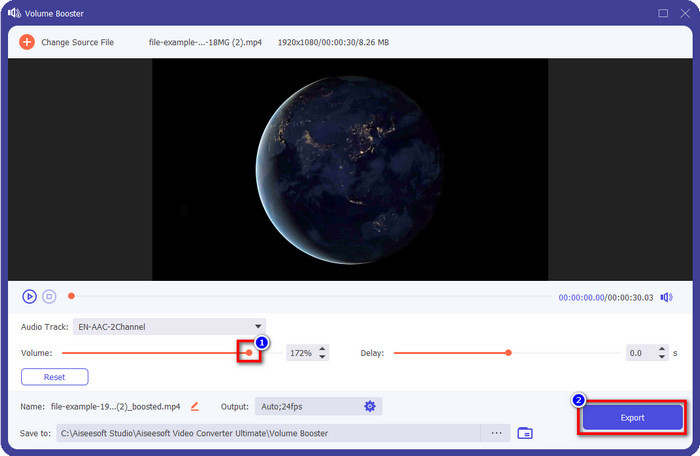
Step 4. After that, go to the Volume and adjust it by dragging the slider to the right to increase volume. Once you've done, click Export to proceed. With that, you have already increased the volume of the video you want.
Related:
Parte 2. Perguntas frequentes sobre aumentar o volume nos AirPods
Ouvir alto soa bem?
Não, não é adequado para o seu ouvido. Embora ouvir música no nível máximo seja bom para nós, não é para nossos ouvidos. Certifique-se de não estar superexposto a 70 decibéis para evitar perda auditiva e outros danos permanentes, principalmente se você usar fones de ouvido ou AirPods. Em geral, isso não afetará seu ouvido instantaneamente porque nosso fone de ouvido não pode criar um som ensurdecedor como uma explosão. Mas a longo prazo, haverá um resultado ruim. Então, antes que isso aconteça, você deve evitá-lo.
Por que preciso aumentar o som?
Em alguns casos, será necessário aumentar o volume para ouvir melhor o áudio, principalmente para ouvir alguns detalhes de parentesco que fazem parte do áudio ou vídeo. Mas lembre-se, evite expor demais o ouvido a um som alto para evitar algumas complicações que podem levar a danos permanentes.
Por que meus AirPods têm zumbido?
Existem muitas razões possíveis pelas quais seus AirPods podem ficar zumbindo. Uma das razões é que você pressiona intensamente os AirPods enquanto toca o som por muito tempo no baixo. O zumbido acontecerá após a pressão contínua nos AirPods. Portanto, para evitar que isso aconteça, você deve usar o volume corretamente e não muito alto.
Conclusão
Now we have learned how to turn up the volume on AirPods on your iOS devices quickly. Although the technique we present can help you increase the volume, it is sometimes not enough. So, if you are still not satisfied with the volume, you can use the FVC Video Converter Ultimate with the ways we taught. With this tool, you can quickly increase the volume of your audio within a few clicks. Today is your lucky day because you can download it right away by clicking the download button below. What are you waiting for? No need to worry; it is safe to download for everyone.
-
 Como aumentar o volume e experimentar a melhor qualidade de som [2021]
 Está com dificuldades porque o volume da sua visualização está muito baixo? Então leia este artigo, pois incluímos truques sobre como aumentar o volume e uma ferramenta que você pode usar.
-
 Maneiras rápidas e fáceis de sincronizar áudio e vídeo no Adobe Premiere Pro
 Deseja saber como sincronizar áudio e vídeo no Premiere Pro? Então este artigo irá atender às suas necessidades. À medida que tentamos por nós mesmos como sincronizar para fornecer apenas as etapas reais e simples.
-
 As 3 principais soluções sobre como corrigir o problema no atraso de áudio [2021]
 Você quer saber como corrigir o atraso de áudio em seu vídeo? Então você está no lugar certo, pois explicamos quais são os fatores e como corrigi-los.
