


 Video Converter Ultimate
 Gravador de ecrã
 Reparo de vídeo
Como converter facilmente o arquivo WebM para WMV
WebM is a media file format supported by most web browsers like Google Chrome, Mozilla Firefox, Microsoft Edge, Opera, and more. It is being used on HTML5 videos and HTML5 audios for streaming purposes. However, WebM files do not support Mac and iOS devices without using other tools. Therefore, if you want to open WebM files on any device, we recommend converting it to a WMV file widely supported by almost all devices and players. In this article, we listed the best WebM to WMV Converters for you to try.

Parte 1. As 3 principais ferramentas para converter arquivos WebM para WMV sem perdas
FVC Video Converter Ultimate
FVC Video Converter Ultimate is widely popular on the entire web when talking about file converters. This file converter allows you to convert your WebM file to a WMV file easily. It also has unique features in which you can edit your file, enhance, and even compress your file without the quality being ruined. In addition to that, this tool supports varieties of conversion that you need, including WMV files. Therefore, if you want to convert a WebM file to WMV efficiently, this is the app for you.
Prós
- Permite editar, aprimorar e compactar seu arquivo.
- Pode converter vários formatos de arquivo, incluindo WebM, WMV, MP4, M4V, MOV, AVI e muito mais.
- Interface fácil de usar.
Contras
- Você precisa baixar o aplicativo primeiro, antes de poder usá-lo.
FVC Free Video Converter
FVC Free Video Converter is a free online converter that allows you to convert various file formats, including WebM to WMV, MP4, FLV, MOV, and more. This converter is also easy-to-use, because of its simple interface. Moreover, this converter does not need to be downloaded because it is web-based. However, since it is an online converter, you may experience slow conversion because it is an internet-dependent converter. Nevertheless, many have used this converter and approved it as one of the best online converters to convert your WebM to WMV free online.
Prós
- Não contenha anúncios perturbadores.
- Permite converter muitos formatos de arquivo, incluindo WebM, WMV, MP4, FLV, WMA e muito mais.
- Você não precisa baixar o aplicativo.
Contras
- Pode ser lento para converter.
- Tem apenas recursos limitados para usar.
SavetheVideo.com
SavetheVideo.com is a free online converter that converts major video file formats. With this converter, you can convert videos from famous social media applications like Facebook, Twitter, Instagram, TikTok, and more. Despite that, you may encounter converting files, mainly if the file is not supported.
Prós
- Ele pode converter vídeos em mais de 420 formatos em qualquer dispositivo.
- Você pode converter de dispositivos Android e iPhone.
Contras
- Tem uma interface difícil de seguir.
- Você pode encontrar uma conversão lenta.
Parte 2. Como converter WebM para WMV usando o FVC Video Converter Ultimate
This part of the article will show you how to convert WebM files to WMV file format using the FVC Video Converter Ultimate. Because this converter is what we think is the best among the converters that trend in the market nowadays. Among other WebM to WMV converters available today, this online free converter shows promising performance, especially with its great features.

FVC Video Converter Ultimate
Mais de 5.689.200 downloads- Ele suporta a conversão de WebM para WMV, MP4, MOV, MKV ou em mais de 200 formatos com apenas alguns cliques.
- Oferece conversão em lote para converter vários arquivos WebM ao mesmo tempo.
- A conversão ultrarrápida permite que você tenha um processo de conversão extremamente rápido em poucos segundos.
- Possui recursos de edição onde você pode girar, cortar, mesclar e muito mais.
Free DownloadFor Windows 7 or laterSecure Download
Free DownloadFor MacOS 10.7 or laterSecure Download
Steps in converting WebM to WMV using FVC Video Converter Ultimate:
Step 1. For you to download this converter, click the download button below. Follow the installation process, then open the app.
Free DownloadFor Windows 7 or laterSecure Download
Free DownloadFor MacOS 10.7 or laterSecure Download
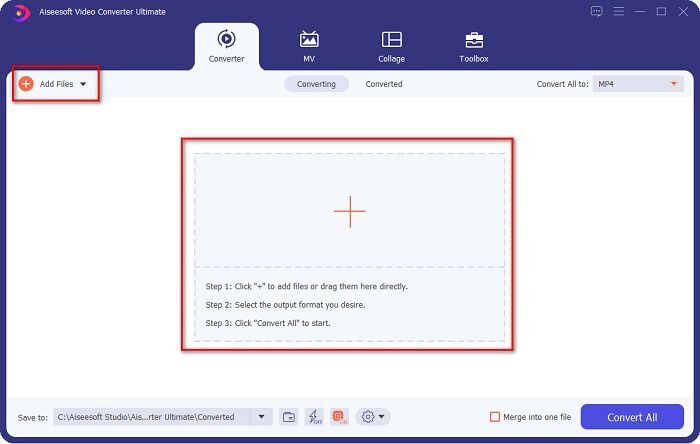
Step 2. After opening the application, click the Add Files button, or you may also click the + button to upload your WebM file in the tool's main interface. And a computer folder will appear, where you will locate your WebM file. Then press the Open button to upload your file. Additionally, you can add more WebM files because this tool supports batch conversion.
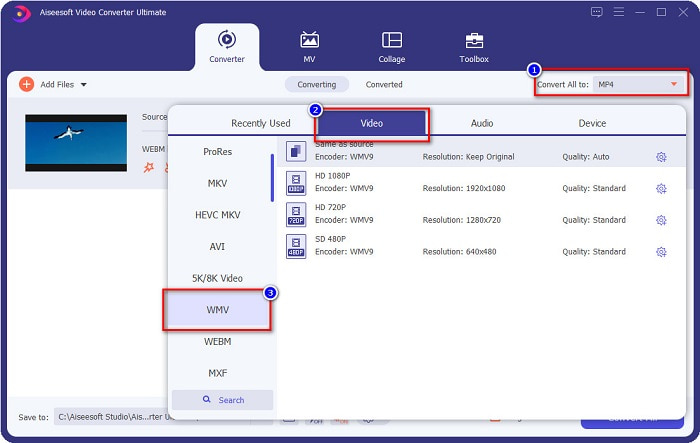
Step 3. In the upper right corner of the software, you will see the Convert All to button, click it, then select the WMV format on the list to change the file format from WebM to WMV format.
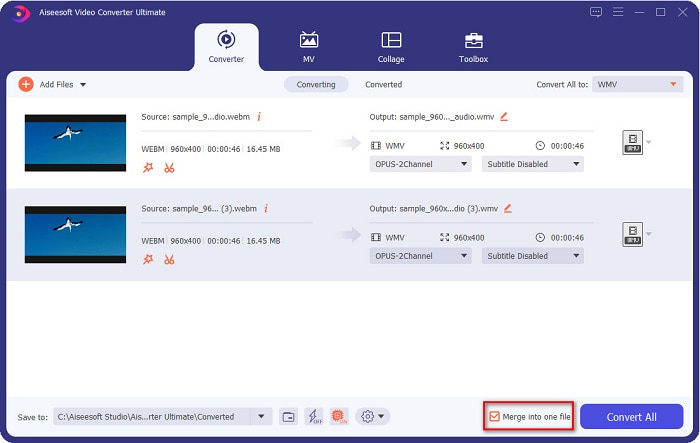
Optional. Do you want to know how to merge multiple WebM files into one? This ultimate tool has a compelling feature to merge them into one file. To do this, tick the box located in the bottom right corner of your software. In doing so, when you convert your files, they will automatically merge into one file. But if you do not wish to merge your files, you can skip this part and proceed to the next step.
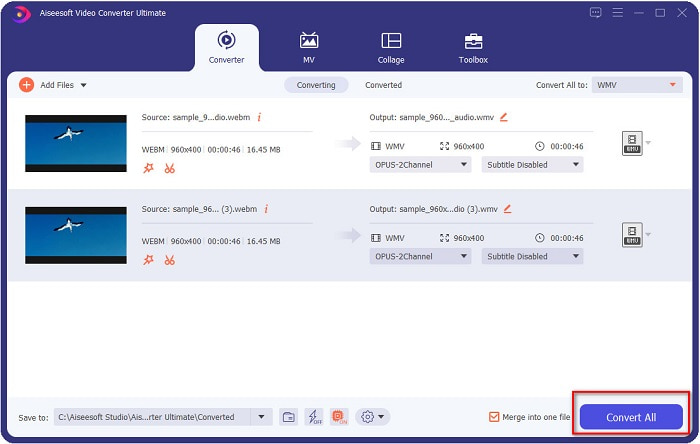
Step 4. When you select the file format that you want, click the Convert All button to start converting your WebM file to WMV. And voila! Your WebM file is now converted to a WMV file!
Você pode converter facilmente seu arquivo WebM em um arquivo WMV com essas etapas simples.
Parte 3. Conhecimento estendido sobre WebM e WMV
Para entender melhor esses dois arquivos, vamos abordá-los nesta parte do artigo.
WebM file is a video file format that widely supports web browsers. HTML5 websites use this format for video streaming purposes. Moreover, this type of file contains video streams compressed with VP8 or VP9 codecs. While on the other hand, Windows develops WMV or Windows Media Video; therefore, Windows System usually plays this type of file. Many encoders also support this type of file. In addition to that, this file format uses a compressor that helps your file make it smaller in size without ruining the quality.
Parte 4. Perguntas frequentes sobre como converter WebM em WMV
O melhor conversor de vídeo pode converter arquivos WebM para o formato de arquivo MP4?
Certainly. Using FVC Video Converter Ultimate can convert your WebM file into MP4. You can click this link and read thoroughly for more information about converting your WebM file to MP4 file format.
O QuickTime suporta arquivos WebM?
QuickTime does not support WebM file formats. Because QuickTime does not contain many codecs like other media players, you can convert your WebM file to file formats like MOV, which is supported by the codecs of QuickTime. To have more Infos about converting WebM to MOV, click this link.
O Internet Explorer suporta arquivos WebM?
sim. O Internet Explorer oferece suporte a arquivos WebM. Mesmo assim, o Internet Explorer já foi descontinuado.
Conclusão
To sum it all up, the WebM to WMV converters presented above will help you convert your WebM files to WMV files easily. Moreover, the tools shown above have different features which allow you to do more when converting. But we believe that FVC Video Converter Ultimate is the best tool that helps you meet your needs. Still can't decide which converter to use? Download it now, and try it!
-
 3 maneiras de converter WebM em MP3 sem perder a qualidade do som
 Tendo um problema porque os arquivos WebM não podem ser usados para reproduzir o áudio que você salvou? Então leia este artigo, pois fornecemos uma ajuda eficaz convertendo WebM para MP3.
-
 3 Software impressionante usado para converter arquivo WebM em formato AVI
 Não tem ideia de como converter WebM em AVI? Então vamos começar a ler este artigo. Como especificamos todos os detalhes no WebM e os três conversores que você pode usar para converter.
-
 Conversor WebM para FLV mais bem escolhido, gratuito na Web e na área de trabalho
 Você tem o mesmo problema ao reproduzir arquivos WebM em seus smartphones? Então gaste 5 minutos lendo este artigo para saber como converter WebM para FLV.
