


 Video Converter Ultimate
 Gravador de ecrã
 Reparo de vídeo
Aprenda as maneiras de converter WebM para MKV com os melhores conversores
Numerous video formats come in WebM file format, and many browsers like Google, Mozilla Firefox, Opera, and Microsoft Edge, support this type of file. However, WebM files are containers that can only store video streams compressed with VP8 or VP9 video codecs. So if you want to convert your WebM file into a file container that can hold an unlimited number of audio, video, and subtitle tracks, you must change your WebM file to MKV file format. Moreover, this article will discuss the best WebM to MKV Converters.

Parte 1. Por que você precisa converter WebM para MKV
WebM files are video file formats widely supported by almost all web browsers. It is a file format that HTML5 often uses for video streaming purposes. In addition, it is a royalty-free file format that is mainly made for the web. This file type is also used as a container for audio and video formats. On the other hand, MKV or Matroska files contain unlimited audio, video, and subtitle tracks. So why do we need to convert WebM to MKV? Simply because the WebM files can only hold videos compressed with VP8 and VP9 codecs. While MKV files can handle multiple subtitles streams and audio tracks in various languages, that is useful for movie enthusiasts.
Parte 2. Converta arquivos WebM para MKV usando um conversor de velocidade relâmpago
Everyone wants a converter that can convert files quickly. Luckily, we found a tool that can convert files in a blink of an eye. FVC Video Converter Ultimate is an offline converter that allows you to convert WebM to MKV quickly. It also supports almost all standard formats like WebM, MKV, AVI, MP4, MOV, M4V, FLV, and many more. And if you want to merge multiple files into one, this converter has a feature to do batch conversion.

FVC Video Converter Ultimate
Mais de 5.689.200 downloads- Ele permite que você faça a conversão em lote.
- Você pode aprimorar, editar, compactar seu arquivo.
- Possui um recurso que pode converter seu arquivo em apenas alguns segundos.
- Tem uma interface fácil de usar.
Free DownloadFor Windows 7 or laterSecure Download
Free DownloadFor MacOS 10.7 or laterSecure Download
Step 1. To download the app, click the Download button below. Then follow the installation procedure and then open the application.
Free DownloadFor Windows 7 or laterSecure Download
Free DownloadFor MacOS 10.7 or laterSecure Download
Step 2. After opening the application, click the Add Files button or the + sign button to upload your WebM file on the first interface of the software.
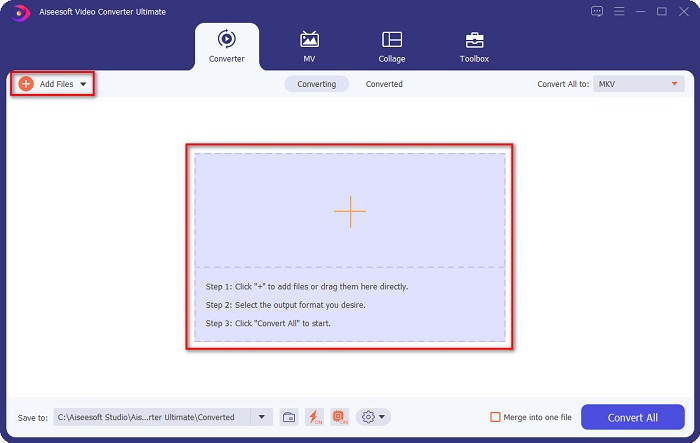
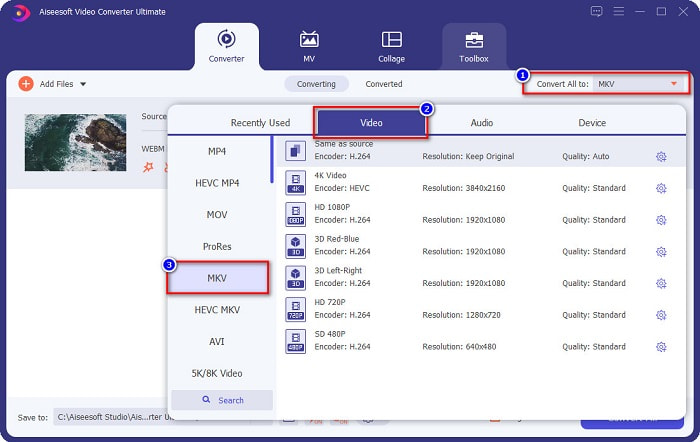
Step 3. To choose your desired file output format, click the Convert All to button at the upper right corner of the software's interface. Select MKV, then proceed to the next step.
Step 4. And for the last step, click the Convert All button to start converting your WebM to MKV file. Just wait for a few seconds, and voila! Your MKV file is now ready.
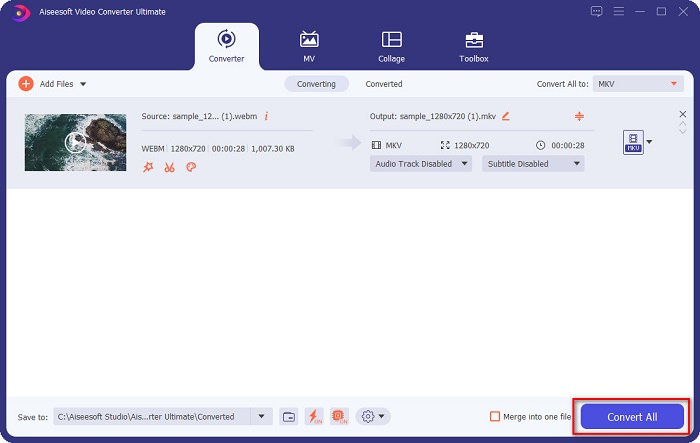
By following these simple steps and using this WebM to MKV converter, you can convert files effortlessly. Also, you can use it to convert WebM to MP3 or other audio files.
Parte 3. Converter arquivos WebM para MKV usando FFMPEG
FFMPEG é um utilitário de linha de comando comumente usado para formatos de transcodificação, edição de vídeo, dimensionamento e efeitos de pós-produção de vídeo. Além disso, este software também permite converter formatos de arquivo. Por ser um conversor baseado em texto, muitas pessoas que desejam usá-lo estão tendo dificuldade em usar esse conversor. No entanto, também é uma maneira eficaz e eficiente de converter WebM para MKV no FFmpeg.
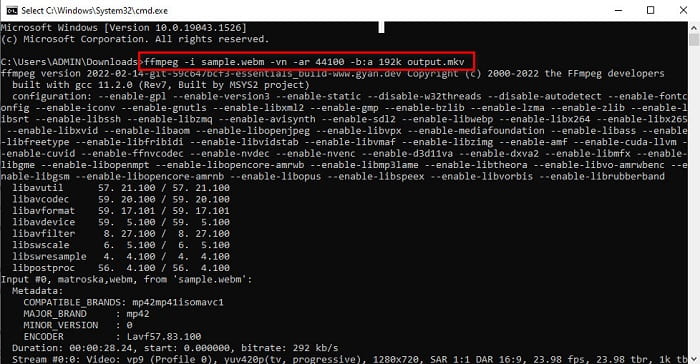
Step 1. To use this converter, download the FFMPEG on your computer. Follow the installation process, then run ffmpeg.exe to your computer system.
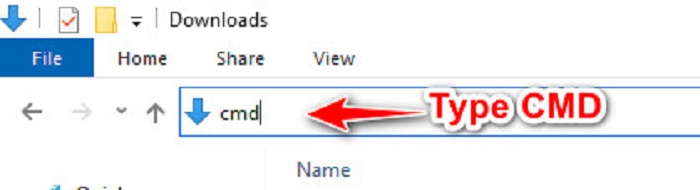
Step 2. Locate your WebM file in your computer files, then on your folder, where your file is located, type CMD to open the command prompt for your file conversion.
Step 3. Lastly, type the following command ffmpeg -i sample.webm -vn -ar 44100 -b:a 192k output.mkv. Then press enter key on your keyboard, and a list of codes will appear, which signifies that your conversion is complete.
Parte 4. Converta arquivos WebM para MKV online usando o melhor conversor online
One of the best online converters available on the web today is FVC Free Online Video Converter. This Converter allows you to convert numerous files, including WebM MKV, MP4, AVI, MOV, WMA, MP3, etc. This online converter is very easy to use because of its simple interface. However, since it is a web-based tool, you may experience having a slow conversion of files due to internet issues. Nonetheless, many still use this to convert WebM to MKV online, and people are satisfied with its performance.
Step 1. In your browser, search FVC Free Online Video Converter or click this link to go to their webpage.
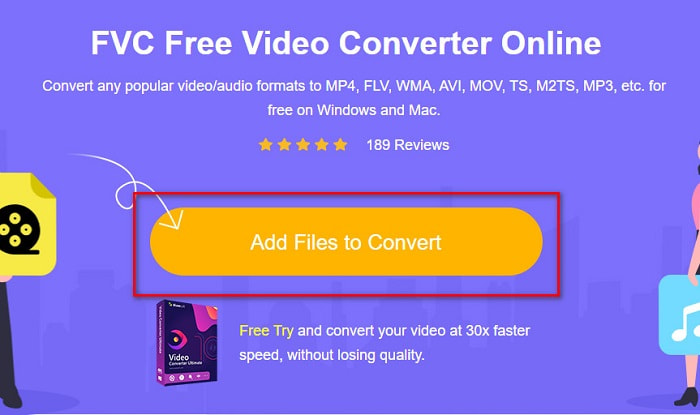
Step 2. Then click the Add Files to Convert and launch the application. After launching the app, your computer files will appear to choose your WebM file.
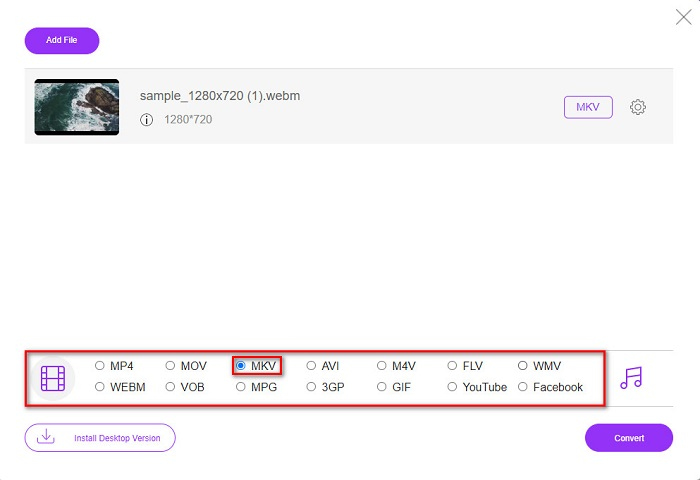
Step 3. Next, choose the MKV file as your desired file format. The list of file formats is located below the software’s second interface.
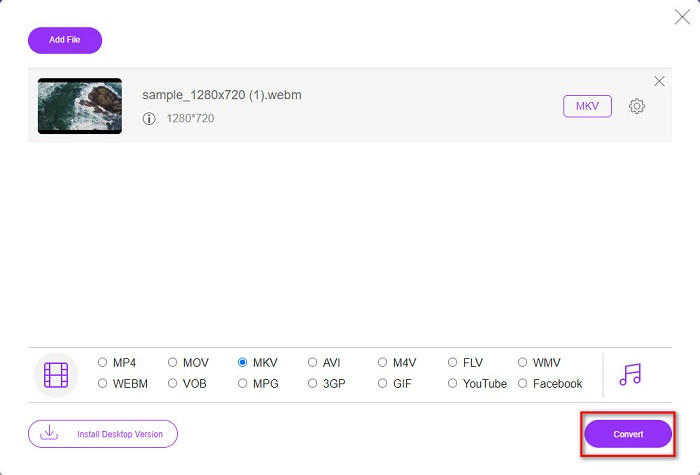
Step 4. Lastly, click the Convert button, then your file will start to convert.
Parte 5. Gráfico de Comparação
| Recursos | FVC Video Converter Ultimate | FFMPEG | FVC Free Online Video Converter |
| Conversão ultra-rápida |  | – | – |
| Conversão em lote | | – | – |
| Formatos de arquivo suportados | Pode converter WebM para MKV, MP4, MOV, AVI, M4V, FLV, mais de 1000 formatos. | Ele suporta vários formatos de arquivo como AIFF, AVI, FLV, GIF e alguns formatos de arquivo. | Permite converter quase todos os formatos conhecidos como FLV, AVI, MP4, MOV, MP3 e muito mais. |
| Interface fácil de usar | | – | |
| Conexão de internet | – | – | |
Parte 6. Perguntas frequentes sobre a conversão de WebM para MKV
Posso converter WebM para MKV sem perdas?
Yes. By using FVC Converter Ultimate as your converter, you can change WebM to MKV without losing the quality of your file.
Por que o MKV tem um tamanho de arquivo enorme?
Os arquivos MKV têm um tamanho de arquivo enorme porque suporta recursos extras de várias faixas de áudio e vídeo.
Posso converter WebM para MP4?
Indeed, a tool can decode WebM to MP4 by using various file converters available in the market. You can also read this article to know more about the topic about the conversion from WebM to MP4.
Conclusão
Embora WebM e MKV sejam contêineres de arquivos, é seguro dizer que converter seu arquivo WebM para MKV é uma boa decisão. E todos os conversores online e offline gratuitos apresentados acima apresentam características distintas. Mas se você deseja um conversor com muitos recursos exclusivos que podem converter seu arquivo WebM para MKV ultra-rápido, acreditamos que o FVC Video Converter Ultimate é a melhor ferramenta para você!
-
 3 Software impressionante usado para converter arquivo WebM em formato AVI
 Não tem ideia de como converter WebM em AVI? Então vamos começar a ler este artigo. Como especificamos todos os detalhes no WebM e os três conversores que você pode usar para converter.
-
 Métodos fáceis de seguir sobre como converter WEBM em MOV
 Você acha difícil que seus vídeos WebM não possam ser reproduzidos pelo safari e não deseja alternar para um navegador que suporte esse formato? Leia este artigo para aprender como alterar o WebM para MOV com facilidade.
-
 Conversor WebM para FLV mais bem escolhido, gratuito na Web e na área de trabalho
 Você tem o mesmo problema ao reproduzir arquivos WebM em seus smartphones? Então gaste 5 minutos lendo este artigo para saber como converter WebM para FLV.
