


 Video Converter Ultimate
 Gravador de ecrã
 Reparo de vídeo
Um guia rápido sobre como converter WMV para MKV no Mac e Windows facilmente
Se você é um entusiasta de filmes e deseja um formato de arquivo que possa lidar com várias faixas de áudio com legendas, convém converter seu arquivo WMV em arquivo MKV. E se você está tendo problemas para procurar um conversor de WMV para MKV compatível com Windows e Mac, encontramos os melhores conversores que você pode usar online e offline. Este artigo apresenta os melhores conversores para converter WMV para MKV no Mac e Windows.

Parte 1. Por que converter WMV para MKV
WMV ou Windows Media Video é um formato de arquivo que quase todos os players de mídia suportam amplamente. É um formato de arquivo que pode armazenar videoclipes, animações, episódios de TV e filmes. Além disso, é um arquivo compactado; portanto, ele tem um tamanho de arquivo pequeno. Então, por que você precisa converter WMV para MKV? MKV ou Matroska é um contêiner de arquivos que pode incorporar faixas ilimitadas de áudio, vídeo e legendas.
Além disso, esse formato de arquivo é à prova de futuro, o que significa que não ficará desatualizado no futuro. Ele também pode lidar com vários fluxos de legendas e faixas de áudio em vários idiomas. Portanto, se você é um entusiasta de filmes, convém converter seu arquivo WMV para o formato de arquivo MKV.
Parte 2. Converta WMV para MKV usando o melhor conversor offline
This converter is proven to be the best offline converter available on the market. FVC Video Converter Ultimate is a free offline tool that could provide professional-like outputs without having a hard time. It also supports various file formats to convert your WMV file to MKV, AVI, MP4, MOV, FLV, and more. Still not pleased with what it can do? You can also edit your video using its advanced video editing features using this converter. Follow these simple steps below to know how to use this WMV to MKV converter for free.
Step 1. Download the application by clicking the Download button below. There are two options where you can choose to download it on Mac or Windows. Then open the application.
Free DownloadFor Windows 7 or laterSecure Download
Free DownloadFor MacOS 10.7 or laterSecure Download
Step 2. After you open the application, click the Add Files button or the + button to upload your file on the software's first interface. Then a new window will appear where you will select your WMV file.
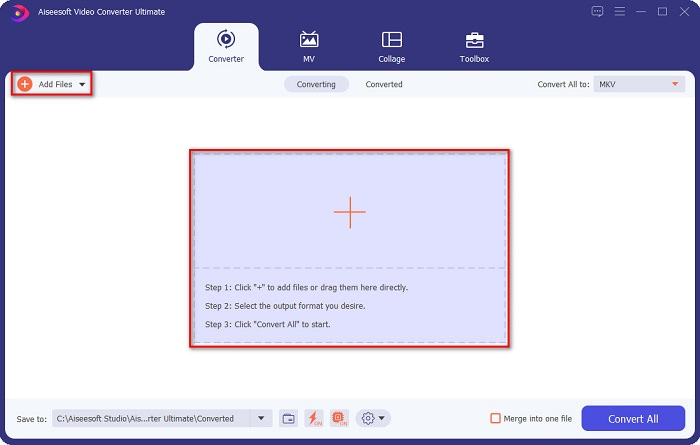
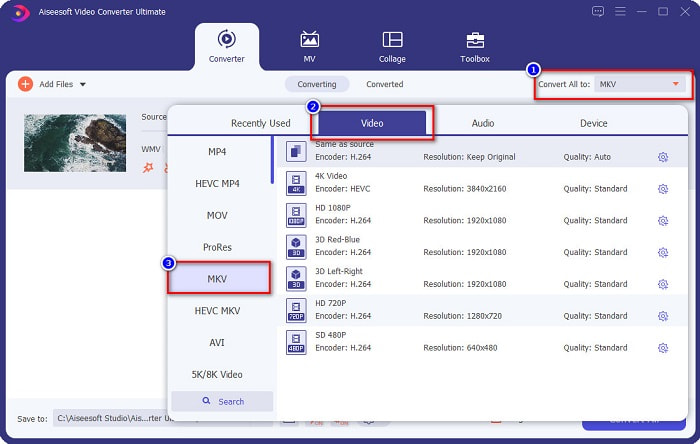
Step 3. Then click the Convert All to button to select your desired output format. In your case, choose the MKV format.
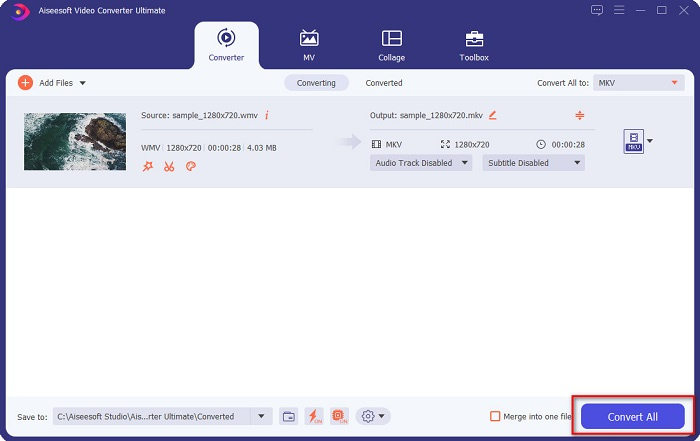
Step 4. Finally, click the Convert All button to convert your WMV to an MKV file. Then just wait for a few seconds. And that's it! By the way, you can also quickly convert WMV to MOV files by following these simple steps.
Parte 3. Converter WMV para MKV usando as 3 melhores ferramentas online
Não há dúvida de que as ferramentas online são as melhores por conveniência, pois você não precisará baixar nada. Esta parte apresenta os melhores conversores WMV para MKV disponíveis na web.
FVC Free Online Video Converter
FVC Free Online Video Converter is an online converter that has an easy-to-use interface. It supports various file formats and can convert WMV to MKV, AVI, MOV, MP4, MP3, TS, and more. However, this transcoder is internet-reliant, which means it depends on the internet on how fast your conversion will be. Nonetheless, it is undoubtedly one of the best online WMV to MKV converters.
Aqui estão as etapas para converter arquivos WMV para MKV através do FVC Free Online Video Converter:
Step 1. Go to their webpage by clicking this link, or search FVC Free Online Video Converter on your browser.
Step 2. For the next step, click the Add Files to Convert button, then launch the application. After the application has been launched, select your WMV file when your computer files appear.
Download the Desktop Version to convert files in batch.
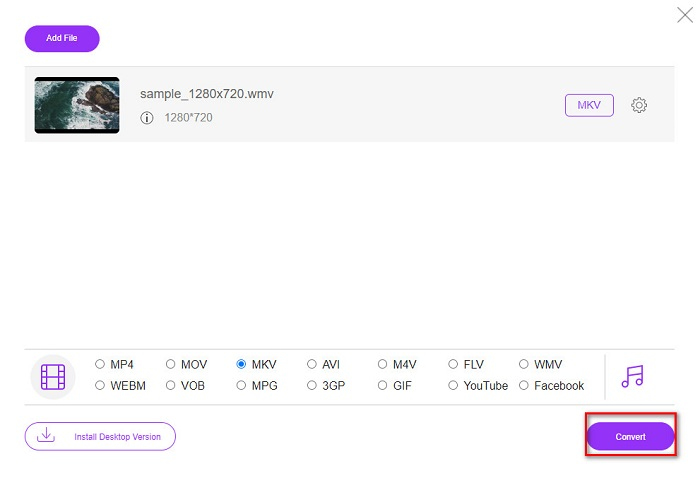
Step 3. And then, to select your desired output file format, click the MKV located below the software's second interface.
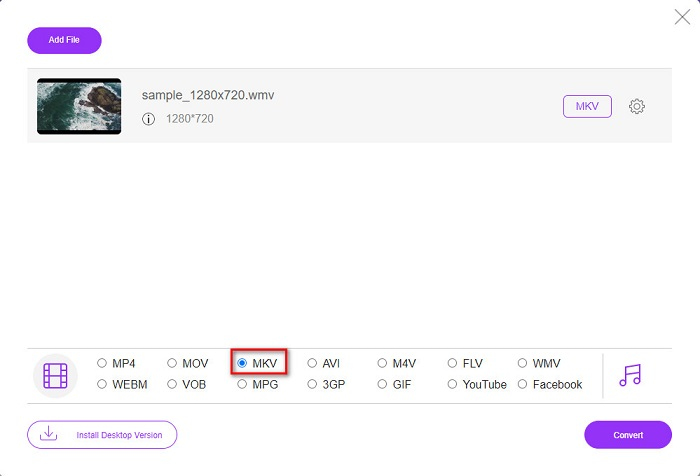
Step 4. To finish, click the Convert button, and your WMV to MKV file will start converting. Just wait for your conversion to finish, and that's it! By following these steps, you can easily convert WMV to MKV online.
Convertio
Another online converter that trends in the web is Convertio. This free online converter is also easy to use. But despite that, this converter contains ads that might disturb you. But still, this converter is very convenient to use when converting your WMV file to MKV.
Step 1. In your browser, search Convertio. Then, click the Choose Files button in the software's main interface to select your WMV file.

Step 2. And then, click the drop-down button to select the MKV file as your output format.
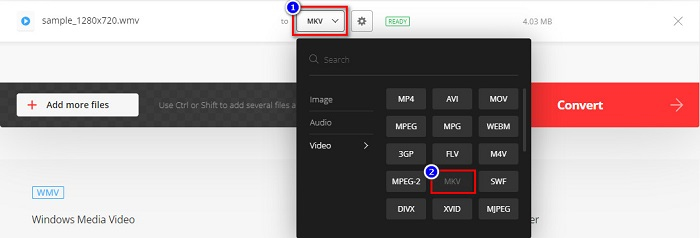
Step 3. For the last step, click the Convert button located at the bottom right corner of the software’s interface. And then, your file will start to convert.

MConverter
MConverter is an online WMV to MKV converter that supports various audio, video, and image files. It has simple steps to convert your WMV to an MKV file. However, there is a file size limit for using this converter. Nevertheless, it can effectively transform your WMV file to MKV with ease.
Step 1. Type MConverter on the browser you use, then you will be led to their web page.
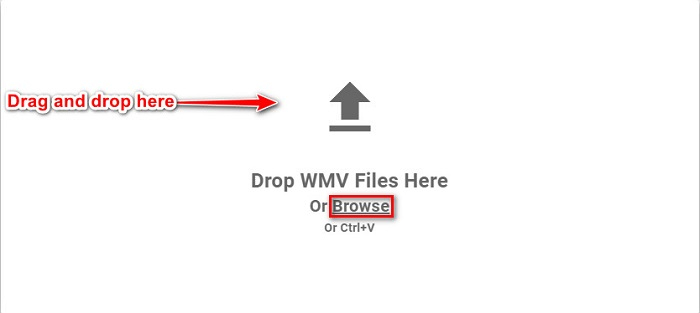
Step 2. And then, drop your WMV file on the rectangular box, or you can choose to click the browse word to select your WMV file.
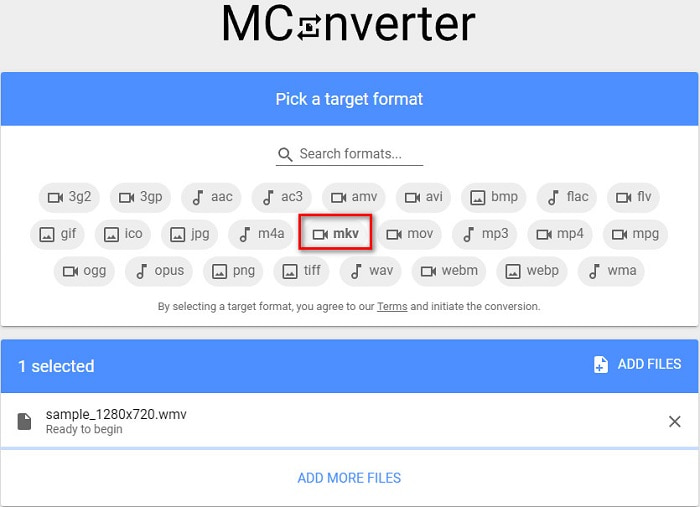
Step 3. After selecting your WMV file, pick the MKV file as your output file format by clicking the MKV button. Right after you click MKV, your WMV to MKV conversion will begin. Then wait for your file to convert.
WMV vs. MKV
Produzido pela Microsoft, o WMV era um dos formatos de vídeo mais comuns nos anos 2000. Ele pode ser visto na web e reproduzido por vários players de mídia no Windows. E também é o formato de arquivo de vídeo padrão do Windows Media Player. Mas foi assumido por outros formatos recentemente.
O formato de contêiner multimídia Matroska, lançado em 2002, é um formato de código aberto que pode incluir várias faixas de vídeo, áudio, imagem e legendas. Assim, você pode usá-lo para armazenar clipes de vídeo curtos, programas de TV e filmes facilmente. É bastante popular para legendas de fãs de anime.
Parte 4. Perguntas frequentes sobre a conversão de WMV para MKV
Você pode jogar MKV no Mac?
No. MacOS does not support MKV file format. However, you can use a third-party player or convert your MKV file to a file format that Mac supports. MP4 is one of the most common file formats that Mac supports. To know more about converting MKV to MP4, click this link.
Você pode compactar o tamanho do arquivo de arquivos MKV?
Yes. You can compress your files using a compressor. FVC Video Converter Ultimate also has a feature that can compress files.
O Windows Media Player suporta arquivos MKV?
Windows Media Player does not support MKV files. You may encounter only audio plays or playback problems when playing an MKV file in Windows Media Player. To play MKV files in Windows Media Player, you need to download and install MKV codec.
Conclusão
Existem várias maneiras de converter WMV para MKV no Mac e Windows para resumir. As ferramentas online e offline apresentadas acima mostram um desempenho promissor quando se trata de converter seus arquivos WMV para MKV. No entanto, se você deseja um conversor que permita ter um formato de saída esplêndido, use o FVC Video Converter Ultimate, pois possui todos os recursos especiais que você precisa ao converter arquivos.
-
 WMV para MP3 – Como converter vídeo para áudio gratuitamente [Desktop/Online]
 Enquanto assiste a um vídeo WMV, você acha a parte do áudio fascinante. Assim, você deseja reproduzi-lo em seu MP3 player. Mas claramente seu player não suporta o formato WMV. Isso faz você se perguntar se há uma maneira de converter WMV em MP3.
-
 2 maneiras mais fáceis de converter arquivos WMV para FLV no PC / Mac
 Como você pode converter WMV para FLV? Em primeiro lugar, você precisa ler nossa recomendação e encontrar seu método favorito e, em seguida, seguir nosso guia para fazer o trabalho rapidamente.
-
 [2 Soluções] Como converter vídeos WMV para arquivos GIF gratuitamente
 Se você deseja recortar as partes maravilhosas dos vídeos WMV e fazer GIFs a partir deles, você pode aprender sobre 2 métodos fáceis de transferir vídeos WMV para GIFs neste artigo.

