


 Video Converter Ultimate
 Gravador de ecrã
 Reparo de vídeo
5 Últimos Extratores de Metadados para Extrair Dados em Arquivo [Comprovado]
Metadata is composed of data that you can't see on the media file; basically, these are hidden contents. Every file has different metadata sets, and most of the time, you will need to extract the metadata on the file because it indicates crucial contents. To do this, you'll need a tool that can extract metadata from your file. Without further ado, determine which metadata extractor presents a straightforward yet effective way of removing metadata on your file.

Parte 1. Extrator/Editor de Metadados de primeira linha no Windows e Mac offline
FVC Video Converter Ultimate is the best metadata extractor example you can use on your desktop even without an internet connection. This tool can help you extract the whole metadata on your file without exerting too much effort on doing it. Unlike the other extractor, this tool can help you remove, edit, or even create new metadata on your files. In addition to this, you can do many different things once you've downloaded the converter; want to check the key features? Check out the list below.

FVC Video Converter Ultimate
Mais de 5.689.200 downloads- Capaz de extrair, editar e adicionar metadados rapidamente em qualquer arquivo de vídeo e áudio, mesmo que você não seja um especialista.
- Ele suporta vários formatos que você pode carregar na ferramenta, incluindo MP4, MOV, AVI, MKV, FLV e muito mais.
- A interface gráfica do usuário é excelente em comparação com o outro extrator de dados que você pode encontrar no mercado.
- Nenhuma marca d'água é aplicada depois que você exporta o arquivo de mídia aqui.
- Funciona melhor mesmo se você não tiver uma unidade Windows ou Mac de última geração.
Free DownloadFor Windows 7 or laterSecure Download
Free DownloadFor MacOS 10.7 or laterSecure Download
Você pode ter tudo isso se usar a ferramenta definitiva, e para ensiná-lo a extrair as informações do seu arquivo usando a ferramenta, siga o tutorial que fornecemos abaixo.
Step 1. Download the software on your desktop by clicking the suitable operating system you are currently using, Windows or Mac. Then, click the file to install it on your desktop rapidly and launch it to begin the process of extracting the metadata.
Free DownloadFor Windows 7 or laterSecure Download
Free DownloadFor MacOS 10.7 or laterSecure Download
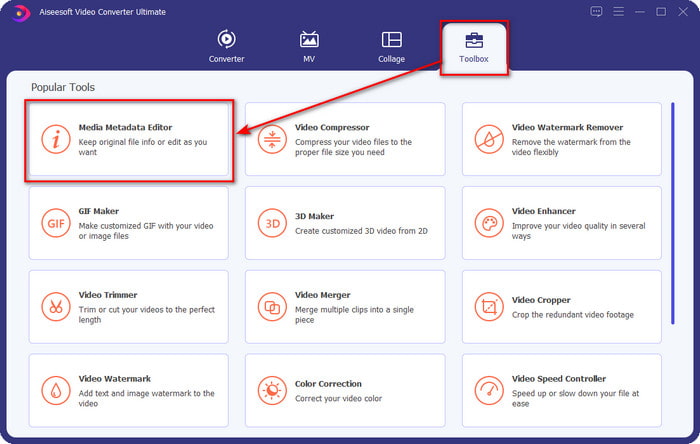
Step 2. Once you've opened the tool, you must go to the Toolbox section, look for the Media Metadata Editor, and hit it.
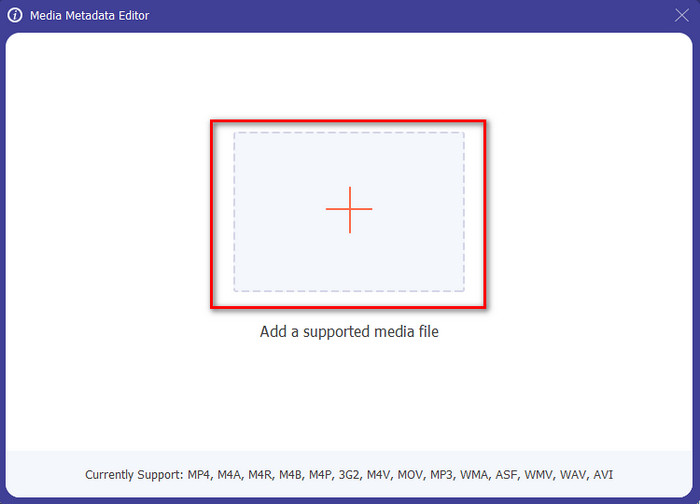
Step 3. After you click it, a new window will show, then click the + icon to upload the media file you want. Find the media file on the folder that will show, click the file, and press Open to insert it.
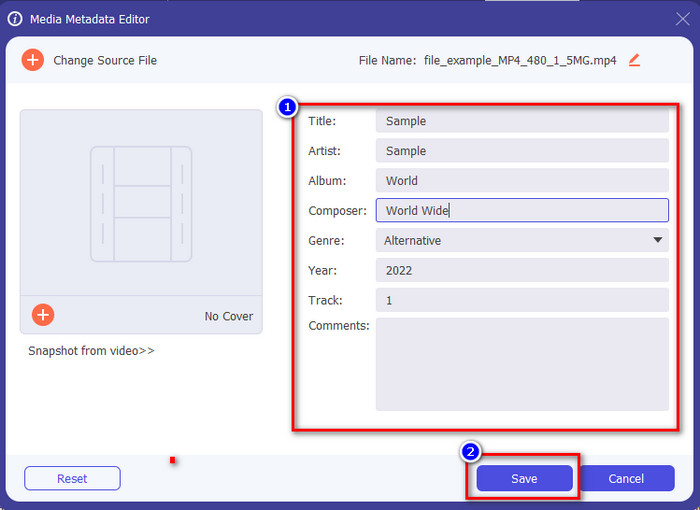
Step 4. This time you can now extract or remove the metadata you don't want to include on your file, but you can also change the metadata by filling out the text box. After doing all of this, click Save to apply the adjustment you've made on the file's metadata. Isn't it easy? Well, we already knew that this tool is easy to use, so try it out!
Parte 2. As 4 principais ferramentas de extração de metadados disponíveis na Web
Antes de apresentarmos a alternativa de extrair metadados em seu arquivo, você deve saber que todos os extratores subsequentes precisam de uma conexão com a Internet para usar ou acessar. Portanto, se você tiver uma conexão instável, essa ferramenta pode não ser a melhor para extrair os metadados. Mas se você quiser conhecer os quatro principais removedores de metadados, leia os seguintes detalhes abaixo.
Topo 1. Pasta de Marca – Extrator de Metadados
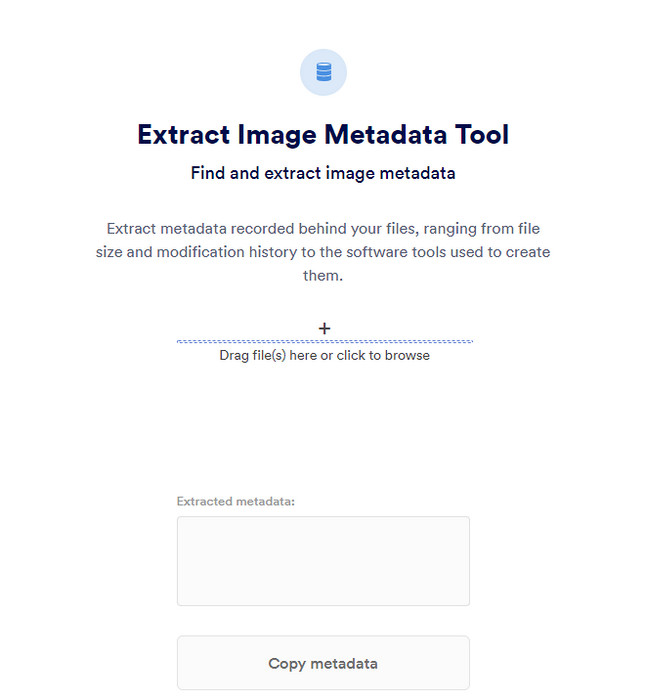
Suppose you want to use a metadata extractor that is free online, then Brand Folder – Metadata Extractor can offer this for you. This extractor online is the best choice for free, removing the data in your image or PDF, and after you extract it, you can copy it to your clipboard. Also, the web tool offers several functions you will need regarding your file. Although it is free to access, there is a drawback to using this tool; first, you can only extract a photo or PDF data 5 times a day; after that, you can't use it again.
Prós
- Uma ferramenta de acesso gratuito na web.
- Fácil de usar, mesmo se você não for um profissional em extrair os dados.
- Extrai automaticamente os dados na imagem e no arquivo facilmente.
Contras
- Você só pode usá-lo cinco vezes por dia.
- Ele não pode extrair metadados de vídeo porque não é compatível.
- Às vezes você não pode usar a ferramenta devido à má conexão com a internet.
Topo 2. Visualizador EXIF
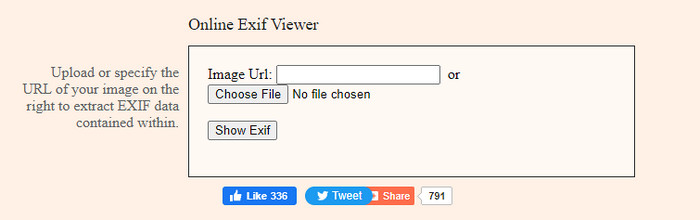
Another powerful metadata extractor online is the EXIF-Viewer. This tool allows you to view, remove, and edit your metadata on your media file for free. Although the GUI looks terrible, the tool's efficiency is great compared to the first tool on the list. However, if you access the tool, your connection isn't secured, and some might steal your information if you use this tool, so beware of the file you upload here.
Prós
- Ele suporta diferentes variedades de formatos de arquivo de mídia.
- Tem uma GUI simples.
- Acesse a ferramenta gratuitamente em sua web.
Contras
- A conexão não é protegida quando você a acessa.
- A ferramenta da Web leva mais tempo para carregar os metadados.
- Os anúncios estão no site.
Topo 3. EXIFMeta
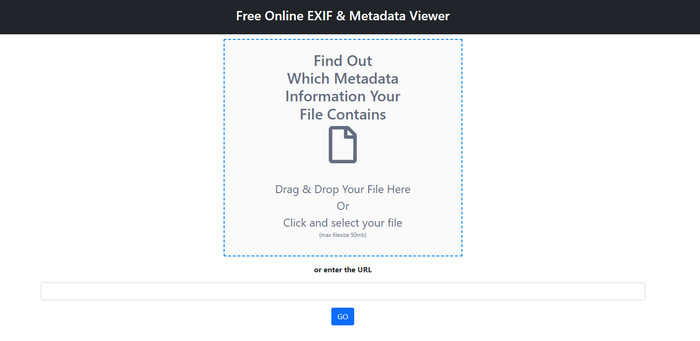
EXIFMeta is another metadata extractor example on the web you can use to show the hidden data on your files. The webtool also supports different media files you can upload, such as images, video, audio, and documents. Suppose you use this tool; you can see the basic information on your media file. Even though the webtool does offer you many things you can do on your metadata, the performance of this tool isn't as efficient as the other. In addition to that, you must make sure that your media file is less than 50MB to upload the file on the tool.
Prós
- Você pode facilmente fazer upload de diferentes arquivos de mídia aqui.
- Tem uma GUI muito melhor do que a outra ferramenta da web.
- Veja os metadados incorporados em seu arquivo de mídia com a ajuda desta ferramenta.
Contras
- Você está limitado a enviar um arquivo de vídeo com menos de 50 MB.
- Às vezes, não funciona bem se você deseja extrair os metadados.
Top 4. Ferramentas de codificação – Metadados EXIF
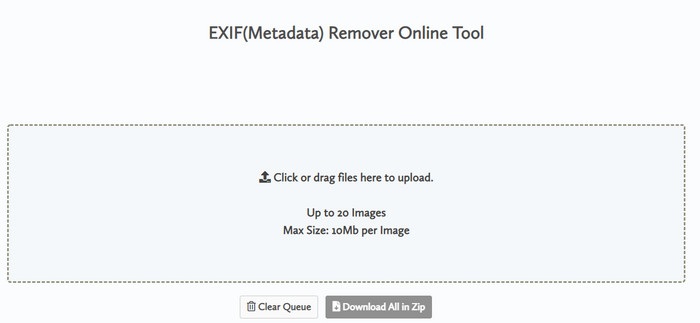
With Coding tools – EXIF Metadata, you can quickly remove the metadata on your images. This metadata extractor is free to use on the web, which means you can use the tool as long as you have an internet connection, like the other extractor above. Unlike the other web tool, this tool lets you insert multiple files and remove the metadata simultaneously. Although the web tool offers you the best extracting features, uploading the file will take time if its size is large and your network is slow.
Prós
- É seguro acessar no seu navegador favorito.
- Uma GUI simples e fácil de entender.
- Sem anúncios na interface da web.
Contras
- Ele mantém seu arquivo de imagem por 1 hora antes de excluí-lo.
- Na maioria das vezes, ao fazer o upload, ele falha.
- Há uma limitação no tamanho do arquivo que você pode carregar.
Parte 3. Perguntas frequentes sobre o Metadata Extractor
Posso adicionar metadados ao meu arquivo?
Você pode ler as etapas que fornecemos na ferramenta definitiva para adicionar os metadados em qualquer arquivo com sucesso.
Alguém pode ver meus metadados?
It is sad to say, but yes, if you post the media file on the internet, someone can see the metadata on your file. With the metadata, someone can know information about the images and other personal information such as location, time, data, a device used, and many more.
Por que preciso extrair os metadados?
Muitos podem ocorrer, mas extraímos os metadados do arquivo porque não queremos que alguém invada nossa privacidade. Embora os metadados tenham um lado bom, lembre-se de que também tem uma desvantagem. Portanto, tenha cuidado, pois os metadados podem ajudá-lo a saber informações sobre o arquivo, mas também podem ser usados para extrair informações sobre o arquivo por alguém.
Conclusão
The metadata extractor we present in this article performs a great job extracting the metadata on the media file you have. Although you remove or edit the metadata, you can still view the media file without corrupting it. As we researched more about the tool's differences, we found out that the FVC Video Converter Ultimate is the ultimate aid on this task. Whether you are a pro or not, you can easily wipe out or change the metadata a few clicks away. So, if you don't have the tool to use, we strongly recommend using the ultimate tool to take this job and finish it flawlessly.
-
 4 dos melhores visualizadores de metadados online e offline [atualizado em 2025]
 Posso verificar os metadados do meu arquivo? Sim, você pode, com a ajuda deste post, apresentaremos os diferentes visualizadores de metadados que você pode usar.
-
 Os 5 melhores editores de metadados de vídeo para 2025 [análise imparcial]
 Deseja visualizar os metadados do seu vídeo? Em caso afirmativo, leia os detalhes abaixo para entender completamente o tópico e saber qual ferramenta se adapta melhor a você.
-
 7 editores de tags de música populares no Windows, Mac e dispositivos móveis
 As tags de música são populares para o arranjo da música em sua biblioteca de acordo com os dados contidos. E se você quiser mudá-lo? Leia os detalhes abaixo para saber mais.
