


 Video Converter Ultimate
 Gravador de ecrã
 Reparo de vídeo
Como remover metadados de arquivos via Windows, Mac, online e telefones
Every media file has metadata connected about the file, whether a video, image, audio, etc. Suppose you post a media file online; through that post, someone has information about coordinates about your location, time, date, manufacturer, device model, and many more, known as EXIF data. Isn't it scary to think someone can get information through your post with the metadata? Thankfully, this article will teach you how to remove metadata on any media file on Windows, Mac, Online, and even your phones before posting it online.

Parte 1. Melhores maneiras de remover metadados em qualquer arquivo no Windows
As maneiras que apresentaremos neste artigo são o removedor de dados integrado que você pode usar no Windows e a ferramenta de terceiros que você pode usar para eliminar os metadados facilmente. Portanto, para ter mais ideias sobre como limpar os metadados do seu arquivo, você pode ler os detalhes abaixo e seguir as etapas para fazer isso com sucesso.
Usar Propriedades no Windows
No Windows, você pode remover facilmente os metadados dos vídeos, se desejar. Seguindo as etapas abaixo, você pode remover as informações sobre seu arquivo antes de publicá-las online.
Step 1. Locate the file on your desktop and tap the right click on your mouse; under it, you will see Properties, then click it.
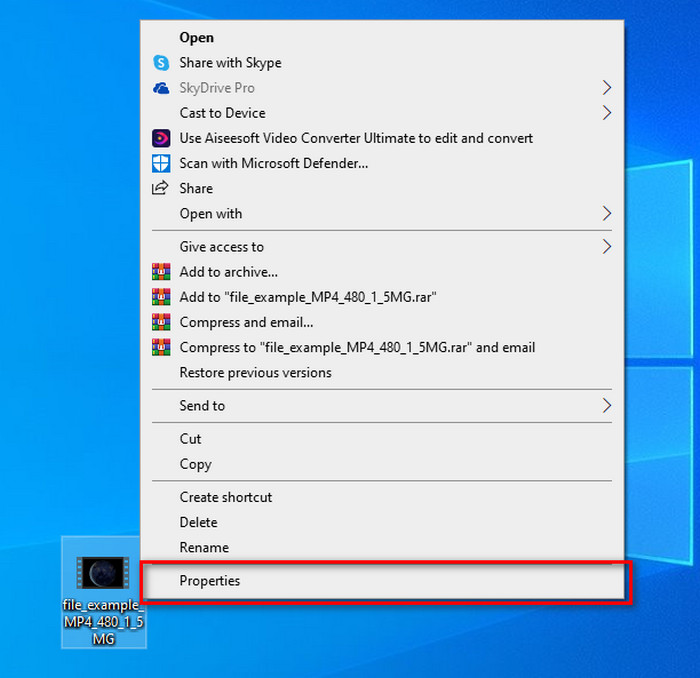
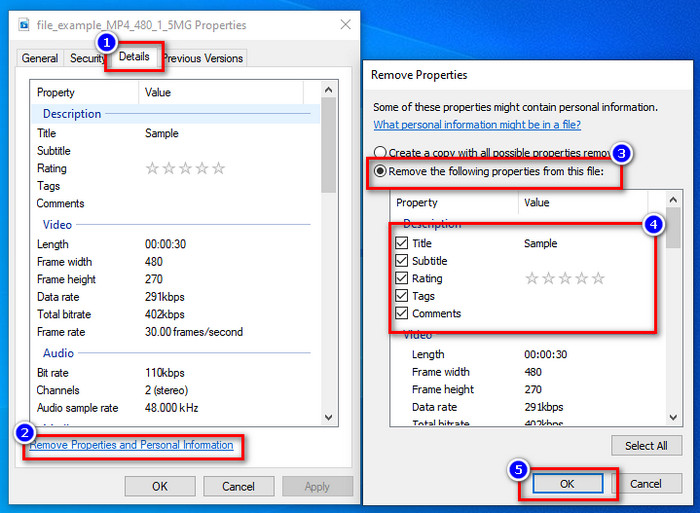
Step 2. Go to Details, and then under it, click the Remove Properties and Personal Information.
Step 3. Please tick the box of metadata you don't want to include on your media file before posting it. If you've done this, press OK; it will create a copy of the file without its metadata.
Use a melhor ferramenta de remoção de metadados no Windows e macOS
Suppose you want the best metadata removal tool, then FVC Video Converter Ultimate is the tool that you're looking for. It is the expert's tool to remove the metadata on your media file before the users post the file online. Although it is an expert choice tool, anyone can easily use it without exerting too much effort to remove the data on your file. Furthermore, this is a third-party option for you if the techniques we taught you can't remove the metadata on your file entirely. The corresponding steps will help you wipe the data you want to delete on your file and follow it accordingly.
Step 1. Before removing the metadata, you must first download the tool by clicking the below download button. Click the corresponding operating system you are using, whether Windows or Mac, then install it promptly. After that, open the tool by hitting the Start Now.
Free DownloadFor Windows 7 or laterSecure Download
Free DownloadFor MacOS 10.7 or laterSecure Download
Para um processo tranquilo, você deve se familiarizar com a interface do usuário das ferramentas antes de prosseguir para a próxima etapa.
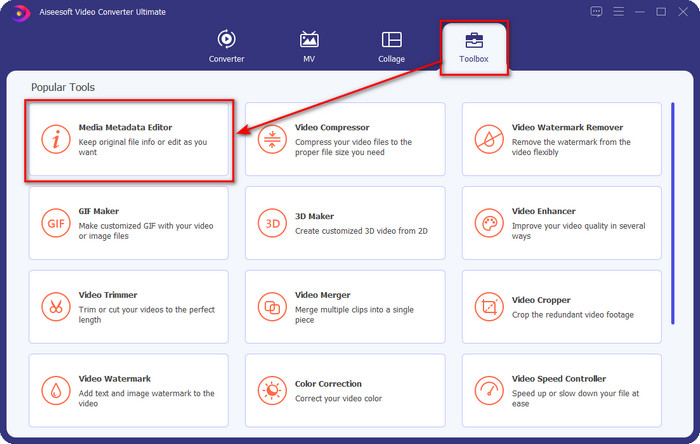
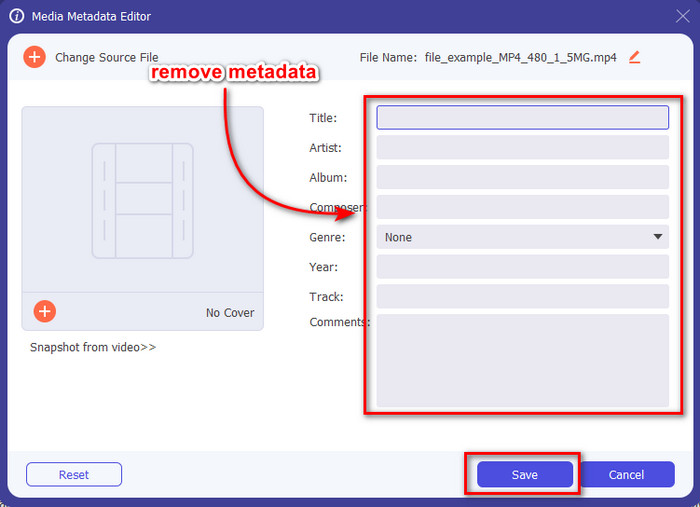
Step 2. Now that you've opened the Toolbox section, hit the Media Metadata Editor under it.
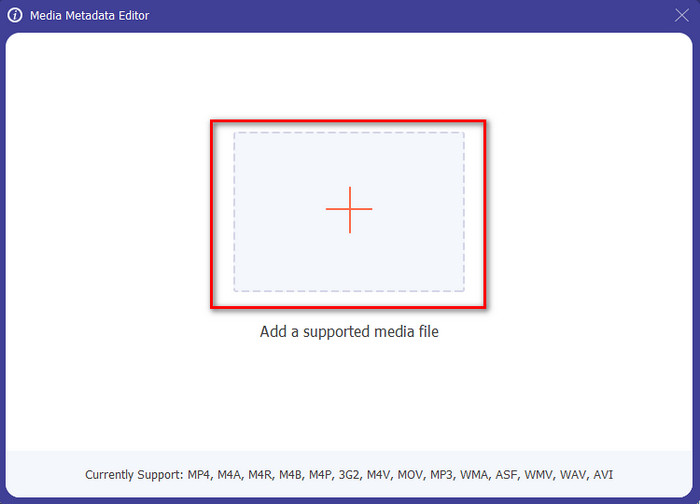
Step 3. A new window will show on your screen; by tapping the + button, you can add the media file you want to remove the metadata, then tap Open to upload it.
Step 4. Click the text box of each metadata you want to remove, then click the Delete Key on your keyboard. To save the file, you can click Save, and it will not make a copy with no metadata. Easy isn't it? It saves space on your desktop because it didn't create a copy of the file you remove metadata.
Parte 2. Melhor maneira de limpar metadados de arquivos no Mac
No Mac, você pode remover facilmente as informações sobre sua foto; no entanto, você só pode remover os dados de localização. Portanto, se você deseja aprender a remover metadados de um arquivo no Mac mais do que a localização, deve usar a ferramenta que apresentamos acima.
Step 1. Go to the Preview and open the file.
Step 2. Click Tools, then Show Inspector and click i to see the location data.
Step 3. On the GPS tab, click Remove Location info, and it will automatically remove information about your media file.
Parte 3. Como remover metadados em dispositivos Android e iOS
Use Exiftool – visualize, edite metadados de foto e vídeo (Android)
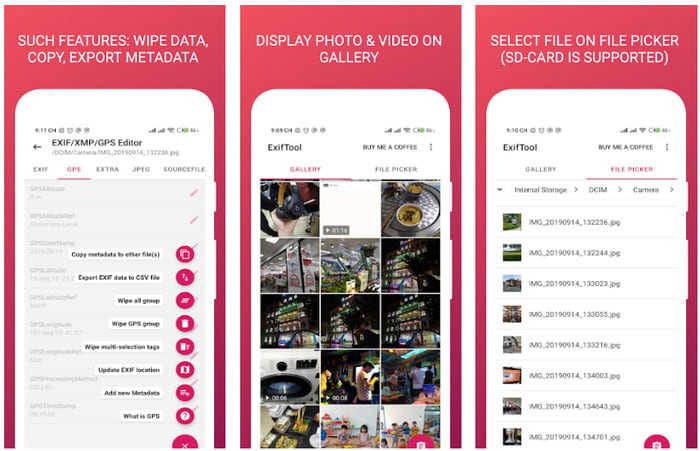
Exiftool – view, edit metadata of photo and video can help you remove video metadata on Android by downloading the tool. With this tool, you can add, remove, and update the EXIF data of the video and photos for free. So, if you want to use this app, follow the steps below.
Step 1. Download the app on the Playstore and click Install.
Step 2. Open the app and select the file you want to remove its metadata.
Step 3. Press the option and click Wipe Quicktime Group to remove the metadata automatically.
Use o removedor de metadados de foto e vídeo (iOS)
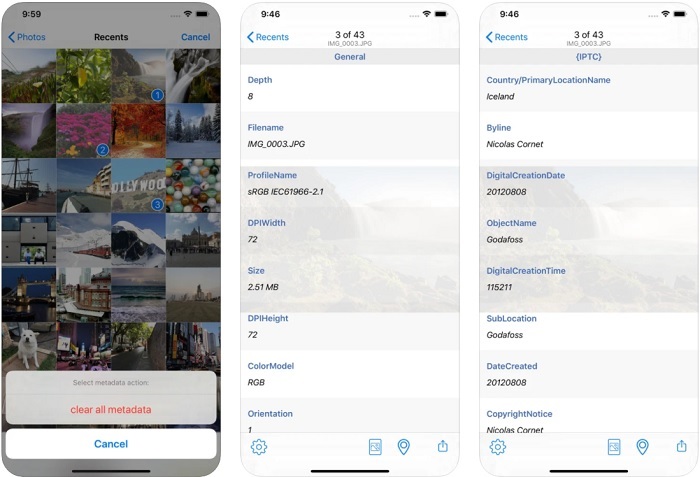
Se você é um usuário iOS, pode usar o Removedor de Metadados de Foto e Vídeo e aprender como limpar metadados em seus dispositivos iOS. Este aplicativo suporta todos os formatos de mídia nativos em dispositivos Apple e faz exatamente seu trabalho como removedor de metadados. Se você tiver um dispositivo iOS, poderá copiar as etapas abaixo.
Step 1. To download the app, you must go to the App Store, search it, then install it.
Step 2. Open the tool and allow the app to access your Photos, select the video or photo you want to remove the metadata.
Step 3. Tap the gear icon, then click clear all metadata, and it will create a copy of the file without metadata on it.
Parte 4. Como remover metadados usando uma ferramenta da Web gratuitamente
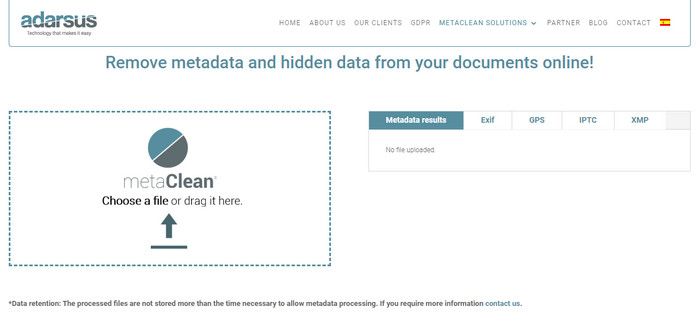
Adarsus – Remove Metadata can help you remove metadata online, and it is for free. Unlike the other converters above, you will not need to download the tool on your desktop to use because it is a web tool; to access it, you will need an internet connection. If you want to experience removing metadata for free, follow the steps below.
Step 1. Open your web browser, and search the tool.
Step 2. On the tool's website, click the upload button and choose the file to remove the metadata.
Step 3. Click Get my File Clean, and it will create a copy without metadata.
Parte 5. Gráfico de comparação sobre o Metadata Remover no Windows, Mac, Online, Android e iOS
| Recursos | FVC Video Converter Ultimate | Propriedades no Windows | Visualizar no Mac | Exiftool – visualizar, editar metadados de foto e vídeo (Android) | Removedor de metadados de foto e vídeo | Adarsus – Remover metadados |
| Seguro de usar |  | | | | | |
| Amigo do usuário | | | | | | |
| Limpar metadados inteiros | | |  | | | |
| Editar Metadados | | | | | | |
| Duplique o arquivo | | | | | | |
| Limitação(ões) | Não está disponível em dispositivos móveis e online | Às vezes, os dados não são totalmente excluídos. | Ele não remove outros metadados além do local. | Não é tão eficaz quanto a ferramenta final. | Na maioria das vezes, ele falha ao remover os metadados | Há uma limitação no tamanho do arquivo, que é de 5 MB. |
Parte 6. Perguntas frequentes sobre como remover metadados
A remoção de metadados diminui o tamanho do arquivo?
Sim, porque os metadados adicionam tamanho ao arquivo de mídia com suas informações. Você pode economizar menos espaço removendo-o e ele ficará menor do que antes. No entanto, as informações que estão em seu arquivo são removidas.
Depois de remover os metadados, a qualidade os afetará?
Não, não vai; a qualidade não será afetada mesmo se você alterar ou remover os metadados do seu arquivo de mídia. Portanto, não se preocupe, pois você ainda terá a mesma qualidade mesmo sem ou com metadados.
Todos os formatos de arquivo têm metadados?
Most media formats have different metadata structures, but not all media formats have metadata. In some cases, formats can't contain metadata because of their build, design, and many more factors.
Conclusão
We have now learned how to remove metadata on the file to protect your privacy as easy as that. With the tool presented in this article, it became possible to remove it before posting on the web. Although we offer five tools to erase the metadata, there is no doubt of the capabilities of FVC Video Converter Ultimate because the tool can entirely remove the entire data or certain parts as quickly as 1-2-3. If you doubt our review, you can check out the tool by downloading it on your computer drive and test it out if it is the real deal!
-
 4 maneiras de converter WMV para MKV no Mac, Windows e online sem perdas
 Quer converter WMV para MKV no Mac e Windows? Este artigo apresenta as melhores maneiras de converter WMV para MKV rapidamente.
-
 4 do Melhor Visualizador de Metadados Online e Offline [Atualizado em 2022]
 Posso verificar os metadados do meu arquivo? Sim, você pode, com a ajuda deste post, apresentaremos os diferentes visualizadores de metadados que você pode usar.
-
 Melhores conversores WebM para MKV que você deve usar para converter rapidamente
 Você está procurando maneiras de converter arquivos WebM para MKV? Este artigo apresenta os melhores conversores WebM para MKV para você experimentar.
