


 Video Converter Ultimate
 Gravador de ecrã
 Reparo de vídeo
[Comprovado] 2 dos melhores editores de tags disponíveis para uso no Windows e Mac
Most of the audio files we recorded on Windows are in WMA, and you can edit their metadata by using a WMA metadata editor. However, choosing the right metadata editor you can use on your desktop might be a bit hard of a task to handle by individuals. But today, this task isn't as hard as you think, with the help of the two editors you can use on Windows and Mac. Want to know what these two are? If you keep reading this article we will provide an unbiased review between the two software you can download and see which is better. Stay tuned and enjoy reading this blog post to know the two excellent tools you shouldn't miss this 2022.

Parte 1. Use o Ultimate WMA Tag Editor disponível no Windows e Mac para editar tags WMA
O primeiro da nossa lista é o melhor editor de metadados WMA FVC Video Converter Ultimate, a ferramenta que apresenta um editor poderoso para suas tags que todo mundo adora. Com esta ferramenta, você pode lidar facilmente com esse problema como um profissional, mesmo que não tenha experiência em editar suas tags WMA. Ao contrário de outros editores de tags, você não precisará de vasto conhecimento sobre este editor de metadados sobre como usá-lo; dentro de alguns cliques e uma fração de segundo, você terá seu WMA marcado sem suar qualquer esforço.
Want more? One of the best features this tool presents is the Toolbox, where you can do multiple things that the other tools can't offer to you, such as compressing, trimming, watermark adding or removing, reversing, and many more. So the task on every media file you can even think of can easily be handled by you with the assistance you will get thru this tool. In addition to that, you can convert your WMA format into 1000+ new formats quickly with the help of the ultra-fast converting process. Notable, isn't it? Well, that is what the ultimate tool is capable of. And to learn how to add a WMA tag, the steps below will help you handle it like an expert.
Step 1. Firstly, click the download button below, choose whether you are currently using Windows or Mac. Install it promptly and after the process, launch it.
Free DownloadFor Windows 7 or laterSecure Download
Free DownloadFor MacOS 10.7 or laterSecure Download
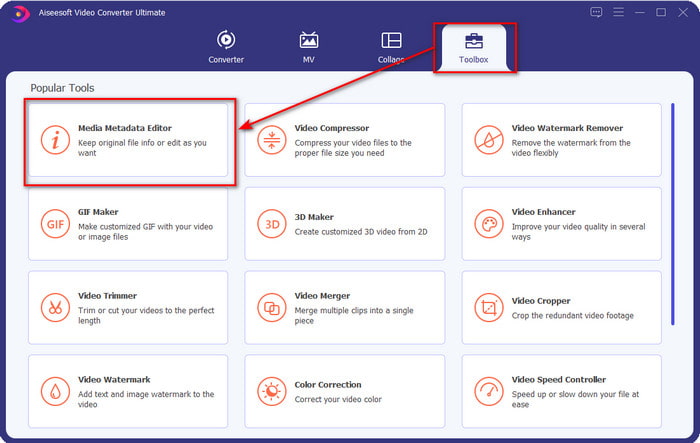
Step 2. On the upper section, click the Toolbox, and do the same thing on the Media Metadata Editor.
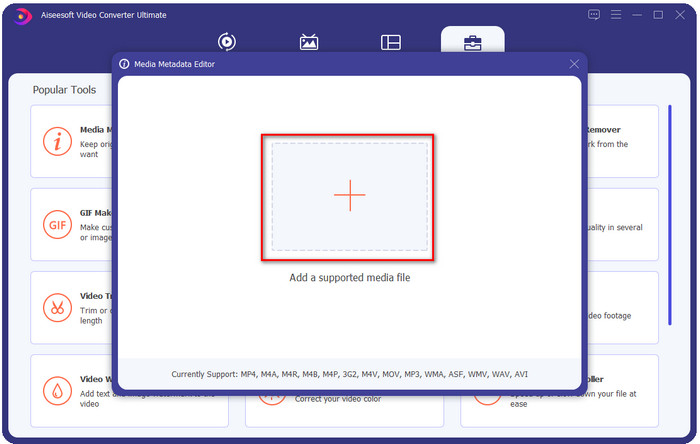
Step 3. Insert the file by clicking the + icon on the mini window that will show, locate the WMA file on the folder, and press Open to proceed to the next procedure.
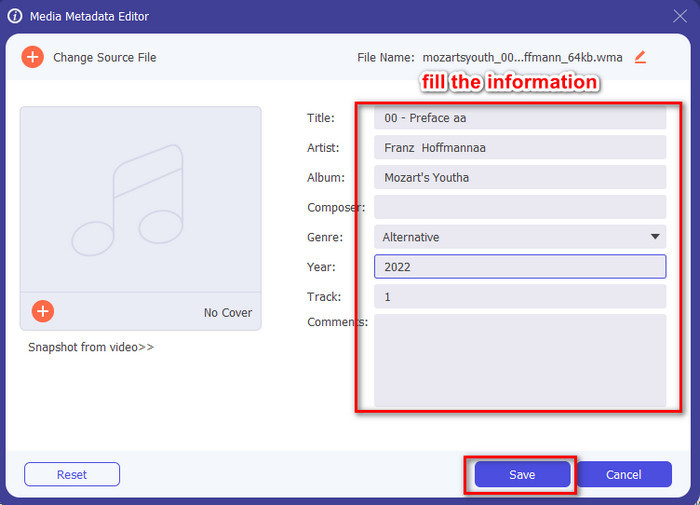
Step 4. In this area, you can edit the metadata or tags in your WMA and fill the textbox accordingly. After all of that, click Save to apply the changes you've made to your audio file. With that, you have tagged the metadata on the audio file as quickly as 1-2-3.
Parte 2. Use o editor de tags WMA gratuito disponível no Windows e Mac para alterar os metadados WMA
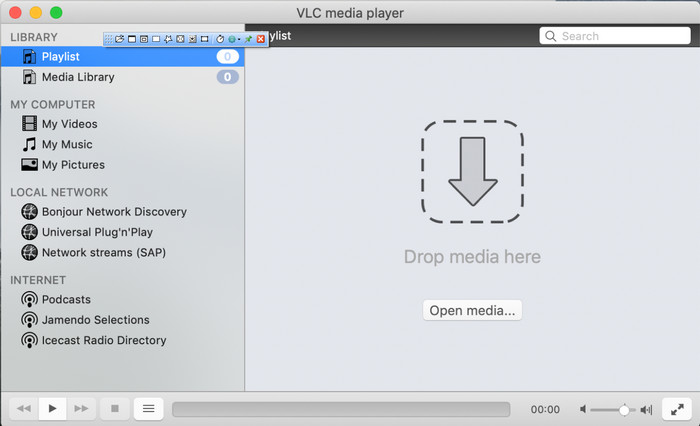
VLC Player is another WMA tag editor you can download for free on Windows and Mac. This media player can help you edit your video and audio file tags. Unlike the first software mentioned, this tool isn't made for adding metadata to any media file. It is used to play the different media files that the original or native media player can't play without downloading an additional codec to play it. Although the tool can add the tags, it is still not as effective as the other committed tag editor.
Além disso, esta ferramenta provou muitas coisas para nós porque é confiável e segura para download. Além desses recursos, esta ferramenta também é capaz de conversão, edição simples e gravação de tela, se você precisar. Podemos dizer que é uma ferramenta multifuncional que não oferece tanta excelência em outras funções, mas na reprodução de vídeos é sem dúvida a melhor do mercado.
Parte 3. Gráfico de comparação entre o editor de tags WMA gratuito e definitivo
Para tornar a análise ainda mais simples de entender, incluímos um gráfico de comparação para saber qual ferramenta é muito melhor para ser baixada no seu drive. Por favor, leia-o cuidadosamente para comparar e contrastar o FVC Video Converter e o VlC Player e julgá-lo, que é o melhor editor de metadados WMA.
| FVC Video Converter Ultimate | VS | Leitor VLC |
 | Disponível no Windows e macOS | |
| Suporta uma ampla gama de formatos para editar tags |  |
| Funções multifuncionais, como aparar, cortar, editar e muito mais | |
| Amigo do usuário | |
| Melhor interface gráfica de usuário | |
Parte 4. Perguntas frequentes sobre o WMA Metadata Editor
Posso jogar WMA no VLC?
Yes, you can easily play the WMA file on VLC because it is supported. If you want to know more about the VLC, you can read this article; by tapping this link, you will learn VLC and its other available alternatives.
O que é WMA?
WMA is an audio format used to store a series of audio codecs available created by Microsoft with the help of its composer Stan LePard. This audio format is one of the famous competitors of the standard audio format, MP3. However, the format isn't as popular as you expected, so if you want to transfer the file with a .wma extension, expect that you will need a third-party app if the users on the other end don't use Windows. So, what should you do? Can you convert the WMA into an MP3 to make it compatible with the receiver? With the help of this article, you will learn how to convert WMA to MP3 on Windows, Mac, and Online.
Preciso de um codec adicional para jogar WMA?
Depende do programa que você está usando no momento; se você for um usuário do Windows, não precisará baixar um codec adicional para reproduzir o arquivo de áudio em sua área de trabalho. No entanto, nem todos eram usuários do Windows, portanto, converter o arquivo de áudio é a melhor maneira de tornar o WMA compatível com seus dispositivos. Se você está procurando um conversor, sugerimos que você escolha o melhor conversor de áudio que você pode baixar no Windows e Mac, o FVC Video Converter Ultimate. Siga estes passos se você quiser saber como. Baixe a ferramenta em sua área de trabalho e instale-a em seguida. Abra a ferramenta e clique no ícone + para carregar o arquivo WMA; no canto superior direito, clique no botão Converter tudo para e escolha o formato de áudio disponível na lista. Pressione Converter tudo para iniciar o processo de conversão. Fácil assim.
Conclusão
Agora que temos uma ideia sobre o FVC Video Converter Ultimate e o player VLC, é hora de escolher o melhor editor de tags WMA que você deve usar. Essas ferramentas são ótimas para editar as tags dos seus arquivos WMA, portanto, se você preferir, poderá lidar com a edição das tags rapidamente. Mas se você quiser uma ferramenta profissional para lidar com essa tarefa, escolha a ferramenta definitiva. Ao pressionar o botão de download, você pode tê-lo em ambos os sistemas operacionais para ajustar suas tags WMA.
-
 O que são metadados: aprenda as informações básicas sobre metadados
 O que são Metadados? Isso é importante? Quais são as partes dos metadados? Você tem a mesma dúvida? Neste artigo, você aprenderá as informações básicas sobre metadados.
-
 4 dos melhores visualizadores de metadados online e offline [atualizado em 2025]
 Posso verificar os metadados do meu arquivo? Sim, você pode, com a ajuda deste post, apresentaremos os diferentes visualizadores de metadados que você pode usar.
-
 6 Filtros de Snapchat Animados do Snapchat de Escolha Favorita no Snapchat
 Quer saber as melhores maneiras de adicionar filtros nos vídeos do Snapchat? Bem, você pode clicar aqui e aprender os diferentes filtros que você pode usar para aplicar nos vídeos do Snapchat.
