


 Video Converter Ultimate
 Gravador de ecrã
 Reparo de vídeo
[Comprovado] Como editar propriedades de arquivos WAV no Windows 10/11 e Mac sem esforço
If you want to store audio bitstream on PC, then without a doubt, WAV is the standard audio format you must use. As an imitation of RIFF, WAV files have their metadata on INFO chunks. Although it can store more than audio, sometimes the data that is on WAV files are inaccurate. So, if the data on your WAV files are wrong, you must use this guide to know how to edit the properties of WAV files on Windows 10/11 and Mac with easy-to-follow detailed steps.

Parte 1. Como editar propriedades de arquivos WAV com as melhores ferramentas no Windows
Melhor editor de metadados no Windows e Mac - FVC Video Converter Ultimate
Aprender a editar propriedades de arquivos WAV no Windows 10/11 e Mac não é um grande problema com a ajuda do melhor editor de metadados que você pode baixar na referida plataforma. O FVC Video Converter Ultimate apresenta o melhor conversor e um dos editores de metadados de primeira linha que você pode usar e baixar em seu desktop. Ao contrário das outras ferramentas do mercado e desta lista, esta ferramenta apresenta um poderoso editor de tags em mais de 1000 arquivos de mídia, incluindo WAV.
Além disso, mesmo que você tenha ou não tenha experimentado editar as tags de metadados; você pode descobrir tudo rapidamente usando o conversor final. Nenhum trabalho complicado pode ser rapidamente superado com esta ferramenta, tornando o software único e poderoso. Quer saber como usar a ferramenta? Você pode seguir o guia que adicionamos abaixo e copiar as etapas para concluir a tarefa com êxito.
Step 1. Please click the download button presented below click the appropriate download button. Then, install and set up the tool next and launch it.
Free DownloadFor Windows 7 or laterSecure Download
Free DownloadFor MacOS 10.7 or laterSecure Download
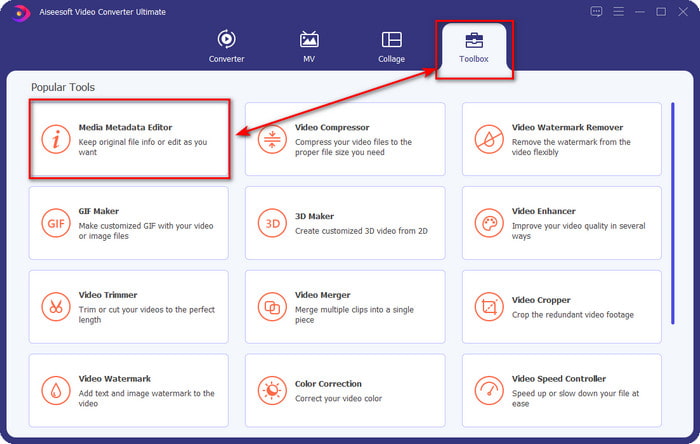
Step 2. Once you've opened the software, you must go now to the Toolbox section, and there the Media Metadata Editor under the setlist below.
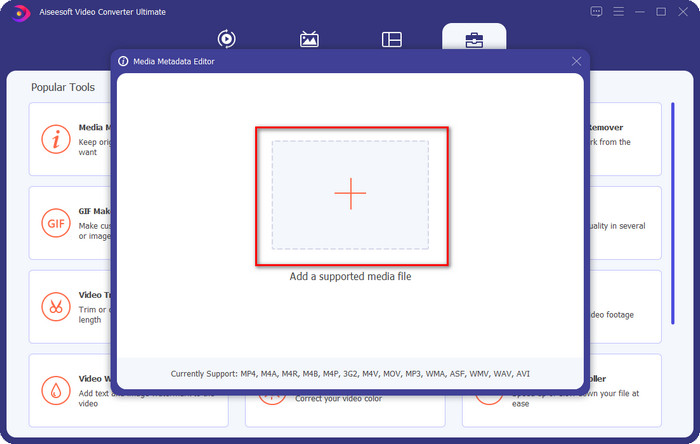
Step 3. Add the file by clicking the + button presented on your screen, find the WAV file you want to add metadata to your computer folder, then press Open.
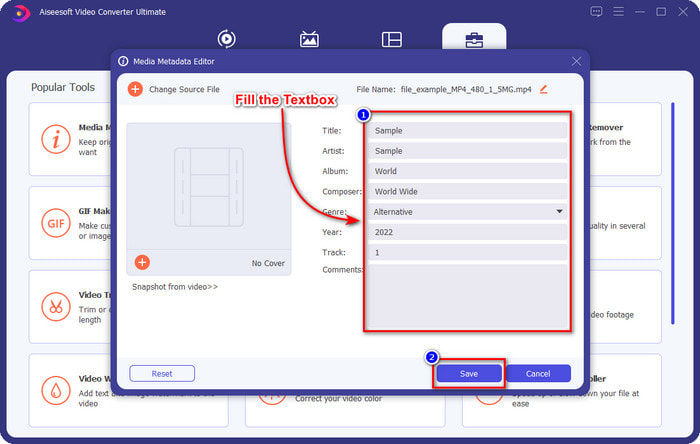
Step 4. Edit or delete the information on the textbox; if you successfully fill them all, you can click Save to apply the changes. And by that, you've learned how to edit tags onWAV files with the help of the ultimate tool.
Audácia
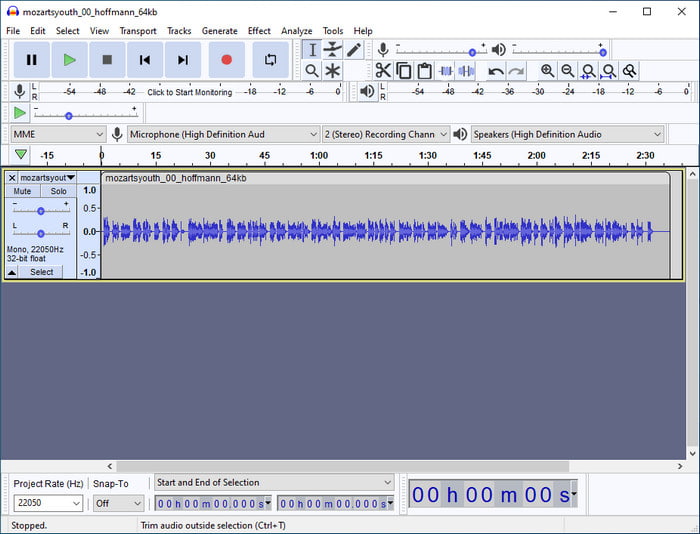
One of the best software you can use to enhance your audio is Audacity. This Windows software presents a powerful enhancer and editor that you would love to use for free. Although it can improve your audio file, it can also change the tags on your audio file if you need it. You can follow the guide below if you want to know how to edit properties of WAV files using the tool.
Step 1. Download the Audacity on Windows, then open it.
Step 2. Then drag and drop the WAV file you want, click Edit, and under it click Metadata.
Step 3. Tap each square under Value to edit the tags of your WAV file, then click OK to apply, click File, and Save Project.
Parte 2. Como editar propriedades de arquivos WAV com o melhor software no Mac
Music Tag Pro
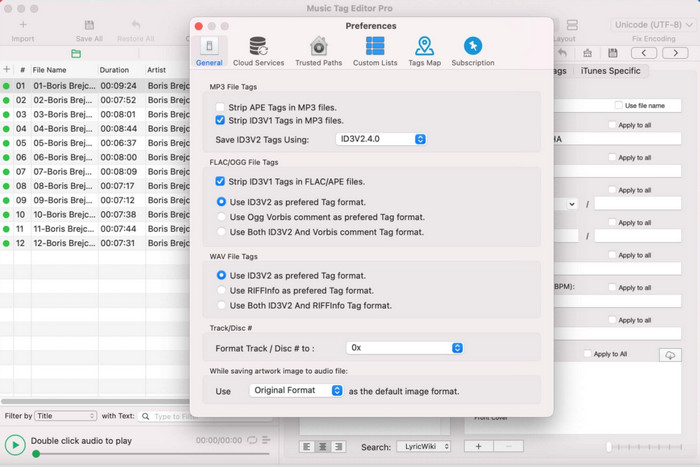
Music Tag Pro is a software you can download on your Mac to edit the audio and video file metadata. It can also bulk edit metadata tags to change the file's metadata efficiently. With the overall performance of the tag editor on Mac, many users enjoy using it and leave a lot of good comments on the Appstore if you take a look. However, the information on your media file is limited, but it is still doable with the tool. If you want to use it, the tutorial will teach you how to edit properties of WAV files on Mac.
Step 1. Search the tool on the Appstore, then download it.
Step 2. Click the Import button to add the WAV files.
Step 3. Click the WAV files, edit the tags on each column, and click Save All if you've done editing the WAV file.
Editor de tags para Mac
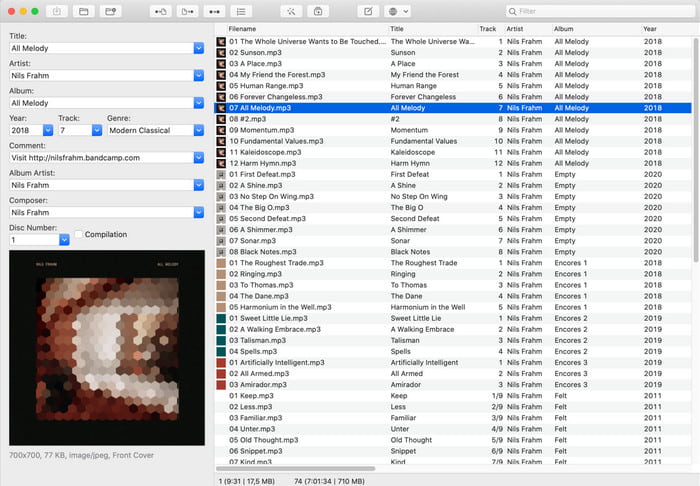
Tag Editor for Mac is a helpful software to add tags to your audio files, such as WAV. With this software, you can easily add the metadata on any audio file without degrading them, like what the ultimate tool can do. Also, this is not only applauded by the users for its tag editing provides and the fast customer service it offers to its customers who need help. If you need a step-by-step tutorial on how to edit properties of WAV files using it, read below.
Step 1. Open your Appstore and download there the Tag Editor; after that, open it.
Step 2. Click the + button above to add the WAV files, and they will automatically be placed on the list below.
Step 3. Click Edit to change the metadata, then to save the changes, click Save.
Parte 3. Perguntas frequentes sobre como editar propriedades em arquivos WAV
Por que a qualidade de áudio do WAV diminui após a edição de metadados?
Algumas ferramentas podem reduzir a qualidade de áudio do seu arquivo WAV; muitos usuários reclamam desse problema mesmo não tendo editado a qualidade do mesmo. Portanto, se você não tiver certeza sobre o software que usa, é melhor ler uma revisão confiável para determinar se ele perderá a qualidade do áudio depois de exportá-lo.
Posso visualizar meus metadados WAV?
Absolutely, yes, you can. Click this link if you don't know how to view your media file's metadata using Windows, Mac, and online services.
Os metadados são necessários no WAV?
Definitely, yes. Metadata is vital on each media file you have, whether audio or video. So, adding metadata on your WAV file can help you, and the library arranges each WAV file according to the author's name, title, time, date, location, and many more. If you aren't convinced of adding metadata to your WAV file, we suggest reading this article to know more about metadata.
Conclusão
With the help of this article, we now have enough knowledge on how to edit properties of WAV files on Windows 10/11 and Mac. If you are a user of both systems, you can use them for free, but some are paid. Even though whatever you choose, we believe that editing the metadata is easy. But if you want to have a low-cost metadata editor on your side that can edit the WAV tags effortlessly, then you must pick the ultimate tool. The FVC Video Converter Ultimate is the budget-friendly professional metadata editor you can use on both Windows and Mac. You can check out the fantastic features this tool offers if you download it, so click the download button and use it.
-
 Como editar e corrigir metadados MP4 de uma maneira muito inteligente
 Você quer saber como corrigir metadados MP4? Nesse caso, leia todo o conteúdo deste artigo para conhecer os truques de como corrigir facilmente as tags MP4.
-
 4 melhores métodos para corrigir e editar metadados MP3 no Windows e Mac
 Quer conhecer os segredos da edição de metadados MP3 com facilidade? Este blog ensinará diferentes técnicas com as diferentes ferramentas que você acessa facilmente.
-
 2 melhores maneiras de editar metadados OGG que você deve experimentar gratuitamente
 Precisa editar metadados OGG? Bem, você pode facilmente editar as tags usando o software correto. Se você não tiver um, a leitura deste artigo é obrigatória.
