


 Video Converter Ultimate
 Gravador de ecrã
 Reparo de vídeo
 Secure Download
Revisão sobre o Pitch Changer no Windows, Mac, Online e Telefones
Frequently, with a pitch changer, we can quickly increase or decrease the original pitch. Most producers use a pitch shifter to add melodic effects to make the song even better than the raw version. On the other hand, buying a toolset to change the pitch will cost you many dollars and take some time to learn how to use. Expensive and difficult to understand. Instead of spending your money on the sets that you will use, why don't you try to use software that can help you change the pitch of the video or audio you have.
Com esta análise, reunimos quatro dos melhores aplicativos e programas que você pode usar para alterar o tom do áudio sem gastar muito dinheiro. Continue lendo este artigo para saber do que estamos falando.

Parte 1. Os 4 principais modificadores de pitch disponíveis para desktop, online e dispositivos móveis
Video Converter Ultimate – Melhor trocador de pitch de vídeo no Windows e Mac
Free DownloadFor Windows 7 or laterSecure Download
Free DownloadFor MacOS 10.7 or laterSecure Download
Available Program: Windows and Mac
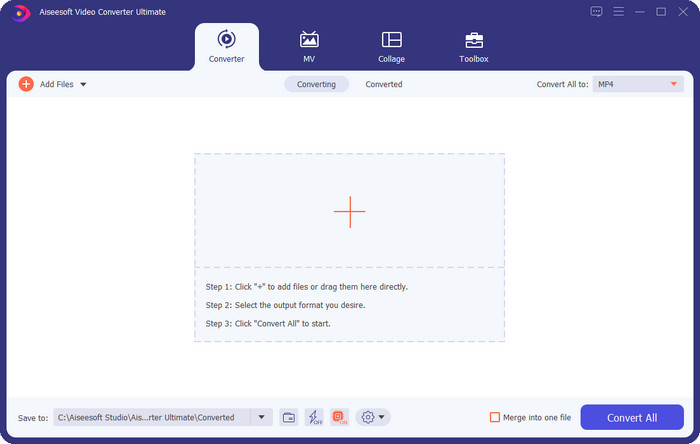
First on our list is the best video pitch changer on your Windows and Mac operating system. Video Converter Ultimate is a powerful tool you can use to manipulate the pitch on your audio by increasing and decreasing the speed of the video you have. Unlike other software you can download on your desktop that can do the same thing, this tool will not consume a lot of your time learning it, for it is a straightforward tool. You can improve the audio pitch in less than a minute to make it sound better than the original version you've recorded.
Além da capacidade de alterar o tom, você também pode estender o volume do áudio até seu potencial máximo usando o Volume Booster na caixa de ferramentas. Nesse recurso, você pode aumentar ou diminuir rapidamente a amplitude ou ganho do áudio em seu vídeo usando os controles deslizantes. Mesmo que você não seja um produtor que gostaria de fazer esse tipo de coisa, ainda é agradável e rápido com a ajuda desta ferramenta definitiva disponível no Windows e no macOS. Portanto, se você quiser usar essa ferramenta definitiva, mostramos na parte dois como usar essa ferramenta com etapas detalhadas que você pode seguir para concluí-la em menos de um minuto.
Vocal Remover.org
Available Program: Online
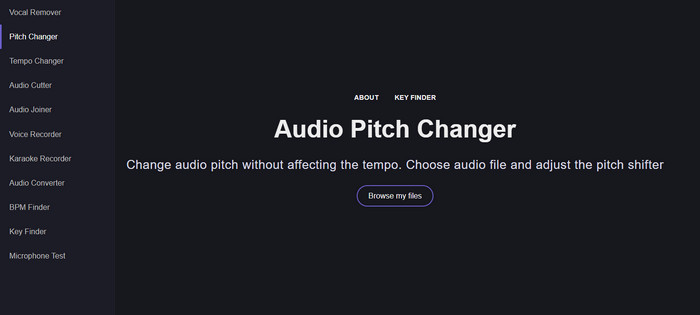
If you need a pitch changer online, then without a doubt, Vocal Remover.org is the tool that serves perfectly to finish this task. Unlike the first tool, this tool works best on audio enhancing. With this tool, you can easily change the audio pitch and determine what key the song uses. There is also an indicator that can help you choose the semitone of the audio. Either you decide to adjust it manually or do a step once you slide the slider. Most of the users who already use this enjoy it, and they are satisfied with the result of the pitch change effect they have.
A ferramenta funciona bem nisso, mas você pode carregar apenas um arquivo de formato de áudio limitado aqui, e o formato de vídeo não é suportado. O upload do arquivo pode ser um pouco difícil para a ferramenta, pois ela suporta apenas alguns formatos de áudio. Mesmo que isso possa ser um problema para todos, ainda consideramos isso como uma das melhores ferramentas online que você pode acessar na web. Mas certifique-se de acessar o site correto para evitar complicações e outros problemas. Além disso, lembre-se de ter uma conexão de internet estável porque a ferramenta funciona melhor se sua internet for forte.
Up Tempo: Pitch, Speed Changer
Available Program: Android
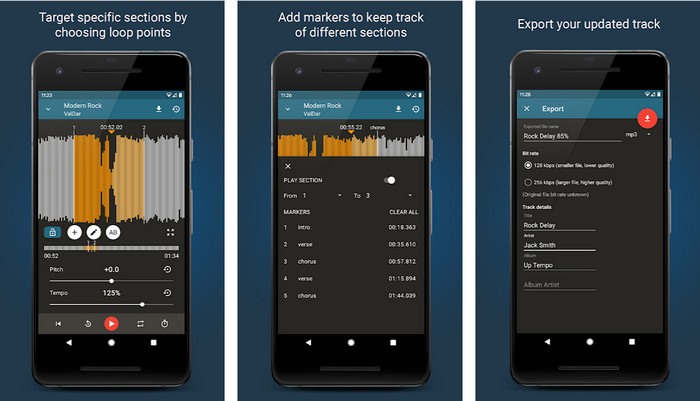
You can download this audio pitch changer for Android users to do the task even if you don't have a desktop at your reach. With the Up Tempo: Pitch, Speed Changer, the job of changing the playback speed and pitch became quick and possible to handle by everyone. Its GUI supports a waveform, which could help you determine which part you want to enhance or change. Same as the online tool, this app can handle music, but it can become handy when you need it.
Embora o download do aplicativo seja gratuito, há coisas que você deve considerar se quiser usar este aplicativo. A maioria dos usuários percebe que o aplicativo não consegue detectar os novos arquivos de áudio baixados em seu telefone. Se você encontrar esse problema, ele pode não ser compatível com o arquivo de áudio neste aplicativo ou pode ocorrer um bug. No entanto, se você tem um telefone Android em mãos, baixe este aplicativo para experimentar e ver se é o aplicativo para resolver o problema.
TimePitch-Pitch, Trocador de Velocidade 4+
Available Program: iOS
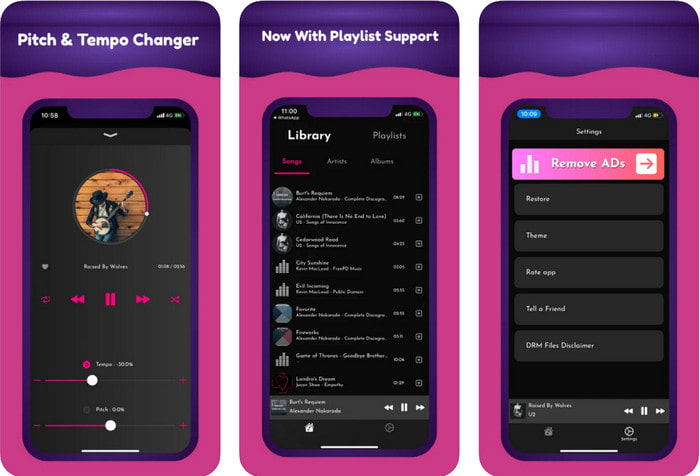
If you are an iOS user, then you must know that this pitch changer app can offer you a solution to this problem. TimePitch-Pitch, Speed Changer 4+ is a music player, library, and changer you can use on your iOS device if you need one. This app works differently from the other because you can change the pitch of the audio you are listening to in real-time, which means when you adjust it, the change won't save. But this could be a strength of the app, for you won't need to wait for it to process; by adjusting it, you can easily change the pitch according to your likes.
No entanto, essa também pode ser sua fraqueza; se você transferir o arquivo em outros dispositivos, o tom que você alterou usando este aplicativo não se aplicará ao receptor. Além disso, você precisará lembrar que, se comprar a música no iTunes ou Apple Music, não poderá usar este aplicativo para alterar o tom. Por quê? Porque os arquivos protegidos não permitirão que nenhum aplicativo de terceiros como este tenha acesso ao arquivo. Independentemente do upload do arquivo de música, ainda incluímos este aplicativo neste artigo porque funciona melhor em todos os dispositivos iOS.
Parte 2. Como alterar o tom de um vídeo usando o software Ultimate Pitch Changer
Siga os passos abaixo para saber como usar este tom de música e trocador de velocidade que você pode ter em sua área de trabalho. Portanto, continue lendo os detalhes a seguir se precisar de um tutorial simples, mas eficaz, sobre como usar o software definitivo.
Step 1. Kindly press the download button to have the ultimate software on your desktop, choose whether you are using a Windows or Mac program. Please wait for the downloading process, click the file you've downloaded, then install it. After all of the set-up process and installation, launch the software to start using this ultimate tool.
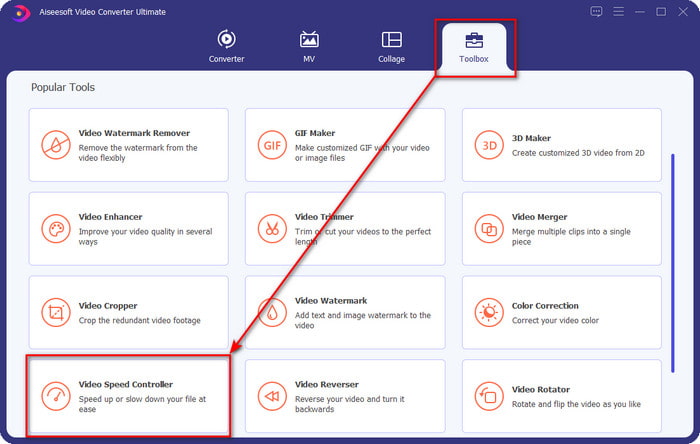
Step 2. Open the Toolbox menu, and under it, find the Video Speed Controller there; click it to open it. Scroll it down for the features that are near the bottom part.
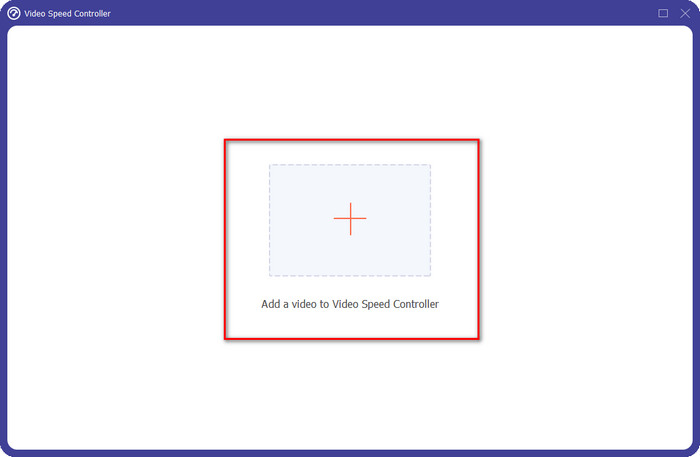
Step 3. A new mini-window will show on your screen, click the + button, locate the video file you want to change the pitch on it, then click Open to upload the video file.
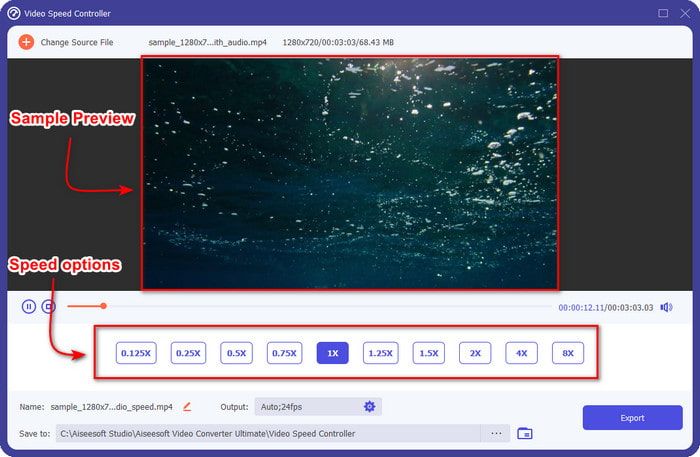
Step 4. In this part, you are now allowed to change the audio speed. You will notice that the audio pitch will also vary by changing it. You can hear and see the preview automatically on the preview screen.
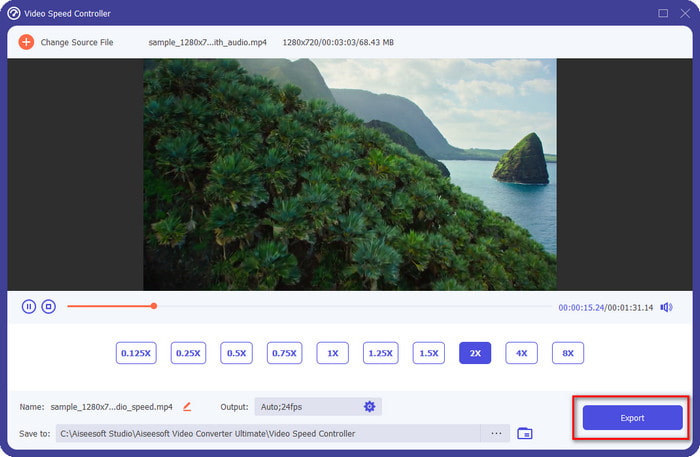
Você só pode reproduzir a visualização do vídeo em velocidade 2x; você notará que o 4x e o 8x não permitirão que você visualize o vídeo para evitar conflitos, mas não degradará a qualidade do vídeo e do áudio.
Step 5. if you are satisfied with the pitch you have, click now the Export button. Easy isn't it? With the help of software like this, you can easily handle different video and audio problems in minutes.
Related:
Parte 3. Perguntas frequentes sobre o Pitch Changer
O que é lance?
Ele avalia a qualidade que ressoa com o seu som medindo-os na faixa, sejam eles mais altos ou mais baixos. É uma onda sonora semelhante à frequência, mas não são a mesma coisa.
Quão alto um tom humano pode ouvir?
Quanto mais baixo o Hz, você ainda pode ouvi-lo conscientemente, mas algumas pessoas só o ouvem quando o Hz está alto. Segundo os pesquisadores, todos podem ouvir 8.000 Hz, e se você pode ouvir 12.000 Hz, seus ouvidos são tão bons quanto as pessoas com menos de 50 anos. E abaixo de 40 você ainda pode ouvir 15.000 Hz, mas para menos de 30 anos, 16.000 Hz, você ainda pode ouvi-lo. Para cada 25 anos ou menos, você ainda pode ouvir 17.000 Hz, e para menos de 20, você pode ouvir 20.000 Hz. Quanto mais velhos ficamos, o tom que ouvimos torna-se menos eficaz de tempos em tempos. Então, se você não consegue ouvir a frequência que mencionamos, você deve procurar um médico para verificar se há algum problema.
Como podemos calcular o alcance do tom?
O intervalo de afinação usa oitavas para calcular, o que permite ao cantor e ao instrumental determinar se esse é o tom certo da música. Com a vibração, você pode notar a frequência alta e baixa que uma onda sonora se acumula.
Conclusão
With the video and voice pitch changer above we can now easily adjust the pitch of the sound, we have on our hands. Instead of buying a specific technology to do the job, you can use the software above. Although they are different based on features and functions, we can still see what makes them good from one another. But if you are using a computer, you must download the Video Converter Ultimate on your desktop because the tool helps you change the pitch and other magical things to make your video and audio even better. Want to know what is the magic stuff this tool can do? Then download it right now by clicking the download button above.
-
 3 maneiras de acelerar o vídeo no iPhone [comprovado]
 Está tendo problemas para ajustar a velocidade de reprodução do seu vídeo porque está usando um iPhone? Este é um excelente artigo para ajudá-lo com seu problema.
-
 Windows Media Player | Aprenda a acelerar vídeos [Comprovado]
 Você deseja diminuir a velocidade do seu videoclipe usando o Windows Media Player, mas está tendo problemas para fazer isso? Este artigo é ideal para leitura e pode esclarecer seu ponto de vista sobre como acelerar vídeos usando o Windows Media Player.
-
 Como alterar o vídeo em câmera lenta para velocidade normal [etapas fáceis]
 Quer saber como reverter um vídeo em câmera lenta que você baixou da Internet ou gravou acidentalmente em câmera lenta? Aprenda a converter vídeo em câmera lenta para velocidade normal no Mac, Windows, iOS e Android.
