


 Video Converter Ultimate
 Gravador de ecrã
 Reparo de vídeo
 Secure Download
Como desacelerar um vídeo no Tiktok? 2 maneiras melhores e gratuitas
Nowadays, you will find many videos circulating on the internet from TikTok. This app is trendy with many features and tools to create video content, from hilarious memes, educational videos, dance covers, and more. And if you are just new to TikTok, your probably want to learn how to slow down a video on Tiktok. Luckily, Tiktok has a built-in slowdown or speed-up tool that allows you to have a slo-mo video. You're on the right track because you will know how to slow down a video on TikTok.

Parte 1. Desacelere facilmente um vídeo no Tiktok
O aplicativo Tiktok possui uma ferramenta de câmera lenta integrada que você pode usar para desacelerar ou acelerar o vídeo que está gravando. E se você já tem um vídeo salvo em sua galeria e quer que ele seja postado no TikTok, você ainda pode desacelerá-lo no aplicativo Tiktok. Nesta parte, você saberá como desacelerar seu vídeo no TikTok.
Desacelere seu vídeo durante a gravação
Aqui está a resposta se você se perguntar como desacelerar um vídeo do TikTok durante a gravação. Siga as etapas simples abaixo para gravar um vídeo em câmera lenta.
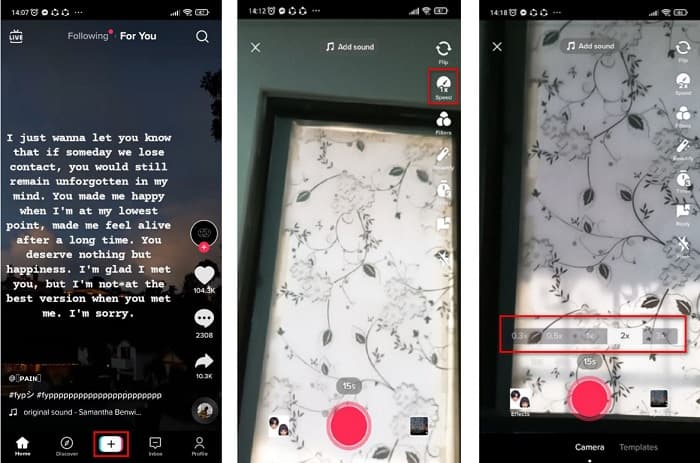
Step 1. First, open your Tiktok app and tap the + sign in the middle of your screen.
Step 2. And when you are on the camera’s interface, tap the Speed option.
Step 3. Lastly, select the speed that you want. 0.3X and 0.5x make your video slower. While 2x and 3x will make your video faster.
Em seguida, basta tocar no botão gravar para começar a gravar seu vídeo e, quando terminar, toque no botão Parar. Você verá que a velocidade do vídeo que você gravou é alterada.
Desacelere um vídeo que é gravado
Se você já tem um vídeo gravado, ainda pode desacelerar ou acelerar seu vídeo no TikTok. Siga os passos simples abaixo para fazer um vídeo gravado em câmera lenta. No entanto, quando seu vídeo já está gravado, sua única opção é fazer o vídeo em câmera lenta sem as opções de velocidade.
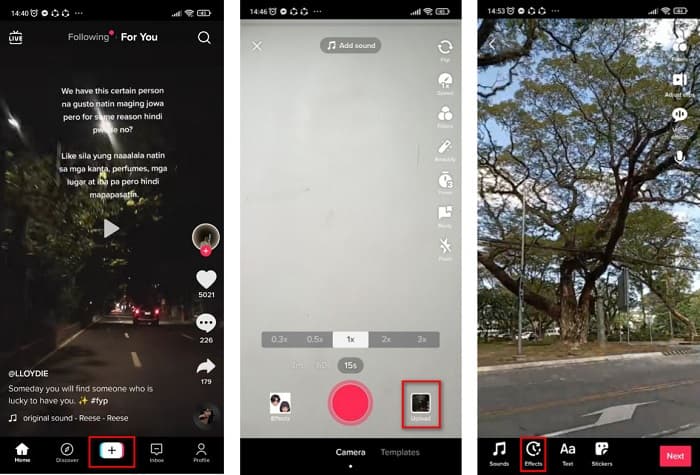
Step 1. Open the Tiktok app, and tap the + sign button in the middle of the software’s interface.
Step 2. Next, tap the Upload option beside the record button. And then select your recorded video, then click Next.
Step 3. Finally, tap Effects and then tap the Slow-mo option. Then adjust the speed that you want.
Depois de ajustar a velocidade do seu vídeo, toque no botão Salvar para salvar sua gravação de vídeo.
Simples, certo? Ao usar o aplicativo Tiktok, você pode ter um vídeo em câmera lenta sem usar nenhuma outra ferramenta.
Parte 2. Desacelere seus vídeos gravados do TikTok usando a melhor ferramenta de troca de velocidade de vídeo
Usar o trocador de velocidade do aplicativo TikTok é fácil e sem complicações. No entanto, ele só pode diminuir a velocidade do seu vídeo em até 0,3x e acelerar seu vídeo em até 3x. Se você deseja diminuir a velocidade do seu vídeo em até 0,125x, temos ferramentas alternativas online e offline.
FVC Video Converter Ultimate
FVC Video Converter Ultimate is an offline tool that allows you to change the video speed of your video. Using this tool, you can slow down or speed up your video to what you desire. This tool can adjust the speed of your video by 0.125x, 0.25x, 0.5x, 0.75x, 1.25x, 1.5x, 2x, 4x, and 8x.
Além disso, esta ferramenta possui uma interface de software fácil de usar, facilitando o uso para iniciantes. Essa ferramenta é impressionante porque possui recursos mais avançados, como editor de metadados de mídia, compressor de vídeo, criador 3D e muito mais. Além disso, ao alterar a velocidade do seu vídeo, você não perderá sua qualidade, ao contrário das outras ferramentas. Portanto, se você estiver interessado em usar este conversor, siga os passos abaixo.
Step 1. Download FVC Video Converter Ultimate by clicking the Download button below. Follow the installation process, then run the application.
Free DownloadFor Windows 7 or laterSecure Download
Free DownloadFor MacOS 10.7 or laterSecure Download
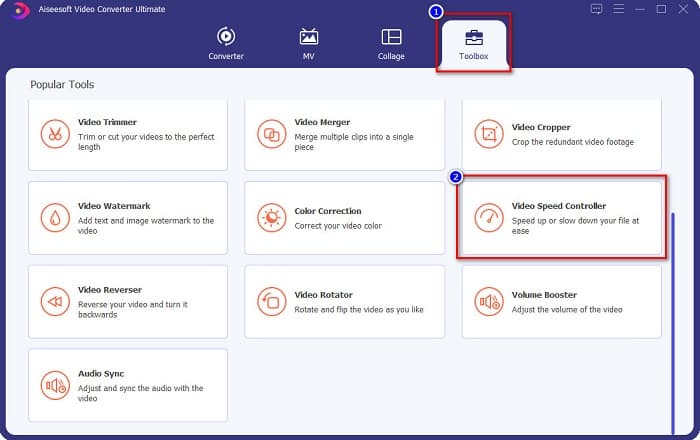
Step 2. Then, on the software’s main interface, click the Toolbox panel. On the toolbox panel’s interface, click the Video Speed Controller.
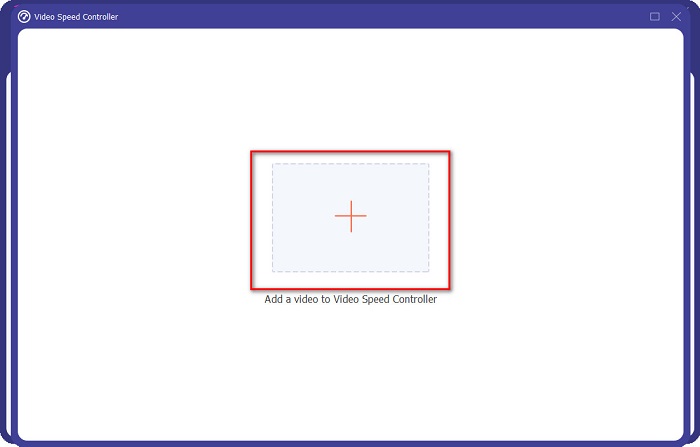
Step 3. Click the + sign button to upload the video that you want to slow down on the next interface.
Step 4. And then, select the video speed that you want, then proceed to the last step.
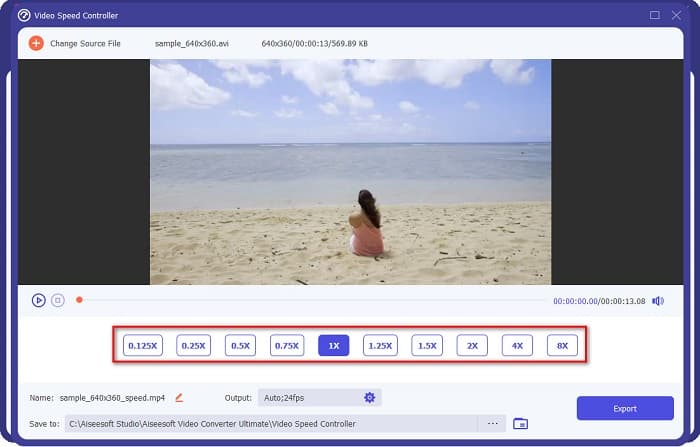
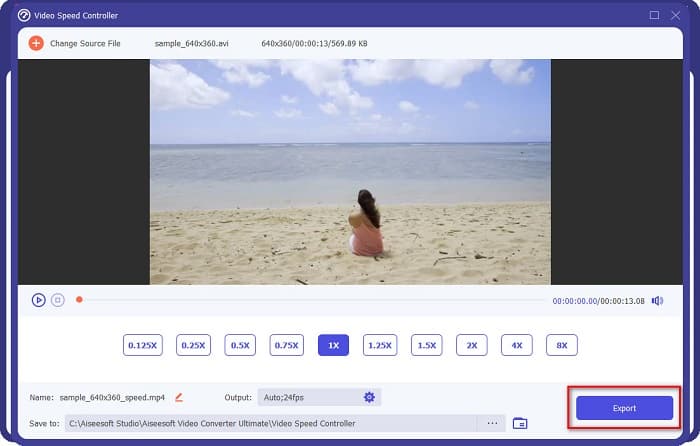
Step 5. Finally, click the Export button to apply the video speed to your video. The output video will automatically be saved on your computer folders.
Prós
- Ele pode ajustar a velocidade do seu vídeo de 0,125x a 8x.
- Possui uma interface de usuário intuitiva.
- Possui recursos avançados de edição, como criador de GIF, criador de 3D, marca d'água de vídeo e muito mais.
- Disponível em todas as plataformas de mídia cruzada, incluindo Windows e Mac.
Contras
- Você deve comprar o aplicativo antes de acessar seus recursos exclusivos.
Kapwing
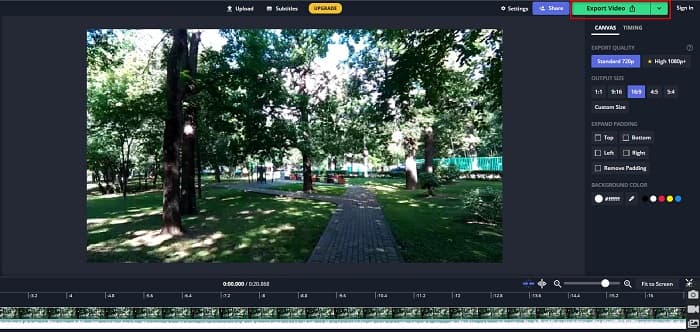
Kapwing is an online tool that is one of the most used video speed changers. This tool has a simple user interface making it a user-friendly tool. It also allows you to trim and crop your video easily. Moreover, it can change your video speed from 0.25x, 0.5x, 0.75x, 1.15x, 1.25x, 1.75x, 2x, and 4x. In addition to that, you can change the output size of your video. However, since it is a web-based app, you may experience having a slow loading process when using this tool. Nonetheless, many people use this converter to change the speed of their video.
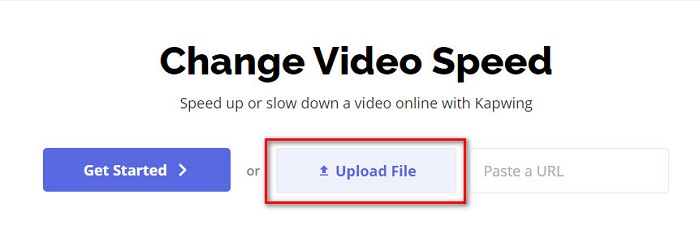
Step 1. First, search Kapwing on your browser, and click the Upload File button. Your computer files will appear where you will select the video you want to change the video speed.
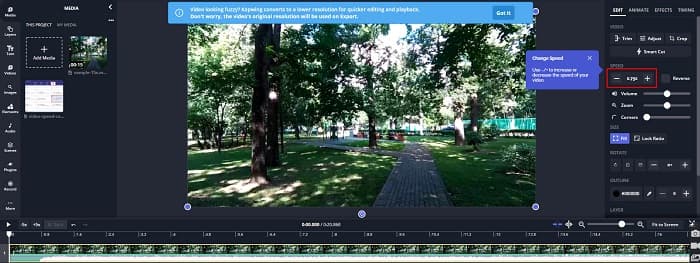
Step 2. Then, adjust the video speed on the next interface by clicking the - or + sign on the speed panel.
Step 3. Click the Export button to change the speed of your video. And then just wait for a few minutes, and that’s it!
Prós
- Possui uma interface de software fácil de usar.
- Permite cortar sua saída de vídeo.
Contras
- Quando a conexão com a Internet é lenta, o processo de carregamento do aplicativo é lento.
Parte 3. Perguntas frequentes sobre como desacelerar um vídeo no Tiktok
Diminuir a velocidade de um vídeo no Tiktok reduz a qualidade?
Não. Como o Tiktok possui um alterador de velocidade de vídeo integrado, ele não afetará a qualidade do seu vídeo quando você diminuir a velocidade de um vídeo no TikTok.
A exportação de um vídeo em câmera lenta no TikTok contém uma marca d'água?
Yes. Every video that Tiktok exports contain a watermark. But if you want to take out the watermark of your Tiktok video, read this article to know-how.
Quanto tempo você pode gravar um vídeo do Tiktok?
Uma única gravação de vídeo do Tiktok tem duração máxima de 15 segundos. No entanto, se você encadear quatro vídeos de 15 segundos, ele terá no máximo 60 segundos.
Conclusão
With all that being said, the task of how to slow down a video on Tiktok is solved. And now you know how to slow down or speed up a video on the Tiktok app. But if you want to adjust the speed of your other videos, FVC Video Converter Ultimate is the tool that can help you with that.
-
 Principais fatos que você deve saber sobre QuickTime Slow Motion
 Você já tentou usar o QuickTime Media Player para reproduzir vídeo em câmera lenta? Leia este artigo para saber mais sobre o excelente serviço deste reprodutor de mídia.
-
 5 Video Makers profissionais em câmera lenta disponíveis para Windows / Mac / Online
 Quer saber como fazer seu vídeo rodar em câmera lenta? Então leia este artigo para descobrir quais são os 5 criadores profissionais de vídeo em câmera lenta.
-
 Melhores maneiras de usar o iMovie para fazer vídeos em câmera lenta [Resolvido]
 Você já usou o aplicativo iMovie para converter seu vídeo de velocidade normal em câmera lenta? Esta é a oportunidade de saber mais sobre este aplicativo, então continue lendo.
