


 Video Converter Ultimate
 Gravador de ecrã
 Reparo de vídeo
 Secure Download
Controlador de velocidade de vídeo poderoso - Editor de velocidade DaVinci Resolve
If you want to use a powerful video speed editor, you probably want to use this tool. DaVinci Resolve Speed Editor is a video speed changer tool that uses a USB keyboard. This speed editor provides custom hardware control that allows you to edit your video speed easily. So, if you are wondering what this tool can do more, read this article to know more about the DaVinci Resolve Speed Editor.

Parte 1. Informações básicas, recursos, funções e preço do DaVinci Resolve Speed Editor
Many professional editors use DaVinci Resolve Speed Editor to change the speed of their video. And if you are new to using DaVinci Resolve Speed Editor, you probably want to know the information, functions, and price of this tool. In this part, you will know the basic information, functions, and the price of this speed editor.
Informação básica
O DaVinci Resolve é um teclado do tipo USB que permite editar seu arquivo. Se você deseja uma ferramenta que possa alterar a velocidade do seu vídeo, essa ferramenta é a melhor para você. O DaVinci Resolve oferece uma maneira mais rápida e fácil de editar vídeos. É mais do que apenas um teclado, pois possui muitos recursos de edição que você pode usar, incluindo um editor de velocidade de vídeo, controle de discagem de pesquisa, adicionar/remover efeitos, seleção de várias câmeras e muito mais. Além disso, esta ferramenta de edição de velocidade também possui uma versão sem fio.
Ao comprar um teclado DaVinci Resolve, você verá um cabo USB e um indicador de carga da bateria. Depois de remover o cabo USB da parte traseira do dispositivo, o Bluetooth tentará emparelhar automaticamente com seu dispositivo.
Além disso, se você estiver solicitando o editor de velocidade desta ferramenta, poderá usar os controles do volante, os controles de reprodução e os controles de edição e corte no teclado.
Características e funções
Se você está se perguntando quais são os recursos e funções do DaVinci Resolve, apresentamos abaixo os recursos e funções mais comuns desta ferramenta.
Speed Editor
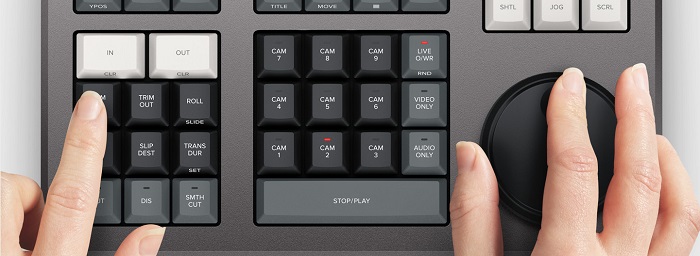
DaVinci Resolve Speed Editor is made for professional editors who want to better transition effects on their video. By using this video speed controller, you can slow down or speed up the fps of your video, highlighting the best scene of your video. There are many ways to use DaVinci Resolve to speed up a clip.
◆ Use the In and Out points by just scrolling on the search dial and placing the in and out points on your video timeline, then going to edit functions to edit your video.
◆ Use the Trim in and Trim out buttons by simply holding the trim buttons and rotating the search dial. The smart indicator on the timeline allows you to see which part you are trimming.
Add and Remove Effects
Using the DaVinci Resolve speed editor, you can also add and remove effects on your video. The smart indicator on the timeline is the determinator of which editing point you are working on. Press the CUT key to remove an effect on the edit point. And if you want to dissolve the edit point on your timeline, press the DIS (dissolve) key. In addition, if you want a smooth cut transition on the edit point, press the SMTH CUT (smooth cut).



Color
Esta função permite alterar o contraste, temperatura, meio-tom, saturação e outros. A página colorida é uma das funções mais apreciadas do DaVinci Resolve e pode ser facilmente usada por iniciantes.
Sync Bin
The sync bin is a function where you can find videos or shots synced in on the editing timeline. And then, you can use the camera keys to select an alternative shot and edit it on your timeline.
Audio Level and Mark
DaVinci Resolve can also adjust the audio of your video. To set the audio levels on your clip, hold the key and adjust the audio level using the search dial. If you double press the audio level key, it will add a marker. And if you double press the key and hold it, it allows you to set the color of the markers.
Full-Screen Viewer and Review
Esta tecla permite que você transforme seu visualizador em tela cheia. Tem uma cor vermelha para que você possa encontrá-lo facilmente. Se você pressionar duas vezes esta tecla, ela orará a partir de sua edição mais recente.
Add Transitions
Using the Transition key will add a custom transition to your video. It is almost similar to the cut and smooth cut buttons.
Snapper and Viewer
Pressing the Snap key enables snapping on your timeline. And if you press and hold the Snap key, it will adjust the viewer size.
Ripple Delete
Ripple delete permite remover o clipe no ponto de reprodução; ele ondula a linha do tempo para remover a lacuna entre os dois clipes. A exclusão de ondulação é uma boa maneira de reduzir a duração da linha do tempo do seu vídeo.
Preço
Você pode comprar o DaVinci Resolve Speed Editor para $395. E se você estiver procurando uma versão de software dessa ferramenta, poderá baixá-la gratuitamente no Windows, Mac e Linux. No entanto, a versão do software desta ferramenta é complicada de usar.
Alternativa para o editor de velocidade de vídeo DaVinci Resolve
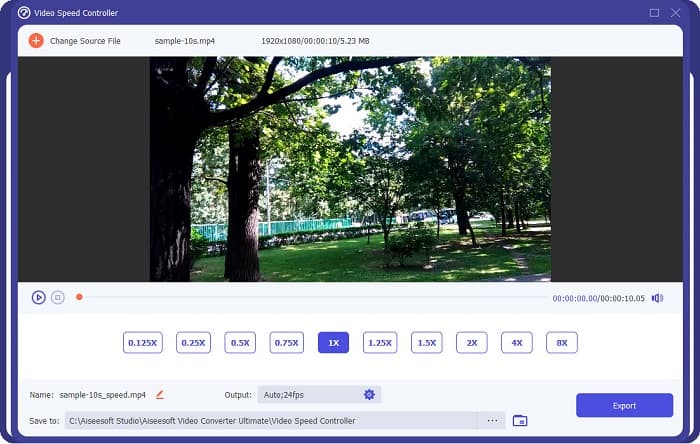
If you want an easier way to edit your video’s speed, use FVC Video Converter Ultimate. This software application allows you to speed up or slow down your video easily. With its fast operating process, you will not consume much time editing the speed of your video. In addition to that, there are many speed presets you can choose from for your video. And if you are wondering what else it can do, this tool has many editing features, including an audio compressor, video compressor, video metadata editor, and more. It also supports numerous file formats, like MP4, MKV, MOV, AVI, FLV, WMV, and 1000+ formats. To know more about this software application, read the descriptions below.
Advantages of using FVC Video Converter Ultimate:
1. Possui uma interface de usuário intuitiva.
2. Ele permite que você altere sua velocidade de vídeo de 0,125x, 0,50x, 0,75x, 1,25x, 1,5x, 2x, 4x e 8x predefinições de velocidade.
3. Tem muitos recursos avançados de edição para usar, como um aparador de vídeo, fusão de vídeo, criador 3D e muito mais.
4. Disponível em todas as plataformas de mídia, incluindo Windows, Mac e Linux.
Parte 2. Perguntas frequentes sobre o DaVinci Resolve Video Speed Editor
O Editor de Velocidade de Vídeo DaVinci Resolve vale a pena?
Com seu preço, vale a pena usar esta ferramenta de edição de velocidade de vídeo porque pode produzir saídas de ótima qualidade e ter muitos recursos de edição para usar.
O DaVinci Video Speed Editor é compatível com qualquer formato?
Ele não suporta todos os formatos de arquivo. No entanto, ele pode suportar vários formatos de arquivo, incluindo MOV, MXF, DNG, DCP, ARI, MTS, etc.
O DaVinci Resolve Video Speed Editor tem uma versão gratuita?
O DaVinci Resolve Video Speed Editor possui uma versão de avaliação gratuita por tempo limitado. Para usá-lo por toda a vida, compre a ferramenta por $395.
Conclusão
All your queries about DaVinci Resolve Video Speed Editor are now answered. With the tool meant for video speed editor, you can easily slow down or speed up your video and create beautiful transitions with this tool. But, if you are searching for a more convenient tool and easier to use, try FVC Video Converter Ultimate for free!
-
 Como avançar um vídeo no iPhone – Ajustar a velocidade do vídeo
 Como posso avançar um vídeo no meu iPhone? Como avançar um vídeo no iPhone usando o iMovie? Aprenda 3 maneiras de acelerar um vídeo em dispositivos iPhone e iPad.
-
 Como acelerar o vídeo no Premiere Pro e com suas alternativas
 Quer saber como usar o Premiere Pro para acelerar um vídeo? Então você está no artigo certo, pois fornecemos etapas e outras alternativas acessíveis.
-
 2 maneiras fáceis de como acelerar um vídeo no TikTok
 Quer saber o segredo de como acelerar o vídeo no TikTok? Então leia este artigo para ter a ideia de como fazer e saber quais são as outras 2 ferramentas que vão te ajudar.
