


 Video Converter Ultimate
 Gravador de ecrã
 Reparo de vídeo
 Secure Download
Aprenda o básico sobre como acelerar o vídeo no Windows Movie Maker
We love to add effects and other things to manipulate our video to make an impressive video. With simple editing, we can make an incredible output with the video we shoot, and by speeding it up on Windows, we can achieve the motion effect we want. One of the best editors on your Windows is the Windows Movie Maker, but it has been discontinued until now. Even though it is unavailable, we still consider the pre-installed editor one of the top-notch free ones you can use. To learn how to speed up a video in Windows Movie Maker, you must read this article.

Parte 1. Como acelerar o vídeo no Windows Movie Maker em menos de um minuto
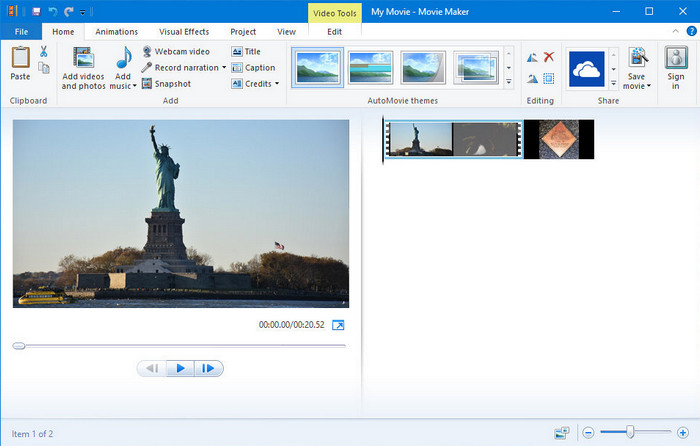
O Windows Movie Maker tornou-se a primeira escolha dos editores que estão usando um sistema operacional Windows porque já está dentro do sistema. Devido à sua popularidade no final dos anos 20, muitos usuários se acostumaram com este aplicativo pré-instalado. Portanto, se a ferramenta ainda estiver disponível em seu sistema e você quiser saber como acelerar um vídeo no Windows Movie Maker, siga os passos abaixo.
Etapas sobre como usar o Windows Movie Maker
Step 1. Launch the Windows Movie Maker on your desktop to open the default video editor on Windows. You can directly drag and drop the video file you want to speed up on the storyboard or timeline.
Step 2. Double click the video you upload on the right side.
Step 3. In the speed section click the drag and drop to see the available options to increase the speed.
Step 4. After you adjust the video speed, click File, Save Movie and choose the location you want it to save.
Prós
- Editor de vídeo padrão no sistema operacional Windows.
- É gratuito e seguro de usar.
- Ele suporta a maioria dos formatos de vídeo.
Contras
- O editor de vídeo padrão não está disponível em nenhuma nova versão do Windows.
- Sua GUI está desatualizada.
Parte 2. Melhor alternativa para acelerar o vídeo no Windows Movie Maker no Windows e Mac
Since the default editor became unavailable on the other Windows, there is no reason to use the editor. But if you are willing to speed up video on Windows Movie Maker's best alternative, then without any doubt, it is the FVC Video Converter Ultimate. This premium video editor can help you manipulate the speed of the video you have within a few clicks. Even though we call it a premium video editor, learning how to use the software isn't that difficult compared to the other editors you can use as an alternative for Windows Movie Maker. Due to its intuitive interface, many users fell in love while using the software.
But what makes the tool special? Since its name is ultimate, the features and functions are also ultimately great. It is an all-in-one converter that can solve many video and audio problems. So, if you seek help to speed up the video, follow the steps below to change the playback speed of the video you have efficiently.
Passos sobre como usar o FVC Video Converter Ultimate:
Step 1. Please click this download button to attain the converter on your computer; choose whether you are using a Windows or Mac. After you download the file, open it, then install the software. You can now launch the software to speed up the video if the process is finished.
Free DownloadFor Windows 7 or laterSecure Download
Free DownloadFor MacOS 10.7 or laterSecure Download
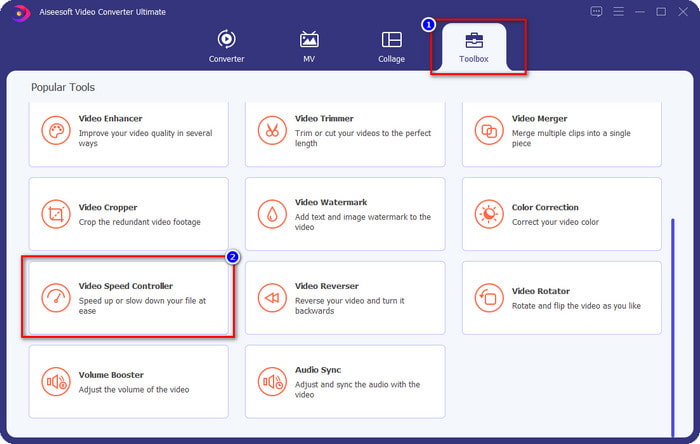
Step 2. Open the Toolbox and locate the Video Speed Controller option on the list of features; click it to open.
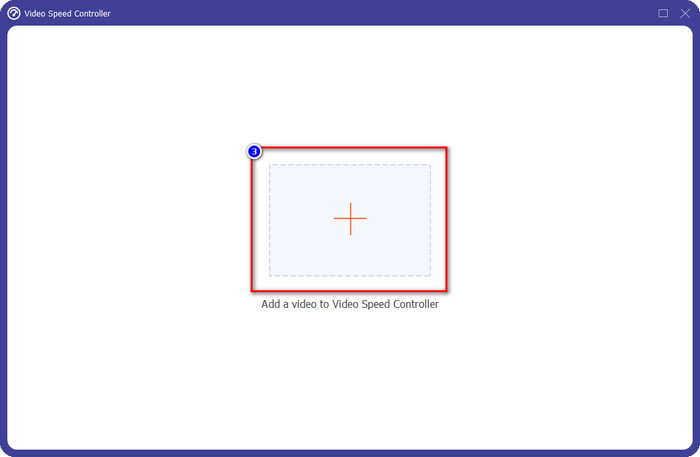
Step 3. Press + to open the folder of your computer, find the video file, and click Open.
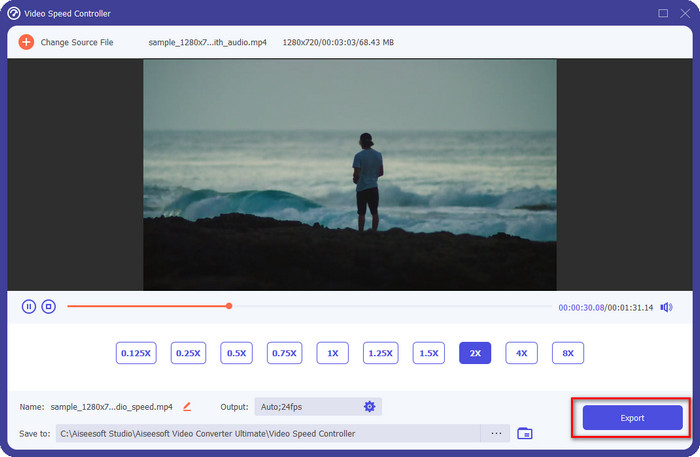
Step 4. Choose the playback speed on the option that is available below. You can also automatically preview the video at the speed of your choice to see if that is the playback speed you prefer. Try all of the video speeds to see which suits the video you upload here.
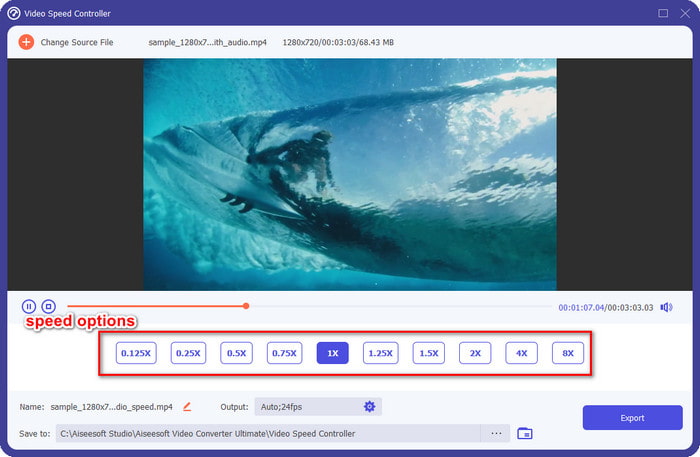
Step 5. After choosing the playback speed you prefer, click Export, and the conversion of the speed process will automatically start. The process will be done instantly; if the folder shows on your screen, that is the video you speed up here. Click the file to watch it and see the best result.
Prós
- Ele suporta vários formatos a partir de MP4, AVI, MOV, MKV, TS e mais de 1000.
- Outros recursos e funções multifuncionais estão disponíveis no Toolbox.
- Pode acelerar um vídeo até 8x que o Windows Movie Maker não pode oferecer.
- Está disponível nos sistemas operacionais Windows e Mac para download.
Contras
- O download do controlador de velocidade é necessário.
Parte 3. Qual é melhor? Windows Movie Maker ou FVC Video Converter Ultimate
O gráfico aqui o ajudará a determinar se o editor é a melhor escolha no Windows. Portanto, antes de escolher entre os dois, você deve ler este gráfico para saber mais sobre essa ferramenta.
| FVC Video Converter Ultimate | VS. | Windows Movie Maker |
 | Ele suporta vários ou uma ampla variedade de formatos de vídeo |  |
| Edite a velocidade do seu vídeo até 8x | |
| Baixe o software no Windows | |
| Editar o vídeo | |
| Disponível na versão atualizada do Windows | |
Parte 4. Perguntas frequentes sobre como acelerar o vídeo no Windows Movie Maker
Posso usar o Windows Movie Maker no Windows 10 e superior?
Infelizmente, o editor padrão não está disponível quando você compra o sistema operacional Windows. Mas você pode ter o outro editor: Fotos, o visualizador padrão de fotos e vídeos no Windows.
Deixará uma marca d'água após exportar o vídeo no Windows Movie Maker?
Felizmente, não deixará nenhum vestígio de marca d'água se você exportá-lo sem marca d'água, mas você pode exportar o vídeo adicionado com uma marca d'água. É sua escolha se você quer tê-lo ou não.
Posso baixar o Windows Movie Maker no Mac?
Não, você não pode baixar o Windows Movie Maker no Mac; se você vir um site que oferece o Windows Movie Maker no Mac, é possível que haja um vírus ou Trojan nesse software. Para evitar danos graves à sua área de trabalho, idealmente, use uma alternativa como a que adicionamos neste artigo, o FVC Video Converter Ultimate.
Conclusão
This article proves that speeding up video on Windows Movie Maker is possible on Windows operating system. Although the editor is free to use and is already installed to your computer, there are still drawbacks to it, and one of them is its availability on the updated Windows. The best alternative you can get to finish the task effectively is no other than the FVC Video Converter Ultimate. This software can easily handle this task better than the Windows Movie Maker. There is nothing to talk more about the software with the advantages you can get. To have it and try it, you can download it freely on your Windows or Mac operating system by clicking the download button above.
-
 3 maneiras de acelerar o vídeo no iPhone [comprovado]
 Está tendo problemas para ajustar a velocidade de reprodução do seu vídeo porque está usando um iPhone? Este é um excelente artigo para ajudá-lo com seu problema.
-
 Windows Media Player | Aprenda a acelerar vídeos [Comprovado]
 Você deseja diminuir a velocidade do seu videoclipe usando o Windows Media Player, mas está tendo problemas para fazer isso? Este artigo é ideal para leitura e pode esclarecer seu ponto de vista sobre como acelerar vídeos usando o Windows Media Player.
-
 Como alterar o vídeo em câmera lenta para velocidade normal [etapas fáceis]
 Quer saber como reverter um vídeo em câmera lenta que você baixou da Internet ou gravou acidentalmente em câmera lenta? Aprenda a converter vídeo em câmera lenta para velocidade normal no Mac, Windows, iOS e Android.
