


 Video Converter Ultimate
 Gravador de ecrã
 Reparo de vídeo
 Secure Download
2 etapas para transmitir DVD do laptop para a TV usando o Chromecast
It is a great way to use Chromecast for streaming your favorite media to the HD streaming output device like TV or monitor. If you’re looking for DVD entertainment on Chromecast, you might be frustrated since it can’t directly cast your DVD movies through your computer’s DVD drive or hard drive. To stream DVD to Chromecast, you need to change the format of the DVD file to a readable file like H.264 video in an MP4 container. After the conversion, you can use Chromecast to stream the DVD content from your PC or Mac to your TV.
Felizmente, existem diferentes tipos de ferramentas de extração de DVD com uma variedade de opções diferentes que podem fazer cópias digitais de DVD e converter para um formato reconhecido pelo Chromecast. Para saber mais detalhes, você pode seguir o guia passo a passo para transmitir e transmitir filmes em DVD do seu computador para a TV via Google Chromecast.

Parte 1. Converter filmes em DVD para formatos de arquivo compatíveis com Chromecast
O primeiro passo para transmitir seu DVD é usar um ripper de DVD profissional para converter seus filmes em DVD para formatos de arquivo compatíveis com Chromecast. Aiseesoft Video Converter é um excelente conversor de vídeo multifuncional e conversor de DVD. Com as mais recentes técnicas de decodificação avançadas, ele pode converter rapidamente quase todos os tipos de DVDs que você vê no mercado para formatos de arquivo compatíveis com Chromecast.
Além disso, o Aiseesoft Video Converter oferece mais de 500 formatos para você escolher, incluindo MP4, AVI, MKV, MPEG, VOB, MP3, AAC, bem como formatos de dispositivos como iPhone, iPad, PS4, Xbox One e mais . Basta baixar o software gratuitamente e seguir as instruções abaixo para iniciar o processo de conversão de DVD para Chromecast.
Free DownloadFor Windows 7 or laterSecure Download
Free DownloadFor MacOS 10.7 or laterSecure Download
Step 1. Insert your DVD to the disk drive and run Aiseesoft Video Converter on your Mac or PC. On the main interface, head to the Ripper feature and then click Load DVD and choose the movie you want to rip and convert. Hit Open to start the analysis.
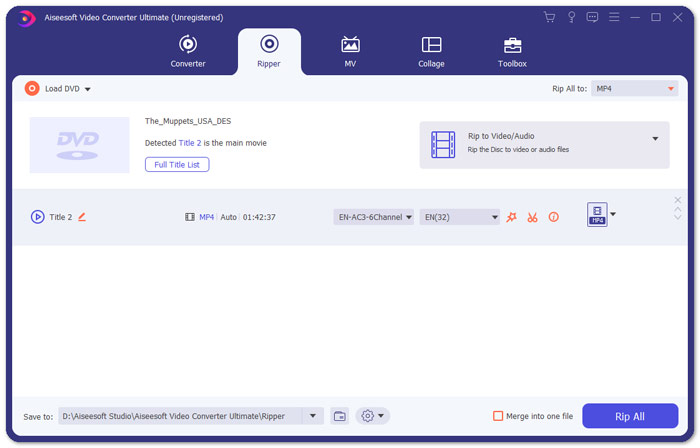
Step 2. After the files are added, convert them to a format that is compatible with Chromecast like MP4. Expand the drop-down list of the Rip All to option and select MP4 from the Video Category tab as the output format.
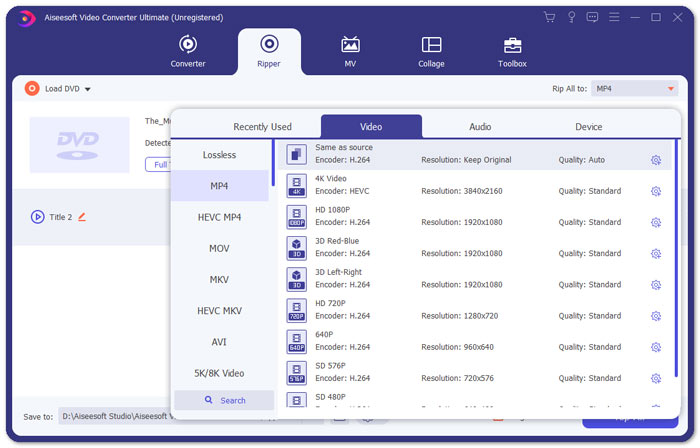
Step 3. Then, navigate to the Save to field to decide the path to save your converted DVD movie file and then hit on Rip All button to start the process of DVD Chromecast conversion.
Parte 2. Transmita conteúdo de DVD convertido para TV via Chromecast
Agora você obteve um arquivo de vídeo compatível com o Chromecast. A próxima coisa que você precisa fazer é transmitir o vídeo do DVD para a TV usando o Chromecast. Aqui está o que você precisa fazer:
Step 1. Open your Chrome Browser and make sure if Chromecast Extension is installed on your computer. If you haven’t installed the extension, you can get it from Chrome Web Store.
Note: Ensure that you’re using the latest Chrome version by heading to Settings, then About Chrome.
Step 2. Now, connect the Chromecast with TV and then connect both devices with the same WiFi network.
Step 3. Then, install Google Cast extension on the Chrome browser. You will see cast icon on the Chrome browser. You can adjust the quality of the casting by clicking the cast icon for your TV.
Step 4. After that, drag your converted DVD movie in the Chrome browser, or press Ctrl+O to browse the media. Now you can start casting your DVD movies to your TV with the help of Chromecast.
Parte 3. Perguntas frequentes sobre streaming de DVD para o Chromecast
Posso transmitir DVD para TV usando o VLC?
Sim. O Google adicionou suporte a VLC no Chromecast 3 para streaming sem esforço.
Existe alguma alternativa ao Chromecast?
Se você não quiser usar o Chromecast para transmitir seu DVD, poderá usar alternativas ao Chromecast como Roku, Amazon Fire Stick, Apple TV e outros.
Quais formatos são compatíveis com o Chromecast?
O Chromecast suporta formatos de mídia de áudio, vídeo e gráficos como JPEG, GIF, PNG, BMP, WEBP, HE-AAC, LC-ACC, MP3, WAV e muito mais.
Conclusão
We hope you successfully casting the DVD to Chromecast with the above steps. Apart from streaming DVD to Chromecast, there are some other streaming choices, for example, streaming DVD to Apple TV, streaming DVD to Roku. Choose a service that suits your needs best to make your DVD streaming easy. If you prefer to enjoy your DVD movies in an online way, try FVC Free Video Player
-
 6 soluções verificadas para corrigir vídeos que não são reproduzidos no Chrome
 Para corrigir o problema de que os vídeos não estão sendo reproduzidos no Chrome, tudo o que você precisa fazer é ler nossa solução de problemas e executar as soluções verificadas uma por uma.
-
 100% Soluções de trabalho para consertar o QuickTime Player que não funciona
 É possível consertar que o QuickTime Player não está funcionando se você seguir nossas soluções passo a passo, uma por uma. Então você pode reproduzir vídeos em seu Mac sem problemas.
-
 Android DVD Player - Como reproduzir vídeos em DVD em celulares Android
 Como reproduzir arquivos de DVD em celulares Android? Existe algum reprodutor de DVD Android? Neste artigo, você aprenderá três maneiras de reproduzir vídeos em DVD em celulares Android com ou sem o driver externo.
