


 Video Converter Ultimate
 Gravador de ecrã
 Reparo de vídeo
 Secure Download
Incrível removedor de marca d'água do Photobucket [maneiras fáceis]
Photobucket is an app that people use for image hosting and a photo wallet for personal and business purposes. This software application allows you to embed your photos anywhere and add filters, stickers, annotations, and cropping to your image. Moreover, when you save your photos using Photobucket, the quality of the image will not be affected. However, since the images from Photobucket are shutterstock images, you cannot download images without a watermark. Luckily we have a tool for you where you can remove the Photobucket watermark from your image. Read this article to know the most outstanding Photobucket Watermark Remover.

Parte 1. Como remover marcas d'água do Photobucket usando o removedor de marca d'água gratuito
Muitas pessoas estão tendo dificuldade em procurar um removedor de marca d'água que seja fácil de usar. Usar o removedor de marca d'água é complicado; procuramos o melhor aplicativo para remover marcas d'água do Photobucket em suas fotos. Aqui está a ferramenta gratuita para remover marcas d'água do Photobucket em sua imagem sem mais delongas.
FVC Free Watermark Remover is an online application that allows you to remove watermarks from images or videos. This online watermark remover is easy to use because it has a straightforward user interface and a detailed guide. In addition to that, it does not only remove Photobucket watermarks on your image, and it can also remove watermarks on any JPEG, JPG, PNG, and BMP photos. Also, when you remove the watermark from your image using this tool, it will be saved in the same format. What’s amazing about this online watermark remover is that you can choose what type of removing tool option you will use, polygonal, lasso, or brush. And if you have a mistake in removing the watermark, you can choose to undo it.
Prós
- É uma ferramenta amigável.
- Ao contrário de outras ferramentas online, não contém anúncios.
- Ele tem um recurso de borracha quando você comete um erro.
- Acessível em todos os navegadores, incluindo Google, Firefox e Safari.
Contras
- Você pode experimentar um processo operacional lento quando sua conexão com a Internet estiver lenta.
Steps on how to remove Photobucket watermark using FVC Free Watermark Remover:
Step 1. On your browser, search FVC Free Watermark Remover. Then click the page that appears first on your search result page. Their webpage looks like this:
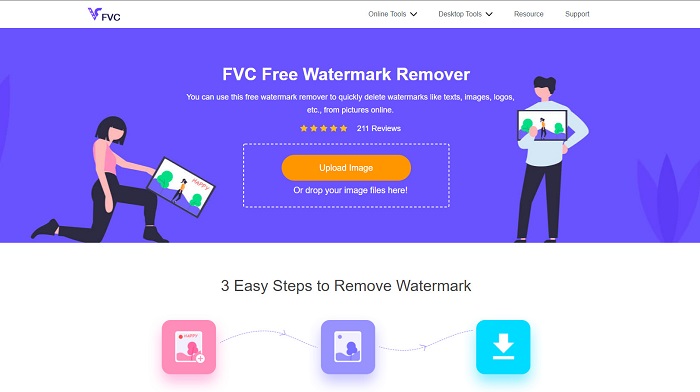
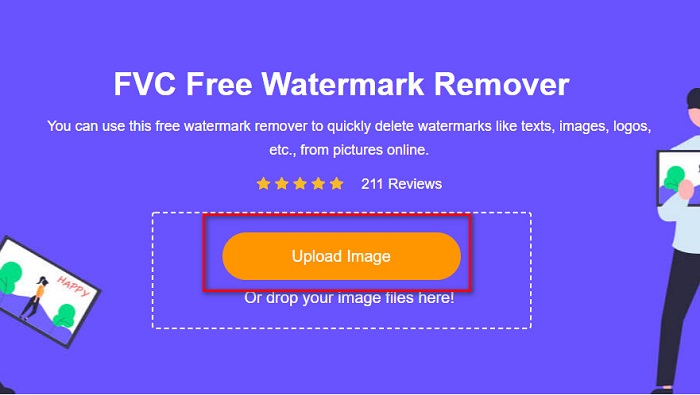
Step 2. And then, on the software’s main interface, click the Upload Image button to upload your Photobucket image. Your computer folders will appear where you will select your Photobucket image, then click Open.
Step 3. Next, select the removing tool you want to use on the options above. You can choose between polygonal, lasso, or brush.
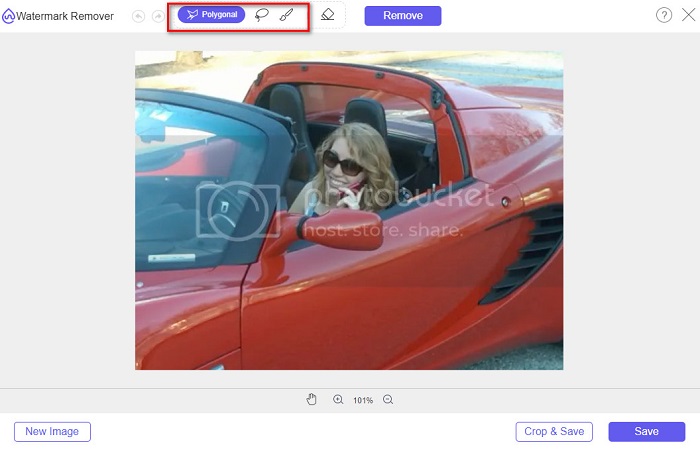
Step 4. Using the polygonal option, draw the part you want to remove, then click Remove

Step 5. Click the Save button; then, your file will save automatically on your computer files.

Fácil não é? Você pode remover a marca d'água da sua foto do Photobucket em apenas cinco etapas fáceis.
Parte 2. Como remover a marca d'água do Photobucket usando o Photoshop
Adobe Photoshop is one tool that many people use to edit images. You can also use Adobe Photoshop to remove the watermark on your image. You will know how to remove the watermark on your Photobucket images using Photoshop.
Prós
- Tem muitos recursos de edição para usar.
- É o aplicativo de edição de imagem mais popular.
- Edite sua imagem e remova marcas d'água profissionalmente.
Contras
- Não é amigável para iniciantes.
Step 1. Install Adobe Photoshop on your computer, then run the app. And then open the image on Photoshop.
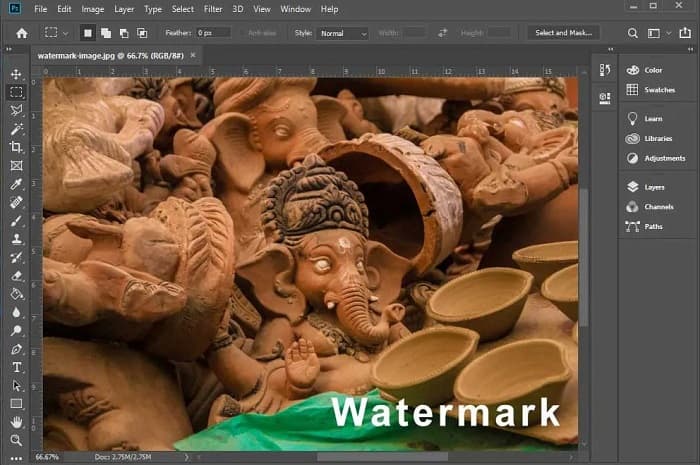
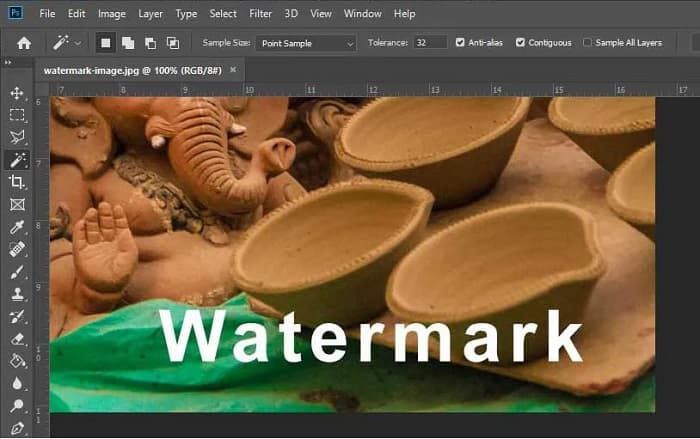
Step 2. And then, click the Magic Wand Tool (W), then zoom to the area of your watermark, then press CTRL +. With the Magic Wand Tool, select the watermark you want to remove.
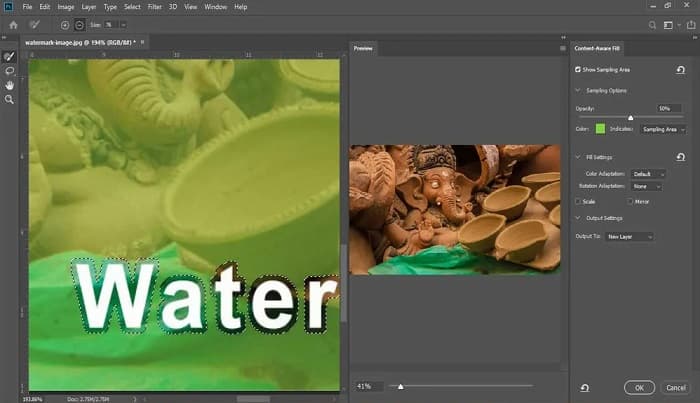
Step 3. Lastly, go to the Edit option, then select Content-Aware Fill. The Content-Aware-Fill will automatically remove the watermark.
Parte 3. Como remover a marca d'água do Photobucket usando o PixlR
Another Photobucket Watermark Removal tool that you can use is PixlR. PixlR is an online photo editor that you can use for free. This online tool is not just for editing photos; it also enables you to remove watermarks on your photos. This watermark remover supports many image formats, like PSD, PXD, JPEG, PNG, SVG, etc. PixlR has a simple interface, making it easy to remove the watermark in just a few clicks. Furthermore, you can use this app on mobile devices.
Prós
- Possui uma interface de usuário simples.
- Ele permite que você defina a qualidade e o tamanho da sua imagem.
- Você pode acessá-lo gratuitamente.
Contras
- Um processo operacional lento pode ocorrer em alguns momentos.
Step 1. Open the PixlR photo editor. To upload your photo, click the Open Image button. You can also use a URL to upload your photo.
Step 2. Click Retouch > Clone Stamp. And then, click the watermark and drag the mouse to remove the watermark on your photo.

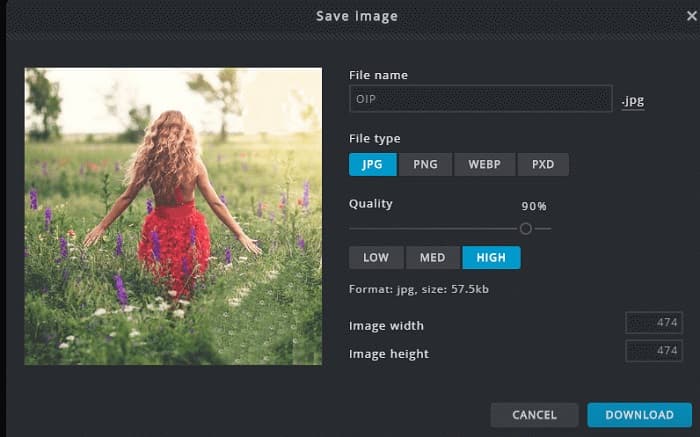
Step 3. Finally, tick the Save button to save your photo on your device. You can also choose the quality and the size of your photo in this step.
Parte 4. Outra maneira de remover a marca d'água do Photobucket Online.
Existem mais removedores de marca d'água online que você verá na internet. No entanto, nem todos os removedores de marca d'água online são seguros e possuem uma interface de usuário simples. Portanto, procuramos uma alternativa para remover a marca d'água do Photobucket.
Media.io
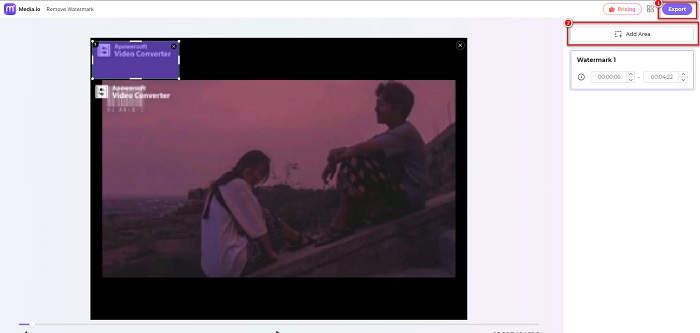
Media.io is an online watermark remover that is user-friendly. It has a simple user interface, and it is safe to use. You can also remove the video logo, texts, and stamps easily. Moreover, you can remove the watermark on any image format, like PNG, JPEG, SVG, etc. What’s even amazing about this tool is that you can remove the watermark on your videos with any format available.
Prós
- Ele permite que você remova marcas d'água de suas fotos e vídeos.
- É um editor de vídeo online.
- Não contém anúncios.
Contras
- É dependente da internet.
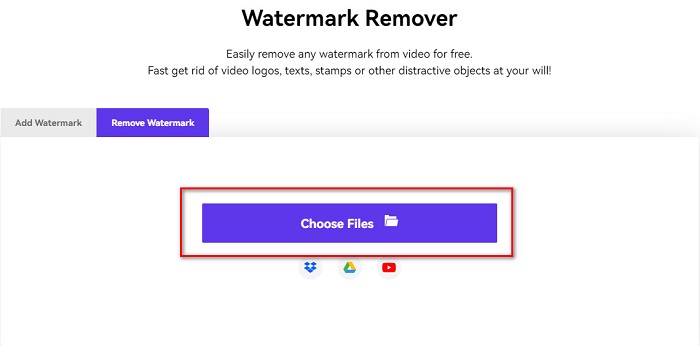
Step 1. Search Media.io watermark remover on your browser. Then, click the Choose Files button on the software’s main interface.
Step 2. And then, drag and drop your photo on the software’s interface to upload your Photobucket image.

Step 3. Lastly, click the Add Area option, then select the area of the watermark. And then, click the Export button to remove the watermark.
Relacionado:
Add Background to Photo on iPhone, Android, Computer, Online
Convert HEIC to JPG with the 6 Effective Offline & Online Ways
Parte 5. Perguntas frequentes sobre o Photobucket Watermark Remover
Posso remover uma marca d'água de imagens JPEG?
Sim. Você pode usar o removedor de marca d'água mencionado acima para remover marcas d'água de suas imagens JPG/JPEG.
Você pode remover marcas d'água de vídeos?
Felizmente, sim. Você pode remover marcas d'água do seu vídeo. Algumas ferramentas permitem remover marcas d'água de qualquer formato de vídeo, como o FVC Video Converter Ultimate.
Existe um aplicativo para Android para remover marcas d'água?
PicLab é um aplicativo de edição que pode remover marcas d'água em sua foto. Este aplicativo está disponível nas plataformas Android e iOS.
Conclusão
Using the Photobucket watermark remover tools listed above will help you easily remove watermarks from your Photobucket image. However, if you want a convenient and easy way to remove watermarks from your photo, use FVC Free Watermark Remover.
-
 Como converter JPG para HEIC no Mac e Windows
 Quer saber como converter JPG para HEIC? Este artigo fornecerá as melhores maneiras de converter JPG para HEIC usando os melhores e gratuitos conversores de JPG para HEIC.
-
 Revisão, recursos e alternativas do CopyTrans HEIC
 Se você quiser saber o que o CopyTrans HEIC pode fazer, fornecemos os recursos, vantagens e alternativas da ferramenta.
-
 Os 5 melhores conversores PNG para HEIC que você não deve perder
 Se você quiser conhecer os conversores de PNG para HEIC mais usados, fornecemos os melhores conversores de PNG para HEIC online. Leia este artigo para mais informações.
