


 Video Converter Ultimate
 Gravador de ecrã
 Reparo de vídeo
 Secure Download
Saiba tudo sobre o que é 3D ou tridimensional
Quer saber o que é 3D? Filmes e imagens em 3D ou tridimensionais estão se tornando mais populares. Como estamos nos dias modernos, é fácil criar um filme 3D usando diferentes ferramentas. Mas primeiro, precisamos entender tudo sobre 3D: o plano de fundo, definição e como fazer um vídeo 3D.
In this article, we will dig into 3D and its parameters. So, if you want to learn about what is 3D, read this article.

Parte 1. O que é 3D
Objetos 3D ou tridimensionais mostram a largura, altura e profundidade. Diariamente, vemos objetos 3D porque nosso ambiente físico é tridimensional. Por causa da percepção 3D que nós humanos temos, podemos perceber os objetos 3D, também chamados de percepção de profundidade. Quando você olha ao redor, a retina em nossos olhos forma uma imagem bidimensional e nosso cérebro processa as duas imagens como visuais 3D. Mas você sabia? Nós, humanos, temos ferramentas que usamos para percepção de profundidade?
Aqui estão as ferramentas humanas que usamos para a percepção de profundidade:
Stereoscopic vision - Stereoscopic vision is a sense of depth perceived by the two eyes. It is one of the abilities of the brain to register 3D shapes and visuals. In this vision, the objects look separated when closer than distant ones.
Parallax - The angles between two lines measure this type of vision. When you move your head side by side, closer objects move more than distant objects.
Size Familiarity - If you are familiar with the size of an object, even though it is far, you can approximately know how big it is to appear in size. In the same way, if two objects have the same size but the other one is bigger, it is assumed that the larger one is closer.
Accommodation - When you focus on a close object, your eye’s lenses physically change. In that way, you will know how far the object is. Also, it is the way of the eye to keep the focus on an object.
Aerial Perspective - In aerial perspective, you will see objects smaller because the view is far. Distant objects also appear to have less contrast and color saturation.
Existem também diferentes tipos de 3D em nosso mundo físico. O 3D também é descrito como uma imagem que dá a ilusão de profundidade de distâncias variadas, que é comumente usada em jogos de computador, gráficos, realidade virtual e filmes.
Diferentes tipos de 3D:
3D Computer Graphics - 3D computer graphics can generate 3D objects in a display screen or two-dimensional space. The pixels in 2D graphics have different properties, such as position, color, and brightness. The 3D pixels then lie on a Z-axis. When the pixels are combined with their depth, it will result in a 3D surface, also called a texture.
3D Films - 3D films are motion pictures that have 3D depth on them. With the help of 3D glasses, we can watch a 3D film. To make this kind of film, creators use stereoscopic vision, which means two images are shown simultaneously, each for one eye.
3D Printing - 3D printing is also known as additive manufacturing. It is a process of making a 3D in solid form from a digital file. Using a Computer Aided Design (CAD), you can print a 3D object from a digital model.
Parte 2. Como reproduzir filmes em 3D
Agora que você conhece o significado do 3D, deixe-nos saber como reproduzir filmes em 3D usando o aplicativo de software mais excelente que você pode usar.
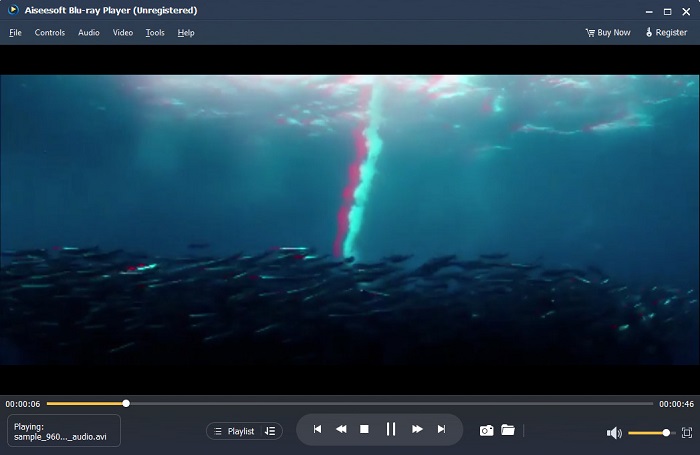
Blu-ray Player é um aplicativo de desktop onde você pode reproduzir qualquer tipo de vídeo. Com esta ferramenta, você também pode reproduzir filmes 3D sem usar nenhum plug-in. Além disso, muitas pessoas recomendam este media player por causa de sua interface de usuário simples e limpa. Além disso, este poderoso reprodutor de mídia pode reproduzir discos Blu-ray, pastas Blu-ray, arquivos DVD/pasta/ISO, que outros reprodutores de mídia não suportam. Você também pode assistir a vídeos em HD com áudio 100% sem perdas e som surround HD dramático. O mais incrível é que você pode criar sua playlist para não ter dificuldade em separar os vídeos ou áudios que deseja.
Como reproduzir um filme 3D no Blu-ray Player:
Step 1. Download Blu-ray Player on your device. Follow the installation process, then run the app.
Step 2. On the software’s main interface, click the Open File button. Your device’s files will appear, where you will select your 3D movie.
Step 3. Then, your video will begin to upload. You can now wear your special 3D glasses and enjoy watching your 3D movie.
Parte 3. O que são TV 3D e óculos 3D
Existem dois tipos de TVs 3D: 3D com obturador ativo, 3D ativo e 3D passivo. Esta parte distinguirá suas diferenças e determinará que tipo de óculos 3D usar ao assistir TV 3D com obturador ativo ou passivo.
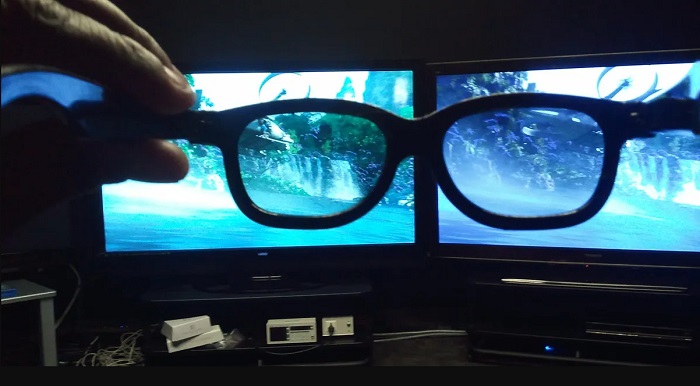
Active-shutter or Active 3D is a type of 3D TV that displays high-quality 3D images alternately on the screen. Active 3D TV displays alternate images on the screen for the right and left eyes. The 3D glasses then shutter black alternately to portray the 3D effect seen on your TV screen. This causes each eye to see the image made for them. The 3D glasses you must use when watching in an Active-shutter 3D are 3D active glasses. This type of 3D glass needs a battery that it uses to block and shutter the lenses on the glasses electronically. These glasses are incorporated with LCD lenses to coordinate with alternating frames.
In contrast, Passive 3D TV is somehow similar to the 3D technology that movie theaters use. This type of 3D TV uses special filters on the screen to see 3D using polarized lenses in the glasses. Furthermore, Passive 3D TVs blend the two frames in one, alternately between the horizontal lines for the left eye and right eye. The glasses that these 3D TVs use are Passive 3D glasses which contain different polarization on each lens. The other eye only sees the odd lines, while the other sees the even lines to produce a 3D image. The Passive 3D glasses do not require batteries to work.
Parte 4. 2D vs. 3D
2D e 3D são dimensões reais em um espaço de trabalho do computador. 2D ou bidimensional são objetos planos que usam as dimensões horizontal e vertical (os eixos X e Y). Como o 2D tem apenas duas dimensões, você só verá uma linha quando as virar para o lado. Ele só tem altura e largura, mas não tem profundidade. Por outro lado, 3D ou tridimensional contém altura, largura e profundidade. Imagens tridimensionais precisam do efeito de dois olhos trabalhando em conjunto para ver uma percepção tridimensional. Se 2D usa os eixos X e Y, 3D adiciona a dimensão Z, permitindo que você veja a profundidade de um objeto.
Se você perguntar o que é bom para usar, 2D versus 3D, a resposta é ambas. 2D e 3D têm diferentes vantagens e desvantagens. Por exemplo, você pode assistir a vídeos ou filmes 2D em qualquer lugar e em qualquer dispositivo sem usar óculos 3D especiais. No entanto, o efeito 3D que os filmes 3D produzem é surpreendente e mais divertido de assistir do que o 2D.
Parte 5. Como Converter Filme 2D para 3D
Se você quiser assistir a um filme ou clipe 3D incrível em sua casa sem óculos 3D, poderá converter seu filme 2D em 3D usando o melhor conversor de vídeo. Portanto, se você deseja converter seu filme 2D em um filme 3D, use este incrível aplicativo de software.
FVC Video Converter Ultimate is an application that is popular for video conversion. This software application cannot just convert file formats. It also allows you to turn your 2D video into a 3D video, such as anaglyph 3D and split-screen 3D. FVC Video Converter Ultimate is famous to users because it supports almost all file formats, such as MP4, MKV, AVI, FLV, WEBM, MOV, DIVX, and 1000+ more. It also comes with tons of advanced editing features, such as a 3D maker, GIF maker, video watermark remover, etc.
Como converter filmes 2D para filmes 3D usando o FVC Video Converter Ultimate:
Step 1. First, download FVC Video Converter Ultimate by clicking the Download button below.
Free DownloadFor Windows 7 or laterSecure Download
Free DownloadFor MacOS 10.7 or laterSecure Download
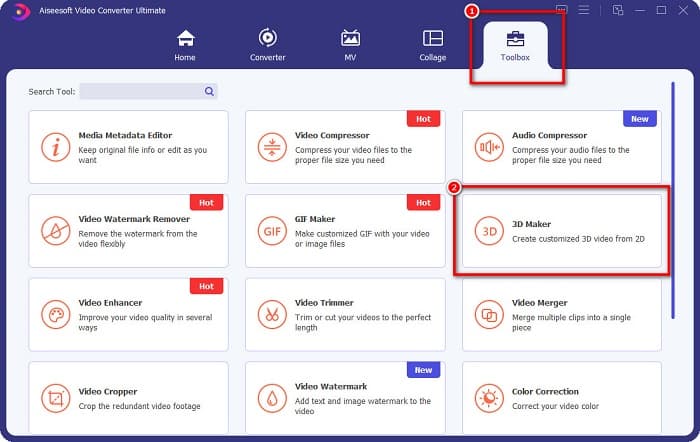
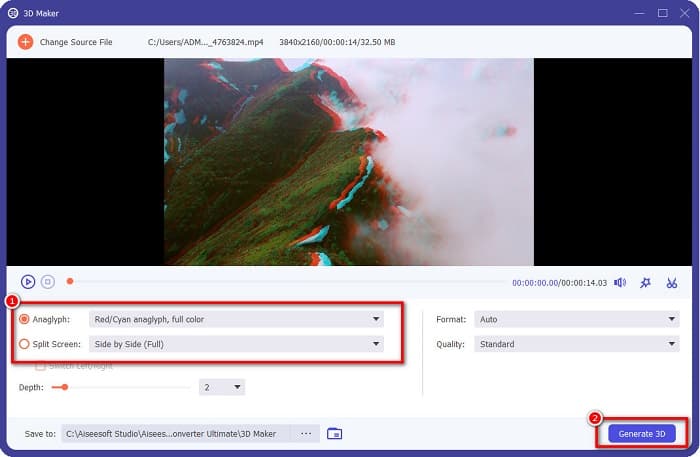
Step 2. Open the app, then go to the Toolbox panel and select the 3D Maker.
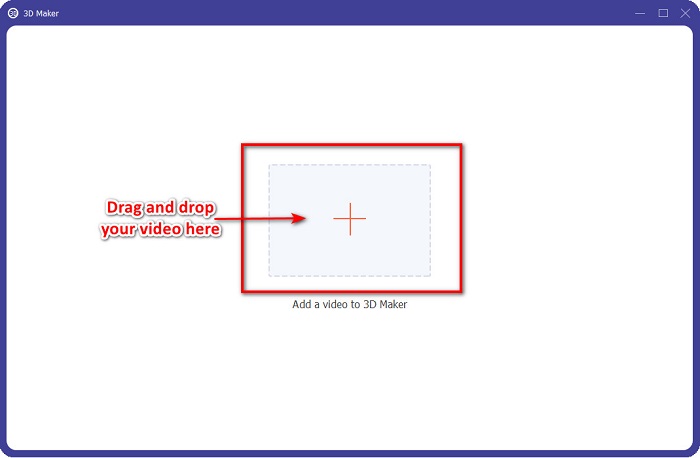
Step 3. Click the + sign button or drag and drop your 2D video into the box on the next interface.
Step 4. Then, choose between Anaglyph 3D or Split Screen 3D. And then, click the Generate 3D button.
Relacionado a:
Quickest Ways to Convert AVI to WMV [Best Converters]
Easily Convert MOV to WMV Using These Amazing Converters
Parte 6. Perguntas frequentes sobre o que é 3D
Você pode assistir a vídeos 3D no VLC Media Player?
Sim. O VLC Media Player suporta todos os formatos de arquivo. Você também pode reproduzir filmes 3D no media player VLC.
Você pode converter vídeos 3D para 2D?
FVC Video Converter Ultimate pode converter vídeos 3D para 2D. Você também pode alterar o formato do arquivo do seu vídeo com este conversor.
Qual é mais usado, 2D ou 3D?
Hoje em dia, na indústria cinematográfica, os filmes 3D são mais dominantes do que os filmes 2D. Por causa dos gráficos interessantes e da animação realista, os filmes 3D são mais populares do que os filmes 2D.
Conclusão
3D or three-dimensional is widely-known in the film industry and especially on computers. Now that you know what 3D is, you have the basic knowledge of how you can create one. If you want to make a 3D video easily, use FVC Video Converter Ultimate.
-
 3 maneiras de converter MPG para 3GP no Windows e Mac [Grátis]
 Se você está procurando maneiras de converter MPG para 3GP, leia este artigo para conhecer as melhores maneiras de converter MPG para 3GP no Windows e Mac.
-
 Os 5 melhores conversores MPEG para DivX gratuitos para Windows e Mac
 Converta facilmente seu arquivo MPEG em um arquivo DivX usando os melhores conversores MPEG para DivX. Leia este artigo para saber mais detalhes sobre eles.
-
 Melhor MOV para DivX Free to Use Converters para Mac e Windows
 Nós temos a solução para você se você estiver procurando por conversores gratuitos de MOV para DivX. Este artigo apresenta os principais conversores MOV para DivX para Mac e Windows.
