


 Video Converter Ultimate
 Gravador de ecrã
 Reparo de vídeo
 Secure Download
Remova a marca d'água Bandicam com os 3 principais removedores de marca d'água para usar
Bandicam is a tool everyone loves to use especially filming action per action that happens while you are gaming, in a meeting, watching, and such. Unlike other screen recorder competitors, this screen recorder can help you film a 480 FPS video with DirectX/OpenGL/UWP/Vulkan hooking and other advanced acceleration technology. Even though you didn't avail of its premium version, you can still use this and record a video with 60 or 120 FPS, preferably high, but with a watermark. The way you can do to save a video on Bandicam with no watermark is by purchasing its full version.
Felizmente, as ferramentas que incluímos neste artigo podem remover a marca d'água que o Bandicam adiciona ao vídeo exportado. Quer saber quais são? Então você deve continuar lendo este artigo para entender a ideia!

Parte 1. Como remover a marca d'água Bandicam usando os 3 removedores de marca d'água mais eficazes
FVC Video Converter Ultimate
The most effective way to remove the Bandicam watermark is by using a tool that could help, like the FVC Video Converter Ultimate. This tool can detect the watermark on your video by placing the selection box on the watermark, then poof; it will be gone. It works like magic; there will be no watermark traces on the video once you export the file. You can now finally enjoy watching the recording you did on Bandicam without the hindrance of the logo.
Os recursos mais prováveis dessa ferramenta são os conversores, aprimoradores, editores no Toolbox e muito mais. Você pode ter todos esses recursos e funções se usar esta ferramenta e baixá-la na sua área de trabalho agora mesmo. Para ensiná-lo a remover a marca d'água Bandicam com este software definitivo, você pode seguir o tutorial escrito completo que adicionamos abaixo.
Step 1. First and foremost, you must download the official software on your desktop by clicking the download button we add here. There is no need to worry because the download link is safe for Windows and Mac users. After downloading the file, click it to install, follow the WinRaR set-up process and click Start Now to launch the tool.
Free DownloadFor Windows 7 or laterSecure Download
Free DownloadFor MacOS 10.7 or laterSecure Download
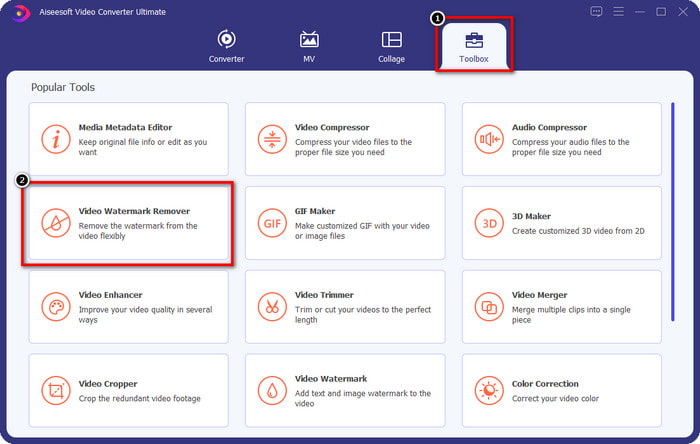
Step 2. On the tool's main interface, you must go to the Toolbox, and under it, you will see the Video Watermark Remover; click it to open this feature.
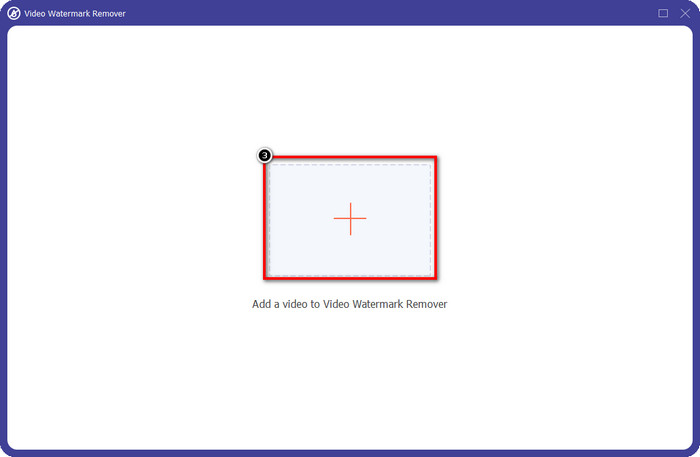
Step 3. A new window will show on your screen; click the + icon to upload the video file that has a watermark. Find the video file on your local drive, then click Open.
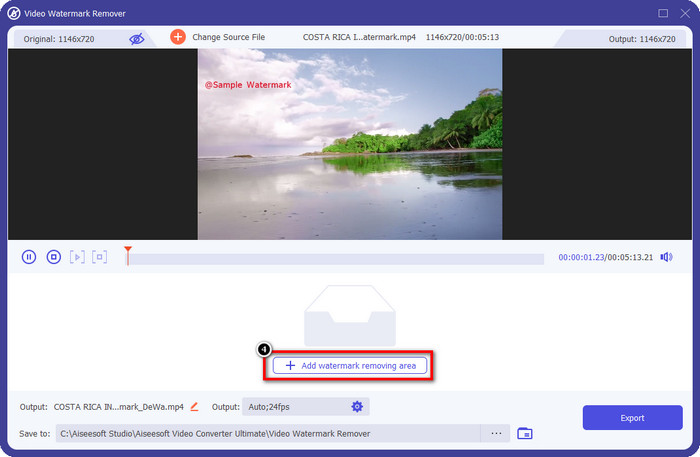
Step 4. After all of that, click Add Watermark Removing Area to start using it so that you can have the videos on Bandicam free no watermark.
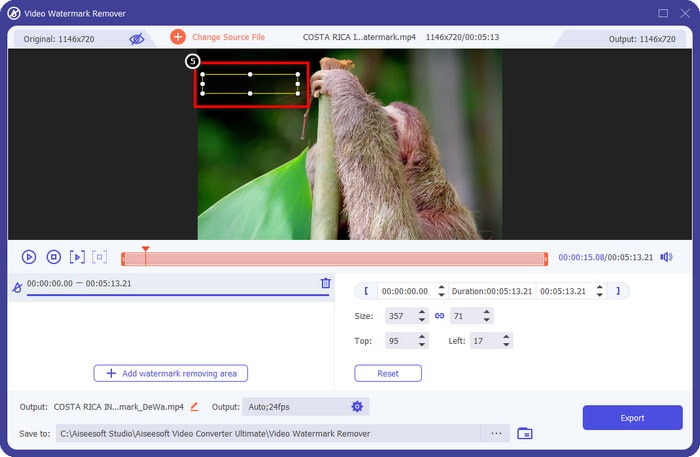
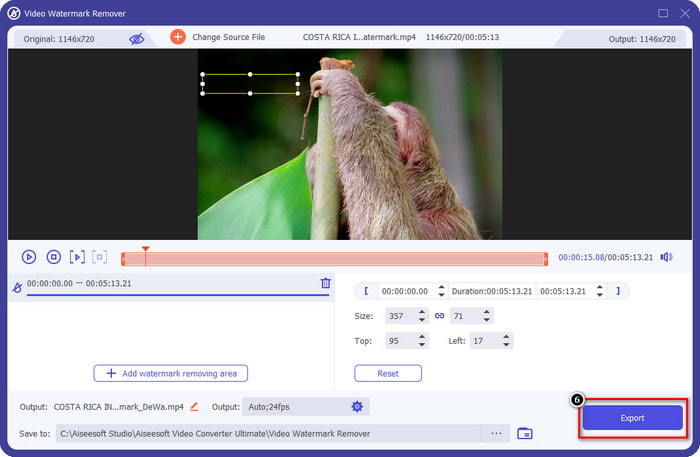
Step 5. On the preview, place the selection box to the watermark; you can change its size to make the image fit the watermark.
Step 6. After placing the selection box to the watermark, click Export to download the video without the watermark that Bandicam adds to it.
Remova o logotipo agora!
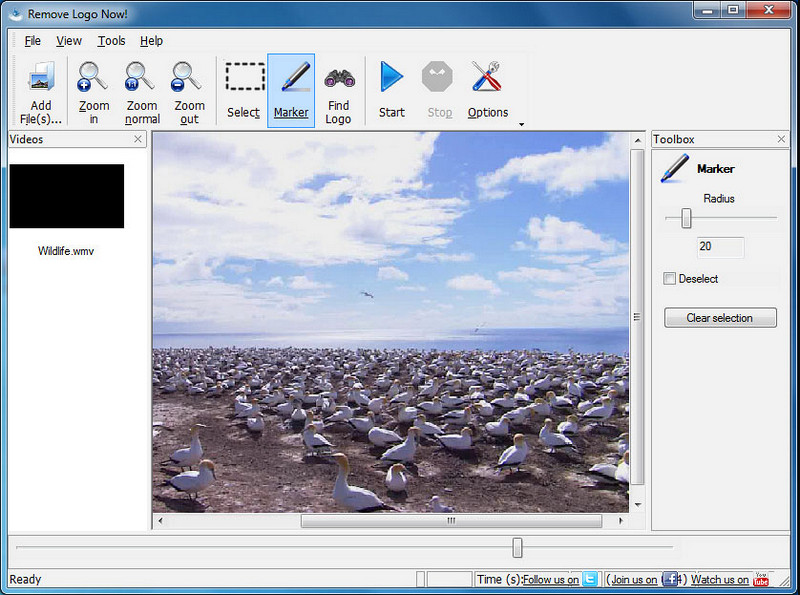
Remove Logo Now! is a complete watermark remover you can use to eliminate the logos that are fixed on your videos. This tool can detect the watermark automatically with the help of algorithms. Still, you can also perform tracing the watermark manually. You can use this tool to remove whatever type of watermark it is without breaking a sweat. However, the software is limited to Windows users, and the interface is a bit outdated. But if you want to try this on your Windows PC, we will show you how to remove the Bandicam watermark for free.
Step 1. You can visit its website to download the Remove Logo Now! Kindly check the website's security to see if it's the official website of the said tool.
Step 2. Open the software you install, then click File to upload the Bandicam video with a watermark.
Step 3. Now that the video is uploaded, click the Find Logo option to detect the watermark on your video automatically.
Optional: If Find Logo didn't detect the watermark algorithm on your video. It would help if you used Marker to manually highlight the watermark, then click Clear Selection to remove it.
Step 4. Click the Start option to export the video and have the version of your recording without the Bandicams watermark.
Removedor de marca d'água online da Apowersoft
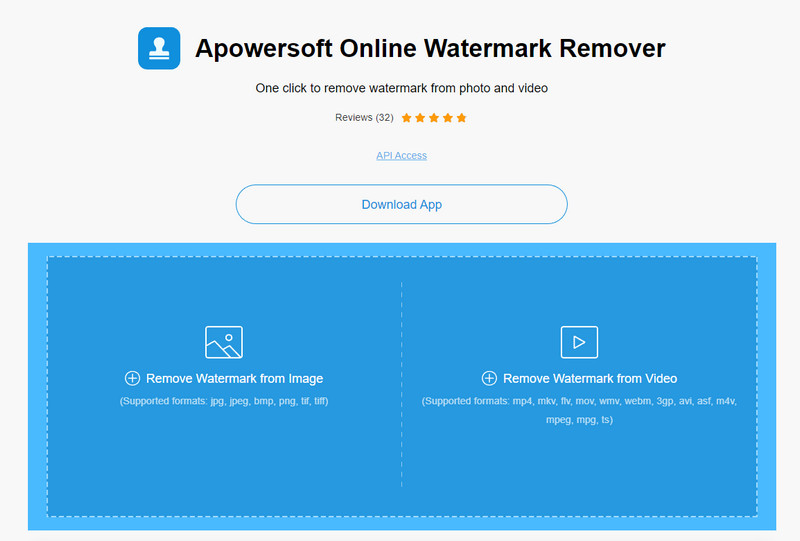
Apowersoft Online Watermark Remover is a dependable and download-free tool you can use to get rid of the watermark on images and videos effectively. The tool is well-known for its watermark removing features because it does the job without leaving a residue on the exported video. Even though it is a web tool, you wouldn't experience lowering the video quality once it is exported. Instead of purchasing Bandicam's full version free from the watermark, you can jump to the steps below to perform removing it.
Step 1. You can go to your favorite web browser and search the name of this watermark remover online.
Step 2. There will be two options available here: click Remove Watermark from Video. Choose the video file that has a logo of Bandicam on your drive, then press Open. Wait for the uploading process; it will take time, especially if the video length is long.
Step 3. Draw a selection box on the video and ensure the watermark is inside the rectangular shape.
Step 4. Click Erase to download the video file, but now the watermark is rid.
Related:
How to Remove the Watermark from Renderforest Exported Videos
How to Remove the Viva Video Watermark on Videos
Parte 2. Perguntas frequentes sobre como remover a marca d'água Bandicam
O Bandicam tem marca d'água?
Para os usuários que estão usando a avaliação gratuita, haverá uma marca d'água assim que você exportá-la. Para evitar esse problema, você pode adquirir a ferramenta no site oficial do Bandicam.
Existem limitações ao usar a versão gratuita do Bandicam?
Existem muitas limitações se você estiver usando a versão gratuita do Bandicam, a gravação de 10 minutos, adição de marca d'água, suporte de 60 a 120 FPS, formatos de arquivo e velocidade de processamento. Embora isso possa ser um problema para a maioria, ainda é considerado um dos melhores gravadores de tela que você pode usar no seu Windows.
Como remover a marca d'água no Bandicam?
Não há outra maneira de remover a marca d'água no Bandicam, e é isso comprando a versão pro. Abra o site oficial do Bandicam, clique em Obter Versão Completa, escolha a licença desejada e clique em Comprar Agora.
Conclusão
De fato, o Bandicam é um gravador de tela de alto nível que você pode usar gratuitamente. Mas uma coisa é certa; usar a versão gratuita adicionará uma marca d'água no vídeo exportado. Com as maneiras que adicionamos neste artigo, você pode remover com sucesso a marca d'água com o removedor de marca d'água ideal que pode ser sua escolha. E se você não quiser usar uma ferramenta para remover a marca d'água? Então sugerimos que você compre o Bandicam para remover a marca d'água dos vídeos. Vai custar-lhe, mas vale a pena usar a versão pro. Esperamos que este artigo forneça as informações necessárias para remover a marca d'água no Bandicam.
-
 Revisão completa dos removedores eficazes de marca d'água PlaceIt [2022]
 O removedor de marca d'água PlaceIt que analisamos aqui são ferramentas eficazes que você pode usar para remover a marca d'água no vídeo que você exporta no PlaceIt.
-
 5 maneiras de remover a marca d'água B612 usando as melhores ferramentas
 Quer saber como remover marcas d'água B612 de suas fotos? Você pode remover sem esforço a marca d'água B612 de suas imagens usando essas ferramentas excelentes.
-
 Passos fáceis sobre como remover a marca d'água WOW Slider [Resolvido]
 WOW Slider é um aplicativo para criar uma apresentação de slides fantástica. No entanto, ele incorpora marcas d'água em sua saída. Leia abaixo para saber como remover a marca d'água WOW Slider.
