


 Video Converter Ultimate
 Gravador de ecrã
 Reparo de vídeo
 Secure Download
Como remover a marca d'água iStock em vídeos e imagens de forma eficaz com etapas
When you need to have a licensed visual media file on your hand, you can access the iStock to download these files. Everyone can't use the website for free, which means you will need to purchase the image with real money. Though you can download the file here for free, it will add a watermark on the file you download. By adding a default watermark on the file, this website is claiming that this file belongs to the iStock website. Aren't you annoyed with the watermark? If we are on the same page, read this blog up to the end to show you the solution we found on the internet. We will also add the plans you can avail of on the said website and how to remove the iStock watermark on each.

Parte 1. Como remover vídeos e imagens do iStock Watermarkon com as 3 maneiras úteis
1ª Via. Comprar um crédito na iStock
Vamos começar com a compra de crédito na iStock. O crédito na iStock é uma moeda; este site reconhece o crédito igual ao seu dinheiro. Você pode usar o crédito para comprar qualquer arquivo com um determinado valor. Você pode salvar imagens da iStock sem marca d'água se comprar um crédito. Para saber como fazê-lo, você pode ler completamente as etapas que adicionamos abaixo para ajudá-lo a fazê-lo.
Step 1. Open the official website and log in to your account on this website. If you haven't created an account, you can create one before purchasing the needed credit.
Step 2. On its website, press Pricing to see what plans this tool supports.
Step 3. There will be a list of credits you can purchase, choose how many credits you want, then click Purchase Credits.
Step 4. Fill in the information and billing you use to purchase a credit here.
2ª Via. Remova a marca d'água iStock em vídeos usando o FVC Video Converter Ultimate
To remove the iStock watermark on video, you will need to use the ultimate watermark remover, the FVC Video Converter Ultimate. It is the most picked watermark remover that works effortlessly on removing the watermark on your videos. This tool removes the watermark on the frame per frame of the videos and doesn't leave a residue once you export it. So, if you are about to use this software on your desktop, then we can assure you that you will have a video without a watermark in no time. Want to use this software? If so, you can continue and follow the steps we add below to help you remove the watermark on the video you saved on iStock.
Step 1. Click the download button we added below to have the program on your desktop. Choose the appropriate operating system to get the right version. Install and set-up the tool after downloading it, then click Start Now to open the software and start using it.
Free DownloadFor Windows 7 or laterSecure Download
Free DownloadFor MacOS 10.7 or laterSecure Download
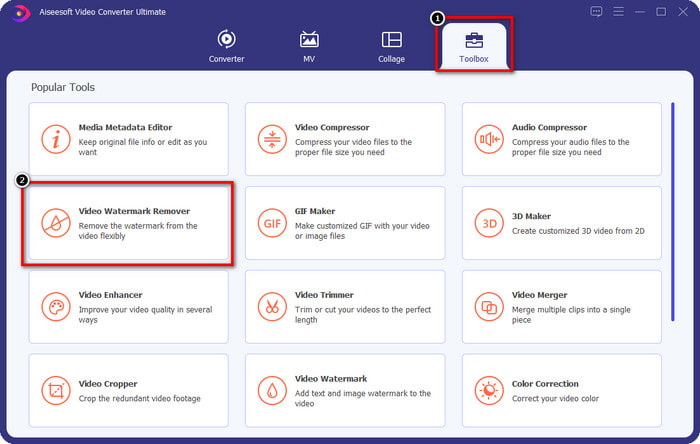
Step 2. Now that you have this iStock watermark remover, you must go to the Toolbox. Look for the Video Watermark Remover to use this feature.
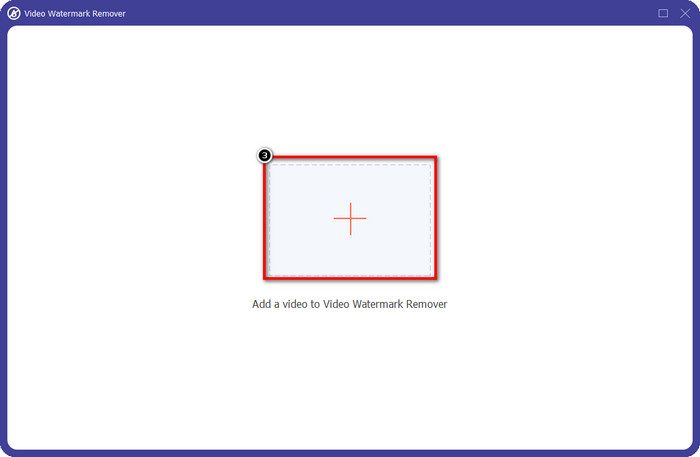
Step 3. Press the + button to upload the video file you download on iStock that has a watermark. Find the video file on the file explorer that will show on your screen, then press Open to upload it.
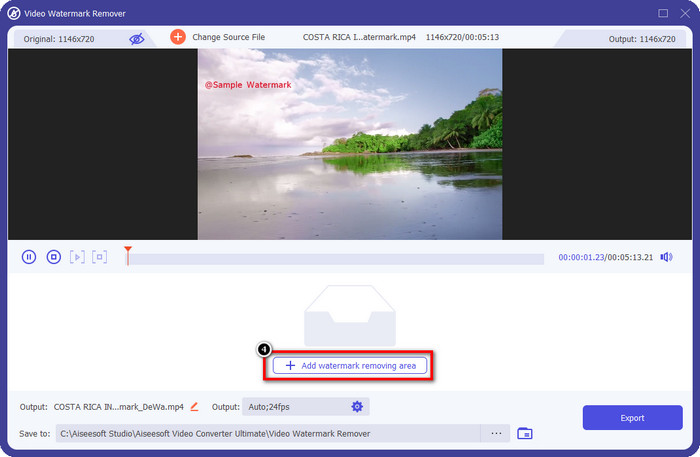
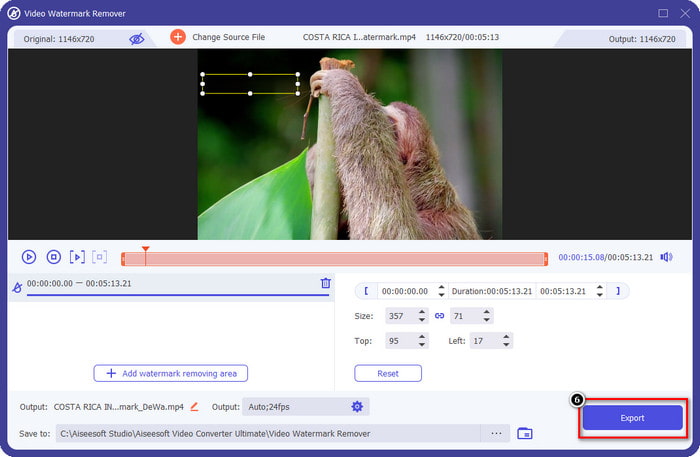
Step 4. On the new window, select the Add Watermark Removing Area to apply a trace of the watermark on the video you uploaded.
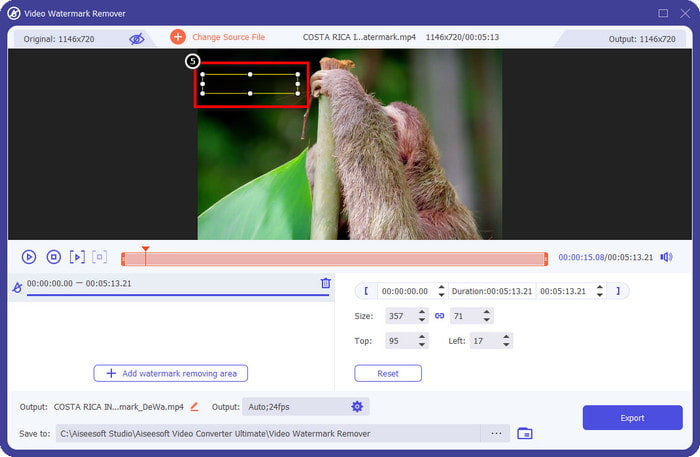
Step 5. In the upper-middle part, adjust the rectangular shape and place it on the watermark to be applied to the area.
Step 6. Start exporting the file if you have done everything written in this step by pressing the Export button. With that, you have now completed removing the watermark in your video with the help of the ultimate tool.
3ª Via. Remova a marca d'água da iStock em imagens usando o removedor de marca d'água gratuito FVC
For dealing with the images watermark, you will need to use the FVC Free Watermark Remover. It is a helpful iStock watermark remover online you can use to efficiently remove the watermark on images without downloading anything on your device. Also, you wouldn't need to purchase or avail of something here because it is free to use. Despite being an online tool, its performance in removing watermarks is undeniably better than other image watermark removers you can use. Doesn't believe what we say? There is only one way to prove to you that it performs excellently: by following the steps we add here.
Step 1. Kindly click this link to use the online watermark remover for images immediately.
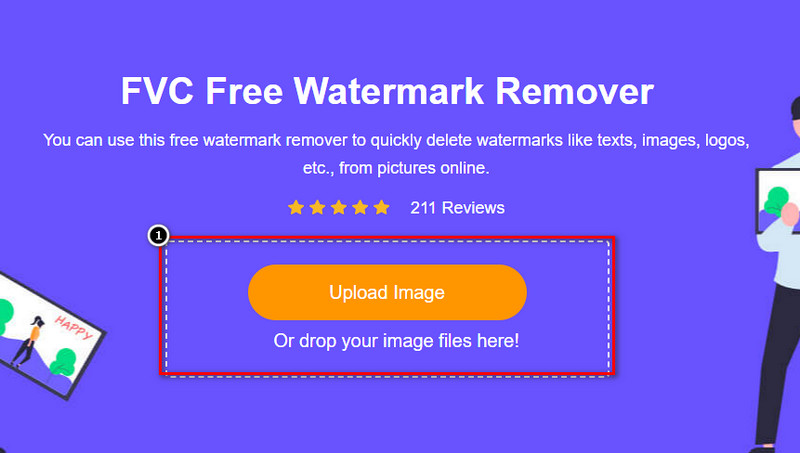
Step 2. Press Upload Image, select the image with a watermark, and wait for the uploading process to be done.
Step 3. Draw on the watermark with these tools to highlight it.
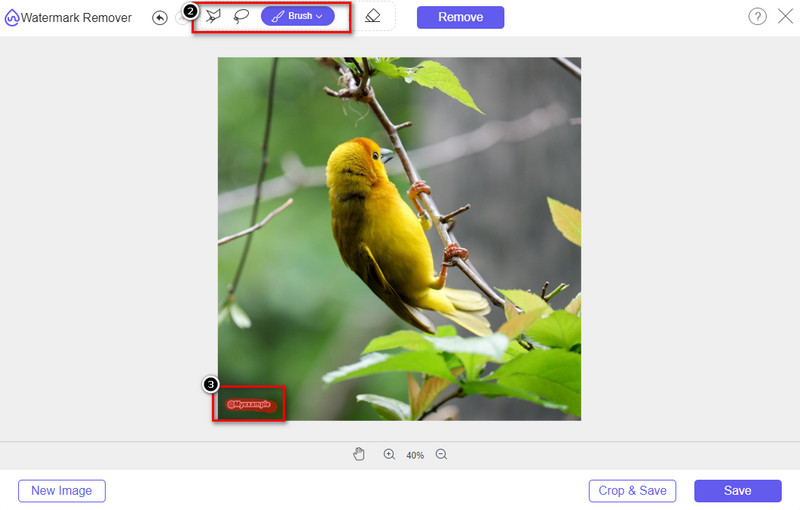
Step 4. Click Remove to see what it looks like if the watermark is removed here.

Step 5. Finally, to save the image file, click Save to export the image without the watermark of iStock here.

Related:
How to Remove the Watermark from Renderforest Exported Videos
How to Remove the Viva Video Watermark on Videos
Parte 2. Perguntas frequentes sobre como remover a marca d'água da iStock
Como baixar imagens da iStock sem marca d'água de graça?
Se você pretende baixar uma imagem na iStock imediatamente, o site aplicará uma marca d'água à imagem. Este site protege todos os arquivos para evitar problemas de direitos autorais e uso excessivo de uma determinada imagem. Se você deseja baixar uma imagem sem marca d'água, deve comprar algum crédito; você pode seguir as etapas que adicionamos acima sobre como fazê-lo.
Qual é o preço de um único crédito na iStock?
O preço de um único crédito na iStock vale $12. Você pode usar o crédito para comprar um arquivo de mídia aqui e baixá-lo sem a marca d'água na mídia visual desejada. Quanto mais crédito você comprar, haverá um desconto por crédito; você pode conferir os créditos disponíveis que você pode gostar.
Não é caro comprar um arquivo na iStock?
Comparado com o outro site que fornece o mesmo serviço, é um dos sites mais baratos que você pode usar para comprar um arquivo licenciado. Depois de comprar um arquivo aqui, você pode usá-lo sem limites ao contrário do outro, onde, uma vez comprado, ainda há limitações no uso do arquivo.
Conclusão
Agora que você já sabe como remover a marca d'água da iStock em vídeos e imagens de forma eficaz, podemos dizer que o trabalho está feito. E aí, qual caminho você prefere mais? Quer adquirir um crédito para ter o arquivo pronto sem a marca d'água? Ou você quer usar as ferramentas que adicionamos aqui que podem lidar com a marca d'água em imagens e vídeos? Seja qual for a sua escolha, você ainda terá o arquivo perfeito e pronto para ser usado sem o distúrbio da marca d'água.
-
 Como remover marca d'água com Pixlr em etapas detalhadas [efetivo]
 Quer saber como remover uma marca d'água com o Pixlr? Se sim, continue lendo abaixo para saber como fazer isso e as alternativas que você pode usar.
-
 Remova a marca d'água Animotica em vídeos exportados com 3 maneiras comprovadas
 Você já se perguntou se é possível remover a marca d'água do Animotica nos vídeos que você exportou? Este artigo fornece um como fazer.
-
 Maneiras gratuitas de remover a marca d'água VideoShop em vídeos [sem esforço]
 Para remover a marca d'água do VideoShop, seu dispositivo precisará de um removedor de marca d'água. Para saber quais são, leia este artigo.
