


 Video Converter Ultimate
 Gravador de ecrã
 Reparo de vídeo
 Secure Download
Como se livrar da marca d'água do Power Director gratuitamente [100% Working]
For choosing a full-featured video editor and maker, you can’t go wrong with choosing the Power Director on your device. Expect that you will get a fantastic result once you use it for editing your video for presentations, vlogs, tutorials, demos, and more. Also, you should know that it adds a watermark on the edited videos if you are currently using the free version. Some users became frustrated with the watermark being applied to the video they worked hard. Instead of being frustrated, why don’t you try reading this article? Let’s learn how to get rid of the Power Director watermark for free to solve the problem once and for all.

Parte 1. Como se livrar da marca d'água do Power Director gratuitamente com as principais soluções do mercado
FVC Video Converter Ultimate
A versão atualizada do FVC Video Converter Ultimate possui um removedor de marca d'água de vídeo que você pode usar para ter o vídeo no PowerDirector para PC sem marca d'água. Esta ferramenta tornou-se a ferramenta completa que pode fazer uma tarefa multifuncional simultaneamente e fazê-lo profissionalmente com processamento rápido. O que nos surpreende com esta ferramenta é a facilidade de uso. Se você usar isso, não precisa se tornar um profissional para remover a marca d'água do seu vídeo. Para os usuários que procuram o melhor removedor de marca d'água, você não pode errar ao baixar este software em sua área de trabalho gratuitamente. Ainda não está convencido? A única maneira de convencê-lo de que ele tem um desempenho final é copiando o tutorial que adicionamos para você seguir.
Step 1. You can download this software on your Windows or macOS free by clicking the download button below. After choosing the version, you want to download, install the software immediately, then open it.
Free DownloadFor Windows 7 or laterSecure Download
Free DownloadFor MacOS 10.7 or laterSecure Download
Step 2. Now that it is running into the system go to Toolbox, and look for Video Watermark Remover on the set of features.
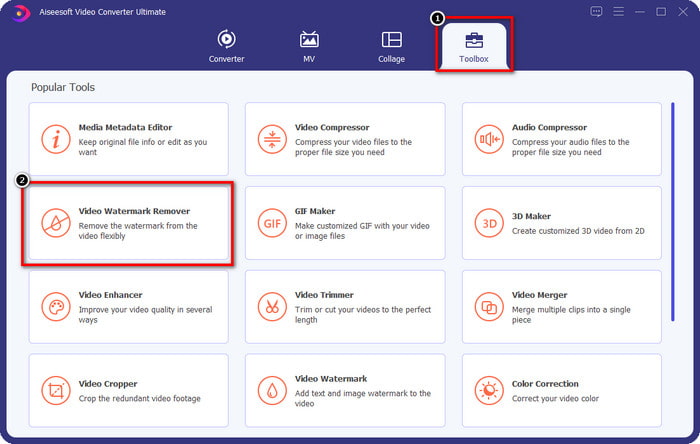
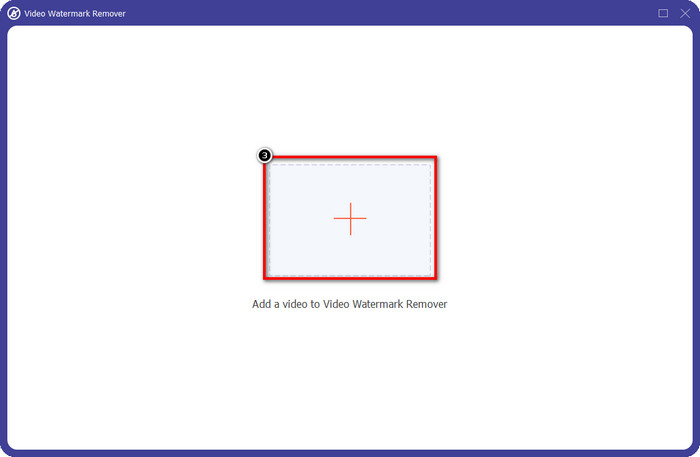
Step 3. After that, click the + icon to upload the video file you have a problem with.
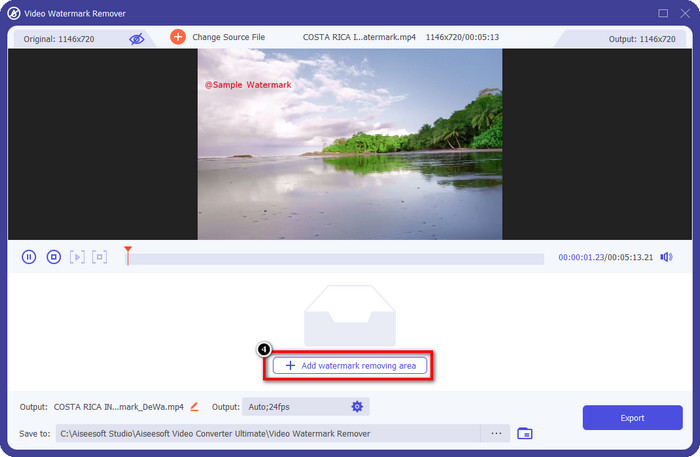
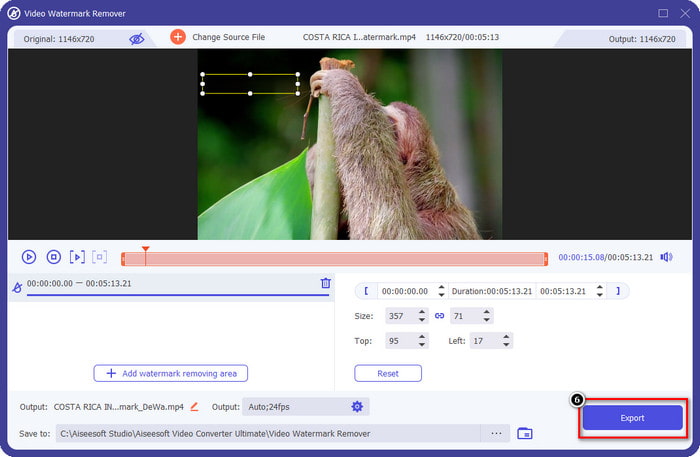
Step 4. Press Add Watermark Removing Area to start using the tool of this software.
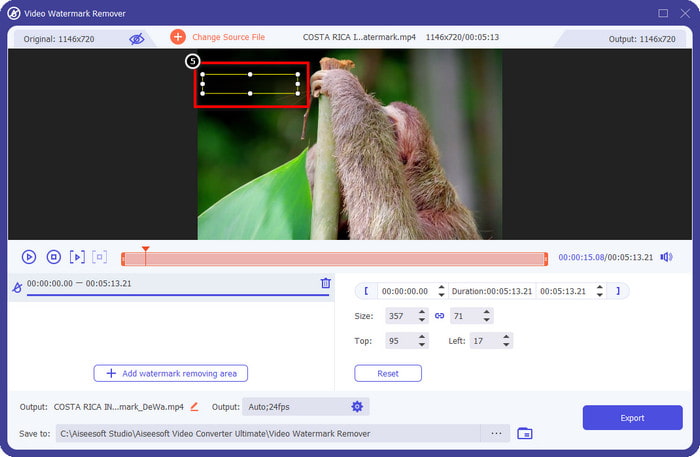
Step 5. With your mouse, drag the rectangular shape to the watermark area, then release it. You are allowed to adjust the rectangular-shaped to highlight the watermark.
Step 6. Hit the Export button to start the watermark removal process. When done, a pop-up folder will show on your screen; click the file to watch the video with no watermark on it.
VLC Media Player
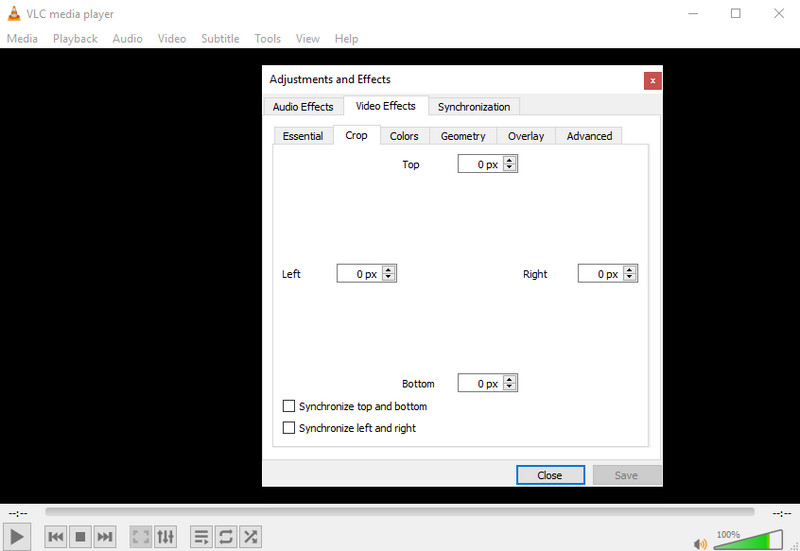
VLC Media Player is not a dedicated watermark remover. Still, it can do the job by cropping out the watermark on the video you have. This tool is not only a video player and cropper; there are other things this popular media player can offer you. But never expect this tool to be capable of doing professional editing and easy to use because it is not. On cropping the video, you will need to add the exact measurement to crop out the watermark on the video. So, suppose you did know the exact x and y of the video. In that case, you can follow how to remove the edited by PowerDirector watermark with this media player.
Step 1. After downloading the software on VideoLAN.org, open the software. Click Media, then Open File, and search the video file you are editing on Power Director on the local drive that will show on your screen.
Step 2. The video will start to play, click Tools, then Effects and Filter. You can use your keyboard by hitting the Control + E for Windows and Command + E for Mac.
Step 3. Go to Video Effects, Crop, and add the measurement to the video to crop out the watermark.
Step 4. To apply the adjustment you did, click Save.
Kapwing
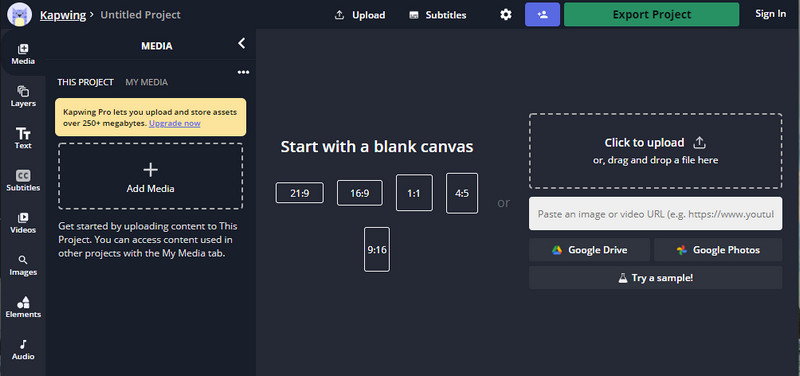
Precisa de um editor de vídeo online? Tente usar Kapwing. É uma ferramenta web intuitiva que você pode usar para editar vídeos como o que você pode fazer no Power Director. Ainda assim, não está no nível do Power Director. A maior parte da edição de vídeo que você pode precisar já está aqui, como cortar a marca d'água. Embora a ferramenta faça o mesmo trabalho que o VLC na remoção da marca d'água, essa ferramenta possui um painel de visualização onde você pode ver o vídeo recortado antes de exportar. Então, se você quiser salvar vídeos, edite no Powerdirector sem marca d'água para PC; você deve cortá-los primeiro aqui.
Step 1. Open the web tool by searching it on your browser, then click Add Media to upload the video file here. There will be an uploading process, so you will need to wait before you can use the video you upload.
Step 2. Click Crop on the left side of the interface to open its cropping features.
Step 3. Adjust the frame and ensure that the watermark of the video isn’t included on the frame.
Optional: If you don’t want to change the dimension of the video manually, there are available options below that you can freely use.
rame e certifique-se de que a marca d'água do vídeo não esteja incluída no quadro.” /]Step 4. When done, click Done Cropping to save the video you cropped with the Kapwing.
Related:
How to Remove the Watermark from Renderforest Exported Videos
How to Remove the Viva Video Watermark on Videos
Parte 2. Perguntas frequentes sobre como remover a marca d'água do Power Director
É seguro baixar o Powerdirector sem marca d'água apk gratuitamente para Android?
Sim, você pode visitar a Play Store e pesquisar seu nome para baixar o aplicativo Power Director. No entanto, a versão de avaliação gratuita desta ferramenta adiciona uma marca d'água. Suponha que você tente baixar o aplicativo em sites de terceiros para ter a versão completa. Nesse caso, você não deve fazer isso porque pode haver vírus maliciosos no arquivo baixado no seu Android. Para remover a marca d'água no Powerdirector, você deve adquirir uma chave de licença.
Quanto custa o aplicativo Power Director no PC?
Você pode ter o Power Director 365 pelo preço inicial de $ 4.08 todos os meses, você pode acessar os planos e a assinatura em seu site oficial. Você também pode ver os recursos incluídos que você pode obter quando estiver disponível para o plano de sua escolha.
O Cyberlink PowerDirector tem uma marca d'água?
Sim, ele adiciona uma marca d'água quando você exporta o vídeo na versão gratuita do aplicativo, mas é evitável. Se você comprar o software de qualquer plano ou assinatura, não precisará se preocupar com a marca d'água, pois não haverá marca d'água do produto adicionada após a exportação.
Conclusão
Se você deseja exportar os vídeos, crie-os no PowerDirector para PC sem marca d'água. Você deve comprar uma chave de licença para este programa. Mas se você não quiser gastar pelo menos um centavo, escolha as ferramentas que adicionamos a este artigo, pois essas ferramentas podem remover efetivamente a marca d'água em seus vídeos editados. Ainda não está convencido com a ferramenta que adicionamos neste artigo? Então ajudaria se você tentasse primeiro, começando com a ferramenta definitiva para remover a marca d'água do Power Director.
-
 Remova a marca d'água Animoto em vídeos com facilidade e eficácia
 Como remover a marca d'água do Animoto no vídeo? Continue lendo este artigo, pois fornecemos um tutorial completo sobre como fazê-lo.
-
 Como remover marca d'água do vídeo usando o Final Cut Pro [Guia Completo]
 Tem algum problema com a marca d'água nos vídeos? Não disse mais nada, pois fornecemos um tutorial sobre como remover marca d'água de vídeo usando o Final Cut Pro.
-
 3 maneiras de remover a marca d'água WeVideo com um efeito instantâneo
 Você tem problemas para resolver o problema da marca d'água que o WeVideo deixa? Não se preocupe mais, pois adicionamos as informações que você deve saber.
