


 Video Converter Ultimate
 Gravador de ecrã
 Reparo de vídeo
 Secure Download
3 removedores de marca d'água da Shutterstock para usar e remover a marca d'água em vídeos
Are you needing high-quality, licensed Shutterstock videos for your project, yet there is a Shutterstock watermark on them? With the help of Shutterstock watermark remover, you can easily erase the watermark on the downloaded video. Professionally and personally, we don’t like our videos to have a watermark because it ruins the whole idea of the video. So, if you want to get rid of the Shutterstock watermark, you can continue reading the information and brief tutorial we state in this article.

Parte 1. Como remover a marca d'água da Shutterstock com o melhor removedor de marca d'água do mercado [Escolha do Editor]
FVC Video Converter Ultimate can accurately help and lead you on how to remove the Shutterstock watermark on the video you have saved. It is an all-inclusive solution you can download on your Windows and Mac to adjust your video, such as removing watermarks. Despite being an all-arounder software, the developer of this program keeps the user-friendly at a low level so that everyone who wants to use it can do it without having vast knowledge.
Mesmo com habilidades de baixo nível, você pode ter uma saída de primeira linha no final depois de usar este editor. Ainda não está convencido com as informações que adicionamos? Para provar isso, vamos te ensinar como remover a marca d'água da Shutterstock gratuitamente com este editor de vídeo.
Step 1. To remove the watermark on the video you have downloaded, you will need to download this editor first by clicking the appropriate download button for your operating system. There will be a short installation process you’ll need to go through; after that, you can start using the software.
Free DownloadFor Windows 7 or laterSecure Download
Free DownloadFor MacOS 10.7 or laterSecure Download
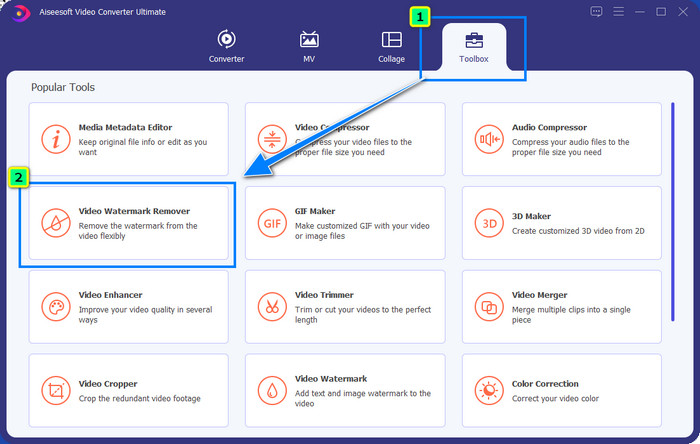
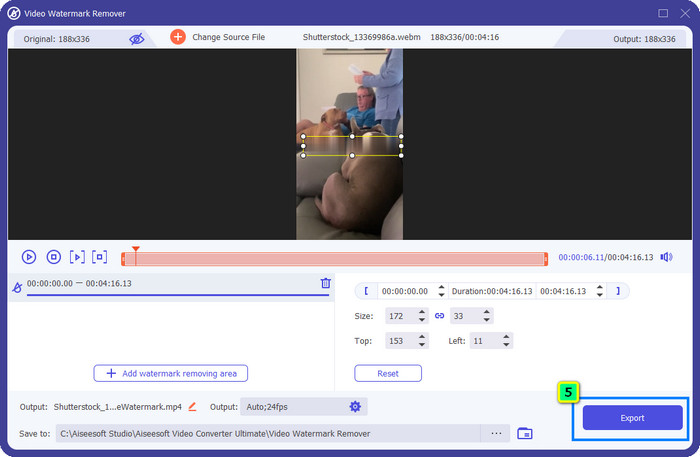
Step 2. Next is to use the Video Watermark Remover; you can find this feature under the Toolbox. As you can see, you can use multiple editing features and functions to adjust your image to your preferred imagery.
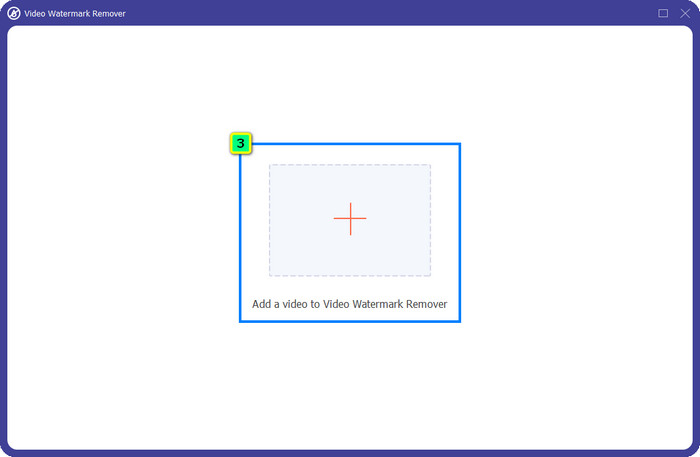
Step 3. Hit the plus icon, and a file manager will appear on your screen. Choose the video file with a watermark, then click Open to upload it.
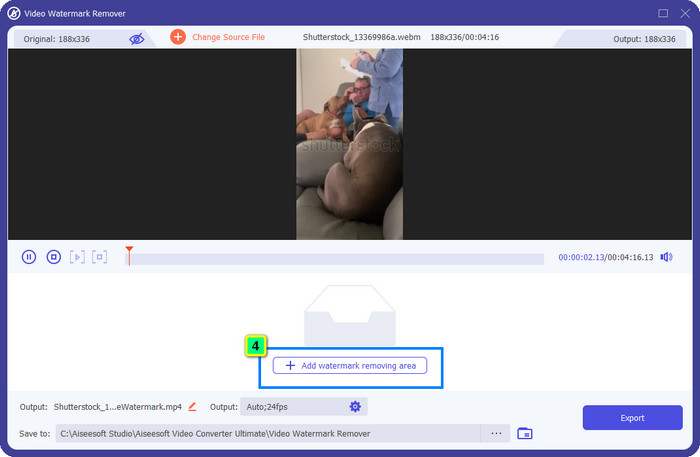
Step 4. To erase the watermark on the video you have uploaded, press, Add Watermark Removing Area, and a new window will appear.
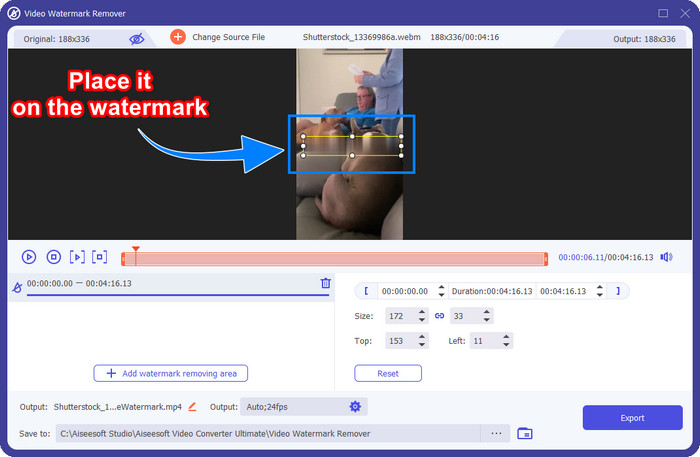
Step 5. In this part, there will be a square-shaped on your video; place it on the watermark. You can either resize, drag, shrink, or enlarge it so that it will become fit to the watermark that you want to delete.
Step 6. Finally, click the Export button to download the final output of the Shutterstock video you download on your device. You can now enjoy it without worrying about the watermark because it has been deleted.
Parte 2. Como remover a marca d'água da Shutterstock online gratuitamente
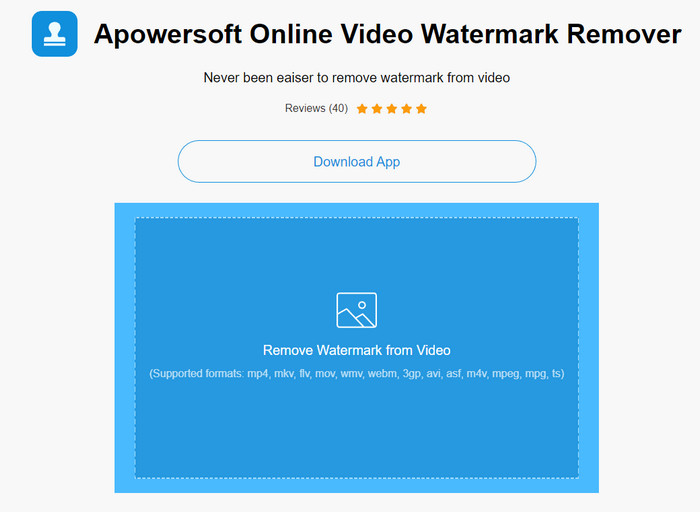
Doesn’t like the idea of downloading a watermark remover on your desktop? If so, you can use the Apowersoft Online Watermark Remover, and we are here to teach you how to remove the Shutterstock watermark online. It is an excellent pick-up for everyone who needs to remove the watermark on the video they have or on the image. The reason why we add this is that this software is accessible, and it is compatible with the different operating systems you have on your hand.
Ao contrário das ferramentas offline, você precisará de uma conexão de internet estável e robusta para usá-las. Como prometemos, abaixo está o tutorial sobre como usar este removedor de marca d'água para remover a marca d'água que a Shutterstock deixa nele.
Step 1. Open the official website of Apowersoft Online Watermark Remover using your favorite search engine, then click the + button on the right side to upload the video file.
Step 2. Put the selection box to the Shutterstock watermark on the video.
Step 3. After that, click Erase to remove the watermark and see the result.
Step 4. Press the Download File to have the Shutterstock video without the watermark.
Parte 3. Como remover a marca d'água da Shutterstock usando o Photoshop [pago]
Many users ask how to remove the Shutterstock watermark using Photoshop, and we are here to help you! Adobe Photoshop supports a professional watermark-removing feature that you would love to use. Like the software introduced in this article, it does the job; however, its approach to removing watermarks is frame by frame. It means you will need to spend time eliminating the watermark per frame of the video; the longer the video is, the more frame it will be. If you want to know how the tool works, read the informative steps below.
Step 1. Download the application on your desktop, then click File. Under it, press Open to upload the video saved on your computer.
Step 2. On the left side, choose the Magic Wand Tool, then click the watermark you want to remove. This feature will automatically trace the watermark on the frame.
Step 3. Go to Edit and press Content-Aware Fill after you trace the watermark.
Step 4. After you open the Content-Aware Fill, it will automatically remove the watermark you select earlier, then press OK.
Further Reading:
Easy Methods on How to Remove Shootproof Watermark
How to Remove the Bandicam Watermark Effortlessly [3 Effective Ways]
Parte 4. Perguntas frequentes sobre como remover a marca d'água da Shutterstock
Como remover a marca d'água da Shutterstock sem o Photoshop?
Você pode usar o FVC Video Converter Ultimate para remover o Shutterphoto vinculado ao seu vídeo. Ele tem um poderoso apagador de marca d'água que você adoraria experimentar. Siga as etapas que adicionamos neste artigo para fazê-lo de forma tão eficaz quanto o Photoshop.
Cortar a marca d'água da Shutterstock funciona em vídeo?
Se você quiser redimensionar o vídeo alterando a dimensão, poderá recortar o vídeo com a ajuda de vários editores de vídeo online e offline. Como a marca d'água do Shutterstock está no meio, é melhor não usar os recursos de corte. Vários removedores de marca d'água estão aqui para ajudar; você pode ler e copiar o tutorial que adicionamos para que você possa apagá-lo efetivamente sem deixar uma mancha nele.
É legal remover a marca d'água da Shutterstock?
A remoção da marca d'água do Shutterstock não é legal, mas se você quiser usá-la para fins não comerciais, poderá fazê-lo com a ajuda de um removedor de marca d'água. É melhor comprar a fotografia que você deseja na Shutterstock se for usá-la para fins comerciais; embora isso lhe custe, pelo menos permitirá que você tenha direitos legais para usá-lo.
Conclusão
Now, you know how to remove the Shutterstock watermark with the included software in this article. So, which software do you prefer, the paid, free online, or the ultimate software? Whatever your choice, you can achieve the Shutterstock photo without the product logo. But if you are about to ask us what to use, without a doubt, we will pick the FVC Video Converter Ultimate, for it provides the most satisfactory job of finishing the task. Despite being an ultimate watermark remover, it is still easy to use. So, if you want to try out this software, you can click the download button to have this tool on your desktop.
-
 Ferramentas finais para remover marca d'água dos vídeos exportados do Renderforest
 Para remover a marca d'água do Renderforest, você precisará de um removedor de marca d'água no seu dispositivo, todas as ferramentas que você pode usar estão aqui.
-
 Passos fáceis sobre como remover a marca d'água WOW Slider [Resolvido]
 WOW Slider é um aplicativo para criar uma apresentação de slides fantástica. No entanto, ele incorpora marcas d'água em sua saída. Leia abaixo para saber como remover a marca d'água WOW Slider.
-
 Como se livrar da marca d'água do Power Director gratuitamente [completo]
 Como se livrar da marca d'água do Power Director gratuitamente? As melhores ferramentas para eliminar a marca d'água estão aqui, então aprenda-as lendo isto.
