


 Video Converter Ultimate
 Gravador de ecrã
 Reparo de vídeo
 Secure Download
Procedimento sem esforço para remover marcas d'água de vídeos MP4
Do you encounter problems like having no idea how to remove watermarks from your MP4 videos using your devices like Mac and Windows? Then, this article has the best solution for you. If you belong to those people who love watching movies, clips, and more, then maybe you can also relate to how disturbing and irritating it is to watch your favorite videos with watermarks or any unnecessary objects you can see on your MP4 videos. Also, you can’t even see the whole part of your screen because these watermarks are covering it. And the most frustrating part is that some of the videos have super large watermarks on them, and you can’t even enjoy watching your favorite videos.
Felizmente, já existe um aplicativo de software tremendo e notável com um removedor de marca d'água de vídeo que você pode usar para eliminar esses objetos desnecessários em seus vídeos, como marcas d'água, logotipos, textos, imagens e muito mais. Você pode apagar ou remover rapidamente esses objetos e assistir ou reproduzir seus vídeos com esses aplicativos. Com esses aplicativos, você nunca mais ficará frustrado ou irritado. Então, se você é cativado por este tópico, você deve ler este artigo para fornecer informações suficientes, especialmente para remover marcas d'água em seus vídeos MP4 com facilidade.

Parte 1: Melhor maneira de remover marca d'água do vídeo MP4
Suppose you are looking for the most outstanding and amazing application for removing watermarks from MP4 videos; Video Converter Ultimate is the best tool. This application is capable of eliminating disturbing objects on your videos, like watermarks, logos, texts, or pictures. Also, you don’t have to wait longer during the saving process because you can save your videos quickly after removing the watermarks.
Além disso, o Video Converter Ultimate possui muitas ferramentas de edição que você pode utilizar, como um aprimorador de vídeo, remoção de marcas d'água, adição de marcas d'água, um controlador de velocidade de vídeo, criador de GIF, criador de colagens, gravador de vídeo e áudio, compressor de vídeo/áudio, convertendo vários arquivos formatos, como MP4, FLV, MOV, TRP, MTS, M2TS, MKV, AAC, MP3 e muito mais. Além disso, a melhor parte é que você não precisa mais comprar ou comprar este aplicativo. Você pode operar isso gratuitamente. Além disso, este aplicativo é muito simples e fácil de usar. Se você deseja remover marcas d'água em seus vídeos MP4, o Video Converter Ultimate pode oferecer duas maneiras. Leia continuamente para aprender essas duas maneiras de apagar marcas d'água em seus vídeos.
1. Usando o removedor de marca d'água de vídeo
Step 1: Visit the website of Video Converter Ultimate. Download the application for free. Then, proceed to the installation process.
Free DownloadFor Windows 7 or laterSecure Download
Free DownloadFor MacOS 10.7 or laterSecure Download
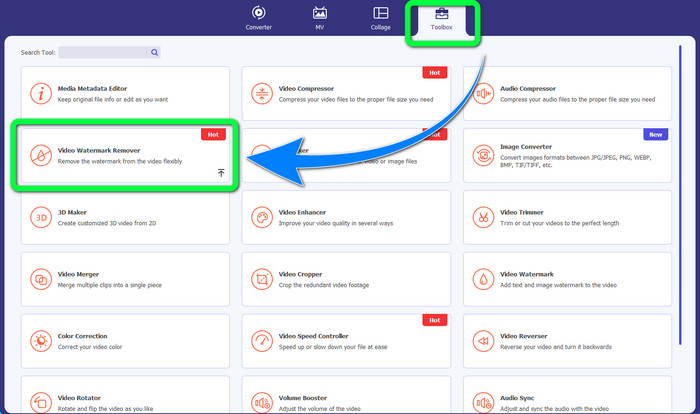
Step 2: Launch the application. Select the Toolbox > Video Watermark Remover.
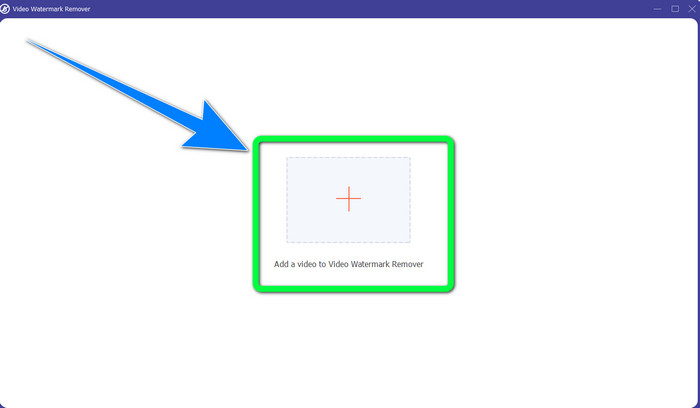
Step 3: Another interface will show up. Select the Plus sign button and add your MP4 video with a watermark.
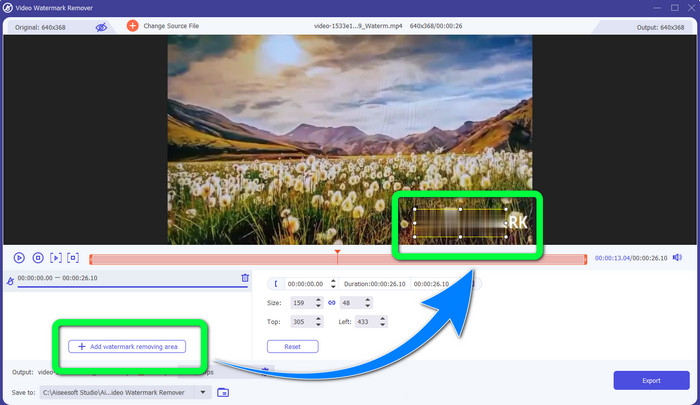
Step 4: Click the Add Watermark Removing Area button. Then, a small box will appear on your video, drag this box and use this to cover the watermarks on your video.
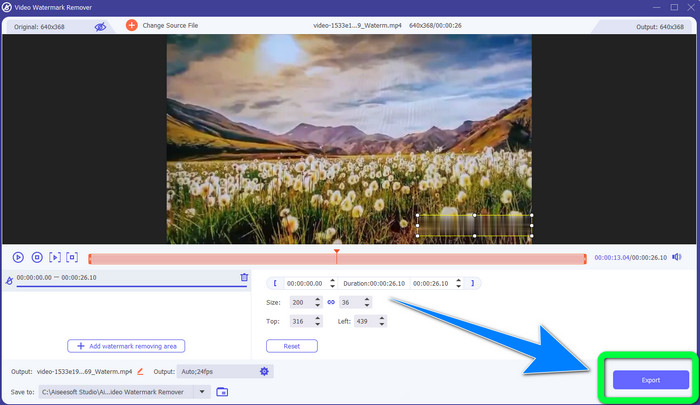
Step 5: When you are done removing the watermark, click the Export button to save your videos. Now, you can cherish the moment by watching your favorite movies without watermarks.
2. Usando o cortador de vídeo
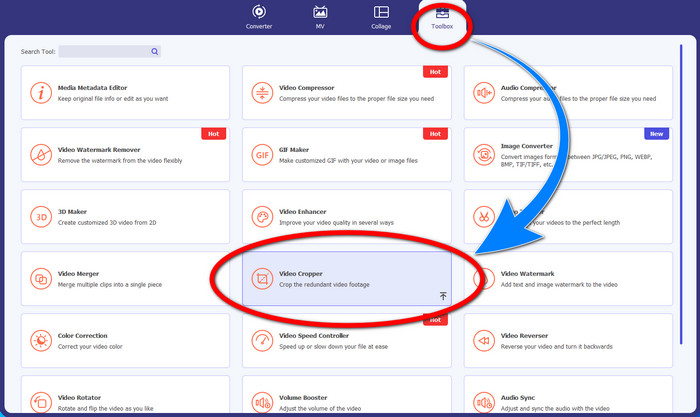
Step 1: Launch the Video Converter Ultimate. Then, click the Toolbox > Video Cropper.
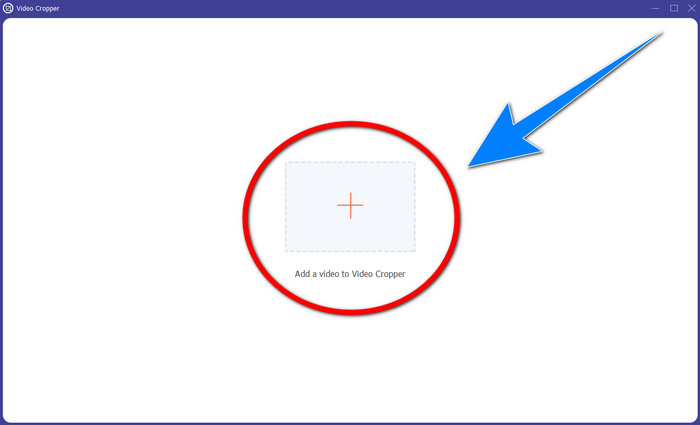
Step 2: Another interface will pop up after clicking the Video Cropper. Click the Plus symbol to add your MP4 video with a watermark.
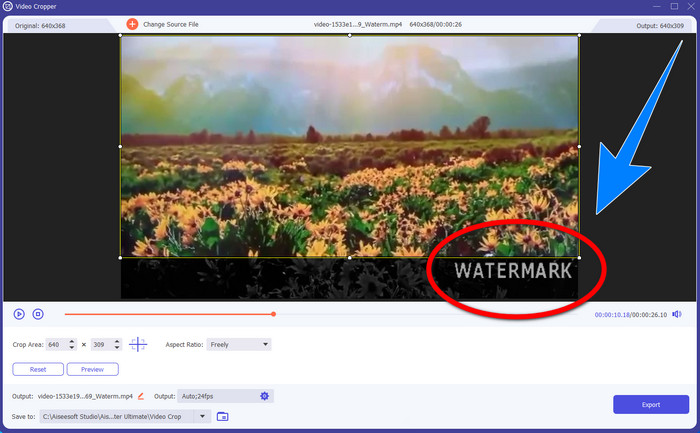
Step 3: When you have already attached your video, you can crop your MP4 video and eliminate the watermark.
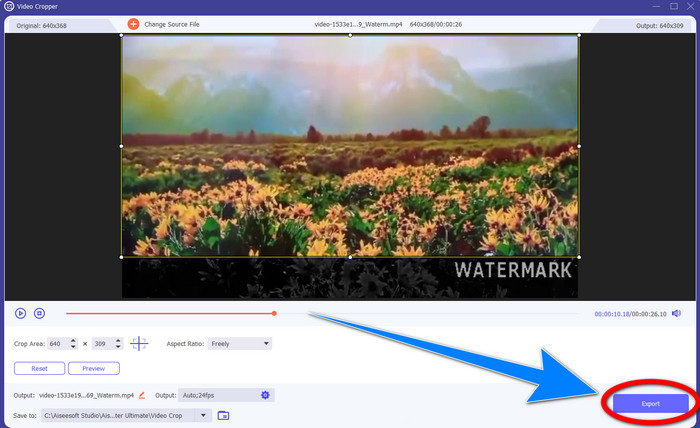
Step 4: If you are done cropping your video to remove the watermark, then click the Export button to save your video. In this way, you can watch your video without a watermark.
Parte 2: Remova a marca d'água do vídeo MP4 online
Are you looking for an outstanding application you can use to remove watermarks from your MP4 video online for free? Then, HitPaw Online Watermark Remover is the application you can rely on. Moreover, you can utilize this application without purchasing anything because it is 100% free. In addition, You can remove watermarks, logos, and signatures without any limits, and it has no ads. Also, it is easy to use and simple. You can remove your watermarks on your videos in just three steps, which is perfect for beginners.
HitPaw Online Watermark Remover é acessível a qualquer dispositivo, como Windows, Mac, iPhone e Android. Este aplicativo também é seguro e garante que você seja o único que pode visualizar e editar seus vídeos. No entanto, se você remover as marcas d'água em seus vídeos, a área ficará embaçada e perturbadora às vezes. Além disso, o processo de salvamento é lento. Se você deseja remover marcas d'água em seus vídeos MP4 online, siga as etapas fáceis abaixo.
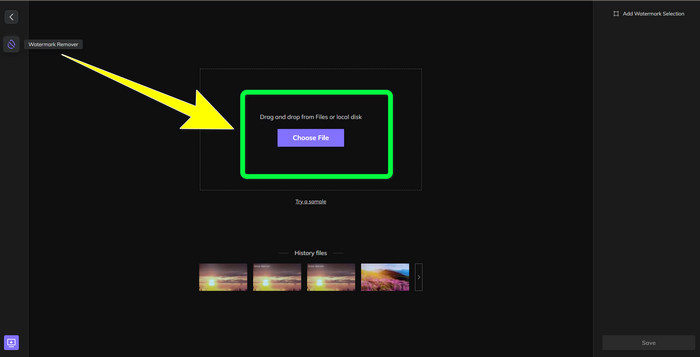
Step 1: Go to the HitPaw Online Watermark Remover website. Click Remove Watermark Now, then select Choose File to add your MP4 video with watermarks.
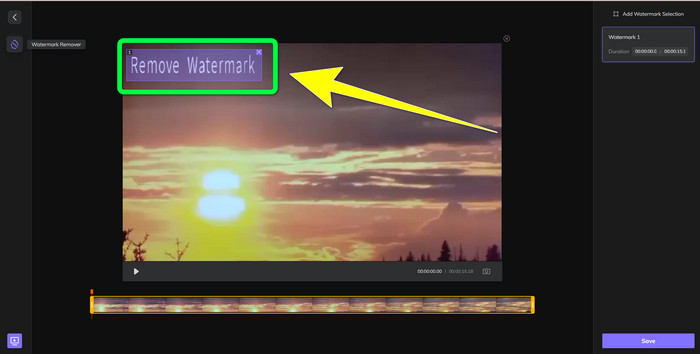
Step 2: After adding your video, there will be a rectangle shape on your videos. Drag this to cover and remove your watermarks.
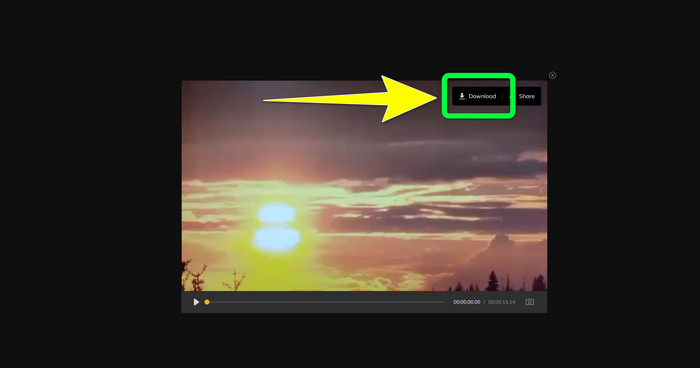
Step 3: After removing the watermarks on your video, click Save Button. Please wait for the saving process, then click the Download button to keep it on your device.
Parte 3: Perguntas frequentes sobre como remover marca d'água do MP4
Também é possível eliminar assinaturas nos meus vídeos?
Yes, it is possible. Video Converter Ultimate is also capable of removing signatures on your videos. Any unnecessary objects that are disturbing to your videos can be removed easily using this application.
É demorado remover marcas d'água de vídeos MP4?
Depende dos aplicativos que você está usando. Se você deseja remover marcas d'água em seus vídeos MP4, use o Video Converter Ultimate. Ele pode remover marcas d'água instantaneamente.
Qual é o melhor removedor de marca d'água de vídeo que posso usar?
If you are looking for a reliable application that can remove watermarks on your video, Video Converter Ultimate is an excellent software you can utilize. You can remove watermarks and save your videos without losing their quality.
Posso usar a ferramenta de corte do HitPaw Online Watermark Remover para eliminar marcas d'água?
Absolutamente sim! Você também pode usar a ferramenta de corte deste aplicativo se quiser remover as marcas d'água em seus vídeos, especialmente se as marcas d'água estiverem no canto ou na borda de seus vídeos.
Além de remover marcas d'água, é possível adicionar marcas d'água usando o Video Converter Ultimate em meus vídeos?
Definitivamente sim! O Video Converter Ultimate não se limita apenas a remover marcas d'água em seus vídeos. Este aplicativo também pode adicionar marcas d'água aos seus vídeos, principalmente se você quiser colocar algum texto, logotipos, assinaturas, etc.
Conclusão
As written above, you can easily remove the watermarks from your MP4 videos using Video Converter Ultimate. In addition, this article shows you some software you can use to remove unnecessary objects from MP4 videos online.
-
 Como remover a marca d'água do Filmora em seus vídeos ou projetos gratuitamente
 Como remover a marca d'água do Filmora? Essa pergunta circula pela web, e aqui listamos diferentes abordagens que você pode usar!
-
 Truque mais rápido para remover a marca d'água do Adobe Stock de um vídeo [Tutorial]
 Você está tendo problemas com a marca d'água do Adobe Stock? Leia isto e saiba como remover a marca d'água do Adobe Stock do vídeo.
-
 5 maneiras de remover uma marca d'água de um vídeo de maneira profissional
 Precisa remover uma marca d'água de um vídeo para torná-lo profissional? Bem, leia este artigo enquanto adicionamos um tutorial sobre como fazer isso!
