


 Video Converter Ultimate
 Gravador de ecrã
 Reparo de vídeo
 Secure Download
Maneiras incríveis de converter GIF para DivX em poucos minutos
Nowadays, different file formats are used on the internet. One of the popular file formats for web graphics that we have now is the GIF, which is usually entertaining to view. However, there are some instances where a GIF file format is not supported on other devices. Sometimes, you need a file format supported by many devices like DivX. In that case, if you want to dig deeper into this post, you must read this article to get a piece of information about how to convert GIF to DivX instantly.

Parte 1: Introdução ao GIF e DivX
Graphics Interchange Format, or GIF, is a popular format for web graphics. It can be animated, often used primarily to display basic animation on your websites. GIFs also include transparent pixels, letting them blend with other colors. In addition, if you observe some pictures moving repeatedly, then there is a possibility that the image is a GIF format. DivX file is another file format recognized by other electronic consumer devices, video playback software, and DVD Players. This file is also known as the DivX-Encoded Movie File, which is classified as a video file. Other devices also support it. Therefore, read the other essential points below if you want to convert GIF to Divx.
Parte 2: Programa para converter GIF e DivX sem perder qualidade
Suppose you are looking for a good and fantastic converter that can convert GIF to DivX without losing the quality. In that case, the best application you can use is Video Converter Ultimate. This reliable application can support different file formats, such as MKV, MOC, GIF, MTS, M2TS, MPEG, FLV, XVID, MTS, DivX, AVI, and more. In addition, aside from converting, this application has many different features and tools you can use, like a video speed controller, video watermark remover, video enhancer, GIF maker, collage maker, video reverser, video trimmer, audio compressor, video compressor, and more. Moreover, this application is free and accessible on both Windows and Mac. Lastly, Video Converter Ultimate is easy to utilize and has a simple interface, which is suitable for new users.
Key Features
O aplicativo não é apenas ótimo para converter arquivos, mas também possui muitos recursos que você pode aproveitar.
◆ Oferece muitas opções para melhorar vídeos/áudio.
◆ Personalize seu vídeo.
◆ Permite editar a taxa de bits do seu vídeo.
◆ Permite editar a resolução e a taxa de quadros do seu vídeo.
Prós
- Adequado para iniciantes.
- Tem um processo de salvamento rápido.
- A conversão é estável e segura.
- Nenhuma marca d'água aplicada.
- Disponível em Windows e Mac.
- Fácil de utilizar.
Contras
- Adquira o software para recursos mais avançados.
Se você deseja converter seu arquivo GIF para DivX usando seu Mac ou Windows, siga estas etapas simples e fáceis abaixo.
Step 1: Download the Video Converter Ultimate on your Mac or Windows. After the process, launch the application.
Free DownloadFor Windows 7 or laterSecure Download
Free DownloadFor MacOS 10.7 or laterSecure Download
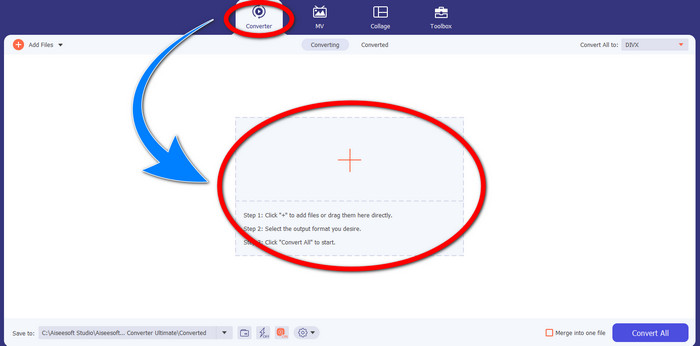
Step 2: After you open the Video Converter Ultimate, click the Converter > Plus sign button to attach the GIF file you want to convert.
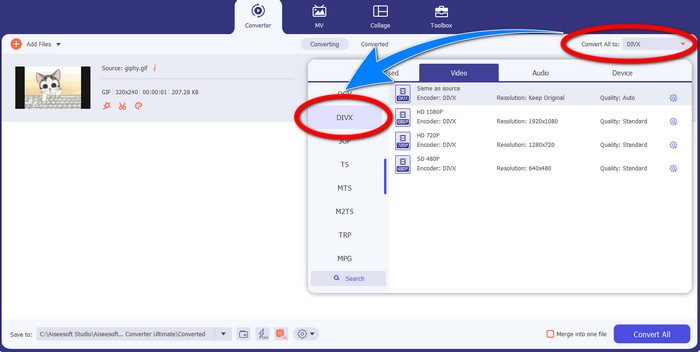
Step 3: When you have already added the GIF, click the Convert All to button, then choose the DivX file with your selected quality, such as 480p, 720p, and 1080p.
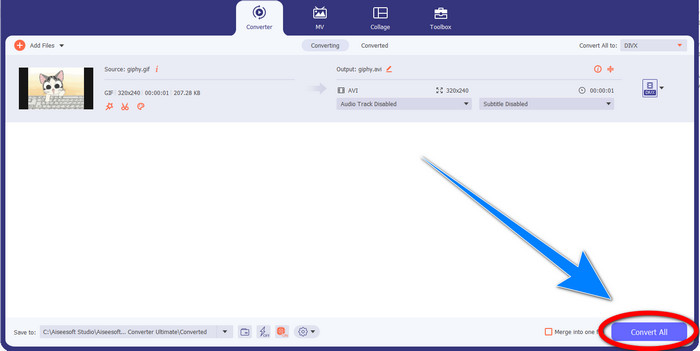
Step 4: After changing the file format from GIF to DivX, click the Convert All button to save your final output.
Parte 3: Conversor online para alterar GIF para DivX
Convertio is an online tool you can use to convert GIFs to DivX file format. This software is capable of converting a specific file format to different formats. Moreover, it has many features, especially converting, like an audio converter, image converter, font converter, ebook converter, presentation converter, and more. In addition to that, you can utilize this software for free, and you can also purchase a subscription for more benefits. Also, you don’t need to worry about your files because it is safe and secured. The file you are converting will be automatically deleted after 24 hours. However, the free version is only limited. You can only have a few features that you can use and a limited file size that you can save. If you are interested in knowing about converting GIF to DivX, follow the given steps below.
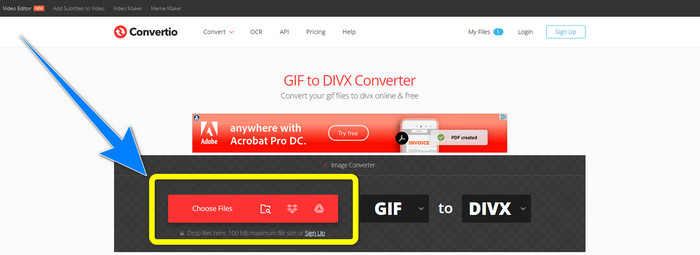
Step 1: Proceed to the website of Convertio. Then, click the Choose Files button to attach the GIF file you want to convert.
Step 2: After attaching your GIF file, you can change the format to DivX by choosing the format options.
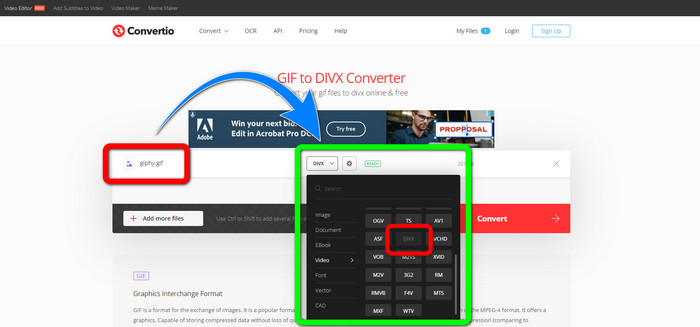
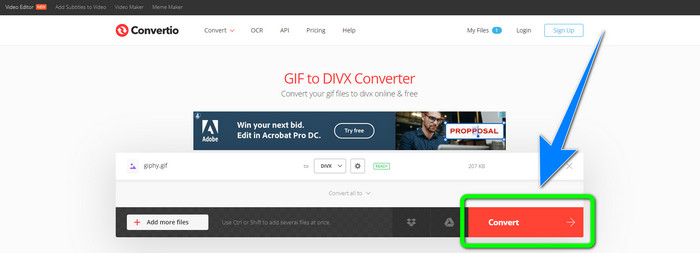
Step 3: When you are done choosing DivX on the format options, click the Convert button to convert the GIF to DivX. Then, you can already save your final output on your device.
Related to:
[Offline/Online] Most Used AVI to DivX Converters You Should Know
How to Convert MKV to DivX Online and Offline for Free
Parte 4: Perguntas frequentes sobre como converter GIF em DivX
Por que devo converter um arquivo específico para outros formatos de arquivo?
Uma das razões pelas quais você deve converter um arquivo específico para outro formato de arquivo é que existem arquivos que não são suportados pelo dispositivo, que se tornarão incompatíveis e inadequados. Dessa forma, um aplicativo com conversor é essencial para alterar o formato do arquivo específico para adequá-lo ao dispositivo que você está usando.
Posso converter meu áudio usando o aplicativo Convertio?
Sim claro. O Convertio também não é confiável apenas na conversão de formatos de arquivo de imagem e vídeo. Este aplicativo também pode ser considerado um conversor de áudio.
Qual é o melhor e mais confiável conversor de vídeo que posso usar no meu Mac?
If you are looking for a great and remarkable application with a file converter, then you must use Video Converter Ultimate. It is suitable for editing and converting your video file using your Mac.
Existe um ótimo aplicativo com um conversor de vídeo que eu possa usar no meu telefone?
Sim existe! O software com conversor de vídeo não é acessível apenas para computadores, mas também existem aplicativos que você pode encontrar na play store ou navegadores para converter arquivos usando seu telefone como o Android.
Existe um conversor de vídeo para o meu iOS?
Definitivamente sim. Existe um conversor de vídeo que você pode usar para o seu iOS. A coisa boa a fazer é olhar para sua loja de aplicativos. Procure o conversor de vídeo, procure os aplicativos que aparecem nos resultados e experimente-os.
Conclusão
As written in the information above, you can conclude that converting a file into a different file format is important. Some formats are incompatible or unsuitable for your devices, so you must convert them to another file format. Also, this article provided two excellent and effective ways to convert GIF to DivX on Windows, Mac, and online. If you desire to convert more files, then the best software you can use is the Video Converter Ultimate. You can utilize this application quickly and convert files faster than other applications.
-
 Como converter M4V para DivX gratuitamente no Mac [Melhores ferramentas]
 Procurando maneiras de converter M4V para DivX gratuitamente? Listamos os melhores conversores para você converter seu arquivo M4V para DivX no Mac.
-
 Conversores WMV para DivX gratuitos A melhor escolha do usuário
 Aqui estão os melhores conversores WMV para DivX gratuitos que os usuários mais usam. Este artigo fornece as melhores maneiras de converter seu arquivo WMV para DivX.
-
 Os 5 melhores conversores MPEG para DivX gratuitos para Windows e Mac
 Converta facilmente seu arquivo MPEG em um arquivo DivX usando os melhores conversores MPEG para DivX. Leia este artigo para saber mais detalhes sobre eles.
