


 Video Converter Ultimate
 Gravador de ecrã
 Reparo de vídeo
 Secure Download
Métodos testados e comprovados para converter MXF para MKV
Are you having trouble playing your MXF file on VLC Media Player and other programs? It only means that VLC hardly recognized your file. Then, you must convert your MXF file to other file formats. You can convert it to an MKV file because you can play this on VLC Media Player and other programs. In that case, we will show you the best and greatest ways to convert MXF to MKV quickly. Read this article to find more important details you need.

Parte 1: Maneira mais notável de converter MXF para MKV
If you want to look for one of the top-notching video converters, you can try the Video Converter Ultimate. It helps you convert MXF to MKV file format. Also, it supports numerous file formats, including M4V, SWF, MTS, MP4, WMV, FLV, AVI, 3GP, and 100+ more. The best experience you can have when using this tool is that you can convert your MXF file 30x faster than other converters. And also, you can convert multiple video files in one go because it has a batch conversion function. But wait, there’s more. If your MXF video has a watermark, you can remove it using the Toolbox features before converting it. Under the Toolbox panel, you will find the Video Watermark Remover function. Also, if there are some instances that you want to play your video backward, then Video Converter Ultimate got your back! This tool also offers a Video Reverser function, so you can reverse your video and play them backward effortlessly.
Features
◆ Converta vários formatos de arquivo de vídeo.
◆ Bom para criar vídeos de música.
◆ Perfeito para fazer uma colagem de vídeo ou foto.
◆ Capaz de converter formatos de imagem, como JPG, PNG, GIF, etc.
◆ Oferece a opção Toolbox para melhorar um vídeo.
◆ Capaz de compactar vídeos e áudio.
◆ Pode desacelerar um vídeo para 0,125x mais lento e acelerá-lo até 8x mais rápido que a velocidade normal.
Prós
- Possui um processo de conversão ultrarrápido, que é 30x mais rápido que outros aplicativos.
- Pode converter vários arquivos em um clique.
- Permite que os usuários personalizem GIFs de imagens ou vídeos.
- Adequado para iniciantes e possui uma interface simples.
- Pode converter mais de 1000 formatos de arquivo, como MP4, AVI, FLV, WMV, WEBM, MOV e muito mais.
Contras
- Mais recursos excelentes podem ser experimentados na versão paga.
Siga as etapas simples abaixo para converter o arquivo MXF para o formato MKV.
Step 1: Click the Download button below to download the Video Converter Ultimate on your Windows or Mac. Go to the installation process and run the application.
Free DownloadFor Windows 7 or laterSecure Download
Free DownloadFor MacOS 10.7 or laterSecure Download
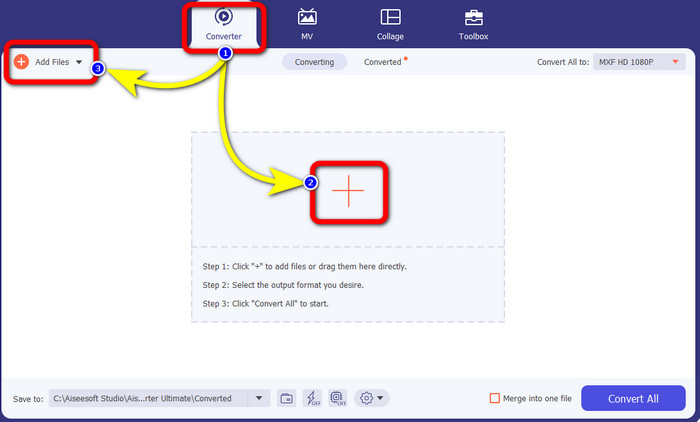
Step 2: Select the Converter panel when the interface shows up. Press the Plus icon to attach your video with an MXF file you want to convert. Also, you can select the Add Files button to add your video.
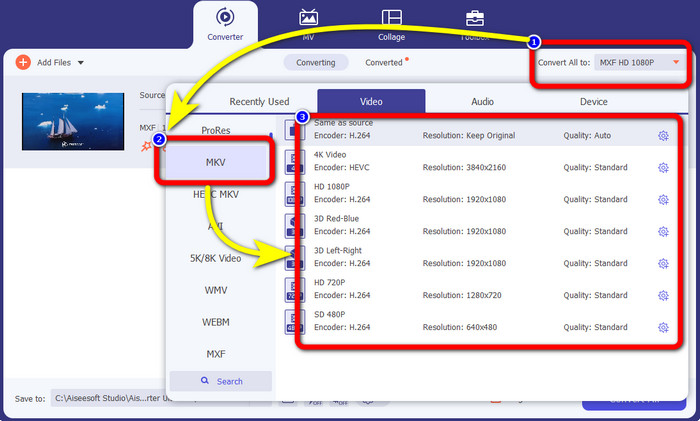
Step 3: After adding your file, click the Convert All to option. The format options will appear, then select the MKV file format.
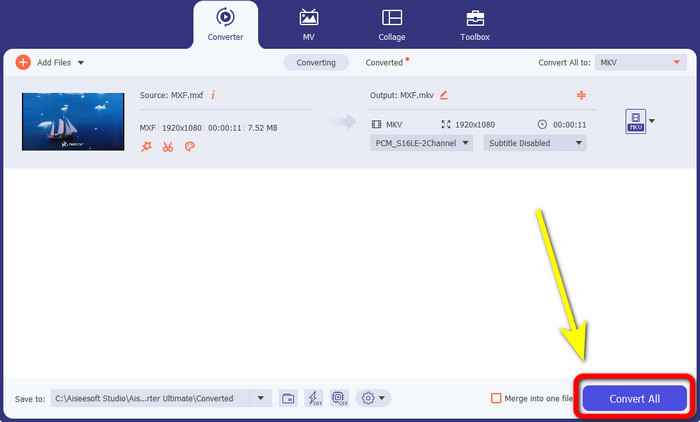
Step 4:Finally, you can already click the Convert All button to convert your MXF file to MKV format.
Parte 2: Métodos online para converter MXF para MKV
Usando o FVC Free Video Converter Online
When it comes to converting MXF to MKV format online, FVC Free Video Converter Online is for you. This online tool can convert more files, including MP4, MOV, FLV, GIF, MPG, 3GP, MKV, VOB, WEBM, etc. You don’t need to worry about how to use it because it only has three simple steps to convert files, which is perfect for any user, especially for beginners. In addition, this online tool video quality up to 1080p. It is also accessible on many browsers, such as Google Chrome, Mozilla Firefox, Microsoft Edge, and more. Moreover, aside from converting video formats, you can also convert audio formats, like MP3, M4A, AAC, AC3, WMA, FLAC, etc.
Vamos converter seu arquivo MXF para MKV usando o FVC Free Video Converter Online.
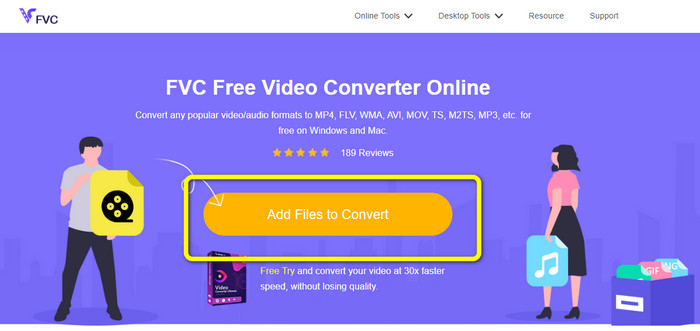
Step 1: Visit the FVC Free Video Converter Online website. Click the Add File to Convert button in the middle to upload your video with an MXF file.
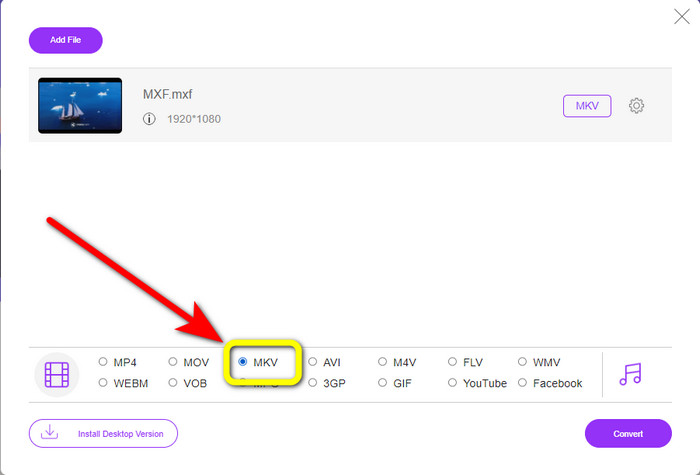
Step 2: A small box on your screen will appear after uploading your MXF file. Then, you will see the format options on the lower part. Select your desired format, which is the MKV file format.
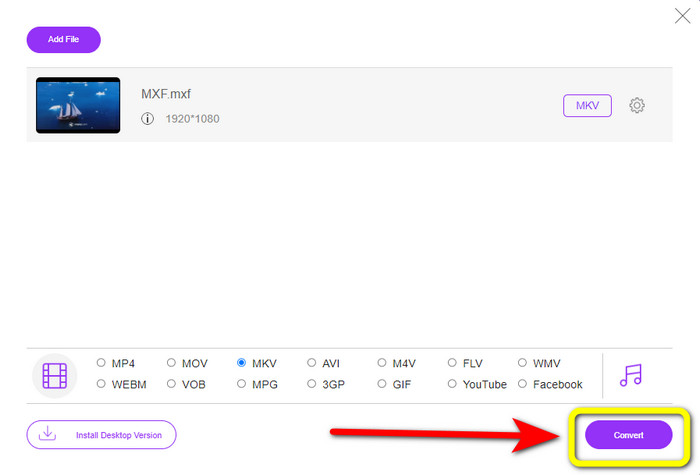
Step 3: For your last step, press the Convert button to convert the MXF file to MKV. Wait for the conversion process and save your video. You can also use this tool to convert MXF to WMV.
Usando o Convertio
Convertio is another online tool you can use to convert MXF to MKV file format. This online software can convert your video file to 37 formats, including MP4, MOV, WEBM, AVI, MTS, MPEG, XVID, DIVX, and more. You can also convert image and audio formats, like GIF, MP3, AAC, FLAC, M4R, etc. Aside from converting, Convertio allows you to compress video, add subtitles to a video, create a meme, and edit videos. However, even though it has many good tools and features, this online software has limitations when using the free version. Sadly, you can only convert files with a maximum of 100Mb file sizes. It only means you must purchase the subscription to converter unlimited files and experience more features from this tool. Follow the simple guides below to convert the MXF file to MKV format.
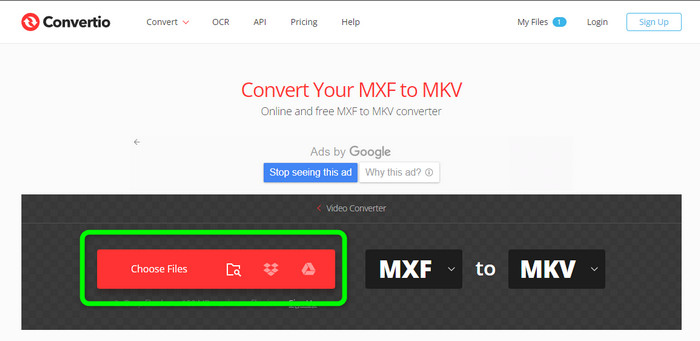
Step 1: Go to the Convertio website. Click the Choose Files button to attach your MXF file.
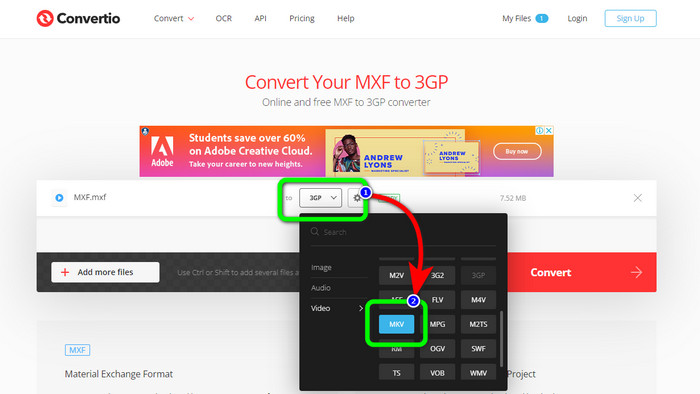
Step 2: When the file is already uploaded, click the format options and select the MKV file format.
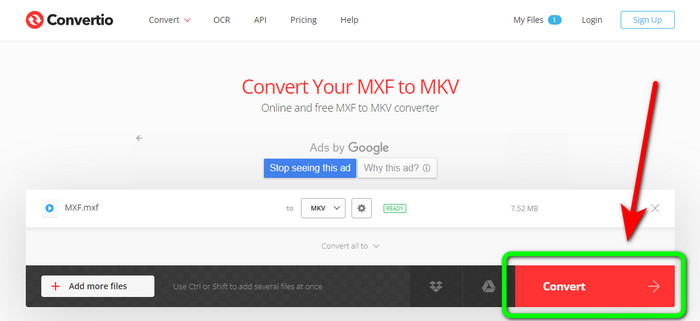
Step 3: After choosing your desired file format, the MKV file, you can click the Convert button. Wait for the process of converting the file and save it on your device.
Como usar o Cloudconvert
If you are still looking for another online converter to convert MXF to MKV, you must visit Cloudconvert. This online tool is good for converting various files, such as MKV, FLV, AVI, WEBM, WMV, etc. In addition, you can convert many files without losing the quality of your videos. However, you can only convert 25 files per day using the free version of this software. In this case, if you want to convert more files, you must buy a subscription. Also, there are times when the conversion process is slow, depending on your internet connection speed. But, Cloudconvert only has eight supported output file formats, which is not great for users. If you are ready to convert your video from an MXF file to MKV format, use the steps below..
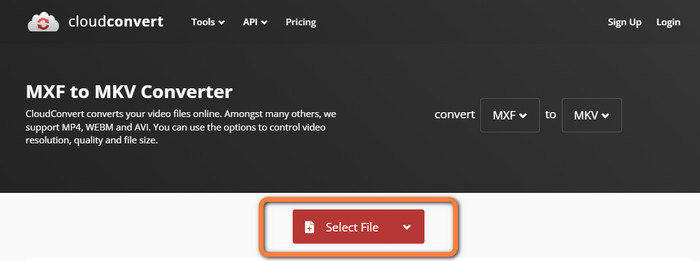
Step 1: Visit the website of Cloudconvert. Click the Select File button to insert the MXF file you want to convert to MKV.
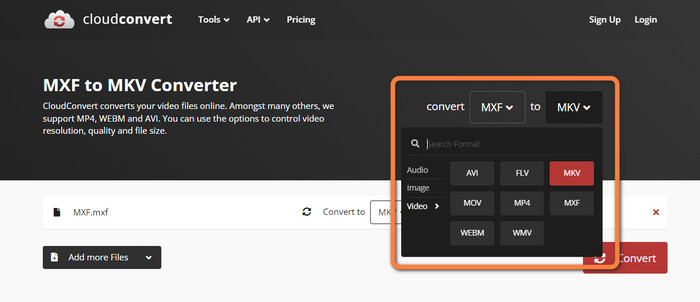
Step 2: After you insert your MXF file, proceed to the format options and select the MKV file format.
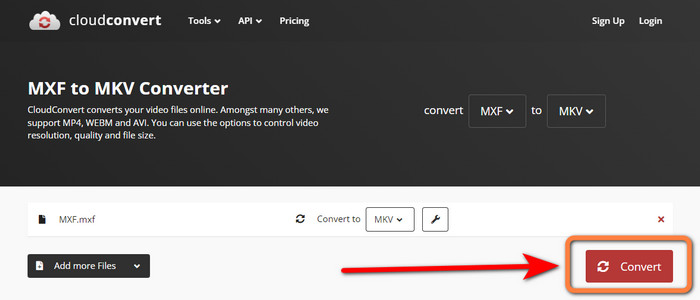
Step 3: The last step is to press the Convert button. Then, wait for the conversion process and save your final video. This tool also helps you convert TRP to MKV.
Parte 3: Compare MXF vs. MKV
| MXF | MKV | |
| Extensão de arquivo | .mxf | MKV |
| Descrição | Um formato de contêiner multimídia chamado MXF contém vídeo, áudio e metadados para acelerar o intercâmbio de vídeos entre vários computadores. Os arquivos MXF são frequentemente usados para filmes e comerciais de TV que serão exibidos nos cinemas. | O formato de contêiner multimídia Matroska, ou MKV, combina outros tipos de faixas de vídeo, áudio e legendas (como USF ou SRT) em um único arquivo. A distribuição online de curtas-metragens e amostras de áudio usa frequentemente arquivos MKV. |
| Desenvolvedor | A Sociedade de Engenheiros de Cinema e Televisão | Core Codec, INC. |
| Tipo MIME | aplicativo/mxf | vídeo/x-matroska |
| Codecs de vídeo | MPEG-4 AVC/H.264, MPEG-1, MPEG-2, MPEG-4 Visual, etc. | MPEG-1, Theora, Vídeo Real, Microsoft MPEG4 V2, VP8, MVC, etc. |
| Programas Associados | Visualizador de arquivos mais Adobe Premiere Pro Windows Media Player | VLC Media Player DIVX Player MX Player GOM Player KMPlayer PotPlayer |
Parte 4: Perguntas frequentes sobre a conversão de MXF para MKV
1. O MKV é um contêiner ou um codec?
O formato de contêiner multimídia para vídeo usado pela Matroska é conhecido como arquivo MKV. Extensible Binary Meta Language é a base do MKV, que suporta vários formatos de compressão de vídeo e áudio. MKV é um contêiner, não um codec, que é a principal distinção entre ele e outros formatos de vídeo.
2. O MKV é melhor que o MP4?
Ambos são magníficos. Para reproduzir vídeo em um navegador, o MP4 é mais amplamente suportado e tem menor sobrecarga de arquivo. O contêiner MKV é amplamente utilizado para converter discos Blu-Ray e DVDs em arquivos de vídeo.
3. O MXF é um arquivo de vídeo?
Definitivamente sim. MXF é um formato de arquivo para áudio e vídeo. Os arquivos MXF consistem em informações sobre a mídia interna. As informações também são conhecidas como metadados, incluindo tamanho do quadro, taxa de quadros, data de criação, etc.
Conclusão
This article offers the most excellent, tested, and proven methods to convert MXF to MKV using desktop tools and online applications. If you want to convert unlimited files easily and instantly, you can visit the FVC Free Video Converter Online.
-
 Como converter MKV para DivX online e offline gratuitamente
 Você está procurando as melhores maneiras de converter o formato MKV para DivX gratuitamente. Continue lendo para conhecer os melhores conversores online e offline de MKV para DivX
-
 Melhores procedimentos sobre como converter AMV para MKV gratuitamente
 Deseja converter AMV para MKV facilmente de graça? Nós lhe daremos informações suficientes e o melhor aplicativo com um conversor que você pode usar. Vamos prosseguir!
-
 Converta facilmente MTV para MKV usando esses conversores finais
 Quer conhecer o excelente método para converter MTV para MKV? Este post oferece três maneiras descomplicadas de converter arquivos online e no seu Windows/Mac
