


 Video Converter Ultimate
 Gravador de ecrã
 Reparo de vídeo
 Secure Download
Os 4 principais métodos eficazes para converter TS em 3GP
The article is focused on how to convert TS to 3GP. Nowadays, mobile phones are popular. This is one of the ways to watch your favorite videos. But unfortunately, there are times when the TS file is not supported by mobile phones. The popular format you can use to watch videos on the phone is the 3GP file format. This way, the only solution you can do is to convert your TS file to 3GP format. If that’s the case, this article can provide your needs. Read this article to learn about how to convert TS to 3GP.

Parte 1: Aplicativos gratuitos para download para converter TS para 3GP
Video Converter Ultimate
If you want a free downloadable application you can use on your Windows and Mac to convert TS to 3GP with ease; Video Converter Ultimate is for you. This software lets you convert TS to 3GP easily and quickly. Also, it will allow you to convert many files in a single click. In addition, you can convert your files quickly because Video Converter Ultimate has a speedy conversion process, which is 30x faster, unlike other converters. All users can also use this application because it has a friendly interface and simple methods. Moreover, this converter has more features than you imagine. It can also convert image file formats, such as JPG, PNG, BMP, TIFF, and more. Also, if you want to rotate your video, you can still rely on this application. You can flip your video horizontally and vertically. See the details below to discover more features.
Features
◆ Converta formatos de vídeo, como MP4, M4V, 3GP, FLV, AVI, MOV, MKV e muito mais.
◆ Confiável na criação de uma colagem maravilhosa.
◆ Oferece processo de conversão em lote.
◆ O criador de videoclipes está disponível.
◆ Pode ajustar a velocidade do vídeo de 0,125x até 8x mais rápido.
◆ Oferece ferramentas de edição, como aprimorador de vídeo, compactador, fusão, aparador, etc.
Prós
- Também é bom na conversão de arquivos de imagem.
- Não há necessidade de uma conexão com a internet.
- Perfeito para iniciantes e tem uma interface simples.
- Tem a capacidade de personalizar vídeos 3D a partir de 2D.
Contras
- Compre a versão pro para experimentar ótimos recursos.
To convert TS to 3GP file format, let’s use the Video Converter Ultimate with detailed guides below.
Step 1: Click the downloading button below to download the Video Converter Ultimate for free on your Windows or Mac. Then, install it and run the converter.
Free DownloadFor Windows 7 or laterSecure Download
Free DownloadFor MacOS 10.7 or laterSecure Download
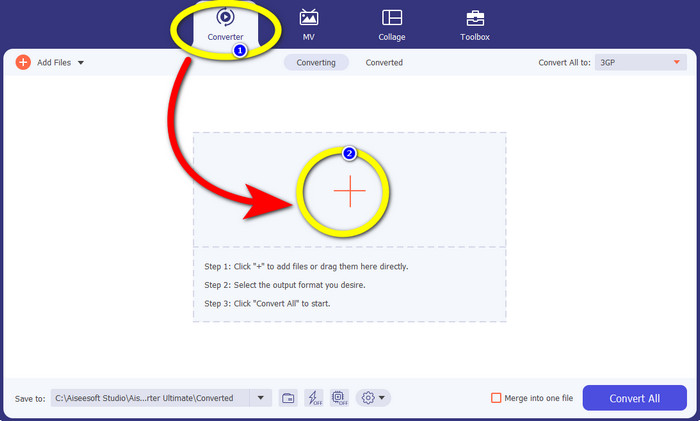
Step 2: Select the Converter panel and click the + sign to import the TS file you want to convert to 3GP format.
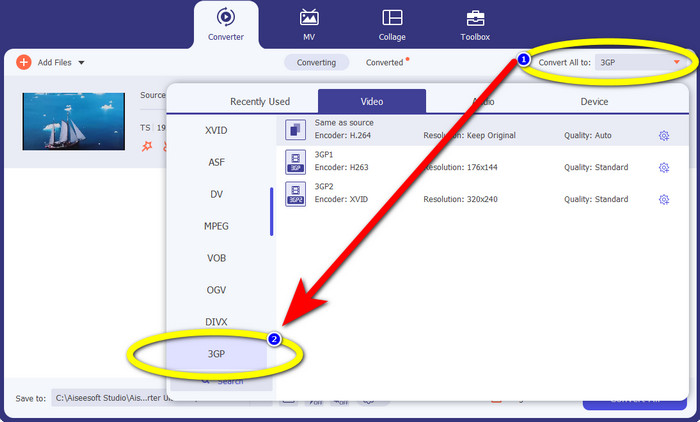
Step 3: After you import the TS file, click the Convert all to button. The format options will show up, and then click the 3GP file format.
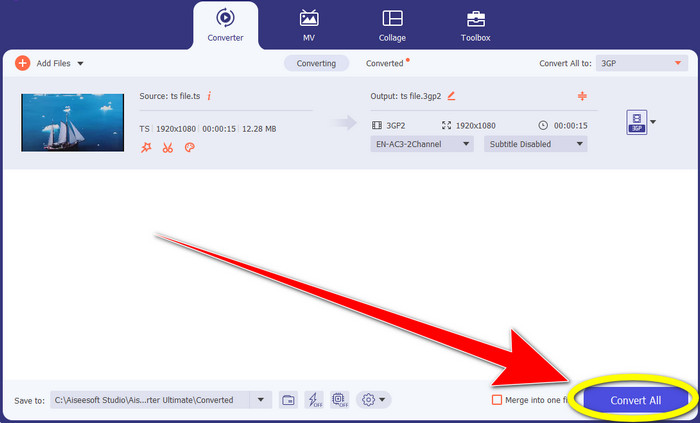
Step 4: For the final step, click the Convert All button. The conversion process only takes a few seconds, and you can already save your final video on your Windows or Mac.
Conversor de Vídeo HitPaw
Another free downloadable tool to convert TS to 3GP is HitPaw Video Converter. This converter is also great for converting different files, like MKV, M4V, VOB, WEBM, FLV, XVID, M2TS, TS, 3GP, and more. Also, you can convert audio formats easily using this tool. In addition, it has many editing tools, like cut, merge, crop & rotate, watermark, speed, filter, etc. Moreover, HitPaw Video Converter lets you download videos from 1000+ sites like YouTube, Bili Bili, Facebook, etc. However, even though it is a free download application, the features are limited, so you still need to purchase the application. Also, the process of downloading and installing it to your Windows and Mac is complicated, and there are many processes you have to do. Follow the steps below if you want to use HitPaw Video Converter to convert TS to 3GP.
Step 1: Download the HitPaw Video Converter on your Windows or Mac. Follow the installation process and open it.
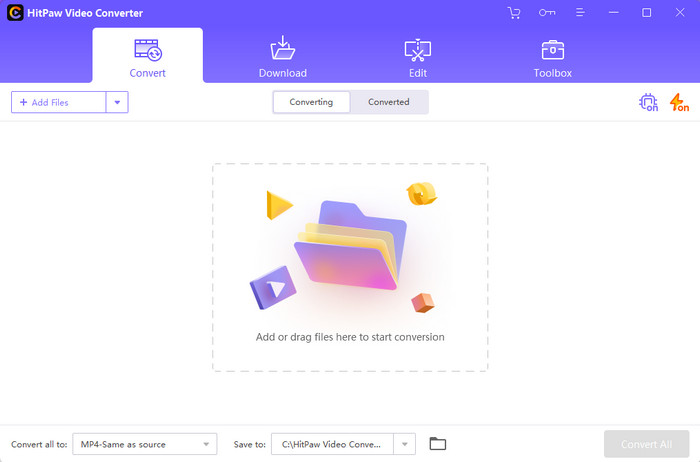
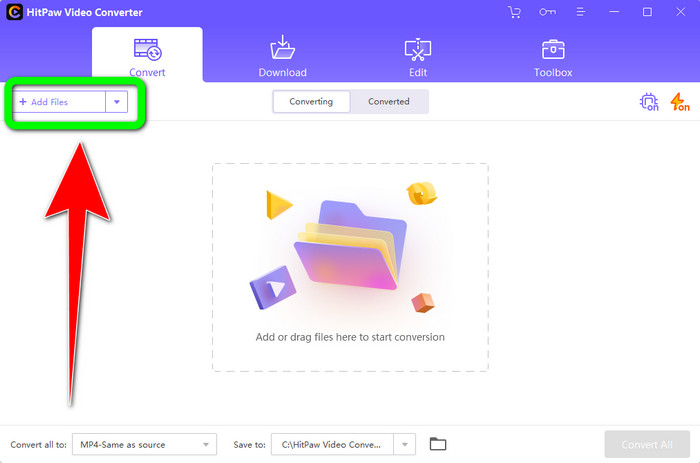
Step 2: Click the Add Files button to upload the TS file.
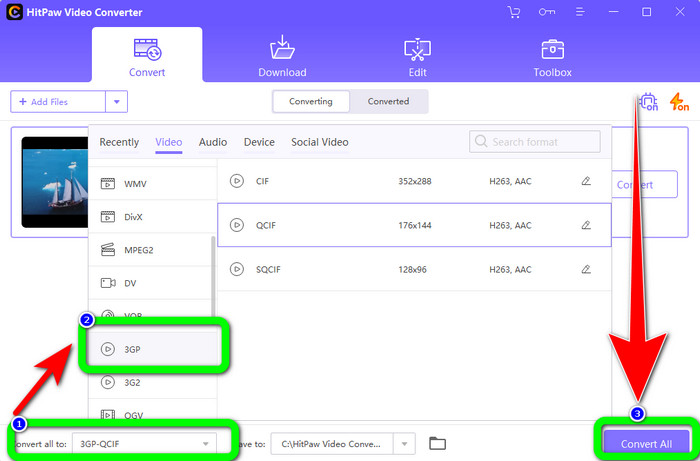
Step 3: Click the Convert All to button. Then, format options will appear on the screen. Select the 3GP file format and click the Convert All button to finally convert and save your final video.
Parte 2: Incríveis Conversores TS para 3GP Online
FVC Free Video Converter Online
When it comes to online converters, FVC Free Video Converter Online. This application can convert TS to 3GP easily and smoothly. It can also help you convert more files, like MP4, AVI, WMA, TS, M2TS, XVID, FLV, and more. In addition, this converter is simple to utilize and is suitable for all users. Moreover, you can use this free online software on both Windows and Mac. It is also available in almost all browsers, like Google, Mozilla Firefox, Microsoft Edge, and more. Follow these simple steps to convert TS to 3GP file format using FVC Free Video Converter Online.
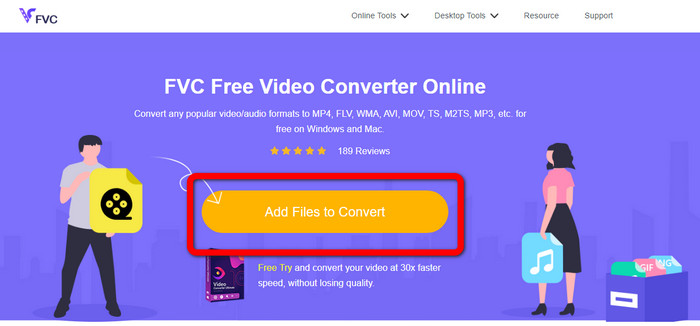
Step 1: Proceed to the website of FVC Free Video Converter Online. Click the orange box in the middle to upload the TS file.
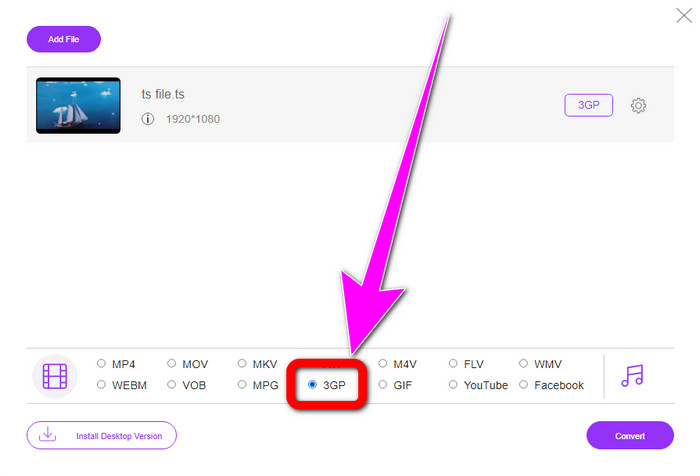
Step 2: After you upload the TS file, you will see many format options in the lower part of the interface. Then, choose your desired file format, which is the 3GP format.
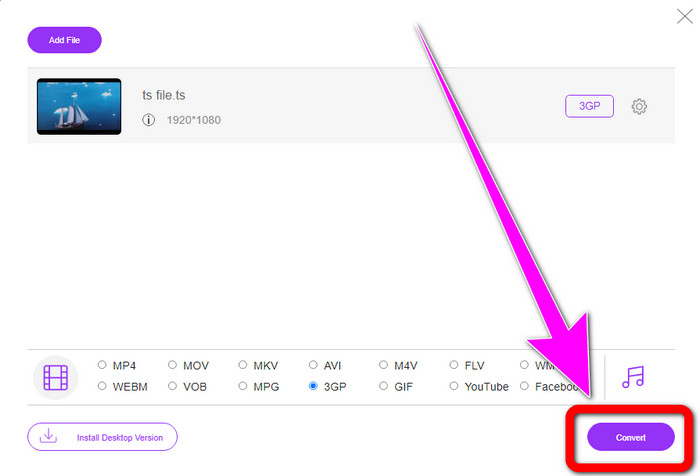
Step 3: If you are done choosing and selecting the 3GP format, click the Convert button. Then, download and save your final video output.
Convertio
Convertio is another online tool for converting TS to 3GP. Like the applications above, this converter is easy to utilize because it only has three clicks to convert various files, such as MOV, AVI, FLV, MKV, MPG, MP4, and more. Aside from converting videos, Convertio is also audio, document, and presentation converter. But it has a disadvantage, especially when using the free version of this tool. It only has a maximum file size of 100Mb, so you can’t convert unlimited files. You must use the paid version to experience outstanding performance from this application. Proceed to the steps below to convert TS to 3GP format.
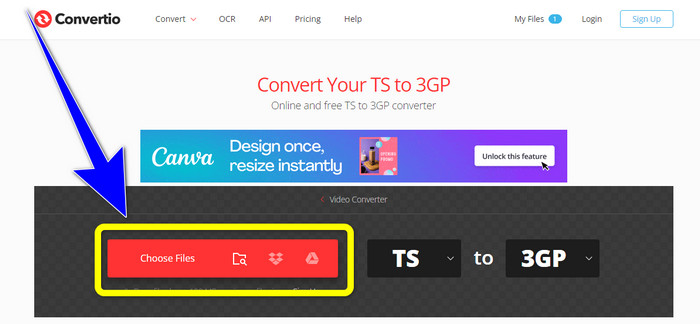
Step 1: Visit the website of Convertio. Then, click the Choose Files button to insert your TS file.
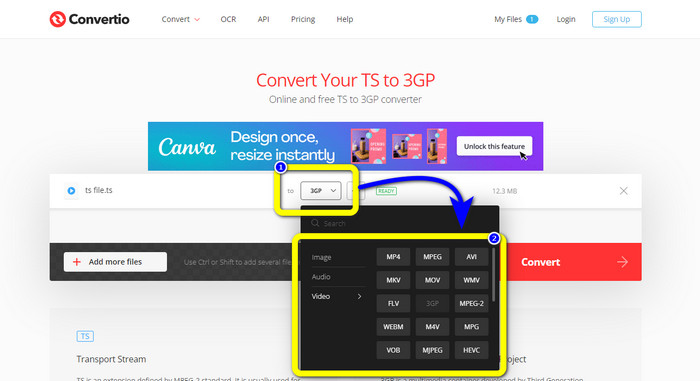
Step 2: Click the format options and select the 3GP file format.
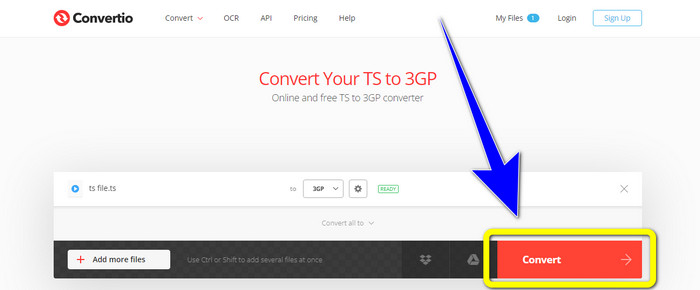
Step 3: For the last step, press the convert button. Wait for the process, then save your output. You also can use this tool to convert TS to FLV.
Parte 3: TS vs. 3GP
| Arquivo | TS | 3GP |
| Extensão de arquivo | .ts | .3gp |
| Descrição | A especificação MPEG-2 define TS como uma extensão. Normalmente, é empregado para transmissão, streaming de mídia da Internet e armazenamento de música e vídeo em DVDs. Quando ocorre uma falha na transmissão de dados, os fluxos elementares desse contêiner de mídia são salvos de uma forma que permite reprodução rápida e sincronização de áudio/vídeo. | Para telefones baseados em GSM (Sistema Global para Comunicações Móveis), o Projeto de Parceria de Terceira Geração criou o contêiner multimídia 3GP em 1998. O contêiner é perfeito para telefones celulares porque usa menos dados, largura de banda e armazenamento. É um contêiner comum para arquivos MMS (Multimedia Messaging Service). |
| Desenvolvido por | O grupo de especialistas em imagens em movimento | Projeto de parceria de terceira geração |
| Programas Associados | QuickTime Player, Windows Filmes e TV VLC Media Player | Windows Meda Player, VLC Media Player |
Parte 4: Perguntas frequentes sobre a conversão de TS para 3GP
TS é melhor que MP4?
Os arquivos MP4 e TS têm a mesma qualidade de vídeo. A principal distinção entre arquivos TS e MP4 é que os arquivos TS são planos, mas os arquivos MP4 começam com um índice. Por outro lado, os bits de vídeo dentro dos arquivos são idênticos. Portanto, arquivos TS, M2TS e MP4 têm a mesma qualidade de vídeo.
Posso enviar arquivos TS para o YouTube?
Infelizmente, não. Você pode enviar arquivos TS para o Facebook, mas não para o YouTube. O melhor programa para abrir arquivos TS é o VLC Media Player.
O que são MPEG TS e PS?
TS is Transport Stream which is responsible for communication and broadcasting applications. PS is Program Stream that can be used for storage applications like DVDs.
Conclusão
These are the top four effective methods to convert TS to 3GP. But some applications can be fully used when getting the paid version. If you want a free converter without limitations, use FVC Free Video Converter Online.
-
 TS para GIF: como transformar arquivo TS em GIFs animados
 Aprenda como alterar os arquivos TS para o formato GIF com a ajuda deste artigo. A lista abaixo indica ideias diferentes sobre TS e GIF e como converter TS em GIF.
-
 Como converter DIVX para 3GP no Windows, Mac e Online
 Como converter DIVX para 3GP? Se você está procurando uma resposta, leia este artigo. Mostraremos ótimos procedimentos com a ajuda de diferentes conversores.
-
 4 melhores maneiras de converter SWF para 3GP no Windows, Mac e online
 Aqui estão os métodos mais úteis para converter SWF para 3GP instantaneamente. Além disso, esta postagem mostrará algumas ferramentas eficazes do Windows e on-line que você pode usar.
