


 Video Converter Ultimate
 Gravador de ecrã
 Reparo de vídeo
2 maneiras fáceis de compactar arquivos MKV sem perder a qualidade
Want to reduce the size of a MKV file but don’t want to lose its video quality? Is there any simple, especially free way to compress MKV files?
MKV file carries a good video and audio quality, but it generally has a large file size. When you want to upload and share a MKV video, it’s quite necessary to compress it. The question is, how to compress MKV files without losing quality?

In fact, there are a large number of video compressors including free online ones offered on the market that can help you reduce the file size of your MKV videos. Here in this post, we like to share 2 simple ways to compress MKV.
Parte 1. Como compactar arquivos MKV online gratuitamente
As it mentioned above, many free online video compressors or editors can help you compress MKV and reduce the file size. At the first part, we like to recommend a popular online Free Video Compressor to help you get the job done.
Este compressor de arquivos MKV online gratuito é especialmente projetado para compactação de vídeo. É altamente compatível com quase todos os formatos de vídeo, incluindo MKV, MP4, MOV, FLV, AVI e muito mais. Ele tem a capacidade de reduzir o tamanho do arquivo de vídeo 4K, HD ou SD sem perder qualidade. Além do mais, esta ferramenta de compactação MKV traz um recurso de compactação em lote para garantir que você possa concluir a compactação de vídeo com uma velocidade mais rápida.
Step 1. Open your browser and go to the official site of this MKV file compressor. It is compatible with any frequently-used browser like Google Chrome, IE, Firefox, Safari and more.

Step 2. Click the Add Files to Compress button to download and install a small file size launcher for the MKV compressing.
Step 3. Select and add the MKV file you want to compress. Then you can see the MKV file size and its video length on the top-right corner.

Step 4. You are allowed to make adjustments of the MKV video resolution, frame rate and bitrate. Moreover, you can select a suitable output format for the compressed video. After all these operations, click the Compress button to start compressing MKV.

Com apenas alguns cliques, você pode compactar facilmente um arquivo MKV para reduzir o tamanho do arquivo. Mais importante ainda, nenhuma marca d'água será adicionada ao vídeo compactado. Você deve saber disso, a maioria dos compressores de vídeo online irá inserir uma marca d'água em seu arquivo de saída.
Parte 2. Maneira profissional de compactar arquivos MKV
With the method above, you can easily free compress a MKV file online. But if you compress your MKV video too much, you are more likely get a poor-quality compressed file. Actually, you can choose to cut the unnecessary parts to reduce the file size without any quality loss. Here we introduce you with a powerful video converting and editing tool, Video Converter Ultimate to help you compress your MKV files without losing quality.
Video Converter Ultimate is specially designed to deal with various video converting and editing works. It has the capability to trim video and only save the useful part. What’s more, it is equipped with a Video Compressor function for the MKV files compressing.
Free DownloadFor Windows 7 or laterSecure Download
Free DownloadFor MacOS 10.7 or laterSecure Download
Step 1. Double click the download button above to free install and launch this MKV file compressing software on your computer. This video compressor allows you to compress MKV files on both Windows PC and Mac.
Step 2. When you enter the main window, click the Toolbox tab and then select the Video Compressor feature.
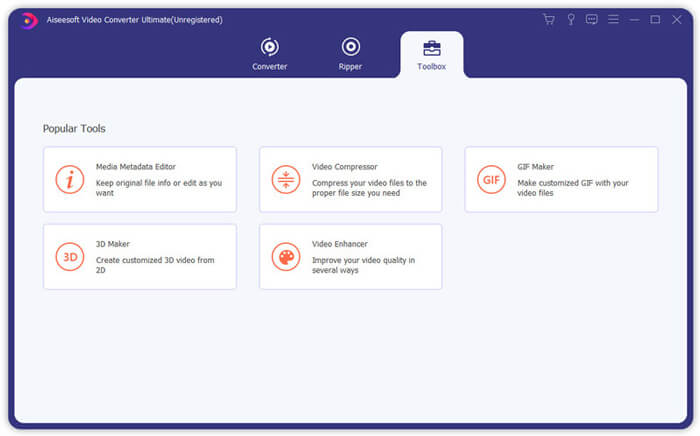
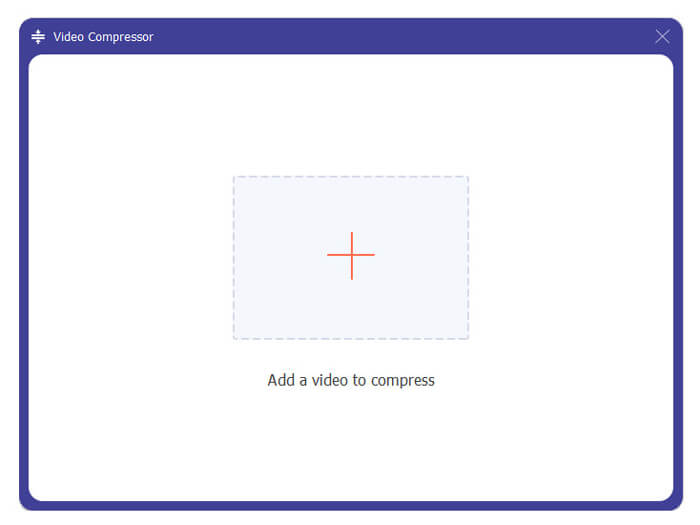
Step 3. Click the + icon to import a MKV file to compress.
Agora você pode reduzir facilmente o tamanho do arquivo MKV de acordo com sua necessidade. Durante esta etapa, você também pode personalizar a resolução de vídeo, taxa de bits, duração e nome do arquivo como desejar. Além disso, você pode selecionar um formato de saída adequado para o vídeo compactado.
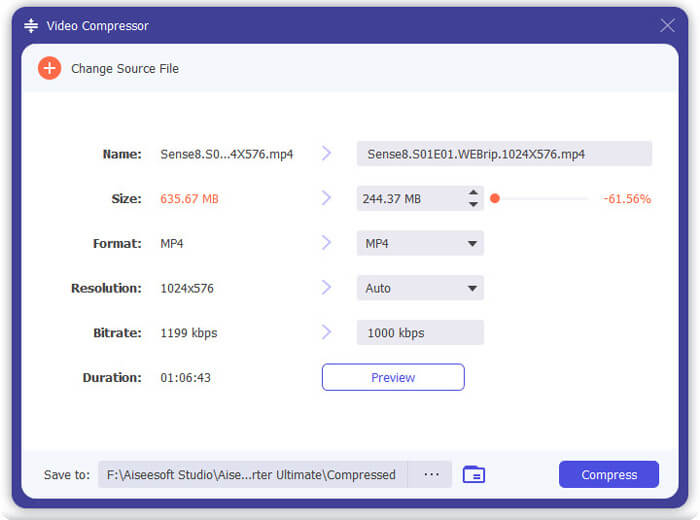
Step 4. Click the Compress button to start compressing your MKV video to a small file.
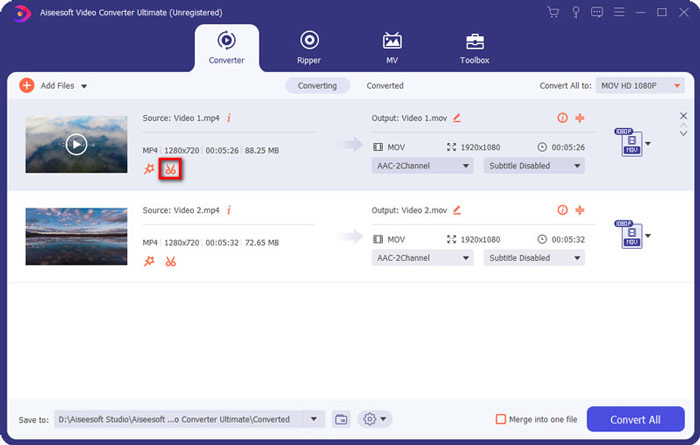
Step 5. If you want to reduce MKV file size through trim feature, you can back to the home window and choose the Converter option. After importing the MKV video, you can click the Cut icon to remove the useless parts.
Step 6. You can drag the clipper on the progress bar or directly enter the start and end time to trim your MKV file. Then you can click Save button to confirm your operation.
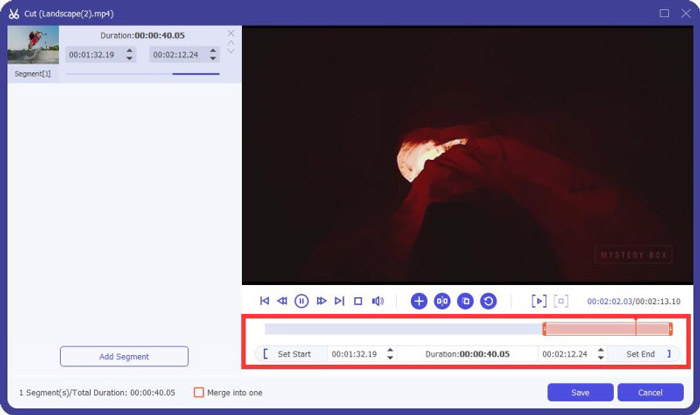
After that, you will be guided back to home window. Here you can click Convert All button to output the MKV video. This MKV files compressing software is designed with a built-in media player which can help you directly view the compressing effect.
Whether you compress a video for email or WhatsApp, you can easily achieve it in this program.
Parte 3. Perguntas frequentes sobre compactação de arquivo MKV
Questão 1. Como comprimir um vídeo sem perder qualidade?
Você pode optar por cortar o vídeo para reduzir o tamanho do arquivo. Ao fazer isso, você pode compactar um vídeo sem qualquer perda de qualidade. Se você escolher um compressor de vídeo profissional ou online gratuito, o vídeo definitivamente perderá alguma qualidade de imagem ou som. Mas você pode não notar a perda de qualidade em seus olhos.
Questão 2. Como converter um arquivo MKV para MP4 gratuitamente?
To free convert a MKV file to MP4 video, you can rely on the trust-worthy Free Online Video Converter. It is able to make the MKV to MP4 and other video/audio conversions with ease.
Pergunta 3. Por que os arquivos MKV são tão grandes?
MKV é um formato de contêiner que usa um codec melhor com uma taxa de compressão mais alta. Os arquivos MKV geralmente são retirados de Blu-Rays e têm resolução mais alta.
Conclusão
After reading this post, you can get 2 easy ways to compress MKV files. With the recommended video compressors, you can handily reduce video size of your MKV files. If you have any better way to compress MKV, please share it in the comment with other readers.
-
 Tutorial para compactar um vídeo para e-mail no iPhone / Android / Online
 Não consegue enviar um vídeo muito grande por e-mail? Se você tiver esse problema, poderá obter maneiras viáveis de compactar um vídeo para e-mail aqui. Este artigo mostrará como reduzir em detalhes grandes arquivos de vídeo gratuitamente.
-
 Tutorial para compactar GIF e reduzir o tamanho do arquivo com alta qualidade
 Aqui estão duas maneiras fáceis de compactar GIF em seu computador ou telefone celular. Você pode usar o FVC Free Online Video Compressor e o Photoshop para reduzir o tamanho do arquivo GIF em diferentes aspectos.
-
 2 maneiras de compactar vídeos AVCHD em tamanhos de arquivo pequenos gratuitamente
 Leia e obtenha 2 maneiras fáceis de compactar arquivos de vídeo AVCHD. Você pode usar compressores de vídeo online e offline para reduzir o tamanho do vídeo AVCHD gratuitamente em seu computador.
