


 Video Converter Ultimate
 Gravador de ecrã
 Reparo de vídeo
 Secure Download
Abordagens surpreendentes para converter TS para DIVX gratuitamente
TS file format is commonly used for broadcasting HDTV. But if you want to play your video on portable devices, you must convert it to other file formats, such as AVI, MPEG, WMV, DIVX, MP4, etc. When it talks about converting, you can rely on this article. We will teach you how to convert TS to DIVX for free and other file formats. Also, we will introduce you to offline downloadable converters you can utilize. If you are ready, then let’s proceed with reading this article.

Parte 1: Converta TS para DIVX sem Perder a Qualidade
You can download Video Converter Ultimate to convert TS to DIVX. This tool has an ultra-fast conversion speed, which is 30x faster than the average speed. It also offers a batch conversion process, wherein you can convert multiple files in one click. In this way, you can convert multiple files in a short time. In addition to that, it supports 1000+ video formats, like AVI, WMV, FLV, MP4, M4V, TS, MTS, and more. This application ensures that your video’s quality won’t change after converting your TS file.Also, with its intuitive interface and simple methods, you can convert files easily and quickly. You can also utilize this converter on your Windows and Mac, which makes it available for both Windows and Mac users.
Além disso, você não sabia que o FVC Video Converter Ultimate pode fazer mais além da conversão? Para sua informação adicional, ele tem mais recursos excelentes do que você imagina. Se você deseja aprimorar seu vídeo TS, confie neste aplicativo. Esta ferramenta oferece uma caixa de ferramentas para melhorar seus vídeos, como usar um aprimorador de vídeo para alterar a resolução e o brilho do seu vídeo. Você também pode corrigir a cor do vídeo para torná-lo mais agradável aos espectadores. Além disso, você pode criar um videoclipe com esta ferramenta. Você pode usar temas gratuitos para tornar seu videoclipe único e atraente. Estes são alguns ótimos recursos que você pode experimentar usando o Video Converter Ultimate.
Features
◆ Pode converter vários formatos de arquivo de vídeo, como M4V, MP4, SWF, WMV, AVI, TS, FLV e mais de 1.000.
◆ Está disponível a criação de um videoclipe com temas acessíveis.
◆ Capaz de criar uma colagem. Ele também oferece modelos e filtros gratuitos.
◆ Fornece uma caixa de ferramentas para melhorar o vídeo, como um aprimorador de vídeo, aparador, rotador, etc.
Você pode seguir os guias detalhados abaixo para converter o arquivo TS para DIVX e outros formatos. Além disso, mostraremos alguns processos para editar seus vídeos de maneira mais simples.
Step 1: Download and Install the Video Converter Ultimate on your Windows or Mac. Click the Download button for Windows if you are a Windows user. Then click the Mac version if you are a Mac user.
Free DownloadFor Windows 7 or laterSecure Download
Free DownloadFor MacOS 10.7 or laterSecure Download
Step 2: When done downloading the application, launch it. Select the Converter button with the four options at the upper part of the interface.
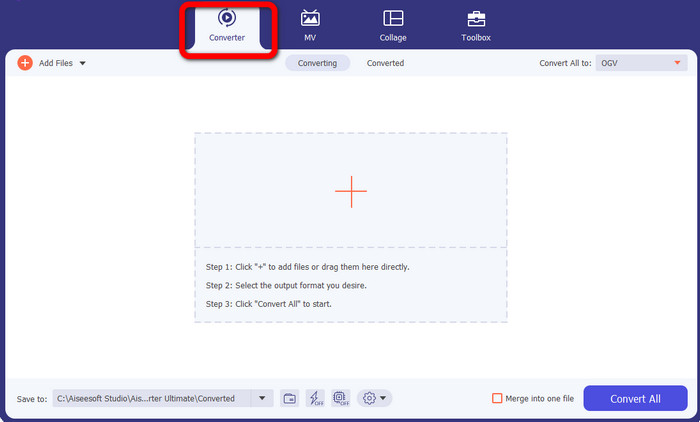
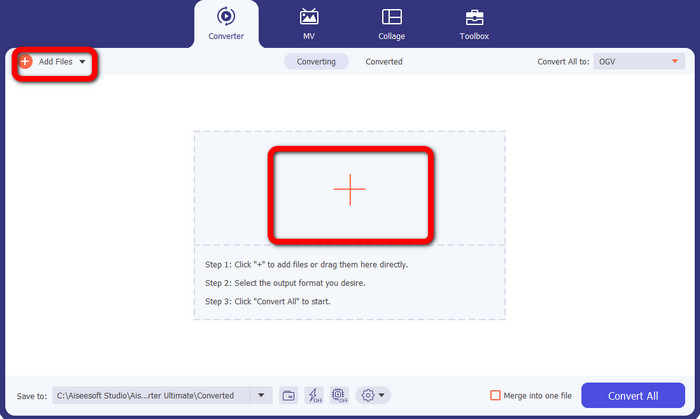
Step 3: After selecting the Converter option, click the Plus sign button to add the TS file you want to convert. You can also click the Add Files button to add the video file.
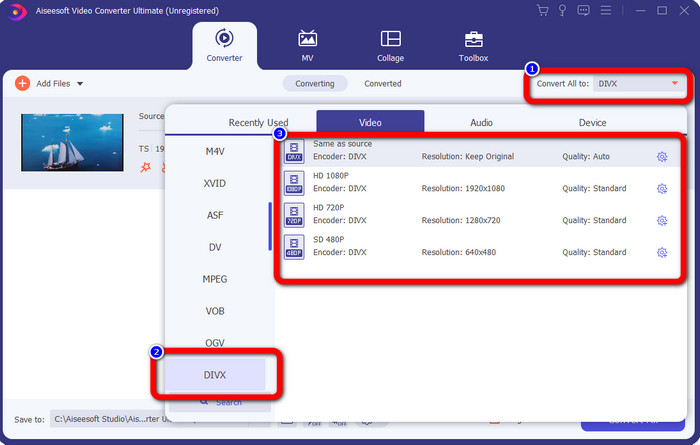
Step 4: Go to the Convert All to button after choosing the TS video file. After clicking it, the format options will show up on your screen. Choose the DIVX file format. You can also select your desired resolution from 480p to 1080p.
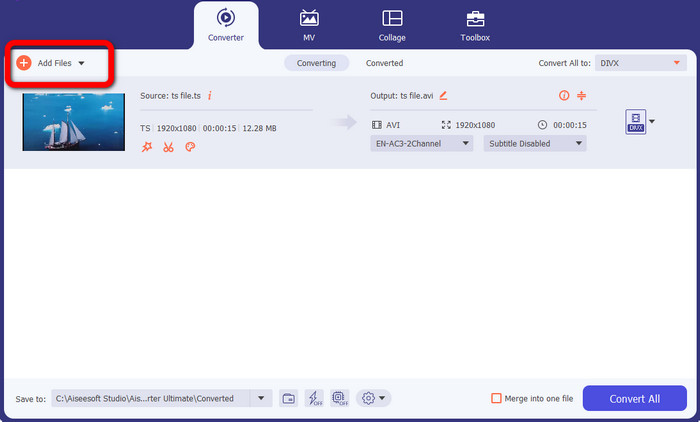
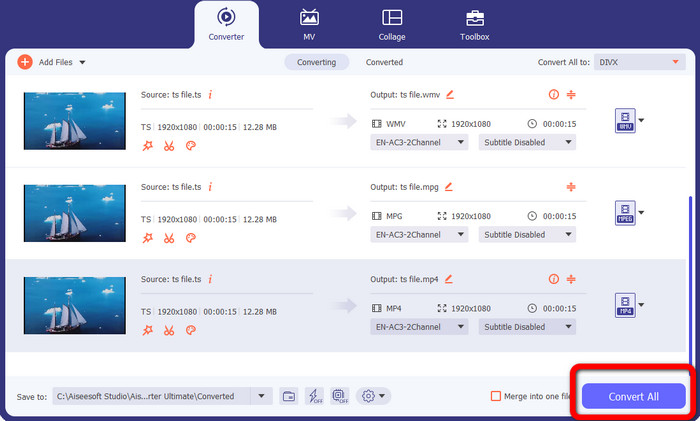
Step 5: This tool offers batch conversion. So, click the Add Files button at the upper left of the interface to convert your TS video file to other formats such as AVI, MPEG, WMV, and MP4.
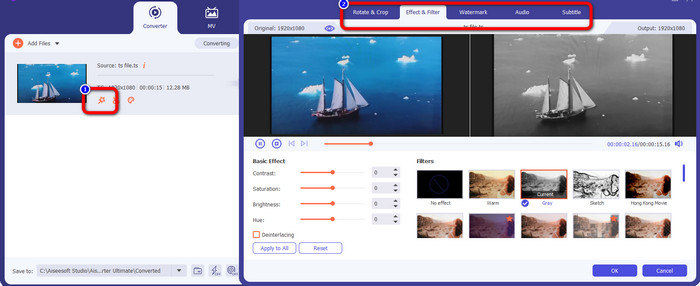
Step 6: If you want to edit your video, click the Edit icon. Then, you can edit your video by adding effects and filters, rotating and cropping a video, and more. After that, click OK.
Step 7: When you add files and change them into your desired file formats, click the Convert All button. Wait for the fast conversion process and download your files on your device.
Parte 2: Conversor Gratuito para Converter TS para DIVX
You can download the FVC Free TS Converter if you want a free converter. You may convert TS videos for free to any video format, including DIVX, AVI, MP4, WMV, and MPEG files. Whether a professional or an amateur, it assists you in converting TS videos to HD videos and lossless audio without compromising the high quality. In addition, this TS converter also offers batch conversion, which means you can upload multiple files and convert them simultaneously. It has a conversion speed of 10x faster than other converters, so you don’t have to consume more time to convert multiple files. Also, you can convert TS videos to audio formats like MP3, AAC, AIFF, ALAC, FLAC, and WAV.
Furthermore, you can also edit your TS videos in this application. FVC Free TS Converter also gives you access to a potent video editor in addition to conversion. It is simple to use to edit and modify your own TS files. You can select a unique theme for each video, including birthdays, family, sports, and even occasions like Halloween. Changing the title, creator, or duration of videos is no longer a challenge, thanks to FVC Free TS Converter. So, without further ado, let’s start converting your TS file to other formats like DIVX, WMV, AVI, MP4, MPEG, and AVI.
Step 1: Download the FVC Free TS Converter on your Windows PC or Mac by clicking the Download button below.
Free DownloadFor Windows 7 or laterSecure Download
Free DownloadFor MacOS 10.7 or laterSecure Download
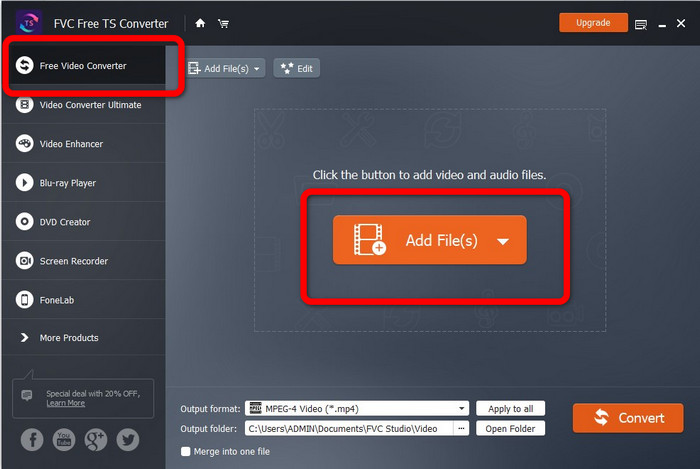
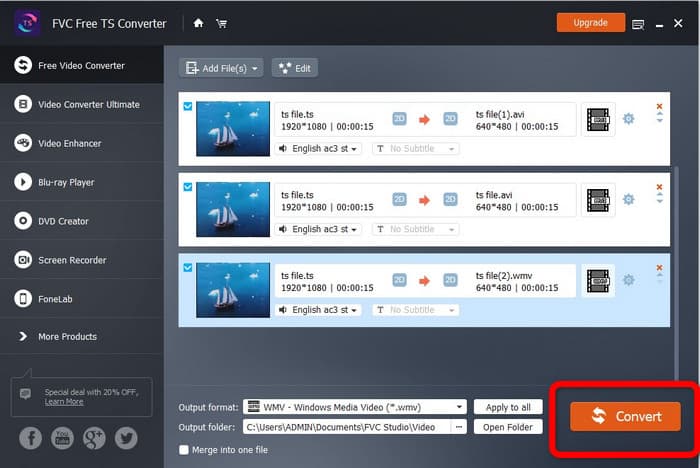
Step 2: Launch the application. Select the Free Video Converter button on the main interface and click the Add Files to upload your TS file.
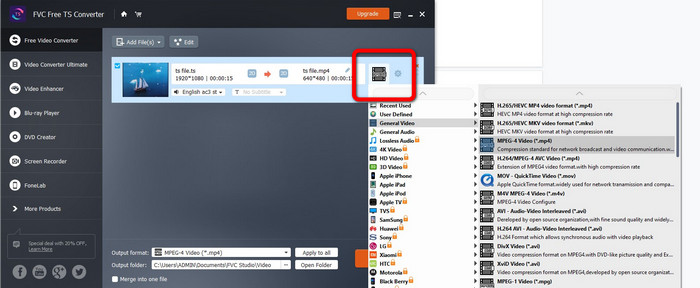
Step 3: Click the format options and select your desired output, such as DIVX, WMV, MPEG, AVI, MP4, and AVI. You are allowed batch conversion to convert multiple times at once.
Step 4: After adding all files, you can convert them in a single click by clicking the Convert button. After that, you can already save your videos in different file formats. You can also use this software to convert WebM to DIVX.
Parte 3: Perguntas frequentes sobre a conversão de TS para DIVX
Posso renomear TS para MP4?
You should not just rename the TS files' extension to 'mp4' or another video format to accomplish a video format conversion. This won't alter the file format. How can TS video be converted to MP4? A more dependable way to convert TS to MP4 is using FVC Free TS Converter. This converter can easily convert your TS file to MP4.
Qual é melhor, TS ou MP4?
Both MP4 and TS files have the same video quality. The main distinction between TS and MP4 files is that TS files are flat, but MP4 files start with an index. The video quality of TS, M2TS, and MP4 files is the same since the video bits inside each file are identical in all other respects. Click here to get how to convert TS to MP4.
Como posso converter TS para DIVX rapidamente?
Se você deseja um conversor de vídeo rápido, pode usar o Video Converter Ultimate. Este aplicativo para download oferece um processo de conversão ultrarrápido, 30 vezes mais rápido.
Conclusão
As shown above, these are astounding approaches to convert TS to DIVX for free. These tools are both magnificent and useful. So what are you waiting for? Use the Video Converter Ultimate and FVC Free TS Converter to convert multiple files.
-
 Como converter MPG para DivX sem perda de qualidade
 Você está procurando um aplicativo sem problemas que possa usar para converter MPG para DivX? Este artigo fornecerá diferentes métodos eficazes que você deve tentar.
-
 Como converter DIVX para 3GP no Windows, Mac e Online
 Como converter DIVX para 3GP? Se você está procurando uma resposta, leia este artigo. Mostraremos ótimos procedimentos com a ajuda de diferentes conversores.
-
 Converta VOB para DIVX com as melhores maneiras de usar ótimas ferramentas
 Este artigo apresentará a você um excelente conversor de VOB para DIVX que você pode usar. Não perca esta chance e aprenda estes métodos fáceis de converter VOB para DIVX.
