


 Video Converter Ultimate
 Gravador de ecrã
 Reparo de vídeo
2 maneiras gratuitas de compactar arquivos WMV online
For sharing or uploading your WMV file to YouTube, Facebook, Google Video, or other platforms, you need to compress WMV and reduce its file size. Do you know how to compress WMV files?

Surely you want to compress WMV while still keeping its original image and sound quality. Considering your need, this post like to share 2 simple ways to free compress MKV files online.
Parte 1. Como compactar arquivos WMV online gratuitamente
There are lots of video compressing and editing tools offered on the market that can help you compress MKV files with ease. Here we strongly recommend the easy-to-use Free Video Compressor to reduce the file size of your MKV files.
This free online WMV compressor has the capability to compress video in any frequently-used format like WMV, AVI, MP4, FLV, MKV, MOV and more. Besides the common videos, it also enables you to compress 4K UHD and 1080p, 720p HD videos. It is designed with a batch compress feature which allows you to compress two or more MKV files at a time. You can take the following guide to compress MKV free online.
Step 1. Go to the official site of this free online WMV file compressor on your browser. It is compatible with any popular browser including Chrome, Safari, IE, Firefox, and more.

Step 2. Click the Add Files to Compress button to install a small file size launcher for the WMV files compressing. After that, you can select and upload the WMV file you want to compress from the pop-up window.

Step 3. You can freely adjust the video resolution, frame rate and bitrate of your WMV video. Meanwhile, you are allowed to select another output format for the compressed file. Then yo can simply click he Compress button to start compressing WMV free online.

Comparado com outras ferramentas de compactação MKV online, este Compressor de Vídeo Gratuito pode oferecer uma velocidade de compactação MKV mais rápida. Mais importante, ele não adicionará nenhuma marca d'água ao vídeo de saída.
Parte 2. Como compactar arquivos WMV online com Clideo
Besides the Free Video Compressor above, you can also rely on the popular Clideo to reduce your MKV file size. It supports many video formats including the WMV, MP4, MOV, VOB, AVI, and more. It is designed with a concise interface which ensures you have a convenient video compressing experience.
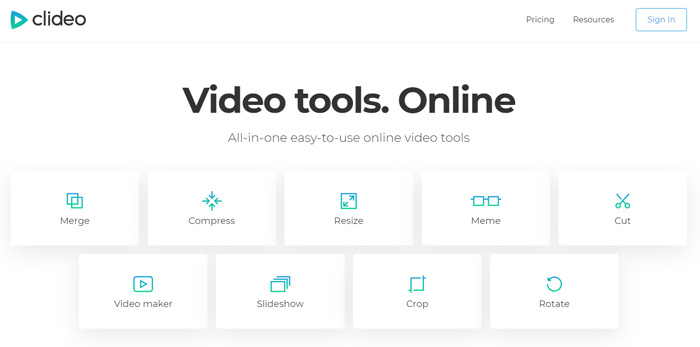
Step 1. Open your browser and go to the Clideo official site. When you get there, choose the Compress option.
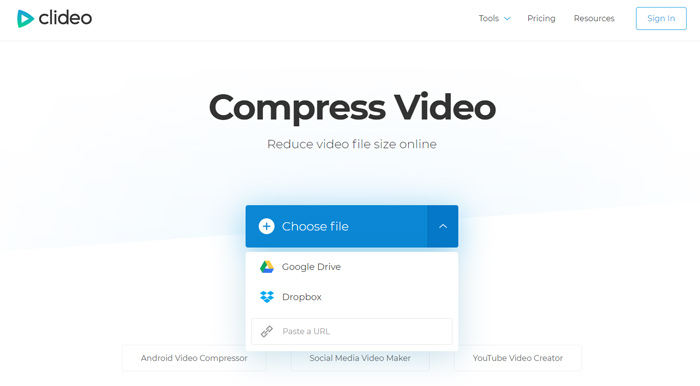
Step 2. When you enter the Compress Video page, you can click the Choose file button to upload your WMV video. Besides the local hard drive, it also allows you to add MKV files through Dropbox, Google Drive or URL. It will take quite a long time to complete the uploading process.
Step 3. This free online WMV compressor will automatically compress the WMV file for you. You can directly preview the compressing result. You need to sign in for more editing. After that, you can click Download button to save the compressed WMV file on your computer.
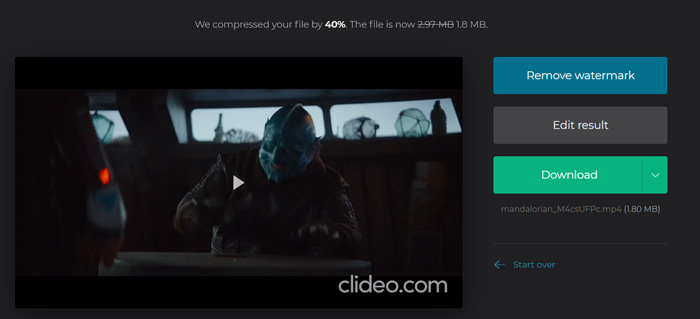
Clideo irá inserir uma marca d'água em seu arquivo WMV compactado. Você precisa entrar no Facebook ou conta Google para remover a marca d'água.
Parte 3. Perguntas frequentes sobre compactação de arquivo WMV
Pergunta 1. O que significa o formato WMV?
O Windows Media Video (WMV) é uma série de codecs de vídeo e formatos de codificação de vídeo correspondentes desenvolvidos pela Microsoft. É uma extensão de vídeo para o formato de contêiner ASF, Advanced Systems Format. WMV é usado principalmente para armazenar vídeos no Windows.
Pergunta 2. Como converter gratuitamente WMV para MP4 online?
To free convert a WMV file to MP4, you can rely on the popular video converting software, Free Online Video Converter. It enables you to make the WMV to MP4 conversion without quality loss.
Pergunta 3. O WMV é melhor do que o MP4?
Comparado com o MP4, a maior vantagem do WMV é seu tamanho de arquivo pequeno. Em geral, um arquivo WMV é menor do que o arquivo MP4 semelhante. Por isso, um arquivo WMV custará menos recursos em sua máquina e pode ser mais bem compartilhado em redes, e-mail ou plataformas de mídia social. Mas você não pode simplesmente dizer que WMV é melhor do que MP4. O formato MP4 pode ser compatível com mais dispositivos, reprodutores de mídia e editores.
Pergunta 4. O WMV ainda é usado?
Como mencionado acima, o formato WMV é projetado pela Microsoft e amplamente utilizado no Windows. Aceita arquivos de tamanho pequeno com melhor compactação do que MP4. Até agora, o WMV ainda é popular para streaming de vídeo online.
-
 3 maneiras de compactar e converter arquivos de vídeo grandes para WhatsApp
 A partir deste artigo, você pode obter três maneiras fáceis de compactar vídeos online para o WhatsApp. Por que você não pode enviar vídeos no WhatsApp? O que você pode fazer para corrigir o limite de tamanho do vídeo do WhatsApp? Basta ler e verificar.
-
 Tutorial para compactar GIF e reduzir o tamanho do arquivo com alta qualidade
 Aqui estão duas maneiras fáceis de compactar GIF em seu computador ou telefone celular. Você pode usar o FVC Free Online Video Compressor e o Photoshop para reduzir o tamanho do arquivo GIF em diferentes aspectos.
-
 6 maneiras principais de combinar arquivos MP4 no Windows / Mac / Online
 Quer mesclar seus arquivos MP4 brutos para o seu projeto? Esta postagem reúne as 6 melhores maneiras de ajudá-lo a combinar vídeos MP4 no Windows, Mac e online com facilidade.
