


 Video Converter Ultimate
 Gravador de ecrã
 Reparo de vídeo
 Secure Download
Ótimas maneiras de usar ferramentas avançadas para converter XviD para 3GP
Can’t play your .xvid file on your cell phone? Then, maybe it is not supported on your device. To play your video on your phone, you must convert your XviD file to 3GP. When it comes to mobile phones, the most popular format you can use in playing videos is the 3GP format. This post will give you insights regarding the best ways to convert XviD to 3GP quickly and effortlessly using the ultimate tools you can use on your Windows, Mac, and online. Let’s read and learn as much as we can.

Parte 1: Melhor maneira de converter XviD para 3GP
The best way to convert XviD to 3GP is using Video Converter Ultimate. This is one of the great converters you can download on your Windows and Mac computers. If you have this application, you don’t have to worry anymore about converting many files because Video Converter Ultimate can convert up to 1000+ formats, including FLV, MKV, DIVX, XviD, 3GP, M4V, MTS, SWF, MP4, and more. In addition, it has a conversion speed of 30x faster than other converters, which is helpful to the users. Also, you can convert multiple files in a single go because it offers a batch conversion process, so you don’t have to convert each file manually. Furthermore, if you want to rotate your XviD video, you can use this tool because it offers a Video Rotator function. With the help of this rotator, you can easily rotate your video. In addition, you can also cut your video to the perfect length using the Video Trimmer tool. With these features, you can say that Video Converter Ultimate is the ultimate tool for converting and editing your videos.
Features
◆ Converta formatos de vídeo como XviD, 3GP, MP4, M4V, DIVX, FLV, AVI, SWF e mais de 100.
◆ Tem a capacidade de criar um videoclipe.
◆ Pode ajudar a criar uma colagem.
◆ Possui ótimas ferramentas de edição, como aprimoradores de vídeo, correção de cores, aparador e muito mais.
◆ Ajuste o controlador de velocidade de vídeo.
◆ Pode alterar o tamanho do arquivo usando o compactador.
Prós
- Ele pode converter arquivos de vídeo 30 vezes mais rápido que outros conversores.
- Adequado para usuários não profissionais e possui uma interface simples.
- Pode converter o formato de imagem entre JPG, PNG, WEBP, BMP e TIFF.
- Pode converter vários arquivos de uma só vez.
Contras
- Obtenha a versão paga para aproveitar os ótimos recursos.
Vamos converter seu arquivo XviD para 3GP usando os métodos úteis abaixo.
Step 1: You must download the Video Converter Ultimate on your Windows or Mac by Clicking the Download button below. Install the app and launch it.
Free DownloadFor Windows 7 or laterSecure Download
Free DownloadFor MacOS 10.7 or laterSecure Download
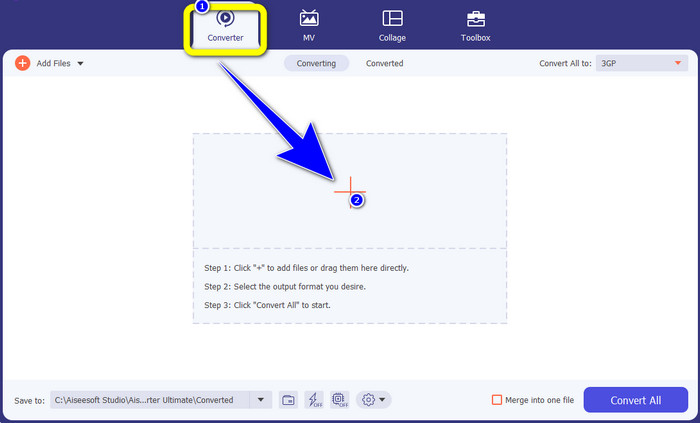
Step 2: There are four options in the upper part of the interface. Converter, MV, Collage, and Toolbox. Select the Converter panel and click the Plus icon to add the XviD file you want to convert.
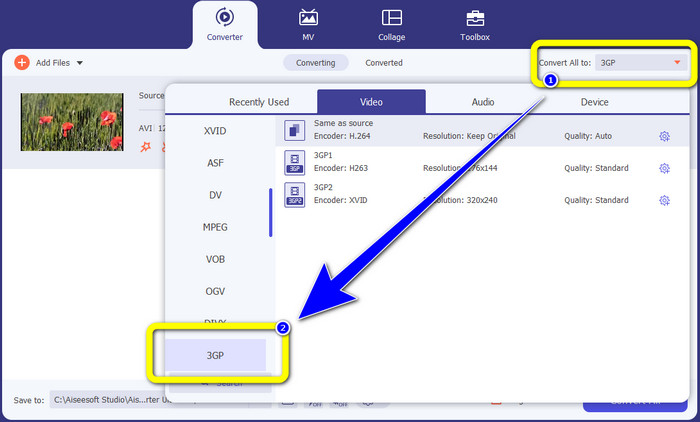
Step 3: After adding your XviD file, look to the right side of the interface and click the Convert all to button. The format options will appear, and select the 3GP file format.
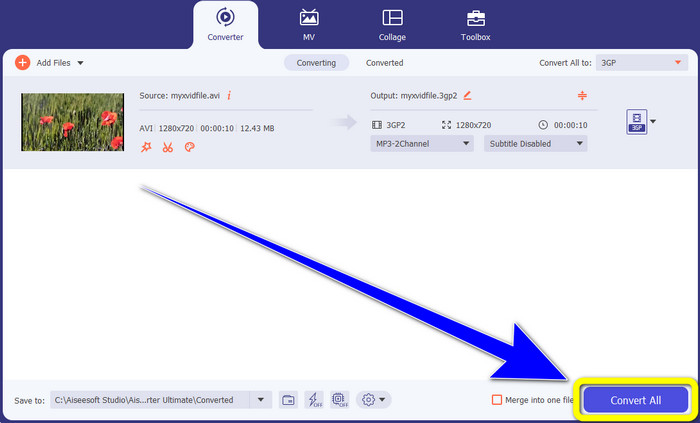
Step 4: For the fourth and last step, Click the Convert All button to convert your XviD file to 3GP. Wait for the conversion process and save your video.
Parte 2: Converter XviD para 3GP Online
Usando o FVC Free Video Converter Online
Aside from the best converter you have discovered from the first part, there are also online converters you can use for free. The best online tool is FVC Free Video Converter Online. This useful software lets you convert XviD to 3GP easily. It supports audio and video file formats, such as MP4, M4V, WMV, AVI, MOV, VOB, WEBM, MP3, AAC, AC3, WMA, FLAC, etc. Moreover, this converter is easy to utilize because it only has three easy steps to follow for converting various files. This way, every user won’t have difficulty utilizing this online converter. If you desire to know how to convert XviD to 3GP easily using FVC Free Video Converter Online, let’s use these three easy steps below.
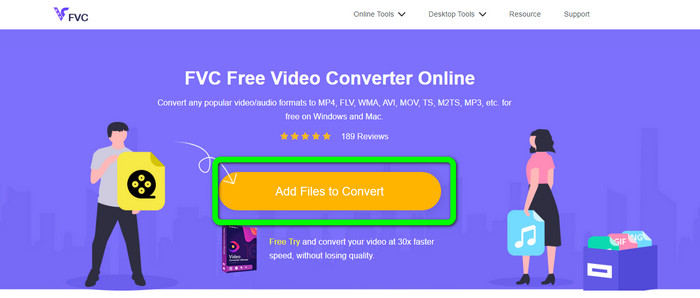
Step 1: Visit the website of FVC Free Video Converter Online. Click the Add Files to Convert button and upload the XviD file you want to convert to a 3GP format.
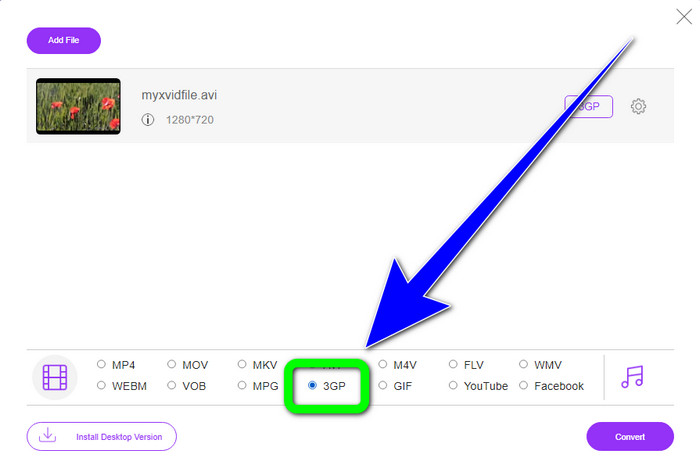
Step 2: When you upload your file, you will see the format options in the lower part of the interface. Choose the 3GP file format.
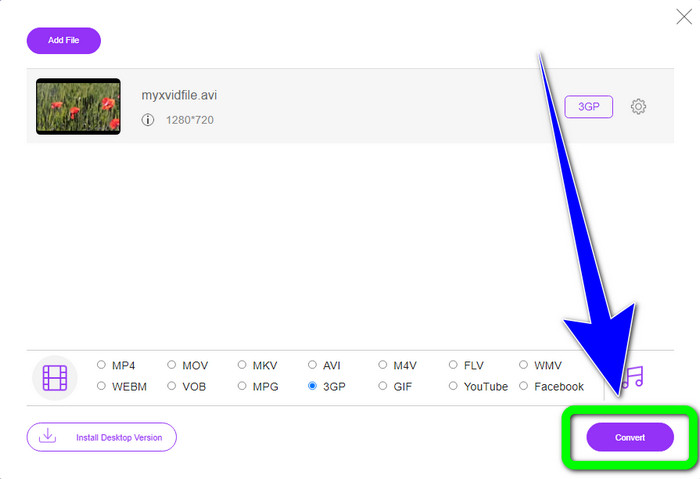
Step 3: You must click the Convert button to convert the XviD file to 3GP. Wait for the process of converting the file and save the final file on your Windows or Mac.
Usando OnlineConvertFree.com
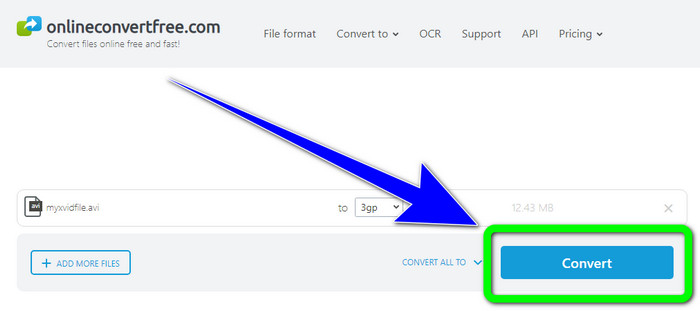
Onlineconvertfree.com is another online tool you can use to convert XviD to 3GP. This application is also good at converting audio, images, documents, and video files, which makes it convenient for anyone. Also, it supports several formats, like AVCHD, MT2S, MPEG, MKV, M4V, MP4, FLV, DIVX, XviD, 3GP, and more. You also don’t need to worry about your file because it is secured in this software. Your video file will be automatically deleted after 24 hours. You also can use this tool to convert XviD to FLV.
No entanto, você deve considerar que o Onlineconverterfree.com é uma ferramenta baseada na web, na qual você deve ter uma conexão rápida com a Internet para operá-la. Além disso, o limite de armazenamento deste software é de apenas 100 Mb, portanto, você deve adquirir uma assinatura para aumentar o limite de armazenamento. Siga as etapas abaixo para converter XviD para 3GP usando Onlineconverter.com.
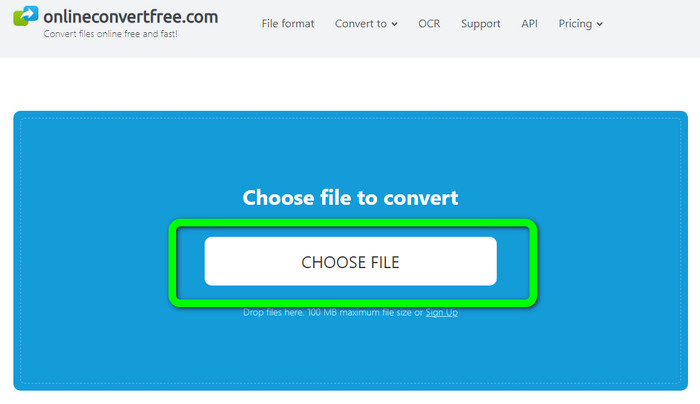
Step 1: Go to the Onlinecovnerter.com website. Click the Choose File button to insert the XviD file
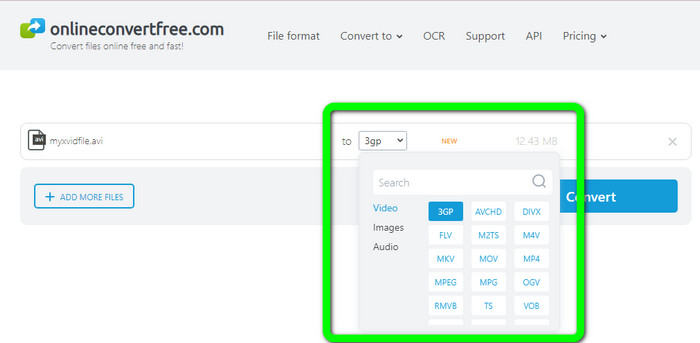
Step 2: Click the 3GP file from the format options.
Step 3: For the final step, click the Convert button. Wait for the conversion process and save your final output on your device. Click here to learn how to convert M4V to 3GP.
Parte 3: Conhecimento estendido sobre XviD
O que é XviD?
Este codec, XviD, é baseado no padrão MPEG-4. Apesar de distorcer as cores, tem uma ótima definição em cenas dinâmicas. Por se tratar de um codec de código aberto, os interessados podem contribuir para o seu desenvolvimento, incentivando atualizações contínuas. Um filme em DVD pode ser compactado o suficiente para caber em um CD, mantendo a qualidade do DVD graças à compactação habilitada no Xvid. O programa Xvid comprime e descomprime dados de vídeo para MPEG-4 ASP. A extensão .xvid é usada para armazenar vídeo compactado. Quando se trata de arquivos de vídeo, o Xvid é comparável ao ZIP. Xvid comprime o vídeo em uma proporção de 200:1 ou superior. Isso permite uma transmissão de rede mais rápida e um armazenamento em disco mais eficaz.
Parte 4: Perguntas frequentes sobre a conversão de XviD para 3GP
1. Quanto tempo devo esperar para converter XviD para 3GP?
O processo de conversão dependerá do conversor que você está usando e do tamanho do arquivo do vídeo. Baixe o Video Converter Ultimate no seu Windows ou Mac se quiser um conversor mais rápido. Este aplicativo tem uma velocidade de conversão 30x mais rápida do que outros conversores.
2. Existe um conversor gratuito que eu possa usar com armazenamento ilimitado de arquivos?
Absolutely, Yes! The best free converter you can use is FVC Free Video Converter Online. This online tool allows you to convert unlimited files, so you don't have to worry about the maximum file size.
3. Qual é melhor, Xvid ou 3GP?
Ambos são melhores. Se você deseja reproduzir um vídeo em um dispositivo 3G, é mais adequado reproduzir um vídeo com um arquivo de vídeo 3GP. E se você quiser reproduzir seus vídeos em players de vídeo, um vídeo com um arquivo XviD é perfeito.
Conclusão
This article provided you with the best techniques to convert XviD to 3GP. To convert more files using your Windows and Mac, you can download Video Converter Ultimate. Also, if you want a free online converter, you can use FVC Free Video Converter Online.
-
 Encontre os melhores e mais simples métodos para converter TS em 3GP
 Este artigo oferecerá um incrível download gratuito do conversor TS para 3GP que você pode experimentar em seu dispositivo. Leia este artigo para descobrir mais detalhes essenciais que você precisa
-
 Converta MTS para 3GP usando estes conversores finais
 Você quer um processo descomplicado para converter MTS para 3GP? Não se preocupe mais! Este artigo oferecerá conversores MTS para 3GP que você pode usar online e offline
-
 WebM para 3GP: maneiras mais eficazes de usar essas ferramentas
 Você está procurando um excelente conversor de WebM para 3GP? Este artigo irá garantir que você obtenha os melhores métodos eficazes para converter seu WebM para 3GP
