


 Video Converter Ultimate
 Gravador de ecrã
 Reparo de vídeo
 Secure Download
Procedimentos mais rápidos para converter VOB para M4V no Windows e Mac
DVDs typically employ the file format VOB or Video Object. This file is often retained in the DVD's root-level VIDEO TS folder. However, the internet now has a considerable number of media files. Additionally, DVDs are less prevalent today and are not widely supported by devices and programs. If that is the reason, you need a format supported by numerous devices and programs like the M4V file format. You will be grateful because you will learn the most useful methods to convert VOB to M4V using online and downloadable software.

Parte 1: Diferenças entre VOB e M4V
| VOB | M4V | |
| Nome completo | Objeto de vídeo | Vídeo MPEG-4 |
| Extensão de arquivo | .vob | .m4v |
| Descrição | Vídeo, áudio, legendas, menus de DVD e outros conteúdos estão todos contidos em um único arquivo usando o formato de contêiner VOB. O formato VOB, baseado em fluxos do sistema MPEG-2 e pode ser reproduzido em muitos dispositivos de mídia, geralmente é armazenado na pasta VIDEO TS na raiz do disco. | A Apple criou o formato contêiner de vídeo M4V, usado para distribuir conteúdo de áudio e vídeo via iTunes. Exceto pela possibilidade de usar proteção contra cópia DRM para proteger a propriedade de episódios de TV, filmes e outros materiais de mídia da loja iTunes, os arquivos M4V são idênticos aos arquivos MP4. |
| Desenvolvido por | DVD Forum | maçã |
| Tipo MIME | vídeo/DVD vídeo/MPEG | vídeo/x-m4v |
| Codec de vídeo | MPEG-1 MPEG-2 | H.264 |
| Codec de áudio | MP2 AC-3 DTS | AAC Dolby Digital |
| Programas Associados | Reprodutor de Mídia Clássico Windows Media Player VLC Media Player Potplayer GOMPlayer | QuickTime Player iTunes Reprodutor de Mídia Clássico K-Multimedia PlayerName MPlayer VLC Media Player |
Parte 2: Por que você precisa converter VOB para M4V
A principal razão pela qual você precisa converter VOB para M4V é que muitos aplicativos não suportam o arquivo VOB. Não importa o que aconteça, se você tiver um vídeo VOB em um Mac, poderá ter problemas. Solte-o no QuickTime para reprodução ou no iMovie/FCP para edição. Portanto, você deve converter o arquivo.vob para um formato compatível com Macs, como M4V.
Parte 3: Como converter VOB para M4V usando o Mac
The best converter you can use to convert VOB to M4V using Mac is the FVC Video Converter Ultimate. This converter is not the same as the other converter you can see on the internet. The other converter only offers a normal conversion speed process. But in this application, you will experience more exciting things. Video Converter Ultimate offers an ultra-speed conversion process, which is 30x faster than the average speed. Also, assuming that you want to convert two or more files, this application is for you. It allows batch conversion, wherein you can upload more files and convert them in a single procedure. With this batch conversion, you can save more time. Moreover, while converting, you can still edit your video. You can enhance, edit, and crop your video because it has more options while you are in the Converting process. In addition, you can still improve your VOB video file using this converter.
Features
◆ Converta mais de 100 formatos de arquivo de vídeo, incluindo MP4, VOB, M4V, WMV, MKV, AVI, FLV, MTS, etc.
◆ Oferece criador de colagem com modelos e filtros disponíveis.
◆ Capaz de fazer um videoclipe com temas gratuitos. Pode combinar vídeos e imagens.
◆ Fornece Toolbox com muitas ferramentas de edição, como um aprimorador de vídeo, aparador, cortador, etc.
◆ Converta arquivos de imagem como PNG, JPG, BMP, TIFF e muito mais.
◆ Crie vídeos 3D personalizados a partir de 2D.
◆ It can slow down and speed up a video from 0.125x to 8x faster.
Siga os procedimentos básicos abaixo para converter VOB para M4V no Mac usando o FVC Video Converter Ultimate.
Step 1: Search the FVC Video Converter Ultimate on your browser. You can also click the Download button below. Choose the Mac version. Then, launch the application.
Free DownloadFor Windows 7 or laterSecure Download
Free DownloadFor MacOS 10.7 or laterSecure Download
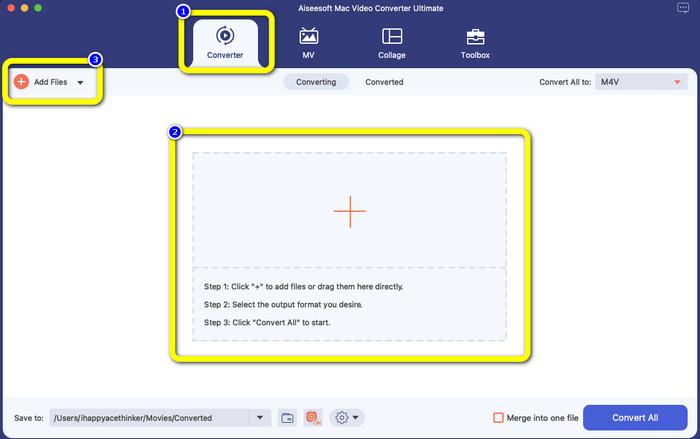
Step 2: Select the Converter panel when the interface already pops up. Click the Plus icon or the Add Files button to add your VOB file. You can also drag your video file directly to the box.
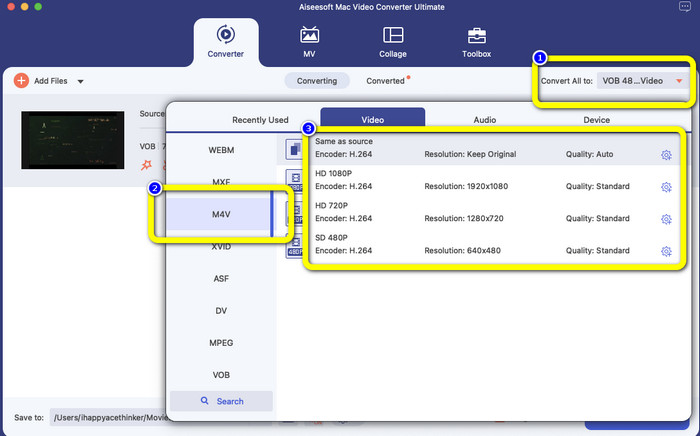
Step 3: Click the Convert All to button to see the format options. After that, select the M4V file format. You can also choose the resolution for your video from 480p to 1080p, or you can stay on the original quality.
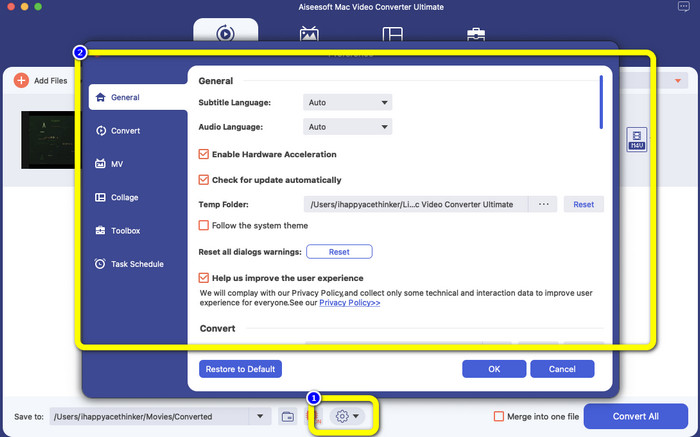
Step 4: Before converting, you can edit your video, like putting a subtitle or audio language and more, by clicking the Preference icon on the lower part of the interface.
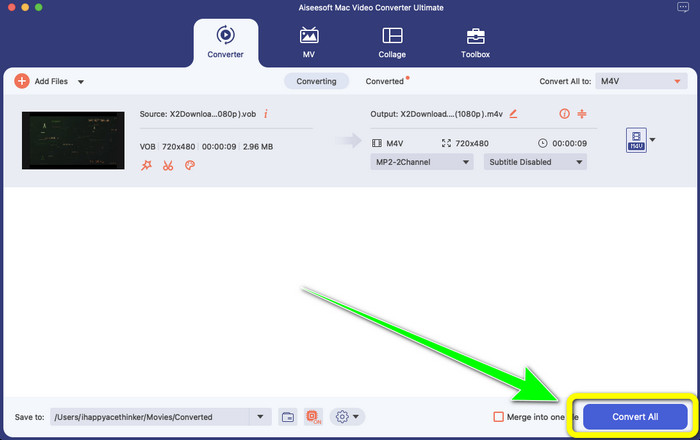
Step 5: If you are done making some changes to your VOB video, click the Convert button to convert your VOB file to M4V format. Then, save your video on your Mac.
Parte 4: Maneiras simples de converter VOB para M4V online gratuitamente
If you want to convert VOB to M4V for free online, you can try FreeFileConvert. This online converter can easily convert different files. It only has three steps to convert your VOB video file to M4V format, which makes it perfect for non-professional users. Also, after 24 hours, all converted files are deleted from the server and are no longer available. You can also delete your file using the Delete button after a file has been converted. Moreover, FreeFileConvert is not only good for video conversion. It also allows you to convert images, documents, vectors, audio, archive, e-book, and presentation, which makes it convenient for users. However, this online tool has a slow conversion process, so you must consume more time. It also requires an internet connection to operate.
Step 1: Visit the FreeFileConvert website.
Step 2: Select the Choose File button to add your VOB video file.
Step 3: Click the Convert File to button to see the format options and select M4V file format.
Step 4: For the last step, select the Convert button. Download the final video after the conversion process.
Parte 5: Perguntas frequentes sobre a conversão de VOB para M4V
1. Qual é o formato de arquivo comum para converter um arquivo VOB?
Como o MP4 é uma extensão de arquivo multimídia comum e um formato de contêiner para armazenar dados de vídeo, áudio e legenda, seria o melhor formato de vídeo para converter seus arquivos de vídeo VOB não suportados nele. Muitos dispositivos portáteis, incluindo produtos da Apple, suportam o formato MP4.
2. Como faço para converter um formato de arquivo VOB sem perder qualidade?
Você pode usar o FVC Video Converter Ultimate. Esta ferramenta offline pode converter vários arquivos sem alterar a qualidade do vídeo.
3. Os arquivos VOB podem ser reproduzidos em Androids?
No. Videos are stored on DVDs using the VOB (Video Object) container format. VOB files are typically not supported by Android. You need to convert your VOB to MP4 or other video formats supported by Android devices if you wish to play them on Android smartphones or tablets.
Conclusão
Now you have learned the differences between VOB and M4V. Also, this article shows you the easiest procedure to convert VOB to M4V. If you prefer an application with a fast conversion process, you can use FVC Video Converter Ultimate. This converter can convert various files 30x faster than other converters.
-
 Como compactar arquivos VOB online e grátis [sem download]
 Você está procurando métodos para compactar arquivos VOB? Aprenda a melhor maneira de diminuir o tamanho dos arquivos VOB neste artigo
-
 Guia concreto para juntar arquivos M4V no Windows e Mac gratuitamente
 Se você está procurando uma solução para combinar arquivos de vídeo M4V em um, nunca perca esta passagem. Aqui falaremos sobre os dois melhores métodos para combinar arquivos de vídeo M4V
-
 Converta VOB para 3PG no Windows e Mac gratuitamente [sem perdas]
 Como converter VOB para 3GP no Windows e Mac? Este artigo fornece as melhores soluções para você converter VOB para 3GP
