


 Video Converter Ultimate
 Gravador de ecrã
 Reparo de vídeo
 Secure Download
Maneiras incomparáveis e perfeitas de converter AMV para MP4
Do you desire to enjoy watching your AMV video on all programs? Then you need to turn your AMV file to MP4 format. But don’t worry! We will give you the best solution for converting your video files. This article has already tested the converters you will discover. In this way, you don’t need to worry if the applications are safe. In addition, we will introduce you to the features you can enjoy while using the software. If we caught your interest and you belong to the users who want to convert AMV to MP4, then read this article and absorb the knowledge about converting videos.

Parte 1: Introdução ao AMV e MP4
AMV
File Extension: .amv
Developed by: MTV
File Category: Video File Format
Description: Videos saved in the Actions Media Video file format, which some Chinese portable media players support, are known as AMV files. It includes a compressed movie with a low resolution (96x96 to 320x240 pixels). Both the desktop PC software that comes with AMV media players and the VideoLAN VLC media player can play AMV files.
Associated Programs: K-Lite Codec Pack, Video LAN, and VLC Media Player
AMV
File Extension: .mp4
Developed by: Moving Picture Experts Group (MPEG)
File Category: Video File Format
Descrição: Os padrões de vídeo AAC e MPEG-4 definem conjuntamente a extensão MP4. Qualquer tipo de mídia, incluindo áudio, vídeo, legendas e gráficos 2D e 3D, pode estar contido no contêiner. Quase qualquer player pode reproduzir arquivos MP4 no Windows, mas no Mac, você deve instalar um plug-in ou converter o arquivo MP4 para outro formato. Um grupo chamado The Moving Picture Experts.
Associated Programs: Apple, QuickTime Player, VLC Media Player, Microsoft, Windows Media Player, and Video LAN.
Parte 2: Excelentes procedimentos para converter AMV para MP4 offline
We have the best solution for you if you desire to convert AMV to MP4 using a downloadable tool. You can use Video Converter Ultimate. It supports 100+ video formats, including AVI, MKV, WMV, MOV, FLV, M4V, SWF, MTS, M2TS, and more. This tool has an intuitive interface with simple methods, which is suitable for all users. Using this tool, you can convert multiple files at once because it allows a user to do a batch conversion process. But wait, one of the most notable features it can offer in converting is its ultra-speed conversion process, which is 30x faster than other converters. Also, you can edit your AMV videos with this tool. To discover more features of this application, read the additional information below.
Recursos
◆ Converta vários formatos de vídeo, como MP4, AMV, WMV, AVI, MKV, FLV, SWF, MOV e mais de 100.
◆ Oferece um processo de conversão em lote para converter vários arquivos simultaneamente.
◆ Fornece ferramentas de edição de vídeo, como aprimorador de vídeo, aparador, cortador, rotador, correção de cores e muito mais.
Siga as instruções simples abaixo para converter AMV para MP4 usando o FVC Video Converter Ultimate.
Step 1: You need to download the Video Converter Ultimate on your Windows or Mac first. Click the Download button below. Then, install and open the software.
Free DownloadFor Windows 7 or laterSecure Download
Free DownloadFor MacOS 10.7 or laterSecure Download
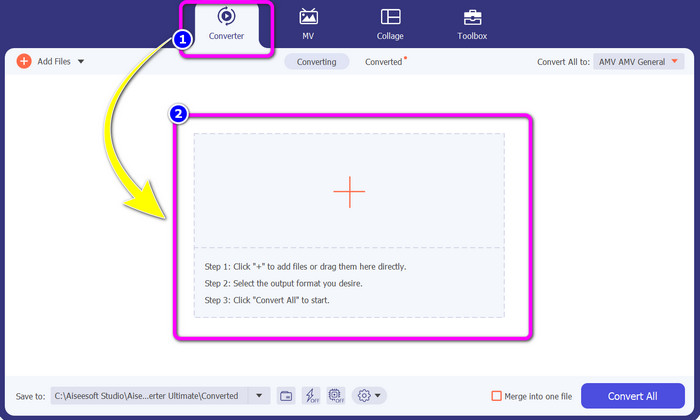
Step 2: Select the Converter Panel and click the Plus sign button. Your folder file will show up on your screen, and choose the AMV video you want to convert.
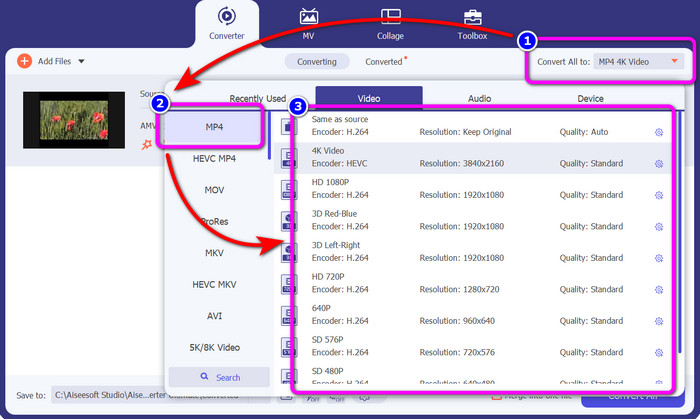
Step 3: Press the Convert All to button. When the format options already appear, select your desired output format, the MP4 file. Then, you can choose the resolution for your video up to 4K Video resolution. Choose the resolution you prefer, or you can choose the same resolution from your original video
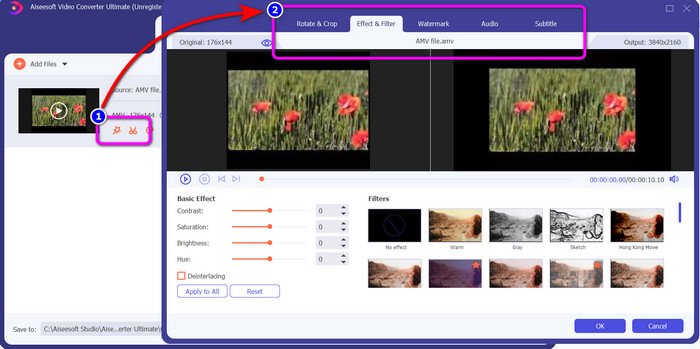
Step 4: If you want to edit your video, click the Edit icon. Then, you can already edit your video by changing, adding, or removing watermarks, putting effects or filters, and rotating and cropping your videos. Then click OK. In this way, you can improve your video.
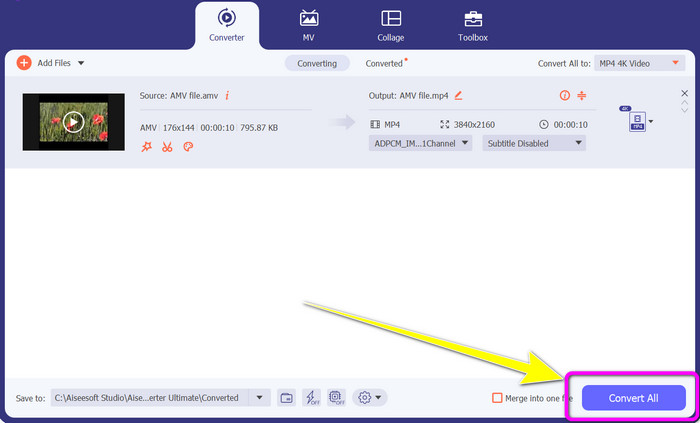
Step 5: After editing your video, click the Convert All button to start the conversion process. After that, save your final output on your computer. And open your converted video on your computer to see the final result. Click here to get how to convert DV to MP4.
Parte 3: Maneira mais fácil de converter AMV para MP4 online gratuitamente
Another way to convert AMV to MP4 online is to use FVC Free Video Converter Online. This tool has a simple step and a simple interface, making it more available on all skilled and non-professional users. You can convert videos in just a few clicks. Also, this converter supports numerous video formats, such as AVI, MP4, M4V, FLV, MOV, WMV, MKV, and more. You can also do a batch conversion process to convert multiple files simultaneously. In addition, you can also change the resolution of your video while converting your files. It is also possible if you plan to adjust your video's bitrate and frame rate. You can utilize this online application for free, and you can download your videos without any unwanted objects, such as watermarks, logos, stickers, text, and more. It is also accessible in all browsers, including Google Chrome, Safari, Internet Explorer, Microsoft Edge, etc.
Features
◆ Converta vários formatos de vídeo, incluindo MP4, AMV, FLV, AVI, MOV, VOB, MKV e muito mais.
◆ Oferece processo de conversão em lote para um procedimento mais rápido.
◆ Edite a taxa de bits, a taxa de quadros e a resolução do vídeo.
◆ Converta formatos de áudio como MP3, FLAC, WAV, AAC, AC3, etc.
◆ Ajuste a taxa de bits e a taxa de amostragem do áudio.
Use os procedimentos simples abaixo para converter AMV para MP4 usando o FVC Free Video Converter Ultimate.
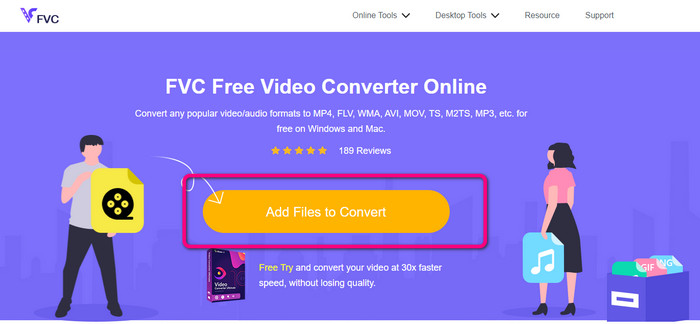
Step 1: Navigate to your browser and go to the website of FVC Free Video Converter Online. Press the Add Files to Convert button to upload the AMV video you want to convert.
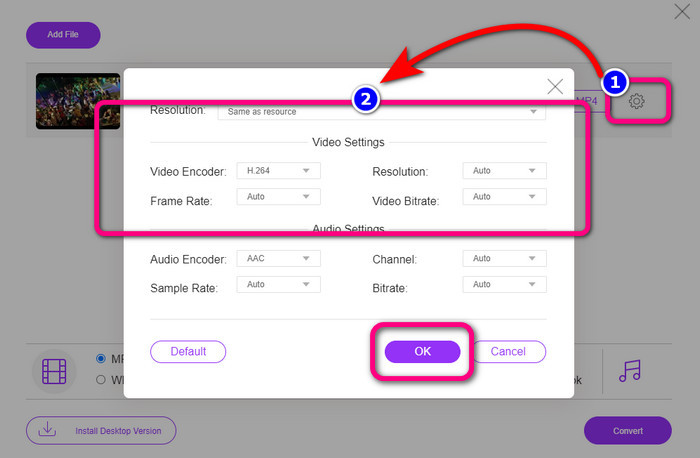
Step 2: After adding the AMV video, click the Setting icon to adjust the video’s frame rate, bitrate, and resolution. After that, press OK.
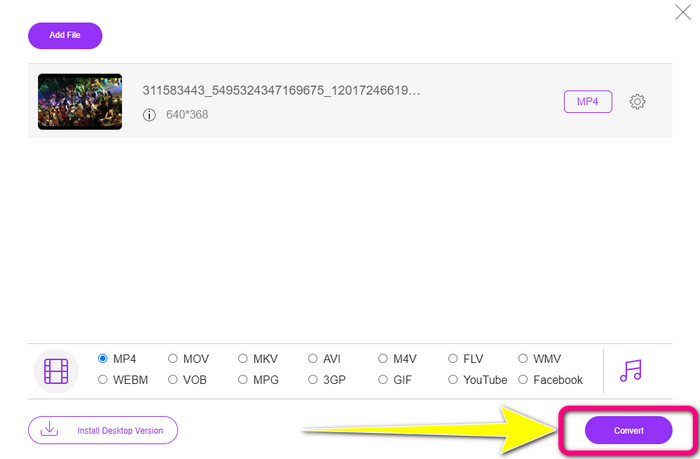
Step 3: Go to the lower part of the interface and choose the MP4 file format. Then, hit the Convert button. You also can use this tool to convert AMV to MKV.
Parte 4: Perguntas frequentes sobre a conversão de AMV para MP4
1. AMV é o mesmo que WMV?
Eles não são os mesmos. AMV é um formato de arquivo de vídeo compatível com MP4 e S1 MP3 player. Comparado a outros formatos de vídeo como WMV, é menor em tamanho. Não requer muito poder de processamento para jogar.
2. O que é melhor, AVI ou AMV?
Você pode usar o arquivo AVI se quiser reproduzir seu vídeo em qualquer lugar. No entanto, o formato de arquivo AMV é uma boa escolha se você preferir um tamanho de arquivo menor.
3. Como faço para converter arquivos de vídeo para MP4?
Você pode usar o Video Converter Ultimate. Ele suporta quase todos os formatos de vídeo e você pode converter arquivos de vídeo mais rapidamente.
Conclusão
Converting AMV to MP4 is easy if you use the two converters mentioned above. Also, advanced and non-professional users can utilize the tools because they both offer an intuitive interface and simple methods. So, use Video Converter Ultimate and FVC Free Video Converter Online right now!
-
 Métodos bem-sucedidos para converter DIVX para MP4 imediatamente
 Como faço para converter DIVX para MP4? Se procura a melhor solução, está no artigo certo. Mostraremos como converter DIVX para MP4 facilmente
-
 Como converter F4V para MP4 com os métodos mais eficazes
 Seus vídeos F4V não são de boa qualidade? Em seguida, transforme-o em um arquivo MP4. Esta postagem oferecerá a melhor maneira de converter F4V para MP4 online e offline
-
 Cinco abordagens populares para converter o formato Xvid para MP4
 Dê uma olhada nesses métodos incríveis sobre como converter o formato de arquivo Xvid para MP4 neste artigo. Além disso, você aprenderá os melhores aplicativos que pode usar na conversão
