


 Video Converter Ultimate
 Gravador de ecrã
 Reparo de vídeo
 Secure Download
Como converter ICO para PNG instantaneamente [métodos completos]
ICO is an image file for computer icons, especially on Microsoft Windows. It is used to contain an icon file. However, ICO is not popular on other programs and devices. So, if you want to view your images with other programs, you need to convert them to another format. If you prefer an image file with a smaller file size, PNG is one of the best picks for you. The PNG format has a smaller file size, and you can view images in almost all programs. In that case, the article has the best solution for you. Using image converters, you will learn the best methods for converting ICO to PNG.

Parte 1. ICO vs. PNG
| Formato de arquivo | ICO | PNG |
| Extensão de nome de arquivo | .ico | .png |
| Nome completo | Ícone | Gráfico de Rede Portátil |
| Desenvolvido por | Microsoft | Grupo de Desenvolvimento PNG |
| Descrição | ICO é um tipo de arquivo de imagem que pode armazenar ícones de imagem. Os sistemas operacionais Microsoft Windows usam a extensão de arquivo ICO para armazenar arquivos de ícone. Inclui imagens bitmap. Além disso, os sites usam arquivos ICO como seus favicons. Imagens com cores de 24 bits são suportadas. Além disso, o Windows salva apenas ícones para arquivos executáveis no formato ICO. As imagens nos arquivos ICO do Windows variam em tamanho de 16 × 16 a 256 × 256 pixels. Arquivos ICO mais antigos só podem armazenar imagens de 48 × 48 pixels. | Um tipo de arquivo de imagem raster é um gráfico de rede portátil ou PNG. O formato GIF evoluiu para este. Oliver Fromme desenvolveu o formato PNG em 1995 para realizar tarefas que os GIFs não conseguem. Ao contrário do GIF, o formato PNG não tem patente e oferece uma gama mais ampla de cores. PNG é um dos formatos de imagem mais usados atualmente. Você pode abrir o PNG em qualquer programa de edição de imagem sem licença porque uma patente não protege o arquivo. Este formato também faz uso de compactação sem perdas. |
Parte 2. Converter ICO para PNG online grátis
FVC Free Image Converter is one of the best online tools for converting ICO to PNG. This web-based image converter can convert any picture file format to JPG. The input types that this app can handle include JPG, PNG, JPEG, TIFF, BMP, WEBCO, ICO, and more. It also offers a straightforward layout and clear options. This way, experts and amateurs can convert photographs using this program. Additionally, it is easier to use because it only requires easy steps to convert images. All browsers support FVC Free Image Converter. It includes Safari, Microsoft Edge, Internet Explorer, Google Chrome, and Mozilla Firefox. Also, FVC Free Image Converter offers completely free photo conversion. This tool is web-based, so you don't need to download any software or plug-ins. Images can be easily converted for use in browsers.
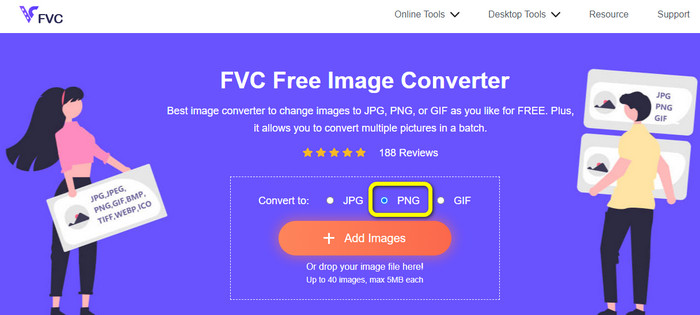
Step 1: Navigate to the FVC Free Image Converter website. Then, go to the Convert to option and select the PNG file format.
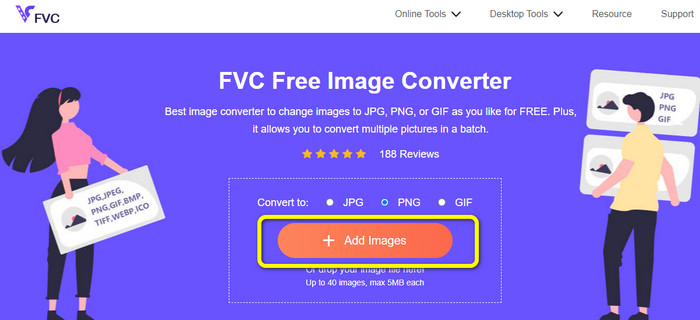
Step 2: Next is to click the Add Images button. Your computer file will show up on the screen. Choose the ICO format you want to convert, and click Open. Click the Add Images button again to add more files and do a batch conversion process.
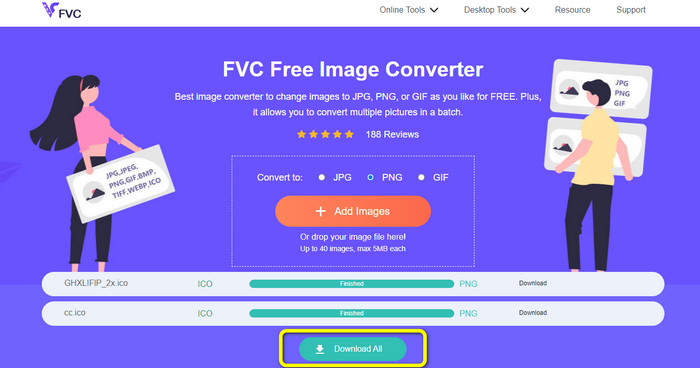
Step 3: Your image will convert to PNG automatically. After the conversion process, click the Download All button to save the images. Then, after the process, you can already open your converted image.
Parte 3. Como converter ICO para PNG no Mac facilmente
Preview is a pre-built program from Mac. Aside from viewing images, you are also allowed to convert image files. This way, you can convert the ICO file to PNG format instantly. Also, the conversion process is fast. You can convert images in just a few seconds, making it convenient for all users. Additionally, it offers a batch conversion process. So, you can convert multiple image files in one go. Moreover, besides converting, there are more features you can enjoy. The program is capable of resizing and cropping photos. However, the conversion process is challenging, especially for non-professional users. The options are confusing to follow. If you desire to convert ICO to PNG format using this program, it is necessary to ask for help from professionals. Follow the steps below to convert ICO to PNG using Mac.
Step 1: Go to your folder and click the ICO image file. Right-click the image and navigate to Open with > Preview (default).
Step 2: In Preview, go to the File option on the upper interface and select Export.
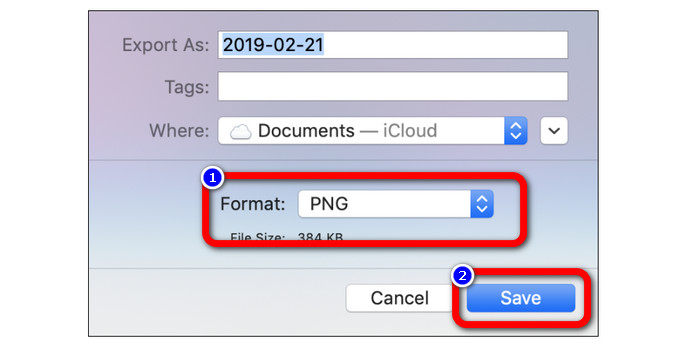
Step 3: Then, from the format option, select your desired output format, which is PNG. After that, click the Save button. This way, your image will be converted from ICO to PNG format.
Parte 4. Como converter ICO para PNG no Windows
One of the best offline image converters is Video Converter Ultimate. You may quickly convert from ICO to PNG using this excellent converter. Also, you may convert many files because of its quick conversion speed. It also offers a batch converting method to convert many files simultaneously. Video Converter Ultimate also supports various image formats. Additionally, it has PNG, BMP, WEBP, and TIF. This offline image converter provides a user-friendly interface and straightforward conversion procedures. Users of all skill levels can easily transform photographs using this method. The conversion process on this converter is also quick. In just a short period of time, you can convert plenty of photographs. Additionally, this converter is accessible from both Mac and Windows PC.
Step 1: Install Video Converter Ultimate on your Windows. Then, after the installation process, launch the program. To quickly access the converter, click the Download button below.
Free DownloadFor Windows 7 or laterSecure Download
Free DownloadFor MacOS 10.7 or laterSecure Download
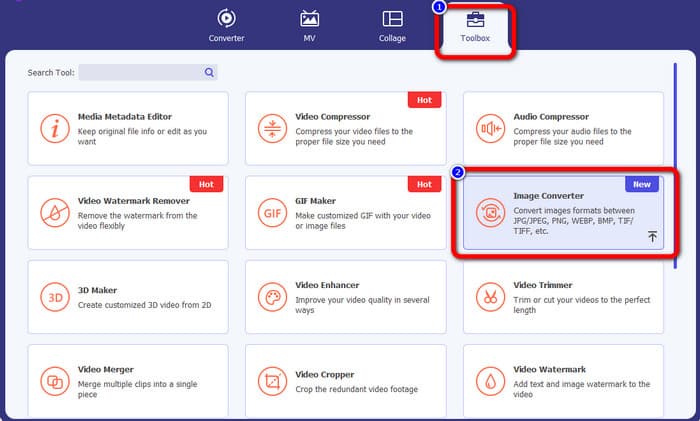
Step 2: After launching the program, go to the upper interface and select the Toolbox panel. After that, click the Image Converter function. Another interface will pop up on your screen.
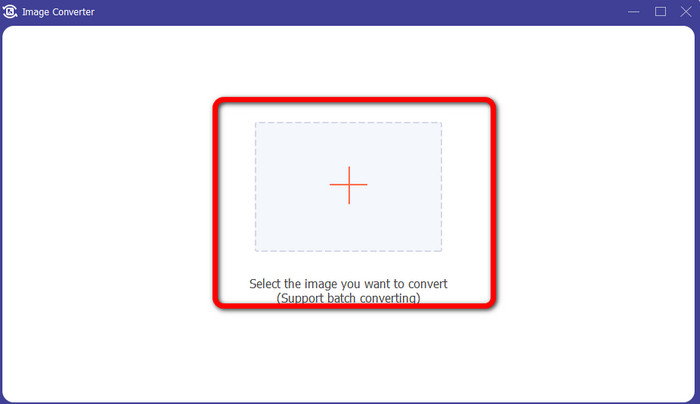
Step 3: When the new interface shows up, click the Plus icon. When the folder file appears, click the ICO image you want to convert and click Open.
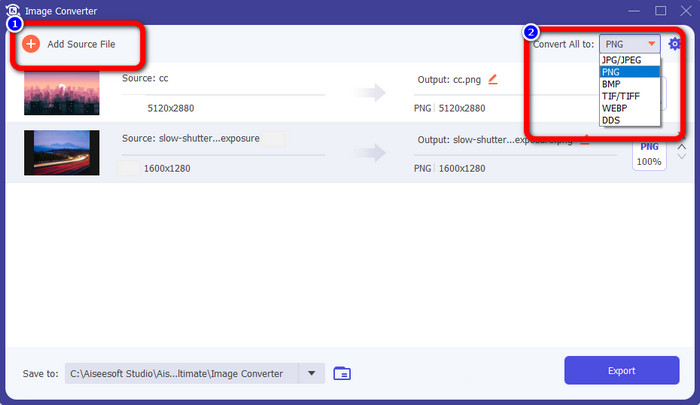
Step 4: If you want to add more files to do a batch conversion process, click Add Source File. Go to the upper-right corner of the interface and click the Convert All to option. Select the PNG format as your desired output format.
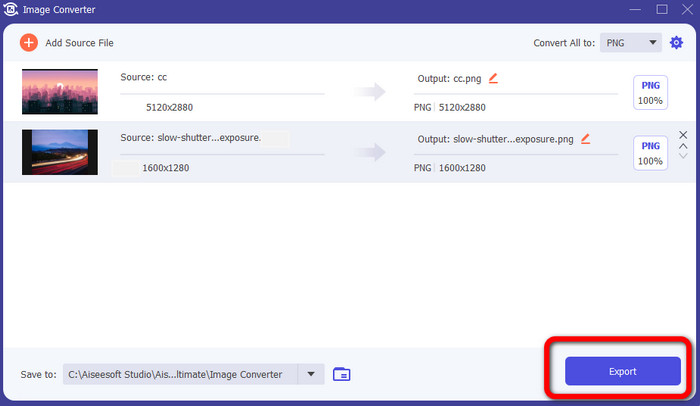
Step 5: Lastly, proceed to the conversion process by clicking the Export button. After that, your files will be saved to your assigned file location from this image converter.
Parte 5. Perguntas frequentes sobre a conversão de ICO para PNG
1. Como posso salvar um ICO em PNG no Photoshop?
Unfortunately, you cannot save ICO to PNG on Photoshop. It is because Photoshop does not support the ICO image file format. If you want to save ICO to PNG format, you can use an image converter like FVC Free Image Converter. This online converter allows you to convert ICO to PNG easily.
2. É possível usar PNG como ICO?
É sim. Para obter informações adicionais, os arquivos ICO podem ser arquivos PNG. ICO pode conter um arquivo PNG e bitmap + alfa ao mesmo tempo.
3. Qual é o melhor conversor de ICO para PNG que posso usar?
The best ICO to PNG converter is FVC Free Image Converter. This converter can convert your file instantly. Also, you can use this converter for free.
Conclusão
Now you have learned the most straightforward ways to convert ICO to PNG quickly. But, if you are looking for an image converter that is free and simple, use FVC Free Image Converter.
-
 Métodos mais simples para converter SVG para PNG
 Saiba como alterar seu arquivo de imagem de SVG para PNG usando conversores de imagem úteis. Leia este guia para saber tudo o que você precisa saber sobre a conversão
-
 Maneiras completas de converter JPG para PNG online e offline
 Procurando métodos úteis para converter o formato de arquivo JPG para PNG? Este guia tem a resposta que você precisa. Para descobrir esses métodos, leia o artigo
-
 Detalhes completos sobre as diferenças entre JPEG e JPG e PNG
 Esta postagem fornecerá informações suficientes sobre as diferenças entre JPEG e JPG e PNG. Além disso, você aprenderá como converter imagens nesses arquivos
