


 Video Converter Ultimate
 Gravador de ecrã
 Reparo de vídeo
 Secure Download
Guia completo sobre como converter uma imagem em preto e branco
The advent of color pictures looks to have rendered black and white useless. But is this really the case? Apparently, black and white hues have not entirely disappeared from our lives. When people see black and white photos, they tend to concentrate more on the most basic lines of people and the sense of texture of objects. Artists commonly use black and white to emphasize vintage effects for historical documentaries. Some designers also choose to convert an image to black and white before adding another bright color to highlight a specific part of the image. If you also want to make your photos look time-traveled or more dramatic, you can try the methods we recommend in this article to make images black and white. We'll provide both desktop and online options for users on different platforms to try.

Parte 1. Como deixar uma imagem em preto e branco no Photoshop
Quando precisamos fazer alguma modificação em uma imagem, a primeira ferramenta que nos vem à mente é o Adobe Photoshop, um programa que se tornou tão popular que se tornou o padrão na indústria fotográfica. Este programa se tornou um padrão na indústria gráfica e pode nos ajudar a fazer com que nossas imagens tenham qualquer aparência, incluindo preto e branco, é claro. Não importa qual sistema você tenha em seu computador. Você pode instalar o Photoshop em seu computador e começar a usá-lo. Além de alterar os tons de cor, podemos usá-lo para adicionar mais efeitos à imagem, como cortar, selecionar, melhorar a qualidade, remover impurezas e assim por diante.
Aqui, mostraremos como converter uma imagem para preto e branco no Photoshop. Siga os passos abaixo.
Step 1. Get Adobe Photoshop on your computer. Please note that if you are a new user, you can enjoy a 7-day free trial first. However, Photoshop is a paid program, and you will have to upgrade your account if you want to continue unlocking the service.
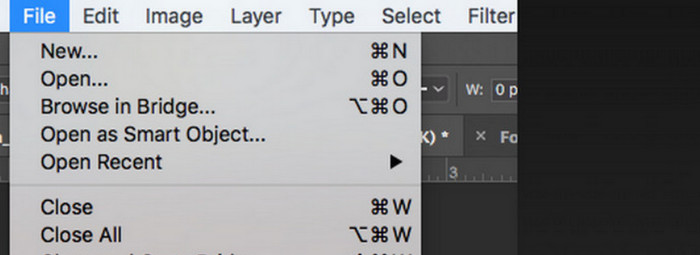
Step 2. After launching it, click File > Open and choose the color image you want to convert.
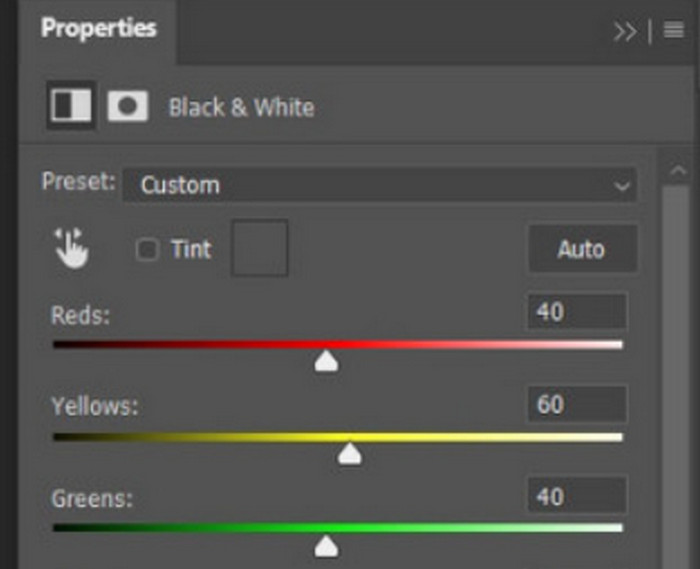
Step 3. When the image is loaded, navigate to Window and click Adjustments. Here you will find a black-and-white icon. Press on it.
Step 4. The Properties panel will open. Choose Color Slider, then move the slider to adjust the gray tones of your image. Take your time setting it up until you are satisfied with the picture's black-and-white appearance.
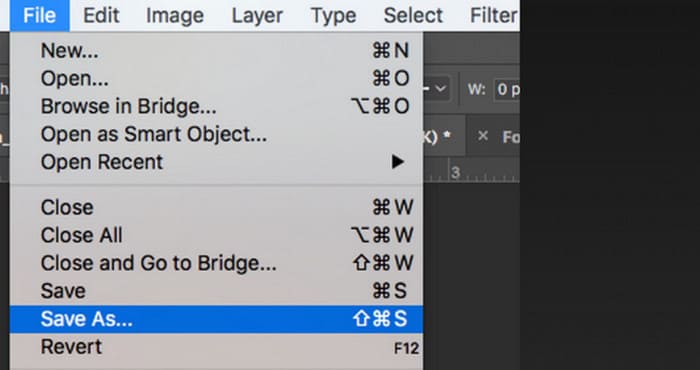
Step 5. Next, click File in the top left corner and choose Save As in the drop-down list. Then, pick a storage path for your converted images.
Após concluir as etapas acima, conseguimos transformar a imagem em preto e branco. No entanto, durante a operação, os usuários podem achar a interface do Photoshop muito complexa e alguns botões difíceis de encontrar. Apesar de ser completo, o Photoshop é praticamente inacessível para iniciantes; muitas vezes, precisamos de muito tempo para aprender e praticar para nos familiarizarmos com a lentidão do software. Se você não quiser ficar enrolando e quiser ir direto ao ponto e começar a transformar a imagem em preto e branco imediatamente, continue lendo para encontrar uma solução mais simples.
Parte 2. Converta imagem para preto e branco online
Algumas ferramentas online são definitivamente uma opção melhor para converter uma imagem colorida para preto e branco do que o um tanto trabalhoso Adobe Photoshop. Elas não exigem instalação e download e podem ser usadas diretamente no navegador. Aqui, recomendamos experimentar o Pixelied Photo Editor, que pode ajustar os tons de cor para preto e branco e atualmente suporta o upload de imagens em formatos como JPG, PNG, SVG e assim por diante. Este assistente online também possui algumas boas seções de corte e edição de imagens que podem nos ajudar a tornar nossos trabalhos mais bonitos.
Veja como deixar uma foto em preto e branco com o Pixelied Photo Editor.
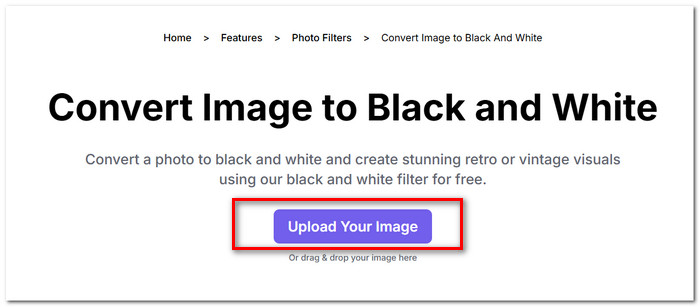
Step 1. Navigate to Pixelied Image to Black and White Converter's website. Click Upload Your Image and add the file you want to convert.
Step 2. When the uploaded image is loaded, go to Edit Image > Filters. Find the Black and White filter and apply it to your image.
Step 3. After finishing converting, click Download to save the image to your computer.
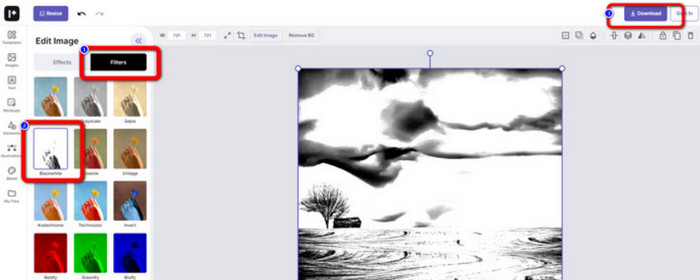
Converting an image to black and white with Pixelied is immediate, and the platform's interface is much cleaner than Adobe Photoshop's. However, to apply the black-and-white filter properly, users must spend money to upgrade their accounts. The free version of this photo color enhancer only provides 2GB of storage space. These are the points we need to pay attention to when applying it.
Parte 3. Dica bônus - Faça uma imagem em P&B voltar a ser colorida
Colorizador de imagens Picwand
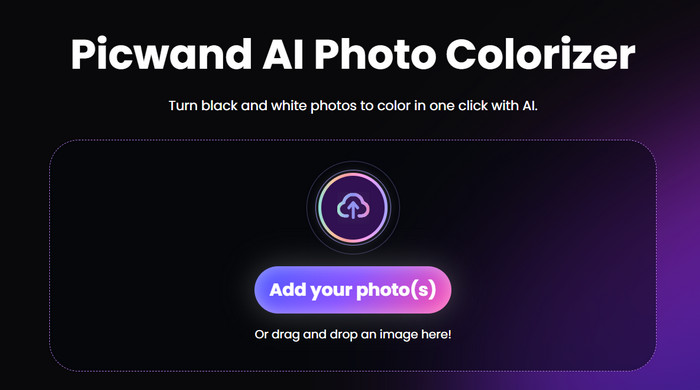
Now, we know exactly how to make a picture black and white. So, on the contrary, is there a tool that can fix a photo that was originally black and white and bring back the color to the people in the picture? This brings us to an online photo editor, which is Picwand Image Colorizer. Backed by the latest AI technology, it can use advanced algorithms to colorize old photos. We don't need to perform many fine and complicated operations; with just one click, Picwand Image Colorizer can make black and white pictures back to colorful.
Parte 4. Perguntas frequentes sobre a conversão de uma imagem para preto e branco
Uma imagem pode ser convertida diretamente de colorida para preto e branco?
Claro. Podemos usar algumas ferramentas inteligentes que não exigem ajustes manuais de cor. Essas ferramentas sobrepõem um filtro preto e branco à imagem original.
Quais fotos ficam melhor em preto e branco?
Uma imagem com linhas, formas e bordas nítidas funciona melhor quando convertida para preto e branco. Um filtro preto e branco permite ignorar as impurezas da imagem e concentrar-se apenas nas linhas mais originais.
Qual é o melhor formato para fotos em preto e branco?
Of course, the best choice is the JPG, which is the most adaptable and strikes a balance between image size and quality, ensuring that the file is not too large without losing too much image quality. If your image is in another format, you can also use a tool to convert it to a JPG file before editing and processing.
Conclusão
In this article, we cover two ways to make images black and white, including using the most classic photo editing software, Photoshop, and trying an online editor. Adobe Photoshop accomplishes the task with the most finesse, but the subscription is expensive and complicated to use. Inexperienced users can opt for Pixelied, which has a more novice-friendly interface.
-
 Como alterar a cor no Photoshop | Guia abrangente de 2025
 Quer levar sua criatividade para o próximo nível aprendendo como alterar a cor de fundo no Photoshop? Este artigo tem tudo que você precisa saber. Leia agora!
-
 Como remover o fundo da imagem usando o GIMP
 Comece a usar o GIMP e o processo passo a passo de remoção de fundos de imagens. Descubra maneiras eficientes de criar imagens transparentes usando o GIMP hoje mesmo!
-
 Como remover o fundo da imagem: ferramentas descomplicadas
 Descubra seis ferramentas para remover o fundo de qualquer imagem sem esforço. Diga adeus à edição complicada e apague fundos de imagens com facilidade hoje mesmo!
