


 Video Converter Ultimate
 Gravador de ecrã
 Reparo de vídeo
 Secure Download
Como converter JFIF para JPG: obtenha os métodos eficientes que você pode experimentar
Nowadays, the JFIF file format is rare. Some programs don't support this file. Some users don't know how to open their JFIF images in this situation. But, if you want to view your JFIF image, you must change its extension. If you want a more familiar and universal file extension, you can turn your images to JPG. For additional information, JPF is one of the most popular image file formats you can use. Almost all browsers and programs support this format. In that case, if you want to convert JFIF to JPG, it would be best if you read this guidepost. We can offer various ways to convert your JFIF file into JPG. Without further ado, read the article to find out.

Parte 1. Maneiras mais fáceis de converter JFIF para JPG online
Bônus: Como converter JFIF para JPG usando FVC Free Image Converter
Using FVC Free Image Converter is the most effective approach to converting JFIF to JPG. You made a wise decision to convert image files. It supports image formats, including JPG, JPEG, PNG, SVG, BMP, TIFF, and GIF. By doing this, you can stop worrying if some tools or devices can't open your image files. Additionally, it can keep the original photographs' superb quality. After the conversion procedure, you won't be able to tell the difference from the original. Moreover, the batch conversion process is supported by the picture file converter. It implies that you can convert up to 40 image files simultaneously. In comparison to other converters, this is a lot more practical and effective. Also, there is no cost associated with using this program. A free image converter is available here.
Além disso, usá-lo não requer a criação de uma conta. Você só precisa ir ao site e começar a converter. Os anúncios são irritantes, como todos sabemos. No entanto, esta ferramenta não possui anúncios, permitindo que você converta em paz. Navegadores da Web como Chrome, Mozilla, Edge, Explorer e outros permitem que você acesse este conversor.
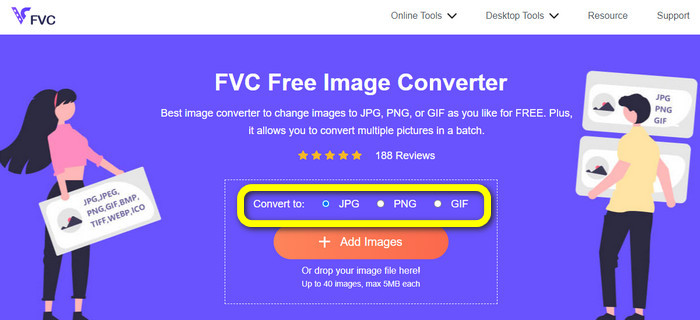
Step 1. On your computer, launch your browser. Then, visit the official website of FVC Free Image Converter. Select the JPG file format from the Convert to option. You can see this in the center of your screen with the orange bar and plus icon.
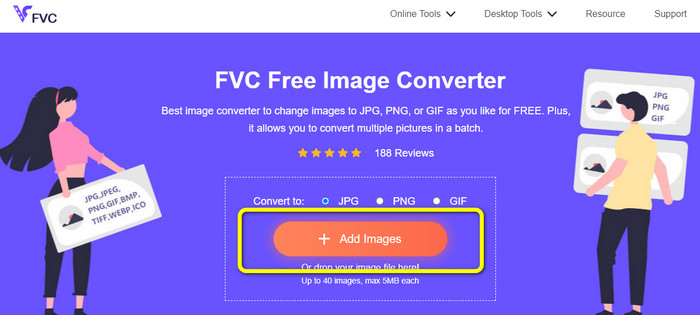
Step 2. Click the Add Images button to upload the JFIF image you want to convert. You can add more than one image file. After the uploading process, your image file will be converted automatically.
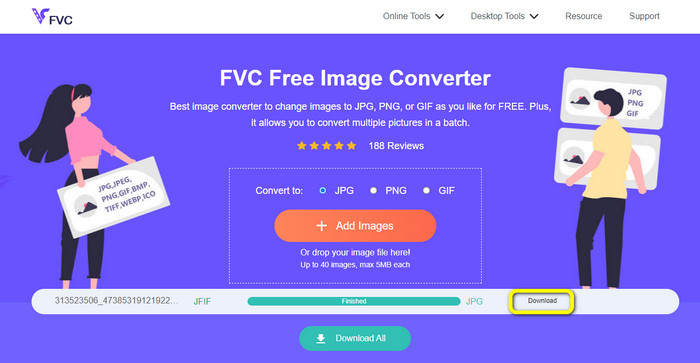
Step 3. The final step is to save your converted file by clicking the Download button.
Como converter JFIF para JPG usando o Convertio
Convertio is one of the efficient online converters you may use to change JFIF files to JPG. Using this image converter's simple process, you can convert your JFIF files to JPG files. It also has a user-friendly interface and layouts that make it simple to understand. This makes it possible for both skilled and beginners to use this web converter. Additionally, this application has a batch conversion feature. Consequently, you can convert several picture formats at once. Additionally, conversion happens quickly. Images can be converted in a few seconds. Popular browsers, including Google, Firefox, Internet Explorer, and others, support Convertio. Conversion also has more features available. You may convert films, audio, documents, and more aside from converting images.
No entanto, o Convertio possui algumas restrições, principalmente ao usar a versão gratuita. Apenas 100 MB de fotos podem ser carregados. Depois disso, a conversão de imagem não é mais possível. Portanto, se você deseja usar todos os seus recursos, invista em um plano de associação. Além disso, a versão gratuita permite que você carregue apenas dois arquivos enquanto executa um processo de conversão em lote. Por fim, é necessária uma conexão rápida com a Internet para obter um desempenho de alto nível.
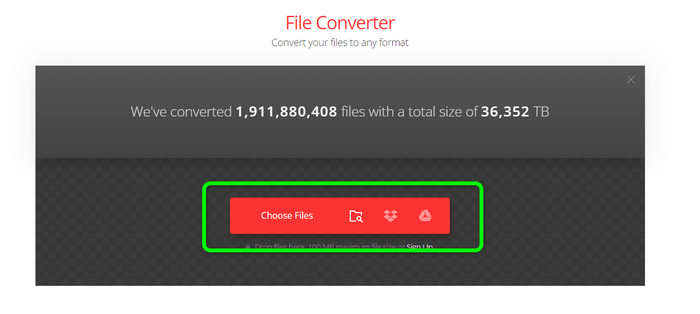
Step 1. Use any browsers from your computer and proceed to the Convertio website. Click the Choose Files button. This button is on the Red bar. After clicking, the computer folder will appear on the screen. Open the JFIF and upload it to the tool.
Step 2. After uploading the JFIF image, navigate to the format option. Then select the JPG as your output file format.
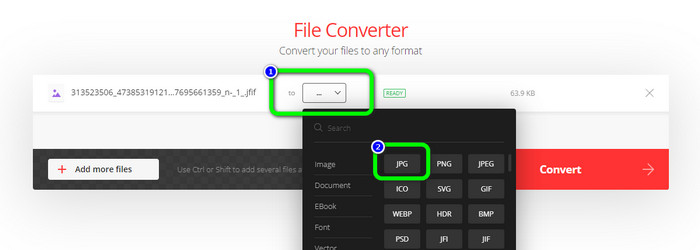
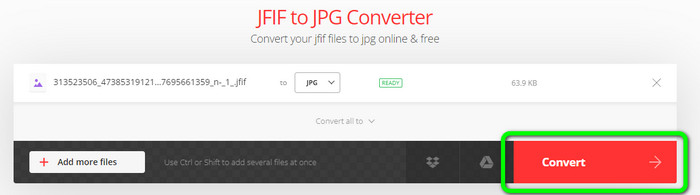
Step 3. When you are done selecting the JPG format, click the Convert button. Wait a few seconds for the conversion process.
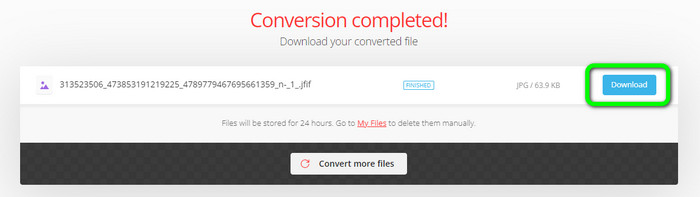
Step 4. Click the Download button when the conversion process is finished. This way, you can open your JFIF image on your device conveniently.
Parte 2. Como converter JFIF para JPG no Windows 11/10
If you want to save your JFIF to JPG image format, use Bitrecover JFIF Converter Wizard. You can download this offline program on Windows for free. In addition, it supports various image formats. It includes BMP, PNG, TIFF, PDF, and more, making it more convenient in the field of conversion. Also, it has a fast conversion process, which is not time-consuming for users. However, there are some disadvantages you can encounter when using the converter. On the free version, the tool only allows you to convert up to 5 image files. So, if you want to convert more than five images, purchase a subscription plan.
Step 1. Download Bitrecover JFIF Converter Wizard on your computer. Then launch it after the installation process.
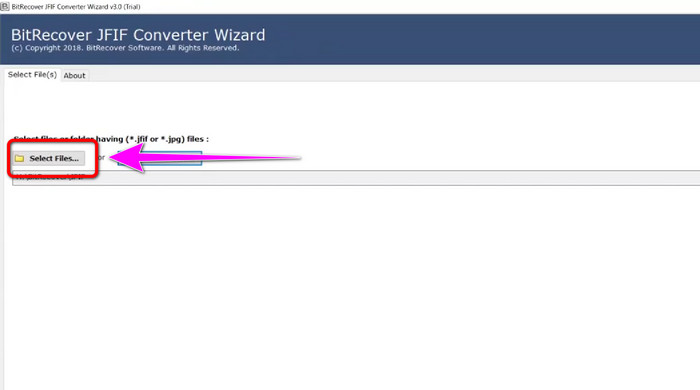
Step 2. When the interface already appears on the screen, click the Select file option to add the JFIF files you want to convert. Then, click the Next option on the bottom left corner of the interface.
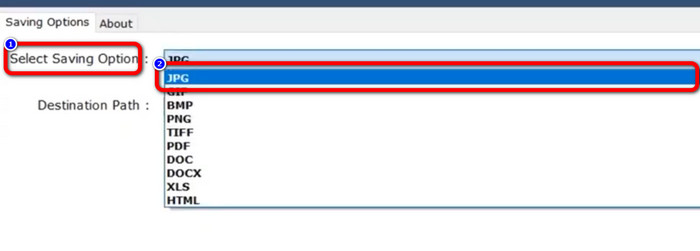
Step 3. After that, navigate to the Select Saving Option. Click the JPG format as your output format.
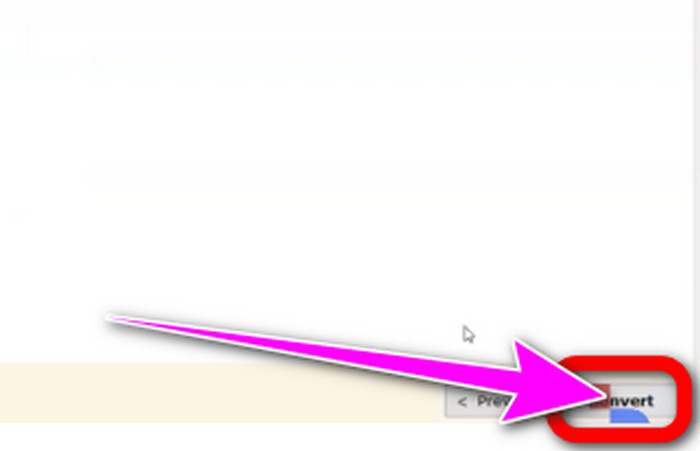
Step 4. Then, for the final step, click the Convert button on the bottom-right corner of the interface.
Parte 3. Melhor maneira de converter JFIF para JPG no Mac
You can convert JFIF to JPG using the built-in Mac program, the Preview program. With the help of this offline program, you can change the JFIF file into JPG. However, if you are not a Mac user or unfamiliar with the device, you must exert extra time. But if you are willing to learn, see the steps below.
Step 1. Right-click the file, choose Open With from the pop-out menu, and then choose Preview. Double-click the file if you don't see Preview listed as an option for this particular file type.
Step 2. A pop-up message stating that no application is available to access the document will appear. Click the Choose Application option.
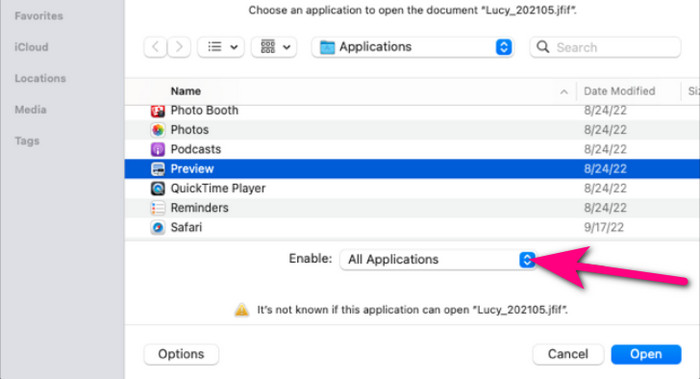
Step 3. Pick All Applications from the Enable drop-down box in the bottom area when the Applications folder opens. Then select Open after selecting Preview from the list.
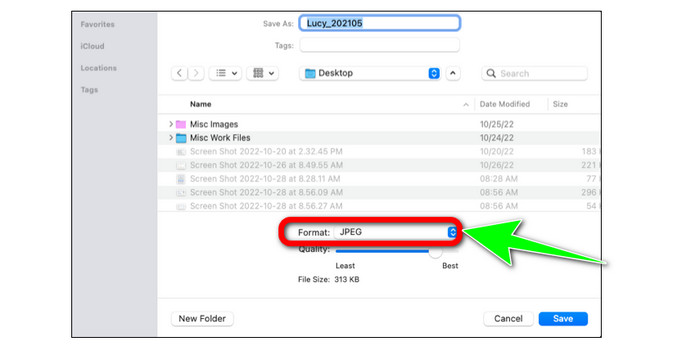
Step 4. Then, your JFIF picture ought to appear in Preview. Holding the Option key, click File in the menu bar, and then choose Save as.
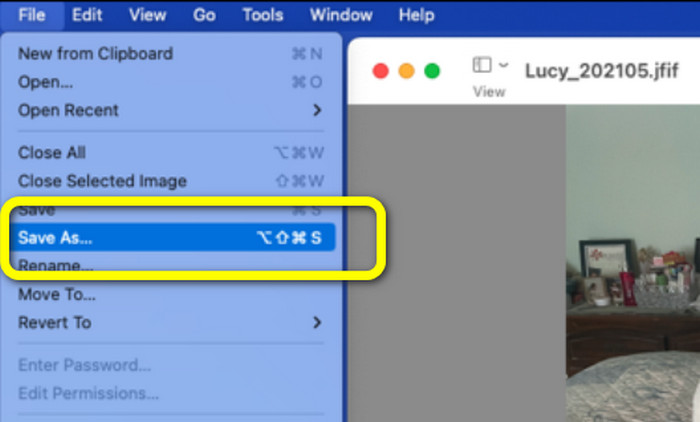
Step 5. Select JPEG from the Format drop-down box in the Save As dialog box. The quality can optionally be changed using the slider.
Parte 4. Perguntas frequentes sobre a conversão de JFIF para JPG
1. Qual é a diferença entre um arquivo .jfif e um arquivo .jpeg?
Arquivos JFIF são tipicamente código de computador bruto. Não é um arquivo de imagem ou vídeo, que às vezes nem pode ser acessado. Em termos mais técnicos, os arquivos JFIF são os códigos-fonte do arquivo JPG. JFIF são dados de arquivo virtual JPG que foram bitmap para armazenamento.
2. Quais são os benefícios de usar um arquivo JFIF?
O formato JFIF define várias características que o formato JPEG original omitia. Os usuários podiam salvar e distribuir arquivos usando compactação JPEG após o estabelecimento de especificações importantes, como um cabeçalho padrão, especificações de resolução e proporção e modelo de cor. Muitas câmeras digitais historicamente armazenaram fotos no formato JFIF.
3. Como sei se uma imagem é JFIF?
Depois de localizar o arquivo da imagem, você deve prosseguir para a barra de extensões à direita, onde várias opções estão disponíveis. Uma extensão JFIF será selecionada por padrão quando você acessar esse menu de extensão. Isso significa que JFIF foi selecionado como extensão ou formato de imagem padrão ao salvar uma imagem.
Conclusão
All the above information is the best method to convert JFIF to JPG. And if you prefer online ways to convert images, it would be better to use FVC Free Image Converter. It has a more straightforward method than other converters online.
-
 Aprenda as abordagens mais fáceis para converter WebP em JPG rapidamente
 Vamos todos aprender maneiras eficazes de converter imagens da Web em JPG facilmente. Este artigo fornecerá excelentes conversores de imagem que você pode usar para converter arquivos de imagem.
-
 Os 5 principais tutoriais para converter PNG para JPG rapidamente
 Se você precisa converter seu arquivo PNG para o formato JPG, pode aprender as melhores maneiras aqui. Você também aprenderá a diferença entre os formatos de arquivo PNG e JPG.
-
 Métodos fáceis sobre como converter SVG para o formato JPG
 Encontrando a melhor maneira de converter SVG para JPG? Esta postagem fornecerá alguns tutoriais infalíveis que você pode experimentar. Você também descobrirá o conversor de SVG para JPG para você.
