


 Video Converter Ultimate
 Gravador de ecrã
 Reparo de vídeo
 Secure Download
Conversão de MP3 para MOV de alta qualidade no desktop, online e móvel
Looking to convert your MP3 audio files to MOV video format? There are many reasons why you might wish to do so, such as generating a video with a musical background or uploading audio on social media networks that only accept video formats. Fortunately, there are various MP3 to MOV converter software available both online and offline, and mobile to make this procedure easy and seamless. In this guide post, we will analyze some of the most effective MP3 to MOV converter options, examining their features and benefits to help you pick the best option for your needs.

Parte 1. Comparação dos formatos MP3 e MOV
MP3 e MOV são formatos de arquivo populares para armazenar arquivos de áudio e vídeo. No entanto, eles têm pontos fortes e fracos diferentes. O MP3 é uma boa escolha para reprodução de música, podcasts e audiolivros, pois oferece boa qualidade de áudio e tamanhos de arquivo pequenos. O MOV é uma boa escolha para reprodução e edição de vídeo, pois oferece excelente qualidade de vídeo. Por fim, o melhor formato de arquivo para você dependerá de suas necessidades específicas para converter MP3 em MOV com eficiência.
| Recurso | MP3 | MOV |
| Extensão de arquivo | .mp3 | .mov |
| Codec de áudio | MPEG-1 Camada de Áudio 3 | MPEG-4 Parte 2 |
| Codec de vídeo | Nenhum | H.264 |
| Qualidade de áudio | Boa | Excelente |
| Qualidade de vídeo | Justo | Excelente |
| Tamanho do arquivo | Pequeno | ampla |
| Compatibilidade | Amplamente compatível | Amplamente compatível |
| Casos de uso | Reprodução de música, podcasts, audiolivros | Reprodução de vídeo, edição de vídeo |
Parte 2. Como converter MP3 para MOV no Windows e Mac
1. Video Converter Ultimate
Video Converter Ultimate is a well-known video converter software that can convert videos to a variety of formats, such as MP4, MOV, MKV, AVI, and FLV. It also allows batch conversion, allowing you to convert numerous movies at the same time. Other capabilities of this software include the ability to edit videos, add subtitles, and remove watermarks.
Key Features:
◆ Velocidades de conversão rápidas: FVC Video Converter Ultimate usa a mais recente tecnologia de conversão de vídeo para converter vídeos de forma rápida e eficiente. Isso significa que você pode converter seus vídeos em questão de segundos.
◆ Fácil de usar: FVC Video Converter Ultimate é fácil de usar, mesmo para iniciantes. A interface do usuário é simples e o software oferece tutoriais úteis.
◆ Recursos de edição poderosos: FVC Video Converter Ultimate oferece a capacidade de cortar, recortar e girar vídeos. Isso permite que você personalize seus vídeos antes de convertê-los.
Step 1. Install and launch the program
Start by hitting the Free Download button to get the program's installer. Next, follow the on-screen instructions to install and launch it on your computer.
Free DownloadFor Windows 7 or laterSecure Download
Free DownloadFor MacOS 10.7 or laterSecure Download
Step 2. Add file(s)
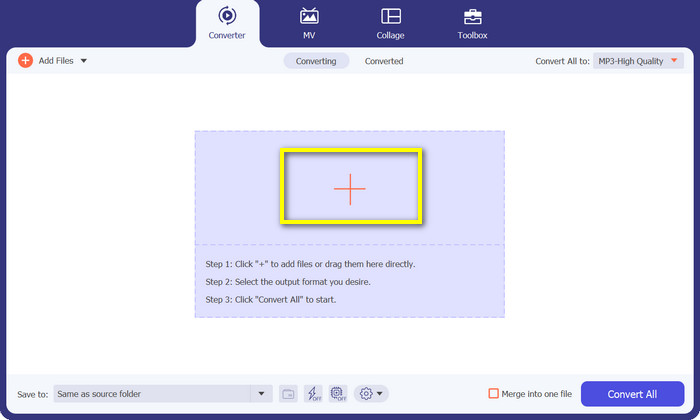
To add files, hit the Plus sign button from the main panel of the program or click the Add Files in the top left corner. Alternatively, drag files to the interface in the center of the interface. The loaded files will then be listed on the panel afterward.
Step 3. Choose the output format
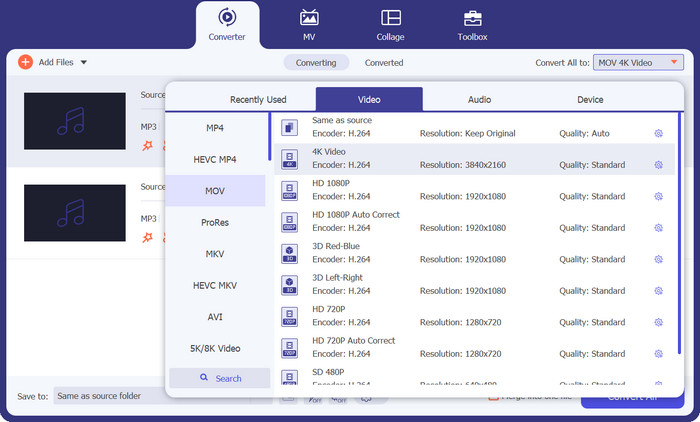
To convert MP3 to MOV, click the Profile bar to reveal the profile list. There are three categories to choose from. Select the Video tab and choose MOV as the output format.
Step 4. Start converting
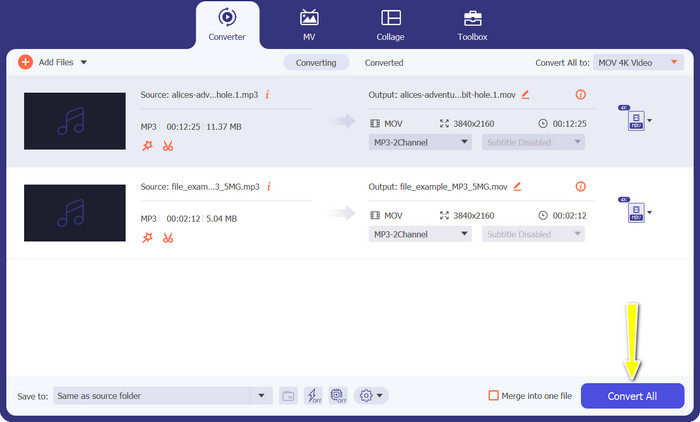
Once everything is set, hit the Convert All button to begin the process of conversion from MP3 to MOV.
2. Conversor MOV Online Gratuito
Free MOV Converter Online is a convenient way to convert MP3 to MOV online for free. The tool offers the capability to transform almost any file to your desired output format without compromising the quality. Additionally, it is designed to have a user-friendly interface, making it simple and easy to navigate. Lastly, unlike traditional software, there is no need to rely on the processing power and resources of the server to help you accomplish the conversion.
Key Features:
◆ Conversão em lote: FVC Free MOV Converter Online pode converter vários vídeos em lote simultaneamente. Isso economiza muito tempo se você precisar converter muitos vídeos.
◆ Sem marcas d'água: FVC Free MOV Converter Online não adiciona nenhuma marca d'água aos seus arquivos MP3. Isso significa que seus arquivos MP3 estarão completamente livres de qualquer marca.
◆ Configurações de saída personalizadas: FVC Free MOV Converter Online permite que você personalize as configurações de saída para seus arquivos MP3. Isso inclui a taxa de bits, taxa de amostragem e canais de áudio.
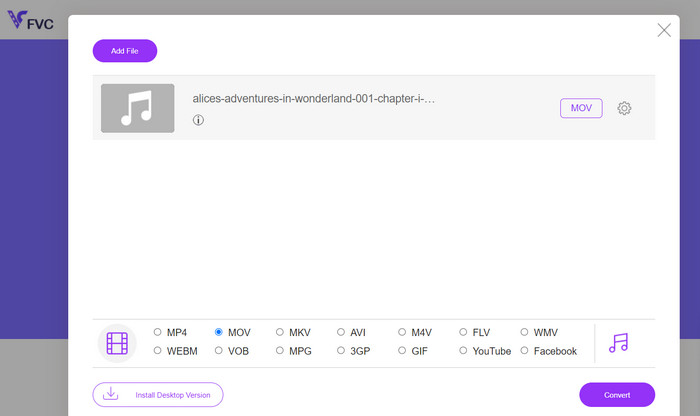
Step 1. Go to the FVC Free MOV Converter Online website. Next, click the Add Files to Convert button and pick the video file you want to convert.
Step 2. This time, select the output format. From the options available, choose MOV as the output format.
Step 3. Click the Convert button. The conversion process will start. Once the conversion is finished, you can download the MP3 file.
Parte 3. Como converter MP3 para MOV no iOS e Android
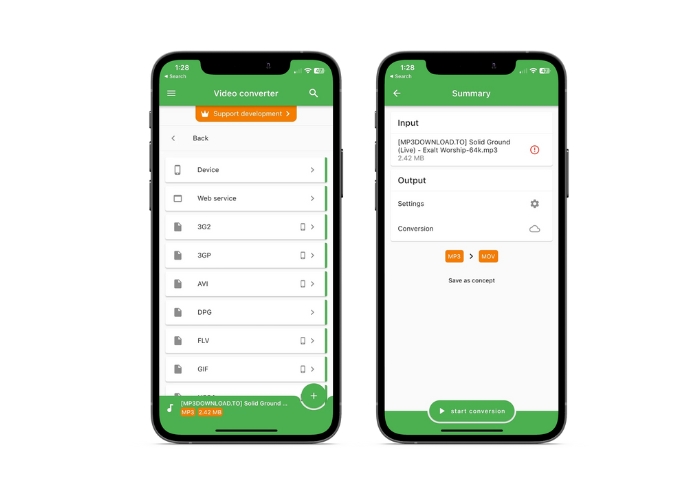
O File Converter permite a conversão de muitos formatos de arquivo de áudio, incluindo AAC e MP3, e está disponível em dispositivos iOS e Android. Você não precisa explorar mais se estiver procurando um conversor de MP3 para MOV para Android ou iOS. Para permitir uma conversão de arquivos rápida e eficiente, o software oferece uma experiência amigável e apresenta uma interface simplificada.
Key Features:
◆ Predefinições e perfis: configurações ou perfis predefinidos para plataformas específicas de hardware ou software que garantem compatibilidade e a melhor saída da categoria.
◆ Seleção de armazenamento: Os usuários podem escolher se desejam salvar o arquivo de saída na nuvem ou em seus smartphones.
Step 1. On your smartphone device, install the File Converter app.
Step 2. Open the app, and choose MOV as the output format from the list of possibilities.
Step 3. You can change the bitrate or other conversion settings by tapping on the Settings option.
Step 4. Tap the start conversion button to start the conversion process after choosing the output format and settings.
Further Reading:
Convert MOV to GIF and Unlock the Power of Animated Content
5 MP3 Cutters to Cut Any Audio Easily [2023 Updated]
Parte 4. Perguntas frequentes sobre a conversão de MP3 para MOV
Quais são as melhores configurações de saída para converter MP3 em MOV?
As configurações de saída de MP3 para MOV dependem de suas demandas. Altas taxas de bit e amostragem fornecem a melhor qualidade. Taxas de bits e amostragem mais baixas economizam espaço.
Quanto tempo leva para converter MP3 para MOV?
O tempo de conversão de MP3 para MOV depende do tamanho do arquivo e das configurações de saída. A conversão de um arquivo minúsculo com parâmetros de saída baixos leva segundos. No entanto, a conversão de um arquivo grande com altos parâmetros de saída pode levar vários minutos ou horas.
Posso converter MP3 para MOV sem perder qualidade?
A conversão de MP3 para MOV degrada a qualidade. MP3, um formato com perdas, perde dados durante a compactação. As configurações de saída podem reduzir a perda de qualidade.
Conclusão
Overall, MP3 to MOV conversion is a relatively simple process. Many different options are available, so you may pick the method that best suits your needs.
-
 MOV VS MP4 - Qual você escolhe?
 MOV VS MP4, qual é o melhor? Este post mostra a diferença entre MP4 e MOV, para que você tenha a melhor escolha para usar em seus arquivos de vídeo.
-
 FLAC vs. MP3: qual formato de arquivo de áudio reina supremo
 Esta postagem irá comparar as principais diferenças entre FLAC e MP3. Isso inclui a qualidade do som, tamanho do arquivo, compatibilidade e muito mais.
-
 Como converter MP3 para M4A para qualidade de som aprimorada
 Melhore a qualidade de seus arquivos de música convertendo MP3 em M4A com nossas dicas e truques de especialistas. Nosso guia oferece instruções passo a passo e software recomendado.
