


 Video Converter Ultimate
 Gravador de ecrã
 Reparo de vídeo
 Secure Download
Como converter MOV para OGG: 5 maneiras ultraeficientes
Playing a MOV container file on their devices poses no problems for many Apple users. Since the MOV file is made initially for QuickTime Player and other Mac video editing software like Final Cut Pro, you may need to convert MOV to OGG occasionally to surpass incompatibility issues with other Android devices and Windows OS media players. In this brief walkthrough, we will give you the Top 5 solutions for converting MOV files to OGG.

Parte 1. 5 maneiras de converter MOV para OGG
1. Video Converter Ultimate
If you are looking for a one-stop solution to convert MOV to OGG seamlessly, go for Video Converter Ultimate. This software utilizes a GPU hardware encoding process, making any conversion activities fast up to 50x speed. Moreover, it allows users to control the output quality of a file to meet their preferences and needs. On top of that, Video Converter Ultimate makes the batch-conversion possible. In other words, you can convert a collection of MOV audio files to OGG in just one click. If you want to see how this unique tool works, follow the guide we created beneath.
Step 1. Launch the Best MOV to OGG Converter
Free DownloadFor Windows 7 or laterSecure Download
Free DownloadFor MacOS 10.7 or laterSecure Download
Step 2. Upload the MOV audio file
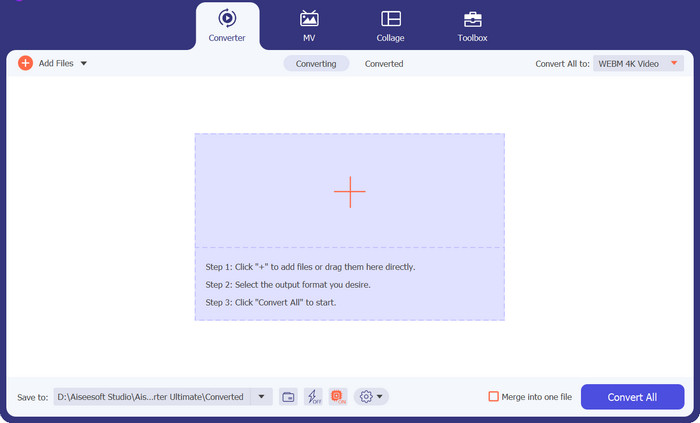
Once the program loads on your screen, click the Plus button on the center of the program's interface. From there, your computer directory will appear, and select the MOV file you wish to transform to OGG.
Step 3. Select OGG as the Output Format
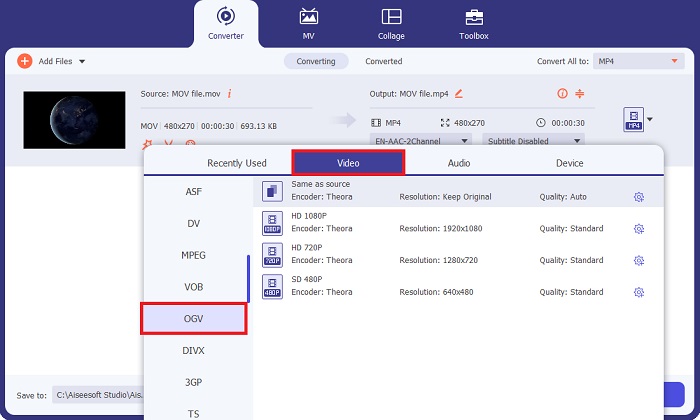
Once the file loads on the screen, head to the Output tab. From there, go to the Audio panel, and select the OGV file. Moreover, you can control your output quality by adjusting the sample rate.
Step 4. Convert the File
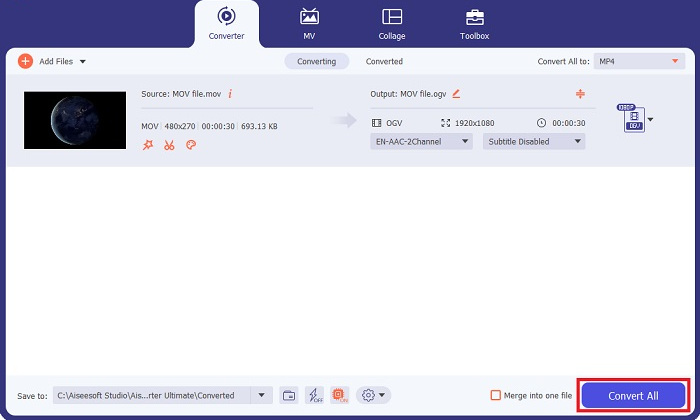
Finally, when all your output requirements are set, hit the Convert All button below. The conversion process may take a while, depending on the size of your audio file. You can click on the output file and listen to it when the process is done.
Prós
- Este programa oferece uma caixa de ferramentas valiosa que contém ferramentas de edição de áudio e vídeo, como Enhancer, Video Merger, File Compressor e muito mais.
- O Video Converter Ultimate oferece mais de 1.000 formatos de áudio e vídeo.
- O Video Converter Ultimate oferece um plano de assinatura flexível que varia de apenas $23,20 por mês a $49,96 por tempo de vida.
Contras
- O programa é incompatível com o software Linux.
2. Conversor de Vídeo Gratuito Online
Some users love to prevent themselves from software installation. If you are one of them, here is Free Video Converter Online, which also supports MOV to OGG conversion. This tool does not only have an aesthetically pleasing interface, but it is way more impressive because it is user-friendly. Here is a breakdown of the conversion process of MOV to OGG using the online converter.
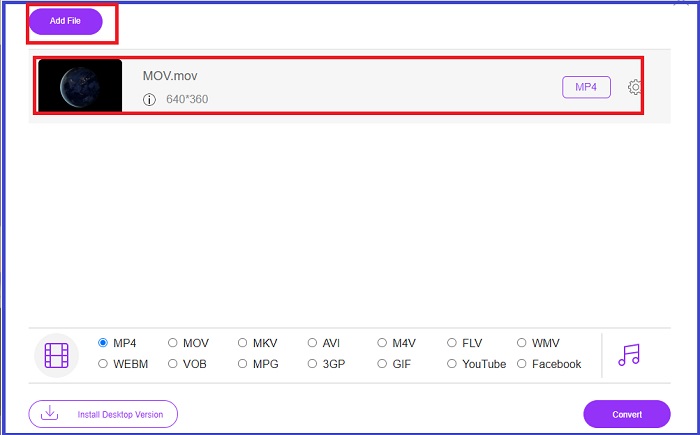
Step 1. Begin by landing on the program's main website. Afterward, hit the Add Files to Convert button and upload your target file.
Step 2. Once the MOV file is uploaded, change the output from Video to Audio button and select OGG.
Step 3. Tick the Convert button to initiate the conversion.
Prós
- O programa garante total segurança e invasão anti-privacidade para seus usuários.
- Ele suporta um recurso de conversão em lote.
Contras
- Não oferece ferramentas abrangentes como editores de vídeo.
3. Convertio
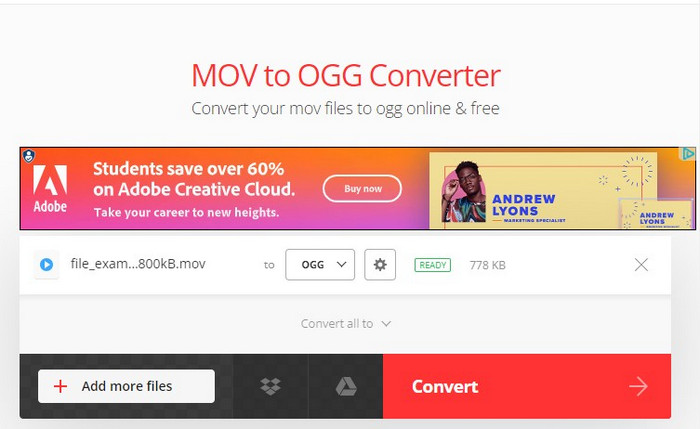
Outra ferramenta confiável para converter OGG para MOV ou MOV para OGG é o Convertio. Este programa online é gratuito e possui uma interface simples. Dito isso, torna a atividade de conversão para iniciantes e indivíduos sem experiência em tecnologia inegavelmente indolor. Além disso, funciona em dispositivos móveis, tornando-o mais prático. Siga o guia abaixo para transformar MOV em OGG.
Step 1. On the program's main page, hit the Choose Files button at the center.
Step 2. Next, upload the MOV file from your computer directory. If you wish to adjust the output quality, hit the Settings button and adjust the details according to your desire.
Step 3. Hit the Convert button. To do a bulk conversion, click Add more files.
Prós
- As configurações de saída podem ser modificadas manualmente, como codec, qualidade e canais de áudio.
- Convertio é um software de conversão on-line de MOV para OGG com proteção 100%.
Contras
- Os usuários podem ter problemas para carregar grandes arquivos MOV.
- Não possui editor de vídeo e áudio.
- Ele contém anúncios indesejados e irritantes.
4. Fábrica de Conversores de Vídeo
O Video Converter Factory é outra ferramenta que simplificará suas necessidades de conversão. Este software offline funciona nos sistemas operacionais Windows e Mac. Além disso, possui vários formatos de saída como OGG, M4A, FLAC e WAV. O que é mais promissor? O Video Converter Factory oferece um downloader de música integrado que permite salvar músicas, álbuns e audiolivros favoritos.
Step 1. First, open the file on your device and click the Add Files button. Then import the MOV file into the program. Alternatively, you can have the drag-and-drop function.
Step 2. Navigate the output panel and select OGG as your output format. You can also modify some of the audio parameters on Settings.
Step 3. Finally, select the folder destination for your file and then hit the Convert button.
Prós
- O Video Converter Factory fornece aos usuários um gravador de tela para gravar a transmissão ao vivo.
- O programa pode criar toques quando você converte vídeo em áudio.
Contras
- O programa não é adequado para sistemas operacionais Mac.
5. FreeFileConvert
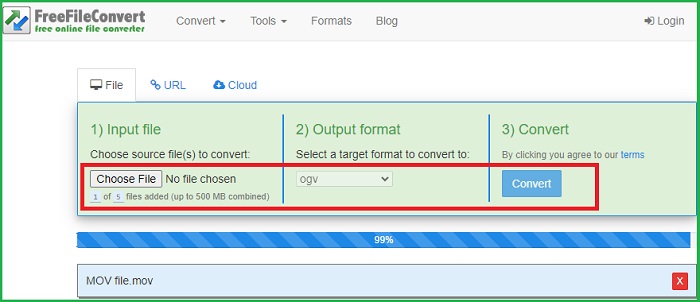
Como o nome indica, FreeFileConvert é um software online que arrebata um pagamento zero para seus usuários. Além de converter arquivos de vídeo como MOV para OGG, também serve como conversor de áudio e compactador de arquivos PDF. Se você deseja converter MOV para OGG, siga as instruções aqui.
Step 1. Go to the Input File tab on the screen and upload your MOV video file.
Step 2. When the file is uploaded, go to the Output Format panel and select OGG.
Step 3. Before converting, click Yes to the Terms of the Agreement and then hit the Convert button to start the process.
Prós
- FreeFileConvert suporta qualquer formato de arquivo de vídeo e áudio.
- Tem uma interface fácil de usar.
Contras
- O programa só pode atender a um tamanho máximo de arquivo de 300 MB.
Further Reading:
Top 5 MOV to WAV Converters of 2023: A Comprehensive Review
[Free & Online] 3 Quick Solutions to Convert MP4 to OGG
Parte 2: Perguntas frequentes sobre a conversão de OGG para MOV
Um arquivo OGG é melhor que um MP3?
Ambos os arquivos têm tamanhos de arquivo semelhantes quando você os compara. Porém, em termos de qualidade, o OGG é um pouco melhor que o MP3.
O que é MOV?
MOV é uma extensão de arquivo de vídeo desenvolvida pela Apple. Esse tipo de arquivo normalmente é reproduzido em players QuickTime.
Como posso converter um MOV em áudio?
Você precisará de um software para fazer o trabalho ao converter MOV em um arquivo de áudio. Com isso, você pode usar programas online ou software offline como o Video Converter Ultimate.
O VLC pode extrair áudio MOV?
Sim. O VLC pode extrair entradas de áudio de uma variedade de formatos de arquivo. No entanto, esse processo pode dar muito trabalho para iniciantes.
Qual é a vantagem de usar um conversor de MOV para OGG offline?
Embora as plataformas online sejam uma boa opção ao converter arquivos MOV para OGG, software offline como o Video Converter Ultimate permite que você estenda a qualidade de sua saída. Você pode personalizar o parâmetro do seu amigo, você pode editar a própria filmagem usando um editor embutido.
Conclusão
While MOV files are suitable for video playback, OGG files will save massive storage on your device when you only need MOV formats in an audio form. With the abovementioned software, you can change MOV to OGG without sweat.
-
 4 melhores métodos para converter MOV para MP3 no Windows e Mac facilmente
 Quando você deseja extrair os arquivos de áudio MP3 de arquivos MOV, você pode aprender mais sobre os 4 conversores MOV para MP3 mais eficientes para obter os arquivos desejados do artigo.
-
 Converta MOV para GIF e descubra o poder do conteúdo animado
 Converta seus vídeos MOV em GIFs animados e suba de nível em seu jogo de conteúdo online! Nossos conversores de MOV para GIF fáceis de usar ajudarão você a criar gráficos atraentes.
-
 2 melhores maneiras de editar metadados OGG que você deve experimentar gratuitamente
 Precisa editar metadados OGG? Bem, você pode facilmente editar as tags usando o software correto. Se você não tiver um, a leitura deste artigo é obrigatória.
