


 Video Converter Ultimate
 Gravador de ecrã
 Reparo de vídeo
 Secure Download
Conversão de MP4 para MPG: alterne facilmente os formatos de vídeo com os melhores conversores
Ever found yourself in a pickle when your awesome MP4 videos won't play on certain devices? We feel you! But fear not, because we've got a neat solution: MP4 to MPG conversion. Yep, it's the key to unlocking universal playability for your precious videos. Well, imagine this scenario: you want to show off your travel adventures on your aunt's old TV during a family gathering. But alas, the TV only supports MPG files, leaving you with disappointment written all over your face. That's where the magic of MP4 to MPG comes in!
Agora, aqui está a melhor parte. Vamos orientá-lo em alguns programas de primeira linha que fazem o trabalho perfeitamente.

Parte 1. MPG vs. MP4
Tudo bem, vamos falar sobre formatos de vídeo – MP4 e MPG! Ambos têm suas vantagens, mas às vezes você pode precisar fazer uma pequena troca de formato. Aqui está uma tabela para sua leitura:
| MP4 | MPG | |
| Qualidade de vídeo | Vídeo de alta qualidade com compactação eficiente | Boa qualidade de vídeo, mas tamanhos de arquivo maiores |
| Compatibilidade | Amplamente suportado por dispositivos e aplicativos modernos | Altamente compatível com dispositivos mais antigos |
| Tamanho do arquivo | Tamanhos de arquivo menores para fácil compartilhamento on-line | Tamanhos de arquivo maiores podem exigir mais armazenamento |
| Transmissão Web | Excelente para streaming e compartilhamento na web | Suporte limitado para streaming online |
| Suporte a dispositivos | Pode não funcionar em alguns dispositivos mais antigos | Funciona bem na maioria dos dispositivos, incluindo os antigos |
| Editando | Permite edição com perda mínima de qualidade | A edição pode causar alguma perda de qualidade |
| Uso | Ideal para conteúdo online e mídias sociais | Adequado para DVDs, dispositivos legados e reprodução de TV |
Parte 2. Converta MP4 em MPG com alta qualidade
We've got a real gem for you – the ultimate MP4 to MPEG converter: Video Converter Ultimate! If you're tired of hitting roadblocks when your MP4 videos refuse to play on certain devices, this tool is your savior. It's a conversion wizard that effortlessly turns your MP4 files into MPG format, ensuring smooth playback on any gadget, new or old.
Esta pequena potência não é apenas um pônei de um truque. Junto com a magia MP4 para MPG, ele exibe uma série de outros truques na manga. Precisa converter entre diferentes formatos de vídeo? Sem problemas. Quer extrair o áudio de um vídeo? Pedaco de bolo. E ei, ele ainda permite que você faça algumas edições básicas de vídeo para dar aquele toque pessoal. Melhor parte? Ele foi projetado com a simplicidade em mente. Sem dores de cabeça tecnológicas ou jargões complicados. Simplesmente uma grandiosidade direta que qualquer um pode suportar.
Agora, aqui estão as etapas fáceis para fazer a mágica do seu vídeo.
Step 1. Download and Install
Head over to the official website or your favorite app store to grab Video Converter Ultimate. For your convenience, we have inserted the download links below. Simply hit the Free Download button. Once it's downloaded, follow the simple installation instructions – you know the drill. In a blink, you'll have the tool ready and waiting on your device.
Free DownloadFor Windows 7 or laterSecure Download
Free DownloadFor MacOS 10.7 or laterSecure Download
Step 2. Add Your MP4 Files
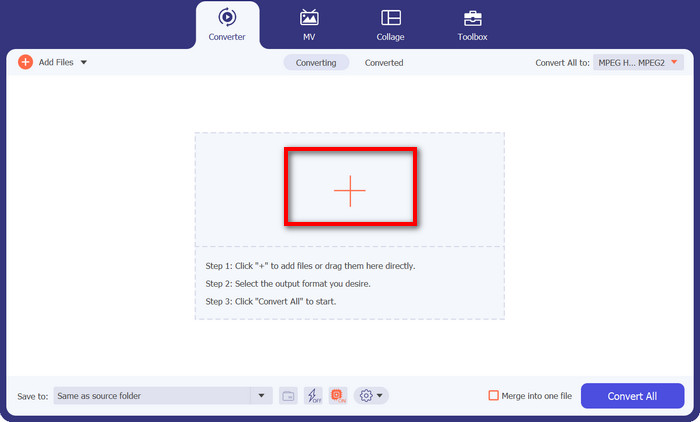
Launch the program, and you'll see a clean, user-friendly interface. No fancy jargon to scare you off! Now, hit that plus sign button. You can choose one or multiple MP4 files – whatever floats your boat.
Step 3. Choose MPG as Output
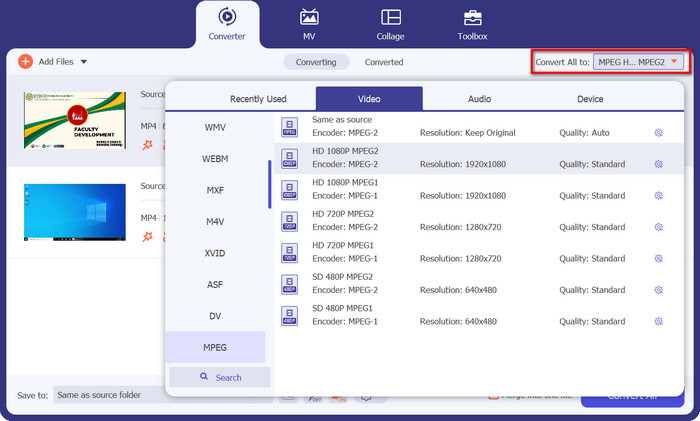
Time to pick your desired output format. Go to the Convert All to section and locate MPEG from the drop-down option. You'll see MPG right there, and that's your magic ticket to compatibility bliss.
Step 4: Hit Convert, and Voilà!
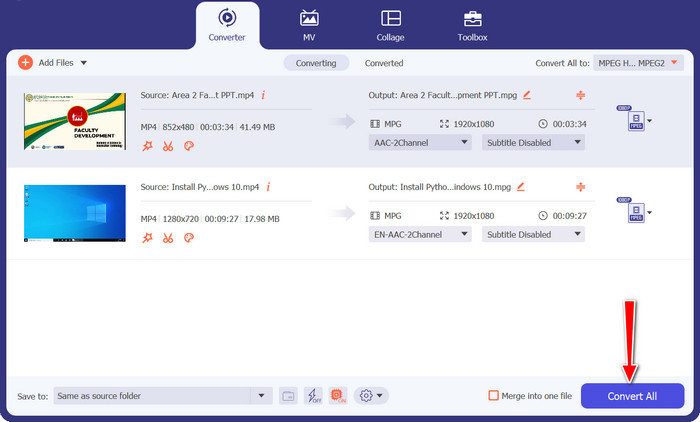
Ready to see the magic happen? Awesome! Just click the big, friendly Convert All button, and watch as Video Converter Ultimate works its charm. Sit back, relax, and in no time, your MP4 videos will be magically converted to MPG format.
Parte 3. Converter MP4 em MPG online gratuitamente
Get ready to experience a world of seamless video conversions without the need for any software downloads or complicated setups. This powerful online converter is designed with simplicity in mind, making it a breeze to convert your MP4 videos to MPG format and beyond. Whether you're on a Windows PC, Mac, or even a mobile device, the Free MP4 Converter Online is accessible from any browser. Convert MP4 to MPG online, anytime, anywhere.
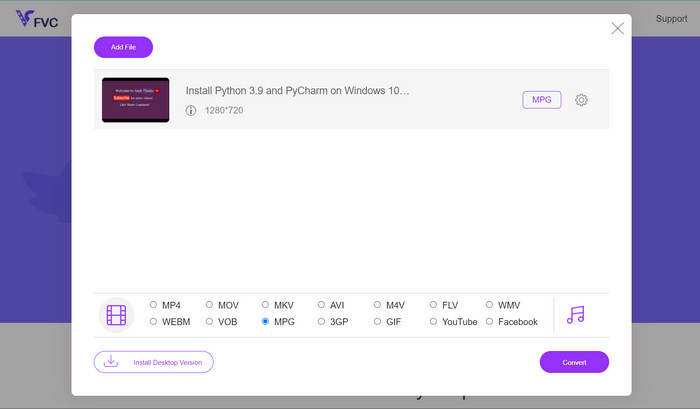
Step 1. First things first, head over to the Free MP4 Converter Online website using your trusty browser. Once you're there, you'll spot the friendly Add Files to Convert button.
Step 2. With your MP4 video in the bag, it's time to pick the desired output format. Look for MPG from the list of available formats, and give it a satisfying click.
Step 3. Ready for the final magic touch? Just hit the Convert button, and let the online converter do its thing. In no time, your MP4 video will be transformed into MPG format.
Parte 4. Converter MP4 em MPG com Handbrake
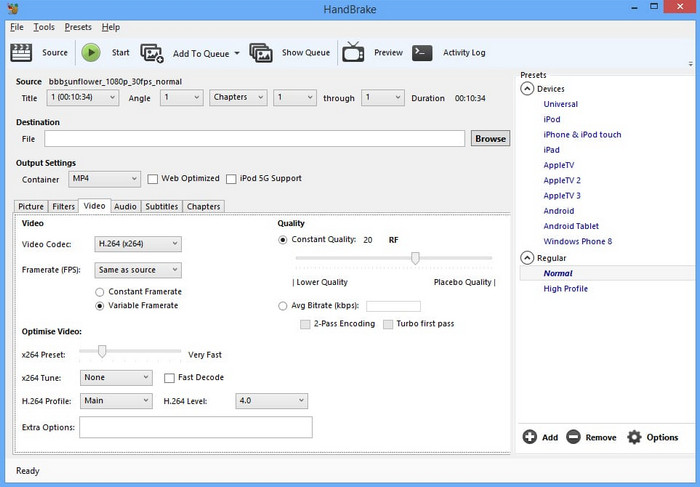
Preocupado com compatibilidade? Não fique! O Handbrake oferece suporte a uma ampla variedade de formatos de saída, tornando-o um companheiro versátil para todas as suas necessidades de vídeo. Converta MP4 em MPG com freeware ou até mesmo faça o contrário. Este conversor tem flexibilidade para lidar com tudo.
Step 1. Launch Handbrake and you'll be greeted with a simple, no-nonsense interface. Click the Open Source button and choose the MP4 video you want to convert from your computer.
Step 2. Look for MPG in the Summary tab under Format. If you need to tweak any settings, you can do that here too.
Step 3. Finally, hit that Start Encode button, and Handbrake will work its magic! Your MP4 video will be converted to MPG format in a jiffy.
Parte 5. Converter MP4 em MPG no VLC
Não há necessidade de ser um guru da tecnologia aqui. O VLC possui uma interface simples e direta que não deixará você coçando a cabeça. Ele foi projetado pensando na facilidade de uso, para que você possa mergulhar direto na conversão de vídeo sem complicações. Fornecemos um guia rápido e fácil em apenas alguns instantes com este programa para converter MP4 em MPG gratuitamente.
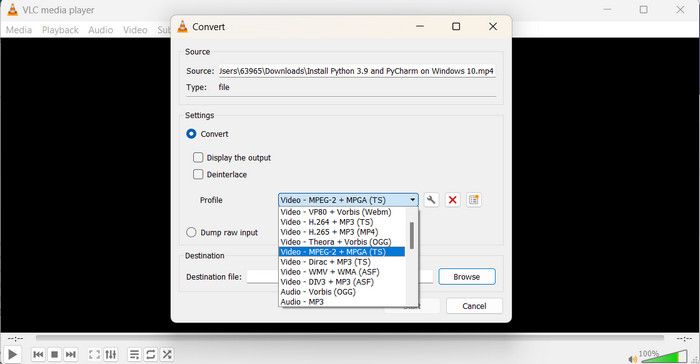
Step 1. Once you've installed VLC, launch the player. Now, click on Media in the top menu and select Convert/Save. In the Open Media window, hit the Add button and choose the MP4 video you want to convert.
Step 2. In the Convert window, click the Profile drop-down menu, and select Video - MPEG-1 as the output format, depending on your preference. Finally, choose the destination folder for your converted video and click Start.
Further Reading:
Top 7 Undefeatable MP4 Converter to MOV (PC/Online/Mobile)
FLV to MPG – How to Convert FLV to MPG on Mac, PC and Online Free
Parte 6. Perguntas frequentes sobre MP4 para MPG
Para que é usado o formato MPG?
O formato MPG (MPEG) é comumente usado para reprodução de vídeo em dispositivos mais antigos, como DVD players e TVs.
Posso converter vídeos sem perder qualidade?
Alguns conversores de vídeo oferecem opções de conversão sem perdas, mas a maioria das conversões envolve alguma perda de qualidade.
Os conversores de vídeo online são seguros para uso?
Os conversores de vídeo online mais confiáveis são seguros de usar, mas é essencial usar sites confiáveis e ter cuidado ao enviar arquivos.
Qual é a diferença entre um formato contêiner e um codec?
Um formato contêiner (por exemplo, MP4) contém vídeo, áudio e outros dados, enquanto um codec (por exemplo, H.264) compacta e descompacta os dados de vídeo e áudio.
Posso converter vídeos para resolução 4K?
Alguns conversores de vídeo suportam a conversão de vídeos para resolução 4K, mas a qualidade da saída pode variar dependendo do vídeo de origem.
Conclusão
Alright, folks, that's a wrap! We've learned all about video conversion and how it helps us make our videos play nicely on any device. From converting MP4 to MPG to exploring various formats and tools, we've covered it all.
-
 Os 4 melhores reprodutores MPG/MPEG para Windows/Mac/Android/iPhone [2023]
 Se quiser reproduzir seu arquivo MPG ou MPEG favorito sem problemas, você pode aprender mais sobre os 4 principais players MPG / MPEG para computadores e telefones celulares neste artigo.
-
 AVI VS MP4 - Diferenças e semelhanças entre os formatos AVI e MP4
 Qual é o melhor formato de vídeo, AVI ou MP4? Se você deseja obter uma comparação detalhada, você pode verificar este artigo AVI VS MP4. Você pode saber as diferenças e semelhanças entre AVI e MP4 em muitos aspectos.
-
 Como converter MOV para MPG facilmente (offline e online)
 Neste passo a passo, você está prestes a descobrir a maneira mais rápida de converter MOV para MPG. Criamos as melhores soluções offline e online para você.
