


 Video Converter Ultimate
 Gravador de ecrã
 Reparo de vídeo
 Secure Download
Como reduzir o tamanho do vídeo GoPro com facilidade e rapidez
Você tem uma câmera GoPro? Então você deve ser um grande entusiasta de esportes radicais e aventuras. GoPro é na verdade uma empresa fundada por Nick Woodman em 2002. Ela produz principalmente câmeras de ação, aplicativos móveis e software de edição de vídeo.
With a GoPro camera, you can capture videos with high resolution up to 4K or HDR. However, this also poses a problem – the captured video files can be too large sometimes. Besides causing serious space issues while storing, huge file size may make it impossible for you to send the video to Instagram, WhatsApp, Dailymotion, Email and other platforms.
To solve that problem, we will provide you a complete guide on how to compress GoPro videos on Windows and Mac.

Parte 1. Como compactar o vídeo online GoPro gratuitamente
Mesmo que GoPro seja uma boa escolha para gravar instantâneos e imagens de vídeo impressionantes, você pode descobrir que os vídeos gravados ocupam muito espaço de armazenamento. No entanto, há espaço limitado para armazenar vídeos em cada câmera GoPro, mesmo na mais recente HERO9 Black, o que significa que você precisa transferir o vídeo para o seu computador, cartão SD, unidade flash ou disco rígido para backup ou edição posterior. Nesse caso, ocupará muito espaço no seu dispositivo.
So, what you need is powerful video compressor to shrink the size of the recorded videos. FVC Free Video Compressor allows you to compress large 4K and HDR videos shot by GoPro camera for free on any popular browser such as Google Chrome, Microsoft Edge, and Mozilla Firefox.
Siga as etapas abaixo para reduzir o tamanho do vídeo GoPro ao mínimo em segundos online.
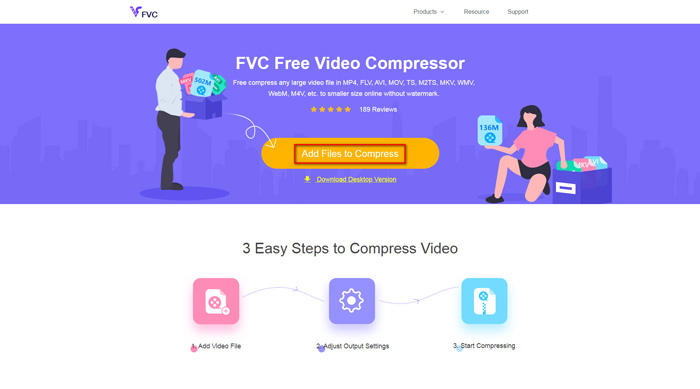
Step 1: Click the link above to visit FVC Free Video Compressor on your browser. Then click the Add Files to Compress button in the center of the banner. Follow the on-screen instructions to download and install the launcher on your computer.
Step 2: Now, please select the GoPro video file you want to compress after you connect the device to the computer. To compress the video, just use the slider behind the Size box. Drag it and adjust the file size as you like. You can even able to customize the resolution and bitrate separately.
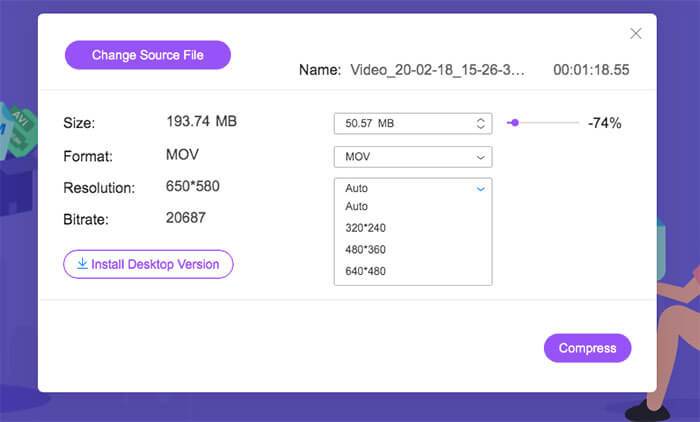
Step 3: Pick an output format. Then click Compress in the right corner. Select a folder to save the compressed video. Wait for a while and you will get the wanted video with high quality.
Parte 2. Como redimensionar vídeo GoPro para upload
Mas e se você quiser compartilhar o vídeo GoPro no YouTube, Instagram, WhatsApp, Facebook, Twitter, Snapchat ou TikTok? E há um requisito estrito de tempo / tamanho ao enviar vídeos nessas plataformas?
| Youtube | Snapchat | TikTok | |||||
| Duração | ≤ 12 horas | ≤ 2 minutos | ≤ 3 minutos | ≤ 240 minutos | ≤ 40 segundos | ≤ 60 segundos | ≤ 60 segundos |
| Tamanho | ≤ 128 GB | — | ≤ 16 MB | ≤ 4 GB | — | — | — |
As you can see, almost all platforms have its own video length requirement, which means you need to cut the video before sharing it. Then you can give Video Converter Ultimate a try. With this video editor, you can trim the video to the desired length. It also makes it possible for you to merge multiple video clips into one complete video.
Free DownloadFor Windows 7 or laterSecure Download
Free DownloadFor MacOS 10.7 or laterSecure Download
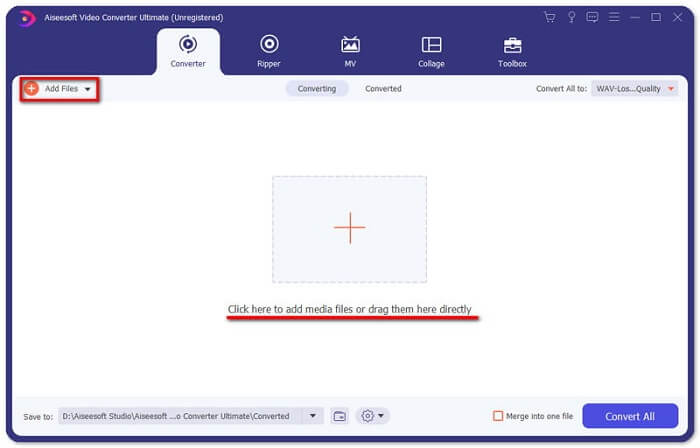
Step 1: Download and install the professional video converter on your computer. Launch the program after installing. Click Add Files to add the GoPro video file you want to edit. Or directly drag the file to this program.
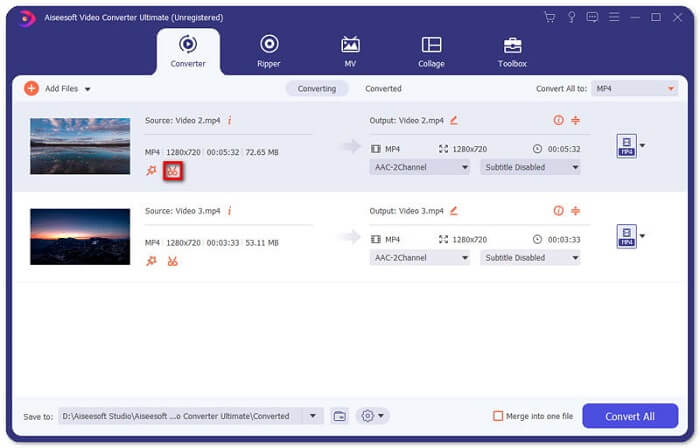
Step 2: After uploading, please click the Cut icon. The icon looks like scissors. And it is next to the snapshot image of your video.
Step 3: To cut off unwanted parts, just drag the clipper on the progress bar. You can also directly enter the start and end time into the Duration box below. After trimming, just click Save to save all the changes.
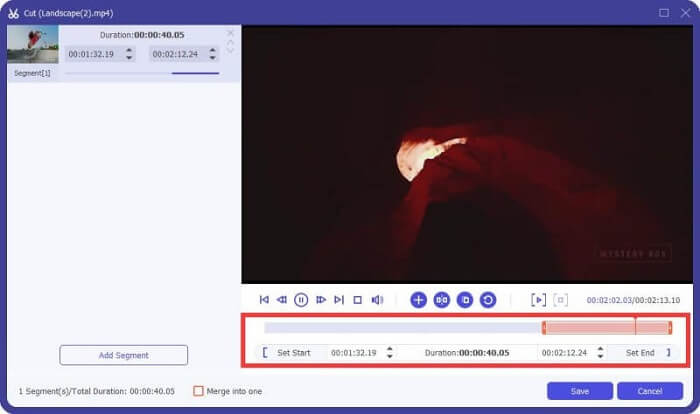
Step 4: Go back to the main interface. Click Convert All to export the trimmed video to your computer. If you have multiple video clips that need to be combined as one, just check the box ahead the Merge into one file option.
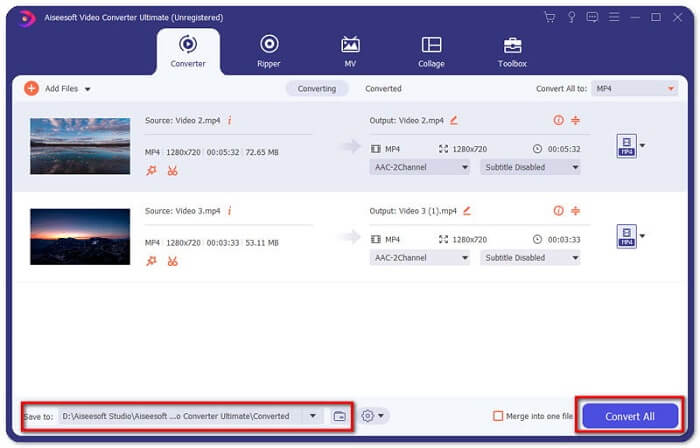
After trimming the original GoPro video, you can easily share your highlight moments with others. But if you are using WhatsApp, you may still need to compress the cut video before uploading due to its maximum video size for uploading.
Parte 3. Perguntas frequentes sobre compactação de vídeo GoPro
Por que os vídeos GoPro são tão grandes?
Isso porque você está filmando a 60FPS em 1080p ou até 4K. Por exemplo, um vídeo de 60 FPS de 1 minuto em resolução de 4K ocupará cerca de 600 MB de memória.
Por que meu vídeo de término da GoPro?
That is called Chaptering. When you shoot a video, your camera may automatically segment into a new file chapter if it reaches a certain size.
Qual é o formato de vídeo da GoPro?
O formato padrão para vídeos GoPro é o tipo de arquivo MP4, o que significa que você pode reproduzi-lo em quase todos os dispositivos e reprodutores.
Conclusão
Now you know how to compress GoPro videos on both Mac and Windows. If you don’t need to upload to platforms with strict limitation, you can simply use FVC Free Video Compressor to resize the GoPro video. To trim the video, you can also try Video Converter Ultimate.
-
 De 50 MB a 5 MB - Como compactar arquivo MP4 em segundos
 O vídeo MP4 é muito grande para ser enviado? Quer reduzir o tamanho do vídeo? Aqui estão 3 maneiras eficientes de compactar um arquivo MP4 em um tamanho menor sem limite.
-
 Como compactar um vídeo para e-mail e torná-lo menor que 25 MB
 Não consegue enviar um vídeo muito grande por e-mail? Se você tiver esse problema, poderá obter maneiras viáveis de compactar um vídeo para e-mail aqui. Este artigo mostrará como reduzir em detalhes grandes arquivos de vídeo gratuitamente.
-
 Compactação GIF - Como compactar GIF animado em um arquivo pequeno
 Aqui estão duas maneiras fáceis de compactar GIF em seu computador ou telefone celular. Você pode usar o FVC Free Online Video Compressor e o Photoshop para reduzir o tamanho do arquivo GIF em diferentes aspectos.
