


 Video Converter Ultimate
 Gravador de ecrã
 Reparo de vídeo
Como consertar um arquivo de vídeo corrompido no Android: 4 maneiras abrangentes
We cannot deny how highly significant Android devices are, especially phones. Our reliance on Android-captured videos, which are in MP4 format, encompasses a range of significant moments and events, and these videos, stored on Android phones, serve as repositories of cherished memories. However, when issues start to arise in connection to our Android video files, the risk of losing these valuable memories becomes absolute. On the one hand, various factors can lead to the corruption of favorite videos, making them unplayable until the repair of corrupted video files on Android is initiated.
Por outro lado, independentemente do formato do arquivo, como MP4, existem ótimas maneiras de reparar arquivos de vídeo corrompidos. Portanto, este artigo orienta você através de truques de solução interessantes para resolver, restaurar ou recuperar essas suas memórias preciosas em seus arquivos de vídeo.
Parte 1. Reparar o arquivo de vídeo Android corrompido com um conversor de vídeo
Converting the corrupted Android video file into an alternative format is frequently the solution to restoring its functionality. This method proves particularly beneficial when a device encounters difficulties with video formats. Although there are a lot of video converter tools that will enable you to convert video, if you are looking for the best converter to repair corrupted video from an Android, then use FVC Video Converter Ultimate. This ultimate converter provides you with a seamless batch file conversion experience powered by advanced ultrafast technology. Furthermore, you’ll be impressed with its conversion speed, as this program boasts a 30 times faster speed due to its hardware acceleration technology. In addition, it has an extensive range of presets, tools, and features that will leave you astounded.
Além disso, sua interface amigável garante um processo eficiente de conversão de arquivos. No entanto, ele serve como sua solução completa para edição de vídeo Android, abrangendo tarefas como aprimoramento, compactação, mesclagem, corte, corte, remoção de marca d’água e muito mais. Além da versatilidade, o conversor suporta mais de 500 formatos de áudio e vídeo, proporcionando flexibilidade para suas necessidades de edição!
How to Fix a Corrupted Videos from Android
Step 1. Transfer your video files to your computer and prepare them for fixing. Launch the video converter after installing it using the Download buttons below.
Free DownloadFor Windows 7 or laterSecure Download
Free DownloadFor MacOS 10.7 or laterSecure Download
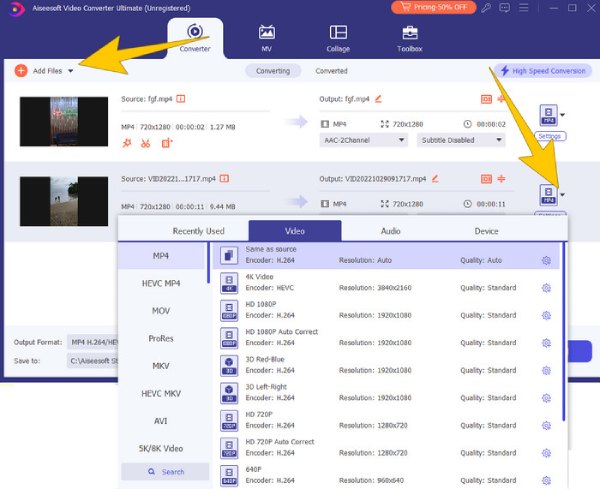
Step 2. Upload all the video files by clicking the Add Files button. Then, head over to the drop-down arrow beside the format section to choose a format for the output.
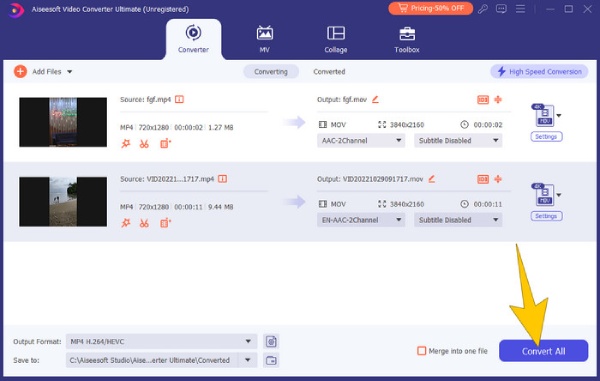
Step 3. After that, hit the Convert All button to start the conversion.
Parte 2. Como reparar vídeos do Android usando VLC
Another resolution you can use to convert Android videos to another format is the VLC Media Player. It is also a versatile open-source software designed to play a wide array of file formats, boasting extensive codec support. It originated as a basic media player and has evolved over time. You can acquire it on all your devices as it is compatible with all OS. Furthermore, VLC Media Player carries a handy feature for your option to deal with corrupted Android videos and attempt video repair by converting them to a different format.
How to Fix Corrupted MP4 Video Files Recorded in Android
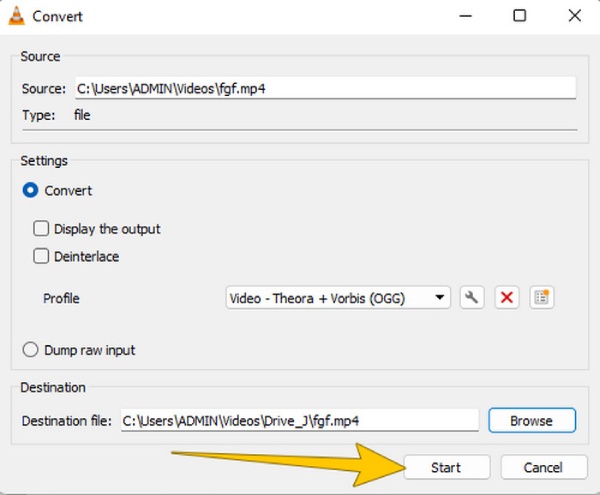
Step 1. Launch VLC, and go to Media > Convert/Save section.
Step 2. Then, click the Add > Convert/Save button to upload the video. After that, click the Profile to choose the format.
Step 3. Finally, hit the Browser to set the file destination and click the Start tab.
Parte 3. Corrija o vídeo corrompido por meio de uma ferramenta de reparo de vídeo notável
If you encounter a severely corrupted video and wonder if it can be recovered, FVC Video Repair offers you the best solution. Compatible with many file formats, this tool effortlessly addresses the corruption issues of multiple MP4 video files simultaneously. The repair process for corrupted video from Android can be done quickly with this software, as it offers an easy-to-master procedure that matches its simple interface. Furthermore, using his FVC Video Repair, you have the option to restore files that have undergone corruption during editing, conversion, or recovery attempts. Follow the quick steps given below to fix the videos coming from your Android.
How to Fix Android Videos Quickly
Step 1. Click the Download button below to initiate the installation process. Once installed, click both the Plus buttons in the interface to upload the corrupted video and a sample one.
Free DownloadFor Windows 7 or laterSecure Download
Free DownloadFor MacOS 10.7 or laterSecure Download
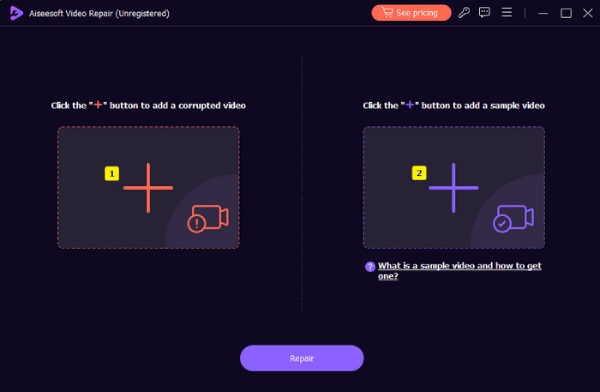
Step 2. After uploading, click the Repair button.
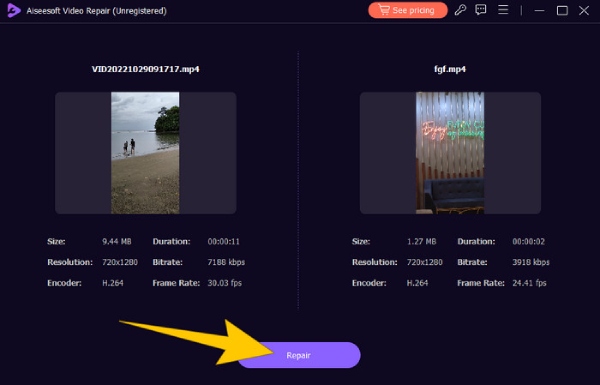
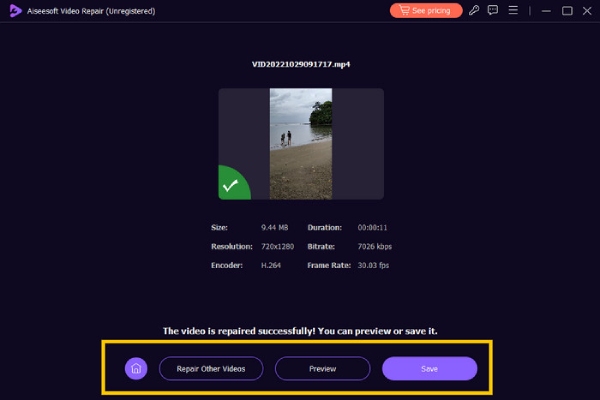
Step 3. After a quick fixing process, click the Save button among the other given options.
Parte 4. Reparar o vídeo com o editor hexadecimal
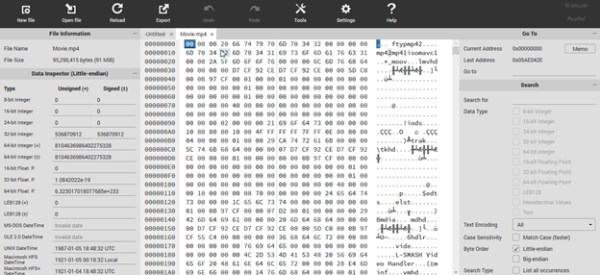
Lastly, you can fix a corrupted Android MP4 utilizing a Hex editor tool, which displays video file data in binary digits. By comparing the binary data of a corrupted video within this free video repair, you can manually adjust the data of the corrupted file. Furthermore, Hex is effective in solving issues related to corrupt file headers that prevent videos from playing. Here are the simplified steps to use Hex.
Step 1. Launch the editor on your PC device and open the corrupt Android video.
Step 2. Compare the video with another video working file. Then, manually edit the video with its binary data. Match the structures of the two videos.
Step 3. Save the changes you have made.
Parte 5. Bônus: dicas para evitar corrupção de arquivos de vídeo no Android
Aqui estão as dicas para evitar a corrupção de arquivos de vídeo no Android. É fundamental adotar cuidados específicos para proteger a integridade dos seus arquivos de vídeo.
◆ Evite gravar seus vídeos quando a bateria do seu dispositivo Android estiver fraca.
◆ Evite gravar vídeos quando a memória do seu Android estiver cheia.
◆ Tenha cuidado e evite baixar aplicativos maliciosos e inseguros em seu dispositivo.
◆ Não ejete o cartão SD do seu Android durante uma transferência de arquivos em andamento.
Parte 6. Perguntas frequentes sobre vídeos Android
Por que meus vídeos ficam desfocados do Android para o iPhone?
O aspecto mais importante que causa vídeos borrados é a diferença entre a compactação e a resolução do Android e do iPhone.
Por que os vídeos ficam tão ruins no Android?
Os seguintes fatores podem contribuir para que os vídeos pareçam menos nítidos em alguns dispositivos Android: Sensores de câmera, configurações de vídeo ou resoluções de tela de qualidade inferior.
Como posso editar vídeos de alta qualidade no Android?
Você precisará de um aplicativo de edição de vídeo confiável para editar seus vídeos de alta qualidade no Android.
Conclusão
It is indeed bothering to have corrupted videos, so you must know how to fix them. Luckily, the given solutions to fix corrupted videos on Android are highly reliable and trusted even by professional video editors, especially FVC Video Repair. However, you might wonder why the solutions are computer programs. Well, that’s how experts edit and fix video files.
-
 Como corrigir facilmente o problema de erro 5 de impossibilidade de reprodução de vídeo
 Você já reproduziu um de seus vídeos baixados, mas foi interrompido por uma mensagem de erro 5 que não consegue reproduzir o vídeo? Aqui está tudo o que você precisa saber.
-
 Meus vídeos não estão sendo reproduzidos, o que devo fazer para corrigi-los
 Preso com vídeos que não estão sendo reproduzidos e você não sabe como corrigi-los? Você está no caminho certo para resolver seu problema. Aqui está tudo o que você precisa saber.
-
 Codec de vídeo não compatível: o que, por que e como resolver
 Você ficou chateado devido à falta de um codec ou a um codec de vídeo não suportado? Ler esta postagem sobre o erro do codec será a maneira mais sábia de aprender a solução.
