


 Video Converter Ultimate
 Gravador de ecrã
 Reparo de vídeo
Como converter RAR para MP4: Descompacte e altere arquivos RAR para MP4 corretamente
If you are a tech-savvy person, you know that RAR and MP4 files are common in everyday routines. Essentially, RAR files are like compressed bundles that can hold all sorts of stuff - videos, images, you name it. That said, have you ever wondered about turning an RAR file into an MP4 for more compatibility? It's a question that pops up when you snag some movies with a RAR tag from the web or get RAR-packed videos via email, right? So, to switch them to MP4, you have to unpack or unzip the RAR and then transform those videos into MP4 format. Therefore, stick around this post to find out the two simple ways, offline and online, to make this RAR to MP4 conversion happen.

Parte 1. Converta RAR para MP4 online com ezyZip
Começando com o conversor online recomendado que pode lidar com arquivos RAR com eficiência. Ezyzip é seu aliado sempre que você estiver em apuros com conversões de arquivos. É a melhor escolha online para extrair arquivos MP4 de um arquivo RAR sem complicações. Você não precisará sobrecarregar seu computador com software conversor de MP4 extra. Isso ocorre porque o ezyZip funciona diretamente no seu navegador, evitando o trabalho de instalação. Além disso, esta ferramenta não se limita apenas à conversão gratuita de um arquivo RAR para MP4 online, pois também oferece suporte a uma variedade de outras opções de extração e conversão de arquivos.
O que diferencia o ezyZip dos demais conversores online é sua abordagem única. Ele mantém seus arquivos sãos e salvos, processando tudo localmente em seu navegador. Isso significa que não é necessário fazer upload ou download tedioso para servidores externos, o que resulta em conversões extremamente rápidas. Surpreendentemente, você pode esquecer as restrições de tamanho ao usar o ezyZip porque esta ferramenta não impõe nenhum limite. Isso também significa que sua privacidade permanece intacta, já que seus arquivos nunca saem do seu navegador! Agora, não deixaremos este slide passar sem lhe ensinar o processo do ezyZip para converter seus arquivos de RAR para MP4. Portanto, o guia abaixo é fornecido.
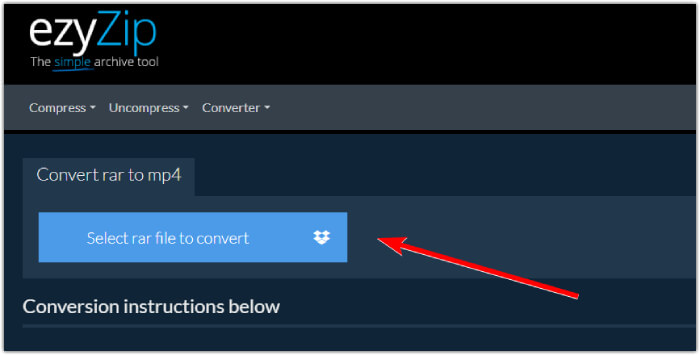
Step 1. Proceed to the converter's official website and import your RAR file by clicking the Select rar file to convert button.
Step 2. When the files are loaded, the tool will automatically convert them for you in the RAR archive. Now click the Save button to save each MP4 file to your desired file destination.
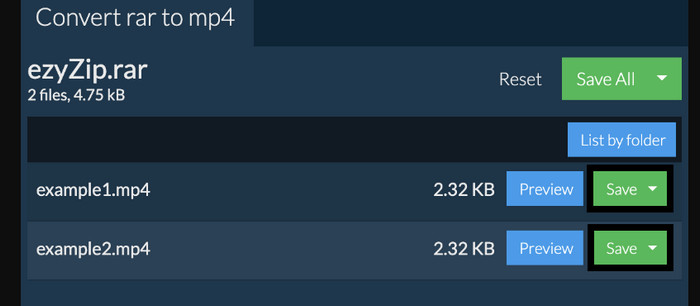
Step 3. If, just in case, the Save button is disabled, you must know that the browser you use is not supported by the converter. Otherwise, when the files are successfully saved, you will be given an option to view your converted files.
Parte 2. Converter RAR para MP4 offline com WinRAR
Existem ótimas maneiras offline de converter RAR em MP4 com WinRAR. WinRAR é um software popular desenvolvido especificamente para usuários do Windows. É um software que oferece uma gama de recursos úteis para gerenciar arquivos compactados. Além disso, este programa simplifica o processo de descompactação ou descompactação de arquivos RAR para que possam ser extraídos e acessados. Além disso, o WinRAR continua porque também oferece a capacidade de converter arquivos RAR em vários formatos de vídeo, como MP4 ou M4V. Esta funcionalidade é inestimável para usuários que precisam trabalhar com conteúdo multimídia armazenado em arquivos RAR. Assim, se você quiser saber como descompactar e alterar arquivos RAR para MP4 com WinRar, continue lendo as instruções passo a passo abaixo.
Step 1. Firstly, download the popular RAR expert program on your desktop. Use a reliable source when downloading it. Then, after the installation, quickly launch it to start the conversion process.
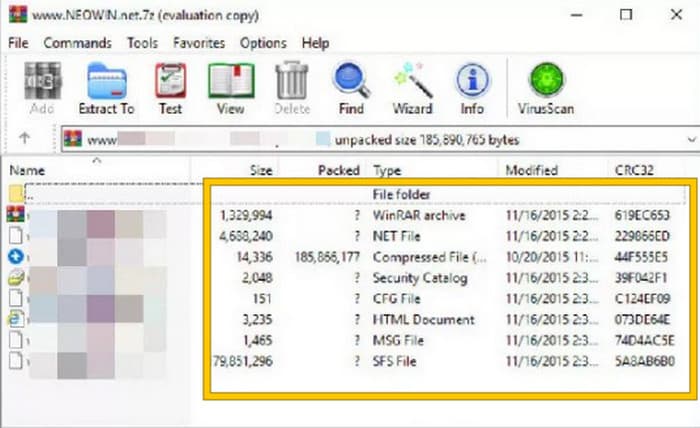
Step 2. Once the program is launched, you can immediately open or upload the RAR file that you want to convert to MP4. You will know whether the file is loaded or not, for it will show at the center of the interface.
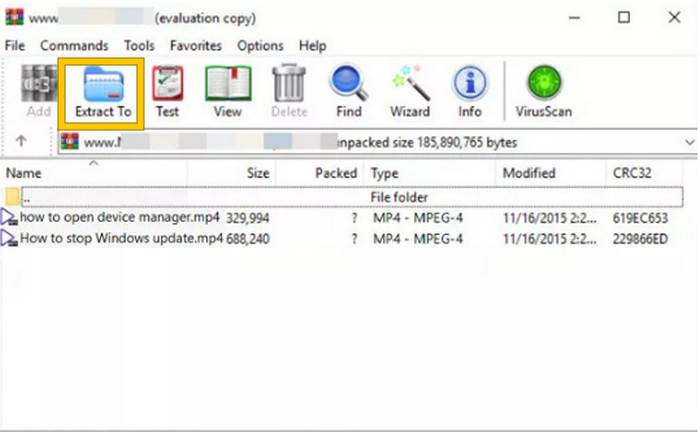
Step 3. Finally, to start the conversion or unpacking, click the Extract To button in the menu tab list. When done, you may directly open the converted files in the interface.
Parte 3. Dica bônus: melhor maneira de converter qualquer áudio/vídeo para MP4 online
Allow us to give you a bonus tip where you can convert any video and audio file into MP4 in the best and most rapid way! Meet this FVC Free Video Converter Online, a converter that makes it super easy and totally free to change your videos and audio files into different formats like MP4. Besides, you can switch your high-definition videos into popular formats quickly while keeping their original quality or sharpness intact. Furthermore, you will also love its lightning-fast process, letting you convert multiple files in no time!
Tem mais! Este FVC Free Video Converter Online também permite que você ajuste seus vídeos e áudio de acordo com sua preferência. Isso ocorre porque este conversor permite ajustar coisas como resolução, taxa de quadros, taxa de bits e até configurações de áudio, como volume e taxa de bits, de acordo com suas configurações preferidas. Isso significa que você pode personalizar sua mídia do jeito que quiser e exportá-la com facilidade. Portanto, se você está se perguntando como converter seus arquivos de vídeo ou áudio para MP4 online, siga os passos simples mostrados abaixo.
Step 1. Kick off the process by visiting the official website of FVC Free Video Converter Online. Once you’ve arrived there, click the Add Files to Convert button to get the launcher and upload the initial file.

Step 2. Once the file is uploaded in, you can add more media files by clicking the Add File button in the main workspace. Then, set them to MP4 by clicking the files and then toggling the MP4 format at the bottom.
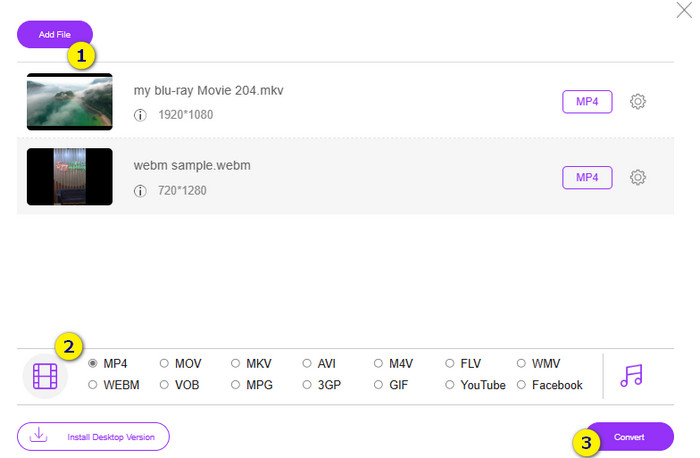
Step 3. Afterward, it’s time to start the fast and bulk conversion by clicking the Convert button at the bottom.
Further Reading:
MOV VS MP4 – Which One Do You Choose?
The Best MP4 Editor for Windows and Mac in 2025
Parte 4. Perguntas frequentes sobre conversão de RAR e MP4
.RAR opção número
Os arquivos RAR são compactados em formato de arquivo compactado. Ele permite armazenar vários arquivos em um único contêiner, reduzindo seu tamanho geral.
Como faço para converter RAR para MP4 no Mac?
To convert RAR to MP4 on Mac, you can then use video conversion software like Unarchiver to extract the contents of the RAR archive. Then, any compatible video files within the extracted contents can be converted to MP4 format using a powerful converter. To do this, you can use the FVC Video Converter Ultimate.
Um arquivo RAR pode conter vídeos?
Um arquivo RAR é como uma pasta zip que pode conter qualquer tipo de arquivo. Então sim, o arquivo RAR pode conter vídeos.
Conclusão
This post is perfect for your RAR to MP4 conversion task as it provides you with the best ways to do it on your device. Fortunately, the best video and audio online converter that makes you work like a pro!
-
 Maneiras de compactar vídeo online para reduzir o tamanho do arquivo de vídeo
 Se você está procurando compressores de vídeo online, não encontre mais porque nós ajudamos você! Aqui estão algumas das ferramentas mais convenientes que você pode usar.
-
 Como compactar um vídeo MP4 para um tamanho menor
 O vídeo MP4 é muito grande para ser enviado? Quer reduzir o tamanho do vídeo? Aqui estão 3 maneiras eficientes de compactar um arquivo MP4 em um tamanho menor sem limite.
-
 Como compactar vídeos gratuitamente / Experimente estes 7 compressores de vídeo online
 Leia e obtenha 7 maneiras de compactar vídeos gratuitamente em seu computador ou telefone. Você pode reduzir vídeos grandes em tamanhos de arquivo pequenos para e-mail, Twitter, Instagram, YouTube, WhatsApp e muito mais com facilidade.
