


 Video Converter Ultimate
 Gravador de ecrã
 Reparo de vídeo
 Secure Download
Instruções detalhadas sobre como fazer um toque para Android
As smartphones are gradually entering into people's lives, everyone is accustomed to making some modifications to their devices, such as modifying phone wallpapers, notification ringtones, and so on. Although smartphones generally come with a default ringtone for incoming calls, the range of choices for users is still quite limited. If everyone uses the default ringtone, it may lead to people not being able to tell if it's an incoming call from their device when one phone rings. This is why everyone tends to choose their favorite songs as ringtones. So, how do you achieve the operation of making a song a ringtone on your Android phone? In this article, we will guide you on how to do it on your device and recommend one of the best ringtone maker software. We hope that this content will help you get out of this dilemma.

Parte 1. Como fazer de uma música um toque no Android diretamente
Primeiro, vamos direto ao cerne da questão. Se você já determinou qual música deseja definir como toque para seu smartphone, você pode fazer isso diretamente no seu dispositivo. Antes disso, você precisa baixar a música selecionada para seu telefone e salvá-la em um formato suportado pelo seu telefone Android. Os formatos de toque suportados atualmente para telefones Android são MP3, M4A, WAV e OGG.
Aqui estão os passos detalhados para fazer de uma música um toque no Android. Usaremos um dispositivo Samsung como exemplo.
Step 1. Go to Settings on your mobile phone, and find Sounds & vibration among all the options.
Step 2. After launching a new window, choose Phone ringtone > My Sounds.
Step 3. From the new page, choose Add. Then, you can select the song from all the files you stored on your phone. Please make sure you have downloaded the song files before applying these steps.
Step 4. Finally, tap Done to keep the change.
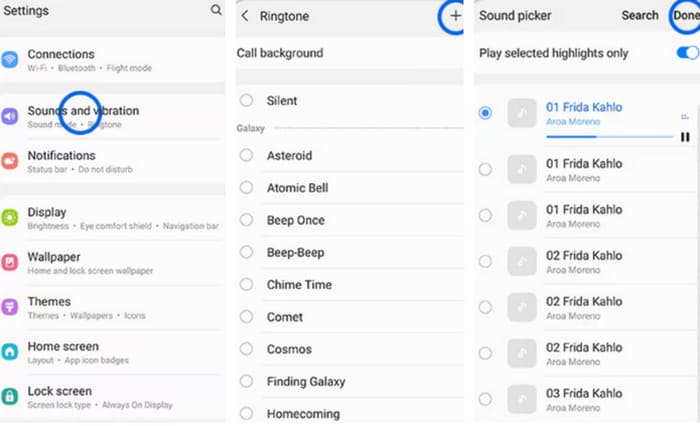
Agora que você concluiu a configuração para criar um toque personalizado no Samsung, você pode testar seu dispositivo para ver se a música selecionada está tocando quando seu celular liga.
Parte 2. Como fazer um toque personalizado para Android
Acima, aprendemos como definir uma música que você baixou para seu telefone como toque para chamadas recebidas. No entanto, se você quiser fazer um toque para Android ou editar determinado áudio para tornar seu clipe favorito um toque, você pode precisar de ajuda de um software profissional de edição de áudio. No próximo artigo, recomendaremos dois melhores assistentes para você.
Faça toque para Android no Windows/Mac
The first tool we recommend is FVC-picked Video Converter Ultimate. It can be used on both Windows and Mac computers. You need to complete the whole procedure on your computer and then transfer the edited audio to your phone. We chose to recommend it because it has a wide range of audio editing tools. In addition to adjusting the length of the audio, you can also convert any file format to a format suitable for different devices. This also means that you can even extract the desired audio from a video to use as your phone's ringtone. Parameters such as audio channel, volume, sound effects, etc., can be adjusted so you can let go of them and manipulate this tool according to your needs. It is quite simple to use, and anyone can get started quickly.
Free DownloadFor Windows 7 or laterSecure Download
Free DownloadFor MacOS 10.7 or laterSecure Download
Aqui, ensinaremos como fazer um toque para Android com o FVC Video Converter Ultimate. Antes de começarmos, você deve baixar o áudio que deseja modificar como toque.
Step 1. Download and install FVC Video Converter Ultimate on your computer.
Step 2. Open this tool on your desktop, and click Add Files to upload the audio file you want to edit.
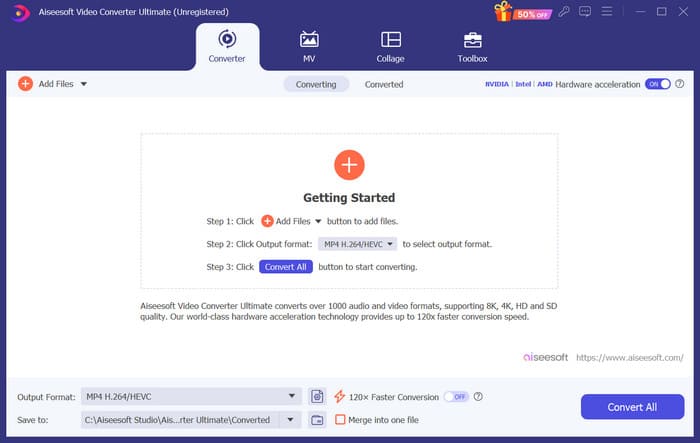
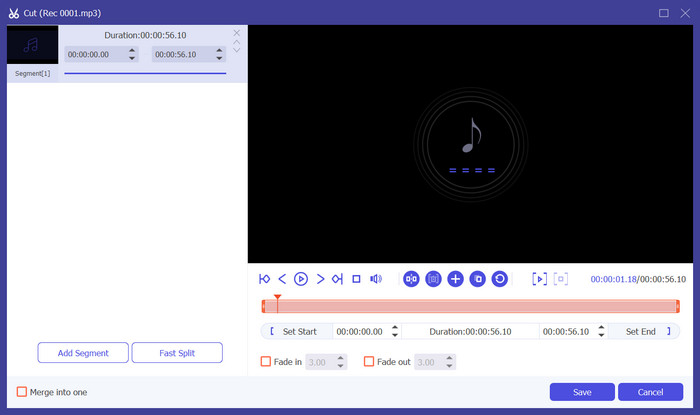
Step 3. If you want to set a portion of the audio as your phone ringtone, you will need to crop that portion out. To do this, click Cut to enter a new window. Here, you can drag the slider to choose the part you want to save. After trimming, click Save to keep the change.
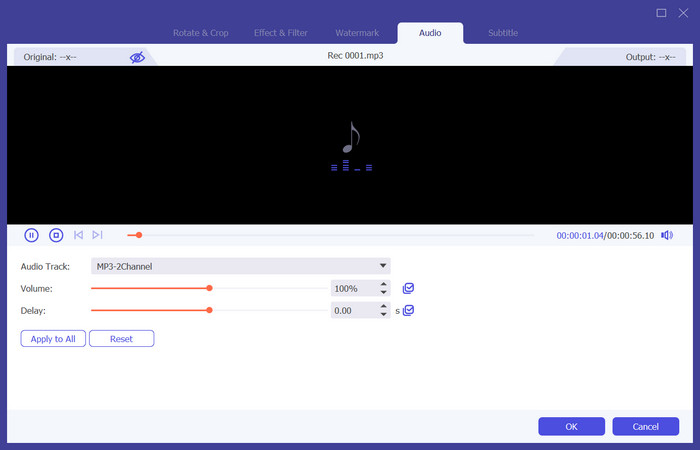
Step 4. If you want to adjust the volume or the audio track, click Edit.
If you want to extract the audio of a video or change the audio format, click Output Format to select a target format for your device.
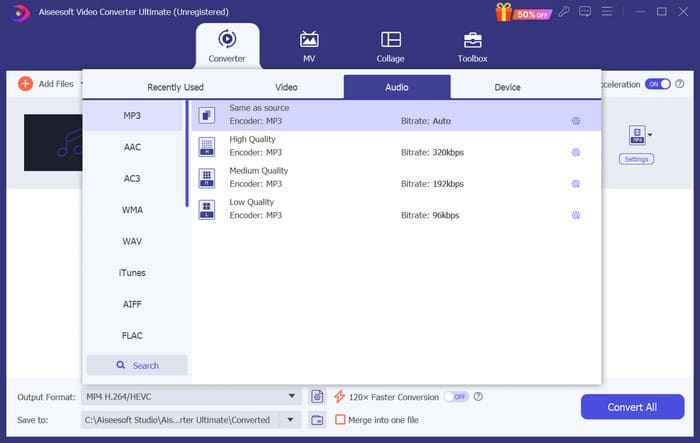
Step 5. Finally, click Convert All to export the audio.
Faça toque para Android online
Apart from downloading desktop software, you can also make ringtones for Android online. The advantage of online tools is that they don't take up extra storage space. Here, we recommend you try a tool called Ringtone Maker. In addition to helping you extract ringtones of excellent quality from videos, it also enables you to add fade effects to ringtones.
A seguir, daremos uma breve introdução sobre como utilizá-lo.
Step 1. Open Ringtone Maker with your chosen browser.
Step 2. Click Choose Files and select the audio file you want to use as a ringtone.
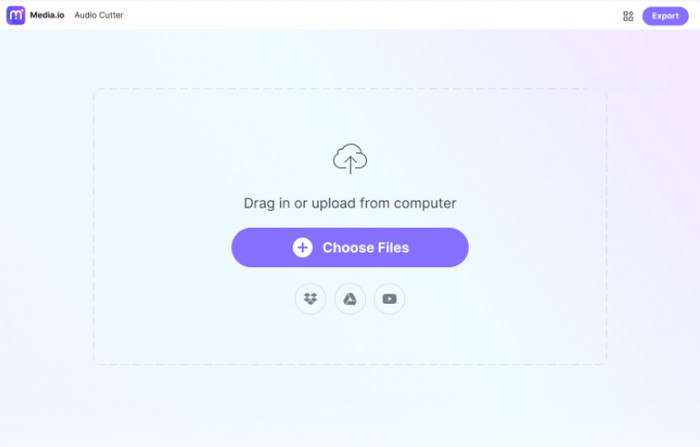
Step 3. Drag the slider to trim the uploaded audio clip. You can also apply Fade in/out effects to your file.
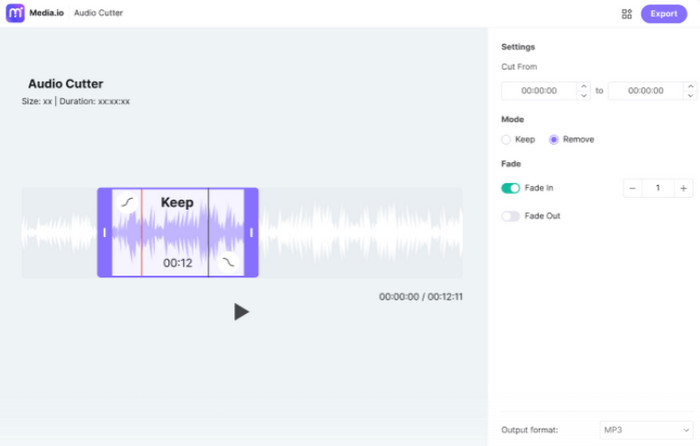
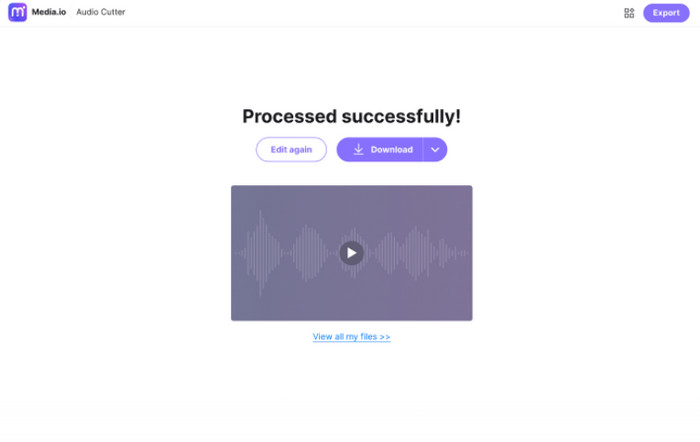
Step 4. Click Export to save your ringtone to your computer.
Parte 3. Como definir toques específicos para contatos no Android
Você tem alguns contatos particularmente importantes que não quer perder as chamadas? Para evitar que você confunda as chamadas recebidas deles com outros contatos, você pode definir toques de chamada específicos para seus contatos. Dessa forma, você saberá que são eles ligando para você na primeira vez que seu telefone tocar. Atualmente, essa operação é suportada pelo sistema de telefone Android.
Nesta parte, explicaremos como definir toques específicos para contatos no Android, usando um telefone Samsung como exemplo.
Step 1. Unlock your smartphone and go to the Contacts app.
Step 2. Choose a contact, and choose Edit > View more.
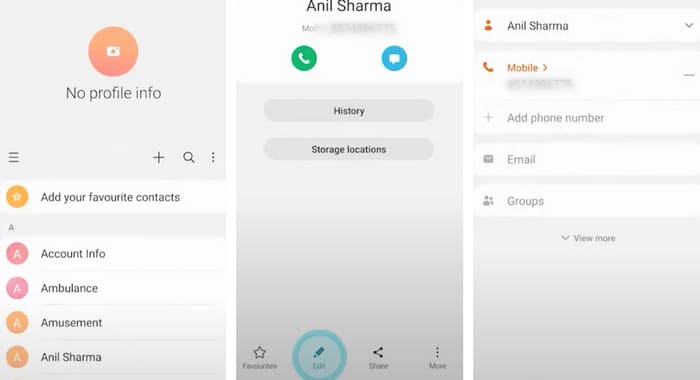
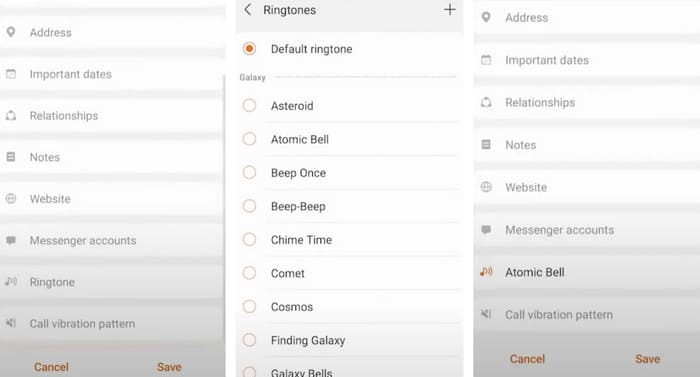
Step 3. To set a specific ringtone, click ringtone. You can choose the ringtone from the list or choose Add+ to select a music file.
Step 4. Finally, tap Save to keep the setting.
Parte 4. Perguntas frequentes sobre como fazer uma música virar um toque no Android
Como posso obter toques gratuitos no meu Android?
Vários aplicativos estão disponíveis na Google Play Store que oferecem toques gratuitos. Além disso, você pode visitar sites no navegador do seu telefone para baixar toques gratuitos diretamente para o seu dispositivo. Se você quiser fazer um toque personalizado no Android, usar seus arquivos de música é uma boa escolha.
Existe algum aplicativo de toque realmente gratuito?
Yes, there is. You can find a few in App Store or Google Play Store. Some of these apps include Ringtone Maker, Audiko Ringtones, and ZEDGE. They are all easy for you to make ringtones for iPhone and Android.
Onde estão os toques no meu telefone Samsung?
Os toques geralmente são armazenados no armazenamento interno ou no cartão SD externo. Se quiser encontrá-los, abra o aplicativo Meus Arquivos no seu telefone Android. Então, você verá uma pasta chamada Toques ou Mídia.
Conclusão
In the above, we have explained in detail how to set a song as a ringtone on your Android phone. If you want to select only parts of the music, you can also use our recommended Video Converter Ultimate to edit your audio files. In addition, we have introduced an online ringtone editing tool, so you can choose your favorite tool according to your preferences.
-
 As 3 principais soluções para compactar arquivos WAV em um tamanho menor
 Se você também está procurando maneiras de comprimir o tamanho de arquivos de áudio WAV, leia nosso conteúdo. Apresentaremos a você diferentes ferramentas de três aspectos.
-
 Tutorial detalhado de compressão de áudio em 2024 (passo a passo)
 Você precisa compactar áudio, mas precisa de ajuda para descobrir por onde começar? Neste post apresentaremos as melhores opções para reduzir o tamanho do arquivo de suas trilhas.
-
 Compressores de áudio eficazes para usuários offline e online
 Teve algum problema com arquivos de áudio grandes? Existem muitos compressores de arquivos de áudio disponíveis para usuários offline e online. Confira aqui.
