


 Video Converter Ultimate
 Gravador de ecrã
 Reparo de vídeo
 Secure Download
4 dicas úteis para consertar o VLC Player não reproduz MKV
MKV (Matroska Video file) is a free and open multimedia file format. But it can’t be supported by many frequently-used players, including Windows Media Player and QuickTime Player. So, you may turn to the popular VLC Media Player for the MKV playing. However, many users have encountered the VLC player won’t play MKV problem.

The MKV playback issues can vary, such as the audio track of your MKV file playing is delay, playback stuttering, fuzzy image, and buggy interface quirks and so on. Here in this post, we like to share 4 useful tips for you to fix the MKV files won’t play on VLC issue.
Parte 1. Defina as preferências para corrigir o VLC Player não reproduz MKV
VLC é uma ferramenta de reprodução de arquivos de mídia muito popular que pode suportar a maioria dos formatos de vídeo e áudio digital, incluindo MKV, MP4, AVI, FLV, MP3, AAC, M4A, FLAC, etc. e VCDs, CDs de áudio e DVDs.
O VLC Media Player atrai milhões de usuários porque pode reproduzir qualquer arquivo de mídia que você tenha. Mas o player VLC não reproduz arquivos MKV. O problema ocorre de vez em quando. Se o VLC player simplesmente pular o arquivo MKV ou HD MKV, você pode personalizar as preferências para corrigi-lo.
Step 1. Open VLC Media Player and choose the Tools menu. From the drop-down list, select the Preferences option.
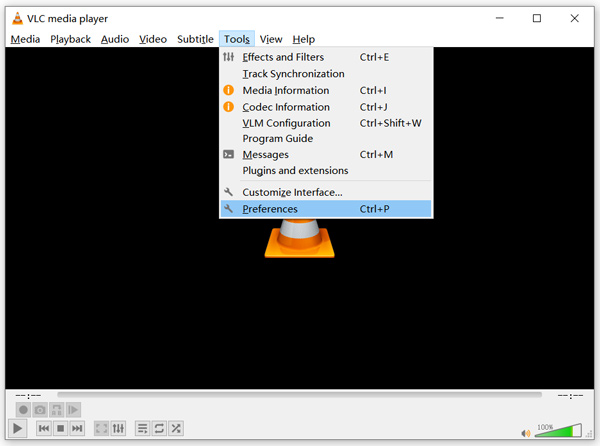
Step 2. Tick All under the Show settings on the bottom left of the dialog window. By doing so, you can display the Advanced Preferences window.
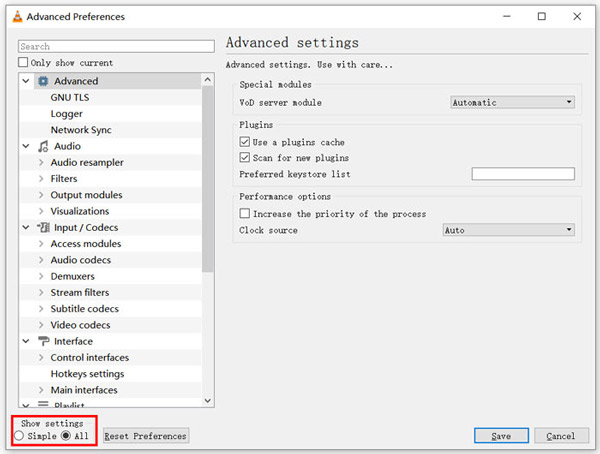
Step 3. Choose the Input/Codecs section on the left, and then locate the File Caching(ms) option on the right. You may need to scroll down to find it.
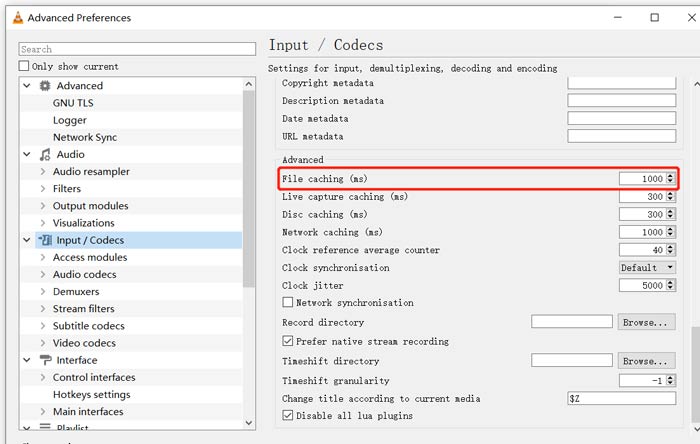
Step 4. Set File Caching to 1000 and then click Save button to confirm your operation. After that, you can restart VLC and replay your MKV file.
Parte 2. Atualizar ou reinstalar o VLC para consertar que o player não reproduz MKV
Se o VLC player não reproduzir MKV, o problema ainda existe, você pode optar por atualizá-lo para a versão mais recente. Você deve saber disso, uma nova versão sempre corrigirá muitos bugs das versões antigas. Você pode seguir as etapas abaixo para atualizar seu VLC Media Player.
Open VLC and click the Help menu. Select the Check for Updates option from the drop-down list. VLC will start to check if there is an available updating version. Then you can follow the instructions to upgrade VLC to its latest version.
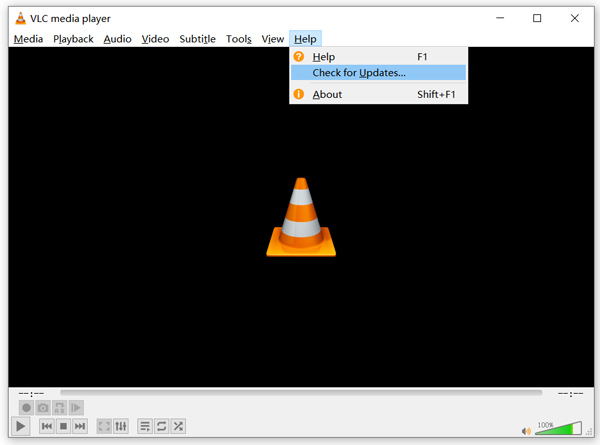
You can also directly remove VLC from your computer, and then go to its official site, VideoLAN to install a right version. When you get a new VLC Media Player installed, you can play your MKV file and check if it can be played normally.
Parte 3. Habilite o áudio para consertar o player VLC sem som durante a reprodução de MKV
Se o seu VLC Media Player pode reproduzir arquivo MKV, mas nenhum som, você deve verificar se as configurações de áudio estão corretas.
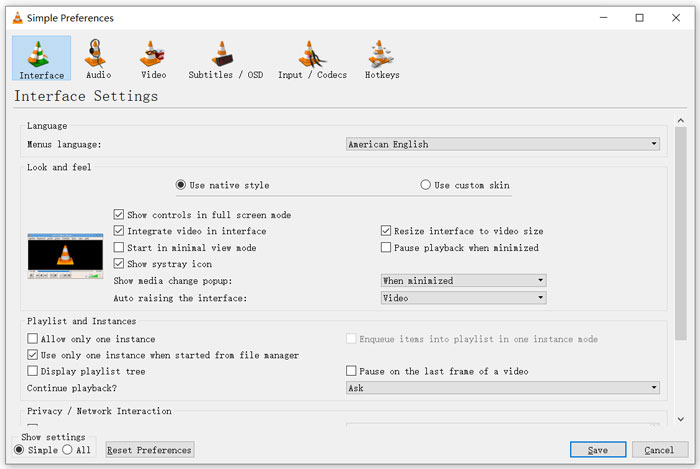
Step 1. Choose Tools option on VLC menu bar. From the drop-down menus, select Preferences. Then you will be guided to the Simple Preferences window.
Step 2. Click on the Audio tab, and then check the Enable Audio option. During this step, you are also allowed to custom Output Module, HDMI/SPDIF audio passthrough and Device based on your need. Click Save button to save your changes.
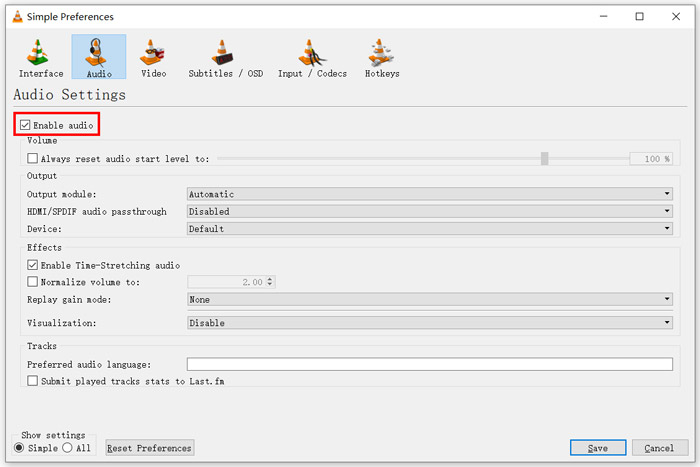
Now you will be back to the main interface of VLC, you can click Media and then Open File to play your MKV file.
Parte 4. Selecione uma alternativa de player VLC para reproduzir arquivos MKV
When you want to watch MKV movies, you can also choose another player to replace VLC. You can give the popular Free Online Video Player a try. Whether you are using a Windows 10/8/7 PC or a Mac, you can rely on it to play any MKV files with high quality.
Este reprodutor online gratuito tem a capacidade de reproduzir vídeos em 4K, 1080p / 720p HD, SD, 3D e arquivos de áudio sem problemas. Além de MKV, ele também suporta muitos outros formatos, incluindo MP4, MOV, FLV, AVI, MPEG, WMV, WMA, AAC, MP3 e muito mais.
Step 1. When you want to view MKV files, you can go to this Free Online Video Player site. It is compatible with any web browser like Chrome, IE, Firefox and Safari. Click on the Play Now button to quickly install a small launcher for the MKV playing.
Step 2. Once the installation is complete, this free online MKV file player will be initiated automatically. Click Open File button to import your MKV file. Here you can also click Open Disc to watch a DVD movie.
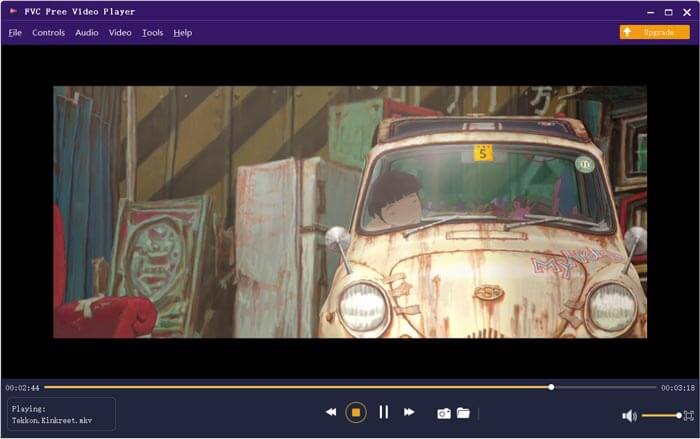
Your MKV video will be played automatically after that. You are given full control of the MKV playing. Compared with VLC Media Player, it gives an easier way to enjoy MKV files. This free online MKV player supports both DTS-HD and Dolby TrueHD to ensure you have a great sound experience.
Parte 5. FAQs do VLC Player não reproduz MKV
A smart TV reproduz arquivos MKV?
sim. Muitas TVs inteligentes, como Sony e Samsung, que oferecem suporte a arquivos MKV. Você pode reproduzir seu MKV por meio de um disco rígido externo ou dispositivo UBS
Como reproduzir DVD com o VLC Media Player?
Quando quiser reproduzir um filme em DVD com o VLC, você deve primeiro inserir o disco DVD na unidade de disco do computador. Abra o VLC, clique em Mídia na barra de menus e escolha Abrir disco. Navegue e carregue este filme em DVD no VLC e reproduza-o.
Como desativar a decodificação de aceleração de hardware no VLC?
Para desabilitar a decodificação de aceleração de hardware no VLC Media Player, você deve ir para Preferências no menu Ferramentas. Escolha a categoria Input / Codecs e, a seguir, Codecs. Localize a opção de decodificação acelerada por hardware e desative-a lá.
Conclusão
When you face the VLC player won’t play MKV problem, you can directly use another player like the recommended Free Online Video Player to view your MKV files. Also, you can choose to upgrade VLC Media Player or custom various settings to fix it.
-
 Maneiras gratuitas e profissionais de converter MKV em MOV
 Como faço para converter MKV para MOV no Mac? O iMovie consegue ler MKV? O que significa o formato MOV? Esta postagem mostra 2 maneiras simples de ajudá-lo a converter MKV em MOV com conversores de vídeo profissionais e online gratuitos.
-
 Como converter M2TS em MKV sem perder qualidade
 Quer converter M2TS em MKV mantendo a qualidade original? Esta postagem mostra métodos gratuitos e online para alterar M2TS para MKV sem perdas.
-
 VLC Media Player - Uma breve revisão do player de vídeo e as melhores alternativas no Windows e Mac
 Por que o áudio não funciona no VLC Media Player? Se você quiser saber mais sobre o popular reprodutor de mídia, pode saber mais sobre a análise e as melhores alternativas do artigo.
