


 Video Converter Ultimate
 Gravador de ecrã
 Reparo de vídeo
 Secure Download
3 maneiras gratuitas de converter FLV em WAV
Want to extract audio from downloaded videos but don't know how? Are you looking for an easy way to convert FLV to WAV or MP3?
Em alguns casos, você só precisa da trilha de áudio ou música de fundo de um vídeo. Portanto, você precisa converter vídeo em áudio. Este post vai falar principalmente sobre como converter FLV para WAV.

3 great FLV to WAV converters are recommended here for you to convert your FLV files. You can choose your preferred method to turn FLV into WAV audio.
Parte 1. Converter FLV em WAV Online
When you search for a method to convert FLV to WAV on the internet, you can see many searching results are free online converters. In case you don't know which one you should use, here we sincerely introduce you with the popular Free Online Video Converter. It is specially designed to convert FLV to any frequently-used video and audio format like MP4, MOV, AVI, MP3, AAC, M4A, and WAV.
Comparado com outros conversores FLV para WAV online, ele suporta mais formatos de entrada e saída e oferece uma velocidade de conversão mais rápida. Além disso, não requer inscrição ou login de conta. Ele permite converter qualquer arquivo FLV sem limite de tamanho de arquivo.
Step 1: Go to this free online FLV to WAV converter site on your browser. It is compatible with most web browsers including Safari, IE, Chrome, Firefox, and Yahoo.
Step 2: Click Add Files to Convert and then Download button to install a launcher for the FLV conversion. There will be a pop-up window for you to load your FLV file after the installation.

Step 3: When you get to the main converter window, you can see some popular video formats like MP4, MOV, AVI, FLV, MKV, VOB, MPG, WMV, and more are listed there. During this step, you need to click on the Audio icon to arise audio formats. Select WAV as the output format.
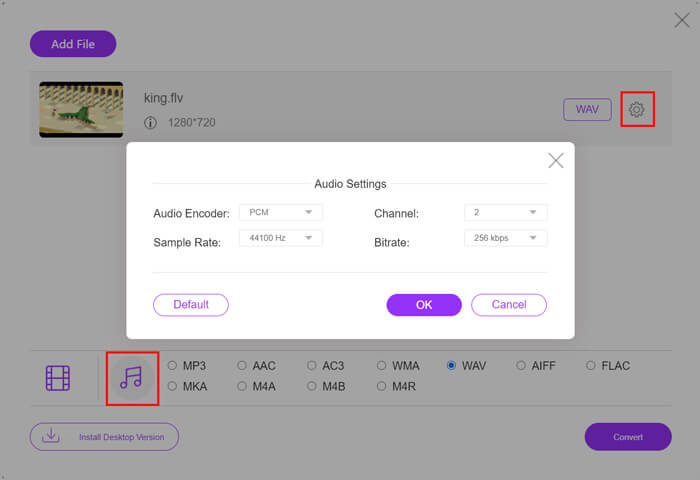
Step 4: Before the FLV to WAV conversion, you can click Settings icon next to the output format to custom more audio settings. Here you are allowed to adjust audio encoder, channel, sample rate and bitrate. Then you can click Convert button to change your FLV file to WAV audio.
If you want to convert FLV to audio like MP3, WMA, WAV, etc., you should click the audio tab to checkmark it.
Parte 2. Conversão gratuita de FLV para WAV
Besides online FLV converters, there are also some free video converters that can help you convert FLV to WAV with ease. To do that, you can rely on the Free FLV Converter.

Conversor FLV para WAV grátis
155321+ Downloads- Converta FLV em WAV, AAC, MP3, M4A, MP4, MOV, AVI e muito mais.
- Suporta todos os formatos de vídeo e áudio usados com freqüência.
- Suporta as mais recentes CPUs multi-core e acelerações de GPU.
- Converta um ou mais arquivos FLV sem perda de qualidade.
Free DownloadFor Windows 7 or laterSecure Download
Free DownloadFor MacOS 10.7 or laterSecure Download
Ele carrega todos os recursos de conversão de que você precisa. O guia a seguir mostrará como transformar FLV em WAV com ele.
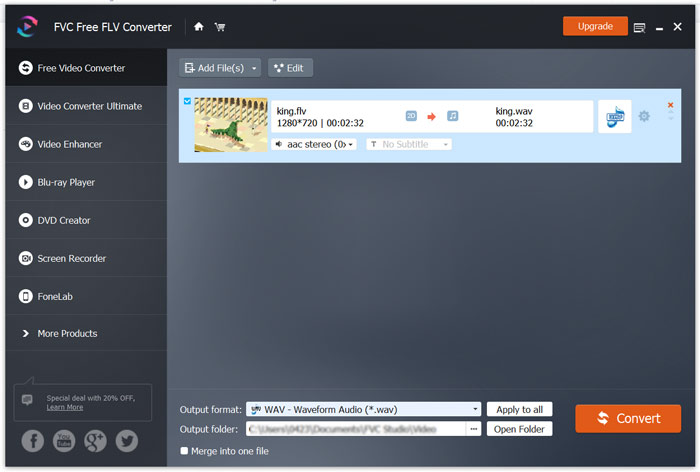
Step 1: Free download, install and run this free FLV to WAV converter on your computer. Click Add Files to import your FLV file(s).

Step 2: Click Output format and select WAV as the target format. Then choose a suitable destination file folder.
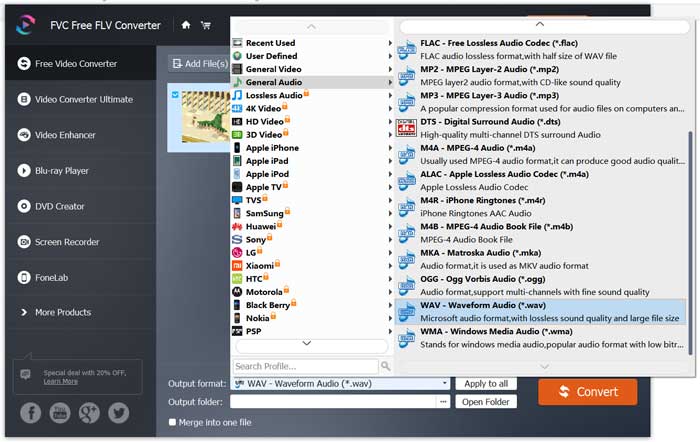
Step 3: Click Convert button to start the FLV to WAV conversion.
Parte 3. Converter FLV em WAV com VLC
If you have VLC Media Player installed on your computer, you can also rely on VLC to convert FLV to WAV. You should know that, VLC is a popular media player that also carries some basic converting and editing features.
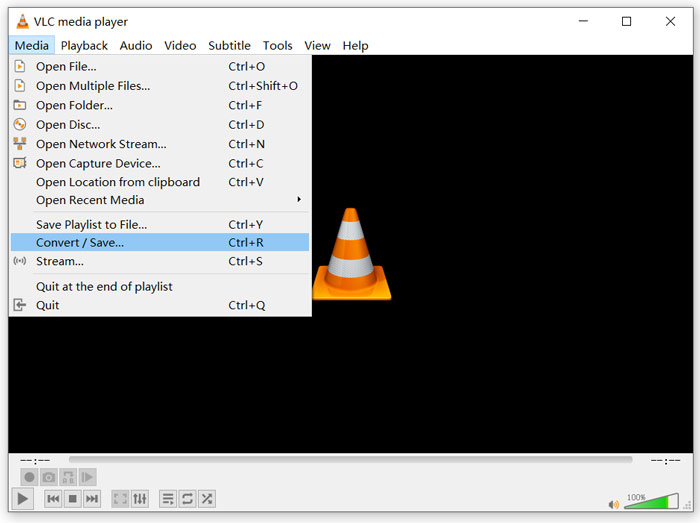
Step 1: Open VLC Media Player on your computer. You can free install it from the VideoLAN site. Click Media and then select the Convert/Save option from the drop-down menu.
Step 2: Now you are taken to the Open Media window. Click Add button to add the FLV file you want to convert. Then click Convert/Save button to arise the Convert window.
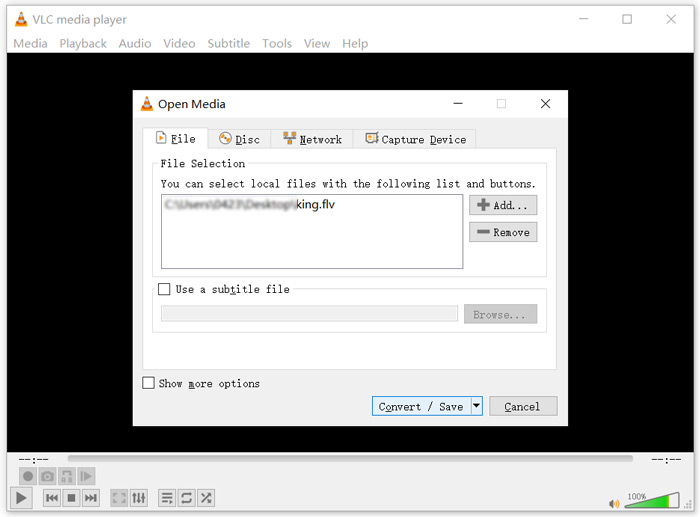
Step 3: Check the Display the output option under the Convert tab. Then select a suitable output format from the drop-down list of Profile. Click Browse button to select a suitable destination file folder. During this step, you can rename the output file.
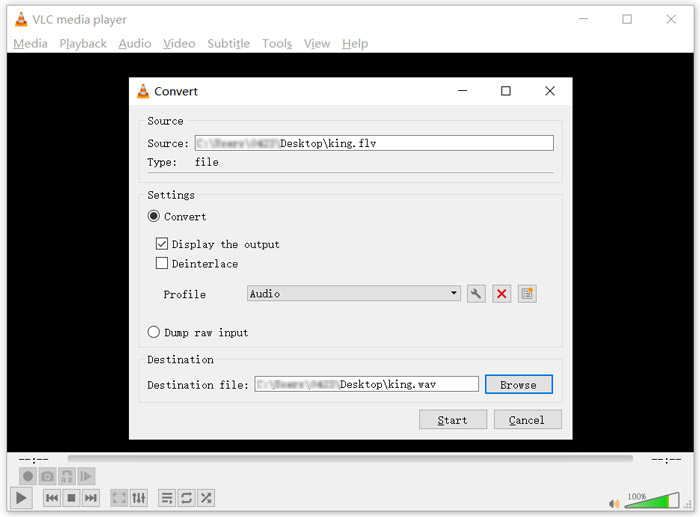
Step 4: Click on Start button to start converting your FLV to WAV. After that, VLC will automatically play the converted WAV file. You can see the Converting file prompt while the conversion. Don't close the VLC Media Player completely until the converting is over.
Parte 4. Perguntas frequentes sobre a conversão de FLV em WAV
FLV vs WAV, qual é a diferença entre FLV e WAV?
FLV, Flash Video File, is a flash compatible video file that developed by Adobe Systems. It contains a short header, interleaved video, audio, and metadata packets. FLV is originally designed to embed video streams in Adobe applications. A FLV file carries a video stream of 640x360 and an audio stream with 44,1 KHz, 2 channels, AAC.
A file with the WAV file extension is a Waveform audio file format and is a container that stores data in segments. It was originally developed by Microsoft and IBM and stores uncompressed lossless audio which results in very large file sizes. The format uses containers to store the audio data, track numbers, sample rate and bit rate.
Como converter FLV para WAV sem software?
Se você deseja converter FLV para WAV sem nenhum software conversor, pode optar por alterar a extensão do arquivo de .flv para .wav.
Como baixar FLV para WAV?
Há um grande número de gravadores de tela disponíveis no mercado que podem ajudá-lo a salvar vídeos como arquivos de áudio em seu computador local.
Conclusão
After reading this post, you can learn 3 free ways to extract WAV audio from FLV files. When you need to convert FLV to WAV, you can pick your preferred FLV converter to do that.
-
 5 melhores jogadores WAV gratuitos para Android, iOS e computador
 Como reproduzir arquivos WAV no telefone Android? Qual jogador pode jogar WAV? Esta postagem compartilha os 5 melhores reprodutores WAV gratuitos para Android, iPhone, Mac e PC.
-
 Os 10 melhores reprodutores de vídeo FLV para Windows 10/8/7, Mac, iOS e Android que você deve experimentar
 O FLV player ajuda você a acessar facilmente seus arquivos FLV em seu dispositivo Windows, Mac, Android ou iOS. Confira os melhores reprodutores de arquivos FLV que você pode baixar agora.
-
 Como converter WAV para MP3 com os 5 principais conversores gratuitos
 Esta página é uma longa lista de conversores WAV para MP3 gratuitos (iTunes, Audacity, VLC, Windows Media Player e Conversor de áudio gratuito) para alterar WAV para MP3 no computador.
