


 Video Converter Ultimate
 Gravador de ecrã
 Reparo de vídeo
 Secure Download
2 maneiras eficientes de combinar vídeos para o Instagram
“Como posso combinar vídeos para o Instagram? Tive uma festa de aniversário inesquecível e fiz muitos vídeos durante ela. Agora eu quero combinar os videoclipes em um completo e postá-lo no Instagram. Por favor, me ensine como fazer ... ”Há muitas ocasiões em que muitos videoclipes estão esperando para serem mesclados em um. Para atender a essa necessidade, este artigo vai falar sobre 2 métodos eficientes de juntar vídeos para Instagram.

Parte 1: Combine vídeos para Instagram sem danos à qualidade
To begin with, you need an App to merge the videos for Instagram. You don’t want a complicated video editing program like Adobe Premiere Pro or Final Cut Pro for the simple task. Video Converter Ultimate is just enough for you.
Ele pode ajudá-lo a mesclar vários vídeos para o Instagram facilmente. A velocidade de processamento e a qualidade da imagem são perfeitas. Independentemente do formato, você pode usar este aplicativo para juntar os vídeos para o Instagram sem qualquer limitação.
Key Features:
- • Combine vídeos para Instagram independentemente do formato e resolução
- • A tecnologia de aceleração de hardware garante uma velocidade de processo 70x mais rápida
- • Edite e junte vídeos para Instagram sem deixar nenhuma marca d'água
- • Colheita e mesclar vídeos com diferentes resoluções para torná-los perfeitos
- • Junte-se a vídeos com o recurso de corte para excluir os segmentos indesejados
- • Interface de usuário suave e intuitiva para iniciantes e profissionais
Free DownloadFor Windows 7 or laterSecure Download
Free DownloadFor MacOS 10.7 or laterSecure Download
Steps to combine videos for Instagram without quality damage
Step 1. Free download, install, and launch Video Converter Ultimate. Click the Add Files button to add the videos you want to merge for Instagram.

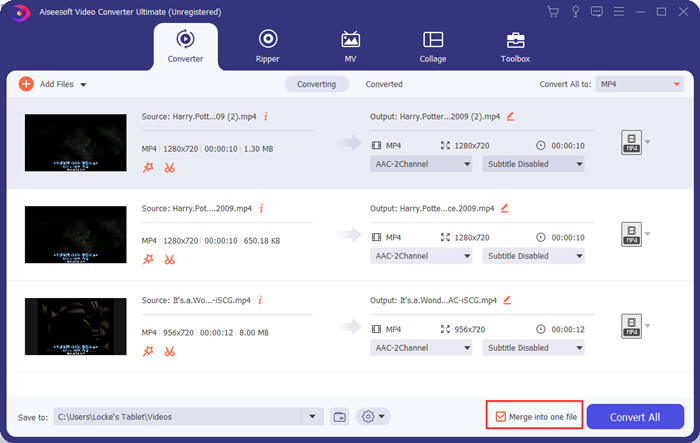
Step 2. On the main interface, you can drag the imported videos to change their order freely. Check the box for Merge into one file so that the videos won’t be separately converted.
Step 3. Click the Convert All to frame for the profile menu. Then you can select your desired format, resolution, and encoder. To merge videos for Instagram, the MP4 format is good. You can also click one of the Custom Profile buttons to customize the settings.
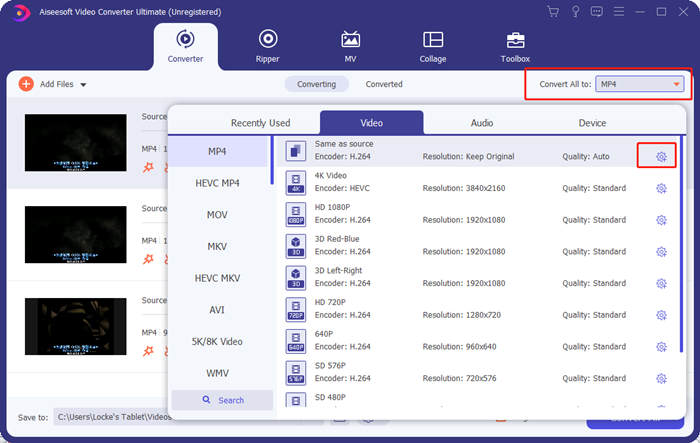
In the Edit Profile window, you can customize the encoder, resolution, frame rate, bitrate, and some audio parameters.

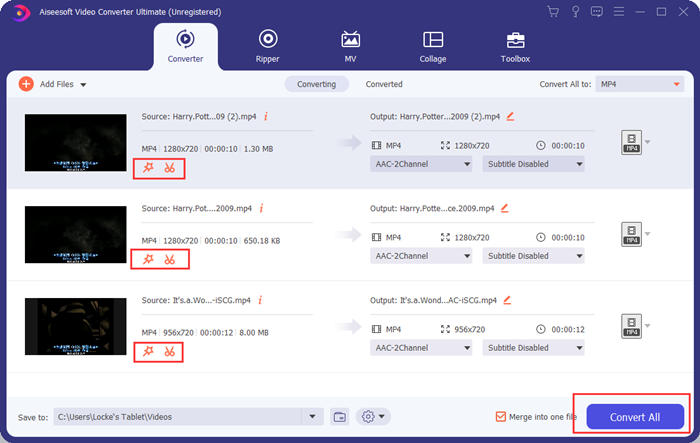
Step 4. Back on the main interface, you can click the Convert All button to start merging the videos for Instagram. Before that, you can also use the Cut and the Edit buttons for the trim, crop, rotate, and some other features that can make your video look better.
Video Converter Ultimate é prático e poderoso, mas ninguém gosta de esperar para baixar um programa enorme. Nós também não. Então, é possível mesclar vídeos para o Instagram sem baixar um programa? Sim, por favor continue a ler!
Parte 2: mesclar vídeos para Instagram online e de graça
Here is another handy tool, FVC Free Online Video Merger, an amazing web-based tool to join videos for Instagram. You can load this tool in one second, and then upload your videos in another second. Simply adjust the settings and let the program finish the rest. The most important thing is that this tool is totally free to use.
Steps to merge videos for Instagram online and for free
Step 1. Click FVC Free Online Video Merger to open it. In the middle of the tool’s webpage, click the Upload Videos to Merge button. Then the file explorer window should pop up, in which you need to select the videos and upload them.

Step 2. When the videos are imported, you can adjust the sequence of them. To do so, you could remove an imported video in the wrong place and re-insert it into the correct gap.

Step 3. This online video merger allows you to decide the Resolution and Format of the video merged for Instagram. You can select Auto to keep the original resolution or select any of the other five resolution options.
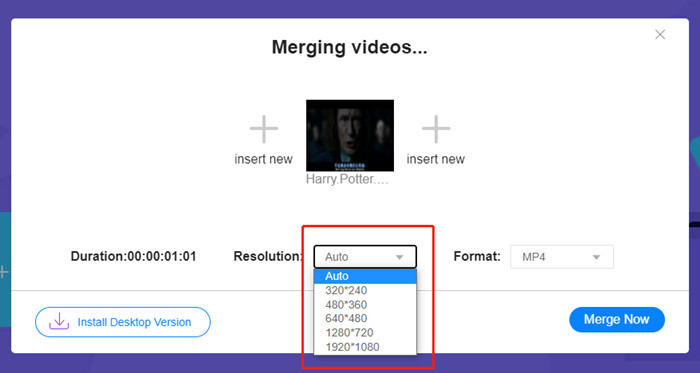
A fusão de vídeo online fornece atualmente nove formatos de saída para você escolher. MP4 pode ser o melhor para sua postagem no Instagram.
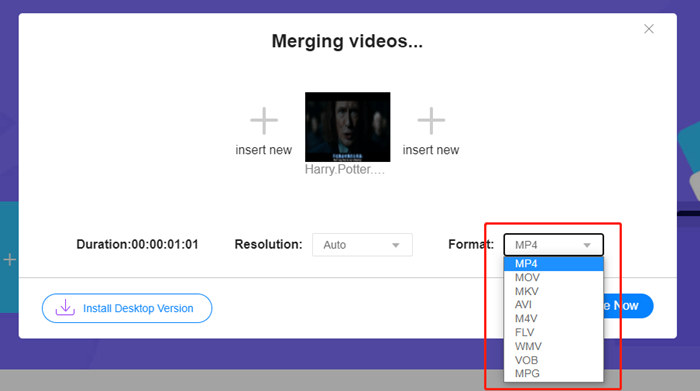
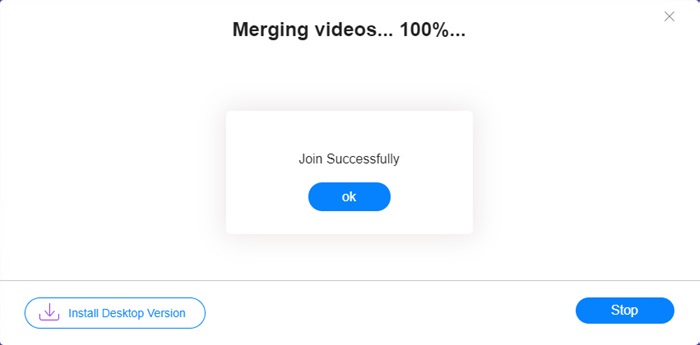
Step 4. Click the Merge Now button and wait for the Join Successfully notice.
Embora conveniente, esta ferramenta online não é tão perfeita quanto o Video Converter Ultimate. Na ferramenta online, você não pode ajustar a ordem dos vídeos convenientemente, alterar o codificador ou a taxa de quadros ou editar os vídeos. Além disso, o Video Converter Ultimate oferece mais opções de resolução e formatos, e processa os vídeos com muito mais rapidez.
Parte 3: Perguntas frequentes sobre a combinação de vídeos para o Instagram
Quais especificações são boas para vídeos do Instagram?
A proporção de aspecto de 9:16 seria perfeita. Mais exatamente, use 1080 * 1920 se for possível. O melhor formato de vídeo é MP4, embora outros formatos populares também sejam aceitos.
O que fazer se meu vídeo combinado for muito grande para o Instagram?
On the top of the main interface of Video Converter Ultimate, there is a Toolbox in which you can find a Video Compressor. You can use it to compress your video to the desired size. As for Instagram, make sure it is not larger than 4GB.
Quanto tempo meu vídeo mesclado para o Instagram pode durar?
Depende de onde você postar o vídeo. O limite para Feed de vídeos é de 3s a 1min e para histórias é menor que 15s. Os vídeos IGTV podem ter uma duração de 60 minutos, o que provavelmente atenderá às suas necessidades.
Conclusão
This article introduced two efficient ways to combine videos for Instagram. You can use Video Converter Ultimate to combine videos for Instagram without losing any image quality and make some adjustment and editing to the videos. The other tool, FVC Free Online Video Merger, is the quickest solution but it provides you fewer options when it comes to resolutions and formats. Also, it cannot change the encoder or frame rate at all. At last, if you have any difficulty in merging videos for Instagram, just leave us a comment to let us know.
-
 Como mesclar vídeos no iPhone com ou sem iMovie
 Leia e obtenha 4 maneiras fáceis de mesclar vídeos no iPhone. Todos os modelos de iPhone e versões iOS são suportados. Você pode combinar 2 ou mais vídeos no iPhone em um novo vídeo rapidamente.
-
 As 2 melhores maneiras de juntar arquivos MKV para assistir filmes sem parar
 Quando você baixa seu filme favorito com arquivos MKV separados e deseja juntar arquivos MKV para assisti-lo incessantemente, você pode aprender 2 maneiras eficientes de juntar arquivos MKV neste artigo.
-
 Os 6 melhores marcadores de vídeo MP4 para combinar vídeos MP4 gratuitamente
 Existem muitos associadores MP4 disponíveis para conectar diferentes clipes MP4. Neste artigo, escolhemos alguns marcadores MP4 gratuitos para Windows 10/8/7 e Mac.
