


 Video Converter Ultimate
 Gravador de ecrã
 Reparo de vídeo
 Secure Download
Uma visão abrangente da resolução de DVD [explicado]
Have you noticed varying video quality when playing your DVDs? For example, others have better quality than the one you’ve played before. This difference often comes down to the resolution and format of the DVD, as they are not often the same. In this guide, we'll explore what DVD resolution is, why it matters, and how you can change it. We'll also discuss how DVD quality differs from Blu-ray and provide you with practical tips on adjusting DVD resolution for optimal playback. Continue reading to know more.

Parte 1. O que é resolução de DVD
Resolução refere-se ao número de pixels na imagem do vídeo, expresso como largura x altura. Normalmente, podemos identificar facilmente a resolução do vídeo em plataformas de streaming, onde ela ajusta a qualidade do vídeo. O mesmo acontece com os DVDs: diferentes resoluções podem afetar a qualidade da reprodução do vídeo em DVD. A seguir, os tipos de resolução de DVD:
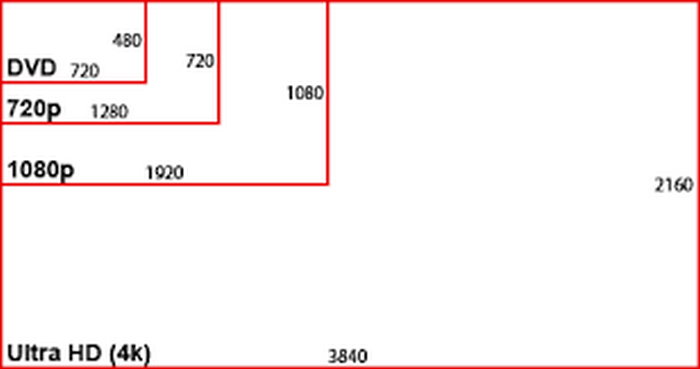
NTSC DVD Resolution: 720 x 480 pixels can be displayed in either 480i or 480p formats. This resolution is Standard Definition or SD, is compatible with NTSC television systems, and is commonly used in North America and parts of Asia.
PAL DVD Resolution: 720 x 576 pixels. This resolution supports 576i and 576p formats, providing slightly higher quality compared to NTSC DVDs. Also, it is commonly used in Europe, Australia, and other regions.
Note: Both NTSC and PAL DVD resolutions are available in both 4:3 and 16:9 aspect ratios.
Por fim, a resolução máxima do DVD é 480i/p ou 576i/p, o que significa que os DVDs são limitados à qualidade de definição padrão.
Parte 2. Qualidade de DVD vs. Blu-ray
Blu-ray é um disco óptico digital projetado para reproduzir o formato de alta definição. Em termos de qualidade, a qualidade do DVD ficou aquém do esperado. Para entender isso, consulte a tabela abaixo:
This table shows that there are indeed differences between DVD quality vs. Blu-ray. DVDs are limited to SD or Standard Definition when it comes to the resolution, but Blu-ray can deliver an HD video up to 4K. Additionally, Blu-ray offers a larger storage capacity than DVD’s capacity. But in terms of compatibility, HD is more flexible as it can be played on both DVD and Blu-ray. Nevertheless, this comparison does not determine which is the best. This is to give you a picture of what you can expect more of your DVD resolution.
Parte 3. Como alterar a resolução do DVD
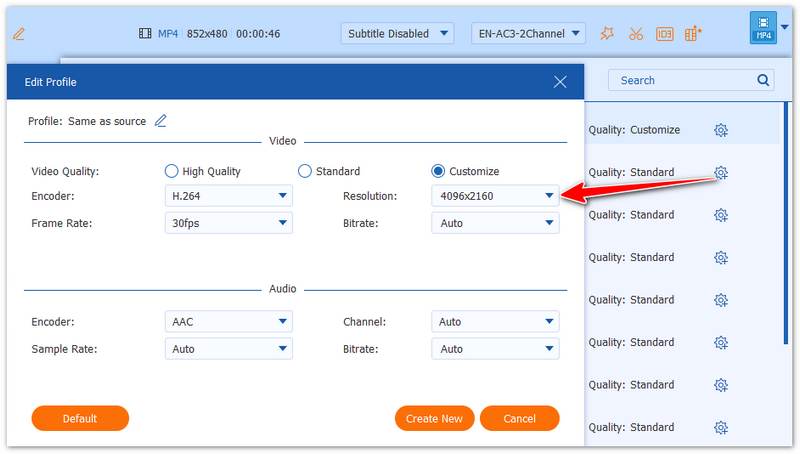
If your DVD has a low resolution, you cannot directly increase it because the source is hardware-limited. However, you can easily improve it by ripping the DVD with a tool like AnyMP4 DVD Ripper. This software allows you to convert DVDs (including 99-title, homemade, commercial, or encrypted discs) to digital formats like MP4, MOV, and more, while also adjusting the resolution up to 4K (4096×2160).
Step 1. Download and install it on your computer with your DVD inserted.
Free DownloadFor Windows 7 or laterSecure Download
Free DownloadFor MacOS 10.7 or laterSecure Download
Step 2. Click “Load DVD” to add and analyze your DVD.
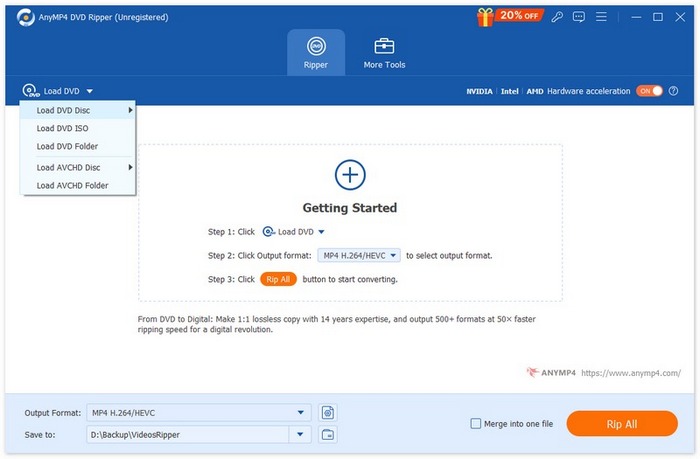
Step 3. Choose the “Output Format” dropdown to select a destination format.
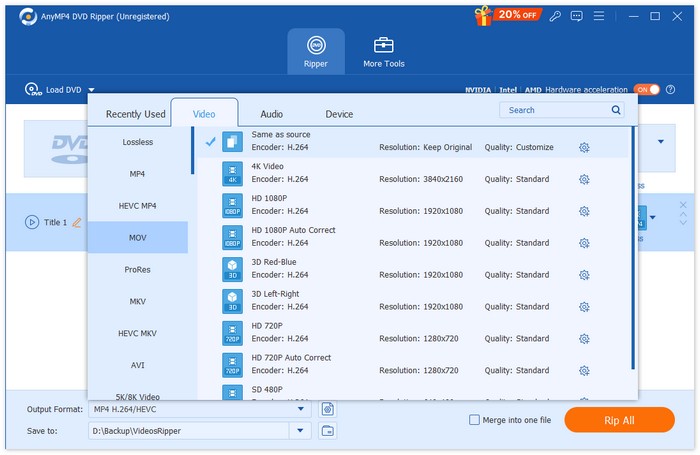
Step 4. Click the “Custom Profile” button next to the format you selected and adjust the resolution to up to 4096×2160.
All in all, AnyMP4 DVD Ripper is reliable, versatile, and supports almost all DVD types. It’s perfect for upgrading your DVD videos to higher-resolution digital files. You can also try other DVD ripping software as you like.
Free DownloadFor Windows 7 or laterSecure Download
Free DownloadFor MacOS 10.7 or laterSecure Download
Parte 4. Perguntas frequentes sobre resolução de DVD
Qual é a resolução padrão do DVD?
A resolução padrão do DVD varia de acordo com a região. Para DVDs NTSC, a resolução é de 720 x 480 pixels. Já os DVDs PAL têm resolução de 720 x 576 pixels. Ambos os formatos estão disponíveis nas proporções 4:3 e 16:9.
Por que a resolução do DVD afeta a qualidade do vídeo?
A resolução determina quantos pixels são usados para exibir a imagem, impactando diretamente a qualidade do vídeo. Resoluções mais altas significam mais pixels e, normalmente, melhor qualidade. DVDs são limitados à Definição Padrão ou SD, que é de qualidade inferior em comparação com formatos de alta definição como o Blu-ray.
Qual é a diferença entre as resoluções de DVD NTSC e PAL?
O NTSC é usado principalmente na América do Norte e em partes da Ásia e tem uma resolução de 720 x 480 pixels. Já o PAL é comumente usado na Europa, Austrália e outras regiões e tem uma resolução de 720 x 576 pixels. O PAL oferece qualidade ligeiramente superior ao NTSC, mas ambos são limitados à Definição Padrão ou SD.
A resolução do DVD é a mesma que a resolução do Blu-ray?
Não. A resolução do DVD é significativamente menor que a do Blu-ray. Os DVDs são limitados à Definição Padrão, que é 480p/576p, enquanto os discos Blu-ray podem exibir resoluções de Alta Definição ou HD de até 1080p e até 4K Ultra HD. O Blu-ray oferece melhor qualidade de vídeo, maior capacidade de armazenamento e áudio superior em comparação aos DVDs.
Conclusão
In conclusion, although DVD resolution is limited to standard definitions like 720 × 480 and 720 × 576, you can still improve your viewing experience by converting DVDs into digital formats. With AnyMP4 DVD Ripper, you can easily rip DVDs and adjust the output resolution to better suit modern screens, making it a practical solution for upgrading old DVD content.
Free DownloadFor Windows 7 or laterSecure Download
Free DownloadFor MacOS 10.7 or laterSecure Download
-
 Melhor Ripper de DVD Linux Recomendado – Qual Você Prefere?
 Se você quiser encontrar um ripador de DVD Linux para o seu computador, pode consultar as 6 opções que oferecemos. As diferenças entre elas também serão demonstradas.
-
 O que é o formato NTSC e como ripar um DVD NTSC no nosso computador
 Se você quer saber o que é o formato NTSC e como ele difere do PAL, leia este artigo. Explicaremos a definição de NTSC e como ripar DVDs NTSC.
-
 O que é um formato BUP – Como podemos reproduzir e converter um arquivo BUP
 Se você quiser saber o que é um arquivo BUP ou que tipo de player podemos usar para abri-lo, leia este guia. Forneceremos uma introdução mais detalhada.
