


 Video Converter Ultimate
 Gravador de ecrã
 Reparo de vídeo
 Secure Download
5 AI Video Enhancers for Android You Shouldn’t Miss
With the growing trend of restoring old footage, AI video enhancers have become a staple in this day and age. Many people have discovered the value of these tools not only for restoration but also for enhancing videos that may appear blurry, grainy, or low in quality. From improving resolution and reducing noise to sharpening details and stabilizing footage, AI-powered video enhancers make it possible to upgrade videos with just a few taps.
Now, if you’re looking for the best AI video enhancer for your Android phone, we’ve got you covered. This article highlights five reliable AI video enhancer apps that stand out for their features, performance, and ease of use, helping you enhance your video quality. Continue reading to get to know them more.

Part 1. Top 5 AI Video Enhancers for Android
AI video enhancers are designed to improve video quality by using intelligent algorithms to analyze and enhance footage automatically. They can upscale resolution, reduce noise, sharpen details, and restore clarity in videos that appear blurry or low in quality. With these tools, users no longer need advanced editing skills to achieve better-looking videos.
In this section, we highlight the top AI video enhancers for Android that stand out for their functionality, ease of use, and reliable results. These apps offer practical solutions for restoring old videos or enhancing newly recorded clips directly on your mobile device.
Video Quality Enhancer
First on the list is the Video Quality Enhancer. This AI video enhancer for Android is focused on quick and simple video enhancement. The app specializes in upscaling and cleaning footage, so you can boost clarity and resolution with just a few taps. Its straightforward interface makes it easy to use, and you don’t need any editing skills to get a good quality result. However, processing can sometimes take longer than expected on larger files.

Rate: 4.5
Supported Platforms: Android
Prós
- Interface fácil de usar.
- Fast enhancement with minimal steps.
- Effective upscaling and noise reduction.
- Polished results even for older or low-light footage.
Contras
- Processing can be slow for longer videos.
- May lack advanced editing controls.
Verdict:
Video Quality Enhancer is a reliable choice for Android users who want a straightforward AI video enhancer app. It can easily enhance various videos. However, it is important to take note that the enhancement process may take longer for larger files, and the app offers limited advanced editing options for users who need more control.
Videoshop - Video Editor
Videoshop - Video Editor is a flexible mobile video editor that combines enhancement tools with creative editing features. Beyond adjusting brightness, contrast, and color tones, it also allows you to trim video, clips, add music, insert text, and apply transitions. While it isn’t purely an AI Video enhancer, it gives users enough control to noticeably improve video quality and overall presentation. It’s ideal for content creators who want both enhancement and storytelling tools in one app.

Rate: 4.7
Supported Platforms: Android and iOS
Prós
- Wide range of editing tools.
- Interface amigável.
- Easy sharing on social media.
Contras
- Some advanced features require in-app purchases.
- Not solely focused on AI enhancement.
Verdict:
Videoshop is more than just a video enhancer, it’s a complete mobile editing suite. While it doesn’t focus purely on AI-powered upscaling, it offers various tools that can significantly improve overall video quality and presentation. It’s ideal for users who want both enhancement and creative editing features in one app.
AirVid
AirVid is an AI video enhancer app that focuses on automated video improvements powered by artificial intelligence. It enhances lighting, corrects color balance, and reduces noise with minimal user input. The interface is clean and beginner-friendly, making it appealing to users who want fast results without dealing with complicated editing panels. However, since many features rely on cloud processing, a stable internet connection is often required.
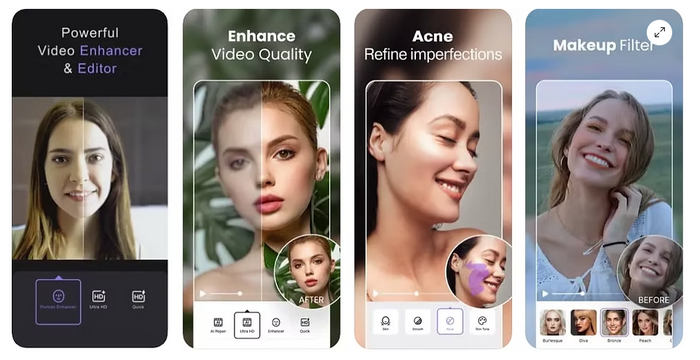
Rate: 4.3
Supported Platforms: Android and iOS
Prós
- AI-powered video enhancement.
- Supports resolution upscaling.
- Interface simples e amigável para iniciantes.
- Fast processing for short clips.
Contras
- Limited free exports.
- Premium subscription required for full features.
Verdict:
AirVid is a solid option for users who want an AI video enhancer for Android. It works well for quick quality improvements, especially for social media content. However, access to its full features requires a subscription.
AI Video Enhancer - HiQuality
AI Video Enhancer – HiQuality is another AI video enhancer for Android that is designed specifically for improving clarity, resolution, and detail with the help of AI technology. With just a few taps, the app can upscale videos, refine focus, and reduce grain. Its layout is simple, making it suitable for users who prefer quick, automated enhancements. However, access to advanced tools may require a premium upgrade.

Rate: 4.5
Supported Platforms: Android
Prós
- AI-based resolution upscaling.
- Effective noise reduction.
- Restores old and blurry videos.
- Interface simples.
Contras
- Processing may take time.
- Contains ads in the free version.
Verdict:
AI Video Enhancer – HiQuality is designed specifically for improving clarity and sharpness in low-quality videos. It’s a practical choice for Android users who want noticeable upgrades in resolution and detail, though patience may be required during processing as it should be done manually.
InShot
InShot is a widely used video editor that blends enhancement tools with full editing capabilities. Users can fine-tune brightness, contrast, saturation, and sharpness, which makes it also one of the best options for a video enhancer for Android. Although it doesn’t offer a dedicated one-click AI enhancer, it provides strong manual control for improving video quality. It’s especially popular among social media creators who want polished, platform-ready content.

Rate: 4.8
Supported Platforms: Android and iOS
Prós
- Powerful editing tools.
- High-quality export options.
- Filters and color correction features.
- Very intuitive for beginners.
Contras
- Watermark in free version.
- Not dedicated solely to AI enhancement.
Verdict:
InShot is one of the most popular mobile video editors available. However, its high Google app rating doesn’t reflect as an AI video enhancer tool. However, its filters, adjustments, and export quality settings can significantly improve video appearance. It’s perfect for users who want enhancement combined with full creative control.
Part 2. Bonus: Best AI Video Enhancer for Desktop
While mobile apps are convenient for quick edits, there are times when your video needs more advanced enhancement, especially if you're working with longer clips, higher resolutions, or professional content.
One of the best AI video enhancers you can use beyond Android is FVC Video Converter Ultimate. This powerful desktop software allows users to repair, enhance, and convert videos into high-quality formats with just a few clicks. Whether you're restoring old footage, improving blurry clips, or preparing content for YouTube or presentations, this tool provides a more stable and efficient enhancement experience compared to mobile apps.
Instead of manually adjusting multiple settings, FVC integrates smart AI-driven tools that automatically improve resolution, reduce noise, and optimize brightness and contrast.
Main Features:
- • Automatically improves resolution, reduces noise, and enhances overall clarity.
- • Converts low-resolution videos into higher quality formats such as HD or 4K.
- • Removes grain and visual distortions, especially in low-light footage.
- • Enhances exposure levels for clearer and more balanced visuals.
- • Enhance multiple videos at once to save time.
- • Converts and exports videos into various formats compatible with different devices and platforms.
- • Helps fix corrupted or damaged video files.
Step-by-Step Guide on How to Enhance Video Using FVC Video Converter
Step 1. First, you need to download and install the tool on your computer.
Free DownloadFor Windows 7 or laterSecure Download
Free DownloadFor MacOS 10.7 or laterSecure Download
Step 2. Next, click the Enhancer tab and from there, Click Add File and upload your video.

Step 3. Now, choose the AI model you want to use according to the video problem. After that, click the Export All and wait for a few seconds, the enhanced video will be saved on your computer.

FVC Video Converter Ultimate is truly a powerful AI video enhancer tool. It leverages AI technology to intelligently enhance videos by upscaling resolution, reducing noise, optimizing lighting, and sharpening details. Moreover, its user-friendly interface and wide format support make it suitable for both beginners and professionals. So if you’re looking for an AI video enhancer tool to help enhance and improve the quality of your video, you must give this tool a try.
Part 3. FAQs about AI Video Enhancer for Android
Will enhancing a video reduce its original quality?
No. AI video enhancers fro Android are designed to improve video quality, not reduce it. However, exporting in lower resolution settings may affect the final output quality, so it’s important to choose the correct export option.
Can I enhance long videos on Android?
Yes, but processing long videos may take more time and device storage. Some free versions also limit the length of videos you can enhance, so you may need a premium version for longer clips.
Can I enhance old or blurry videos with AI video enhancer apps?
Yes. Most AI video enhancer apps are designed to restore old, blurry, or low-light videos. They analyze the footage and apply improvements to make it clearer and more detailed.
Conclusão
There’s no reason for you to stick with your blurry and low quality videos. With the AI video enhancers for Android you can now easily adjust and enhance their qualities. Moreover, if you want a more advanced tool that you can use on your desktop, don’t miss the chance to use the FVC Video Converter tool.
So what are you waiting for? Find the best AI video enhancer tool for your needs and start enhancing your videos today!
-
 Easiest Way to Enhance Video Quality in Premiere Pro
 Learn how to enhance video quality in Premiere Pro with simple steps, the best export settings, and an AI alternative for pro-quality results.
-
 Learn How CapCut Can Enhance Video Quality: 3 Easy Methods
 Do you want to enhance your video quality using CapCut but are not sure where to start? Read this article and learn how CapCut enhances video quality easily.
-
 Como fazer upgrade de 1080p para 4K [formas on-line e off-line]
 Quer fazer com que seus vídeos pareçam ter sido filmados em resolução 4K? Nós pegamos você! Aprenda como fazer upgrade de 1080p para 4K com este guia passo a passo. Leia para saber mais!
