


 Video Converter Ultimate
 Gravador de ecrã
 Reparo de vídeo
 Secure Download
Como converter seus arquivos de vídeo FLV para o formato 3G2 na área de trabalho e online
It is said that technology changes life and make our daily life and work easier. However, every coin has two sides, so does technology. The digital video, for example, gives us the chance to access entertainment and information anywhere and anytime. The problem is video format. According to a recent survey, there are over a hundred video formats. This guide focus on how to help you convert FLV to 3G2 or 3GP on computer and online for free.

Parte 1: Como converter FLV para 3G2 no PC / Mac
Método 1: converter FLV para 3G2 com conversor FLV grátis
There are only limited video converters support 3G2 format. FVC Free FLV Converter is one of them. Moreover, it can meet your need without paying any penny. If you have a lot of FLV files, it can process them at the same time quickly.
Main Features of the Best FLV to 3G2 Converter
- 1. Converta FLV para 3G2 sem perda de qualidade.
- 2. Lidar com vários arquivos FLV usando a tecnologia multi-thread.
- 3. Ofereça uma ampla gama de ferramentas de bônus, como edição de vídeo.
Free DownloadFor Windows 7 or laterSecure Download
Free DownloadFor MacOS 10.7 or laterSecure Download
How to Convert FLV to 3G2 in Batch for Free
Etapa 1: adicionar arquivos FLV
When you need to convert FLV to 3G2, install the best free video converter on your computer and launch it. Click the Add File(s) button, find all FLV files that you want to converter, and open them.

Etapa 2: Selecione o formato de saída
Go to the bottom area after video loading. Click and expand the Output format option, seek for 3G2 with the search bar, and select it on the right side. Click the Open Folder button and choose a specific folder to save the output.

Etapa 3: converter FLV para 3G2
Finally, click on the Convert button to begin converting FLV to 3G2 immediately. A few minutes later, you will find the 3G2 files on the folder you left.

Método 2: como converter FLV para 3G2 com VLC
O VLC não é apenas um reprodutor de mídia de código aberto, mas também um conversor gratuito de FLV para 3G2. Ele permite que você faça um conversor de vídeo gratuitamente no Windows e no Mac. Aqui estão as etapas:
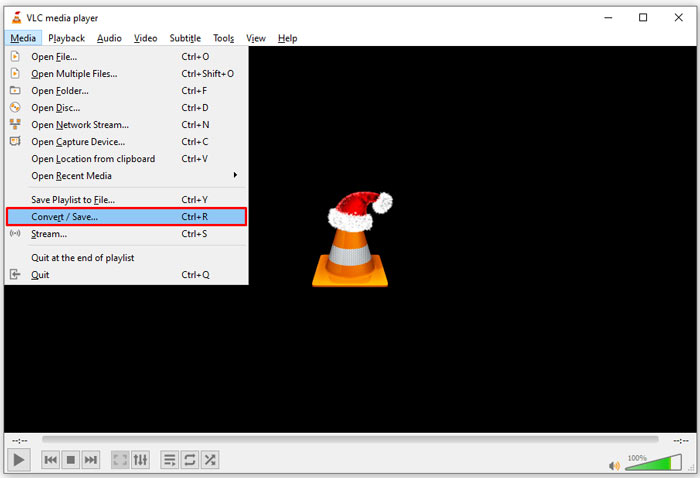
Step 1: Open VLC, go to the Media menu on the top ribbon, and choose Convert/Save.
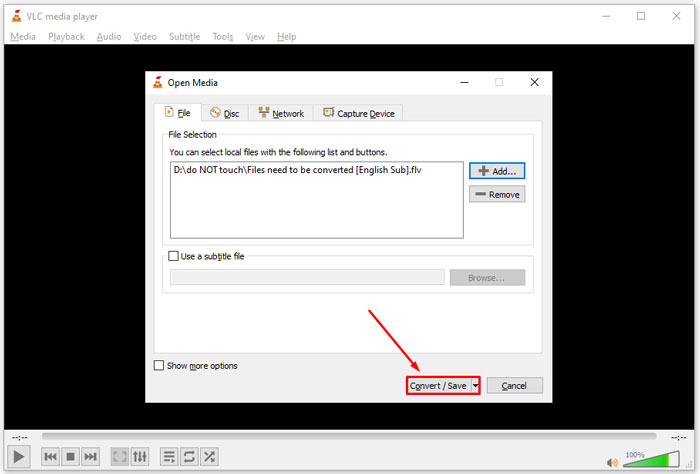
Step 2: Click the Add button and open the FLV file that you intend to change to other format. Hit the Convert/Save button to move on.
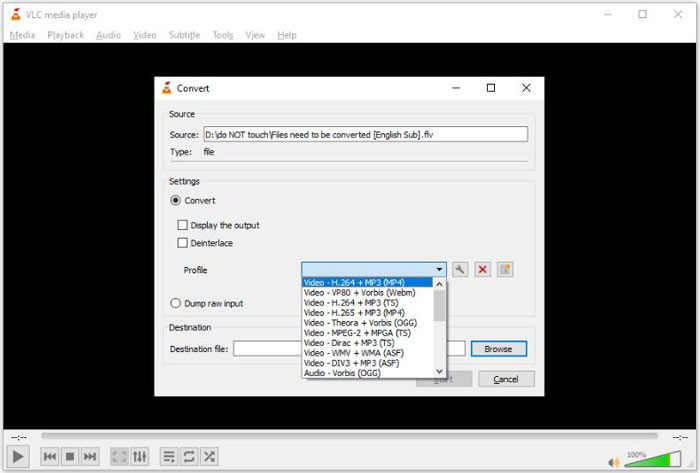
Step 3: Unfold the Profile option and select 3G2 or relative format. Then set the output folder by hitting the Browse button.
Step 4: Once you click the Start button, VLC will convert FLV to 3G2. It takes a while and you must be patient.
Parte 2: Como converter FLV para 3G2 online
Sometimes, you just need to convert FLV to 3G2 occasionally. In such cases, a web app is a convenient choice, such as FVC Free Online Video Converter. It is free of charge with no registration or file size limit.
Step 1: Visit https://www.free-videoconverter.net/free-online-video-converter/ in any browser. Click the Add Files to Convert button and get the launcher.

Step 2: When downloading is done, the launcher will pop up. Click the Add File button and upload the FLV files. This web video converter app supports batch converting.
If you want to adjust the parameters, like resolution, framerate and more, click the Gear icon and open the Settings dialog.

Step 3: Head to the bottom and select a proper output format in the format area. As long as you are ready, click on the Convert button. Then download the result to your hard drive.
Here you may like:
Parte 3: Perguntas frequentes sobre FLV para 3G2
O que são arquivos 3G2?
3G2, sigla para 3rd Generation Partnership Project Group 2, é uma extensão para arquivos multimídia baseados em MPEG-4. Ele foi criado por um grupo de sete organizações de desenvolvimento de padrões para telefones celulares em redes CDMA. É muito semelhante ao 3GP.
O Windows Media Player pode abrir 3G2?
Não, o WMP não pode abrir ou reproduzir arquivos de vídeo 3G2, pois não possui os codecs correspondentes. Você tem três opções para abrir arquivos 3G2: convertê-los para o formato de vídeo padrão, baixar um reprodutor de vídeo 3G2 ou instalar um pacote de codec extra para WMP.
O FLV é melhor do que o 3G2?
A resposta depende do seu propósito. Se você assistir ao vídeo no celular com rede CDMA, 3G2 é a melhor escolha. Para compartilhamento de vídeo, FLV é melhor que 3G2.
Conclusão
Agora, você deve entender o que significa 3G2 e como converter FLV para 3G2 sem perda de qualidade. O VLC é um conversor de vídeo gratuito com capacidade para alterar os formatos de vídeo. No entanto, o FVC Free FLV Converter tem um desempenho melhor. É mais fácil de usar do que o VLC e totalmente gratuito. Se você tiver mais problemas, por favor, deixe uma mensagem abaixo deste post e nós responderemos rapidamente.
-
 FLV para WAV - Converta FLV para WAV online grátis e no Mac / PC
 Como faço para converter um arquivo FLV? O VLC pode converter FLV em WAV? Este post mostra três maneiras gratuitas de converter FLV em WAV sem perda de qualidade.
-
 FLV para MPG - Como converter FLV para MPG no Mac, PC e online gratuitamente
 Como converter FLV para MPEG? Posso converter FLV para MPG gratuitamente? Este post compartilha 3 conversores de vídeo gratuitos para ajudá-lo a converter FLV para MPG sem perda de qualidade.
-
 FLV para Xbox - Como converter e jogar FLV no Xbox
 Não consegue reproduzir arquivos FLV no Xbox One ou Xbox 360? Precisa converter FLV para formato compatível com Xbox, como MP4, AVI, MOV ou WMV? Esta postagem lista 3 conversores FLV para Xbox gratuitos para você jogar FLV no Xbox.
