


 Video Converter Ultimate
 Gravador de ecrã
 Reparo de vídeo
 Secure Download
Como converter gratuitamente VOB para FLV com soluções de desktop e online em 2022
Files in VOB format are typically stored in the VIDEO_TS folder at the root of a DVD. VOB videos contain a majority of the data stored on the disc, including video, audio, subtitles, DVD menus, and other navigation contents. But if you want to upload VOB files to social networks, such as YouTube, you have to change the format of VOB files to video streaming supported formats like FLV – the standard for streaming media over the Internet. So in this article, we will explain how to convert VOB to FLV online or with a free VOB to FLV file converter for better streaming.

Parte 1. Como converter VOB em FLV com software gratuito para desktop
To change the format of your VOB files to FLV quickly, try FVC Free FLV Converter. With this freeware, you can transform video files from VOB to FLV, MP4, AVI, WMV, MOV, and many others. Furthermore, the program is capable of performing basic video-editing tasks if needed. Just download the VOB to FLV file converter and follow the easy steps below.
Free DownloadFor Windows 7 or laterSecure Download
Free DownloadFor MacOS 10.7 or laterSecure Download
Step 1. Launch FVC Free FLV Converter
Primeiro, baixe o conversor VOB para FLV para Windows ou Mac. Após o download do arquivo de instalação, clique duas vezes nele e siga as instruções na tela. Depois disso, execute-o em seu computador e você verá sua interface conforme abaixo.

Step 2. Add VOB files to the program
Hit Add File(s) button, select your VOB files and click Next to continue.

Step 3. Choose FLV as the output format
Then, choose FLV file format from the Output format field
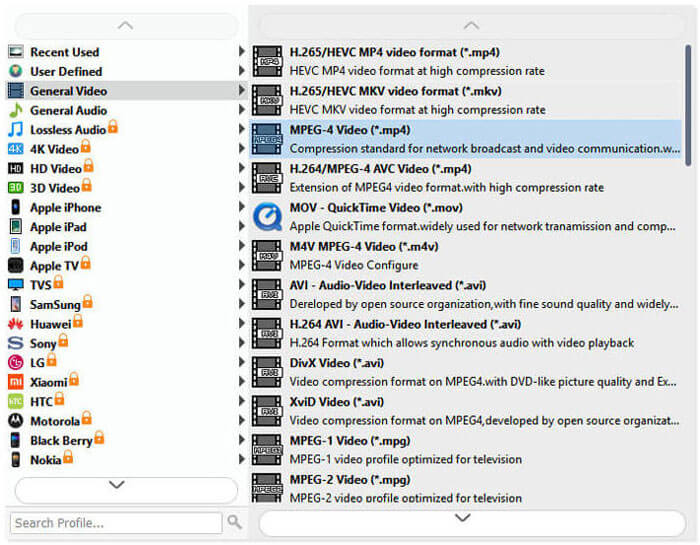
Step 4. Transform VOB to FLV
Click the Open Folder button and choose the folder where you want the converted files to be saved. To start converting your VOB files to FLV, click the Convert button. Once the conversion is complete, the folder that contains converted files will open automatically.
Parte 2. Como converter VOB em FLV Online
Usar serviços online para transformar VOB em FLV também é uma boa escolha. Escolhemos dois conversores VOB para FLV online para você escolher. Todas essas ferramentas online são gratuitas e frequentemente utilizadas por muitos usuários. Continue lendo para saber como você pode converter VOB em FLV em seu computador usando as ferramentas online.
FVC Free Online Video Converter
FVC Free Online Video Converter is a full-featured online tool that supports the most popular video and audio formats. Converting files with this online service is secure, and your converted files will be deleted from the server as soon as you download the result. The conversion requires no software installation and the whole conversion process is simple.
Você pode seguir as etapas abaixo para alterar seus arquivos VOB para FLV.
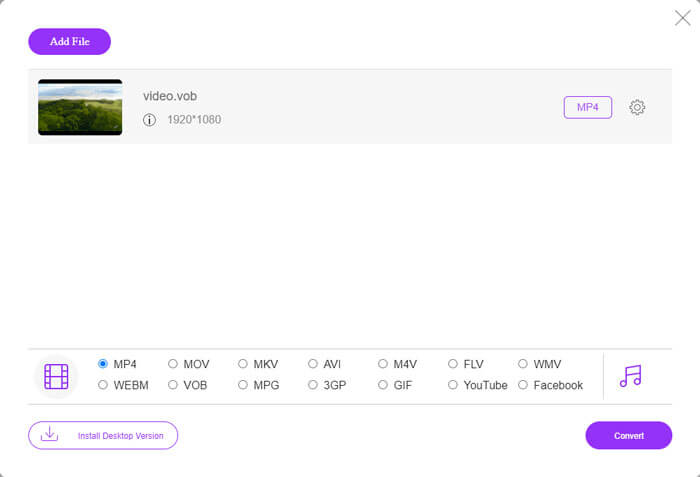
Step 1. On the FVC Free Online Video Converter website, click the Add Files to Convert button to add your VOB files. The first time you go to use this tool, you’ll need to download and install the launcher first.
Step 2. Make sure that FLV is selected as the output format in the Video category at the lower bottom of the window.
Step 3. Hit the Convert button, and then decide the folder destination. After the conversion process is complete, your converted file will be downloaded automatically and the folder that stores the converted files will be open.
ConvertFiles
ConvertFiles é outro conversor online gratuito de VOB para FLV. Este serviço pode converter vários tipos de arquivos gratuitamente em minutos. Este serviço pode enviar o link de download do arquivo convertido para o seu endereço de e-mail, se necessário. A conversão não requer instalação de software e todo o processo de conversão é simples. Mas observe que esta ferramenta online pode converter arquivos de até 250 MB.
É assim que você pode usar este conversor VOB para FLV online.
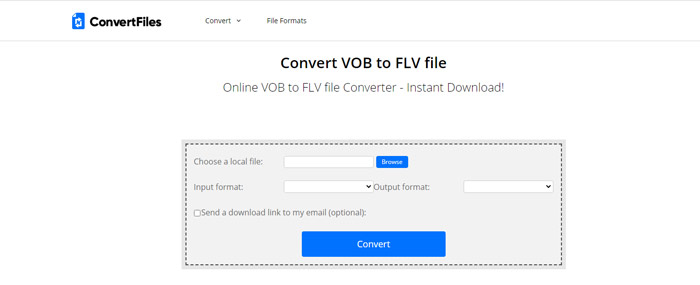
Step 1. Visit the webpage of ConvertFiles, click Browse and add your VOB files to the program.
Step 2. Then, select Flash Video File (.flv) from the Output format drop-down list.
Step 3. Click the Convert button to start converting VOB files to FLV. When the file is converted successfully, you’ll see the link and you can click to go to the download page to download your converted files.
Parte 3. A comparação entre os formatos VOB e FLV
| Parâmetro de Comparação | VOB | FLV |
| Extensão de arquivo | .vob | .flv |
| Desenvolvido por | DVD Forum | Adobe Systems |
| Vídeo 00codecs | MPEG-1, MPEG-2 | On2 VP6, Sorenson Spark, Screen video, Screen video 2, H.264 |
| Codecs de áudio | MP1, MP2, PCM, AC-3, DTS | MP3, ADPCM, Nellymoser, Speex, AAC |
| Programas que abrem arquivos VOB / FLV | Windows Media PlayerVLC Media Player | VLC Media PlayerAdobe Flash Player |
Parte 4. Perguntas frequentes sobre conversão de VOB para FLV
O que é VOB?
VOB (for video object) is the container format in DVD-Video media. VOB can contain video, audio, subtitles, DVD menus with navigation through chapters on a DVD disc. The VOB format is usually formatted as MPEG-2 and can be opened by almost any media player. Read on Top 5 VOB Players for Windows 10/8/7 PC and Mac to learn more VOB players.
O que é FLV?
FLV is a container audiovisual format used to stream digital video content over the Internet using Adobe Flash Player 6 or newer. You can play FLV using Windows Media Player, VLC, Adobe Media Player, Winamp, RealPlayer, or other FLV players.
Os arquivos VOB contêm áudio?
sim. Um arquivo VOB inclui menus de vídeo, áudio, legendas e DVD.
Conclusão
Como você pode ver, você pode transformar MP4 em FLV enquanto mantém a alta qualidade do vídeo original com um conversor de arquivo VOB gratuito facilmente. Além disso, você também pode fazer a conversão de VOB em FLV online. Os conversores de VOB para FLV acima mencionados para desktop e online são todos gratuitos. Esperamos que você encontre uma solução satisfatória que melhor atenda às suas necessidades.
-
 O que é o arquivo VOB e como transformar o arquivo VOB em GIF gratuitamente
 Quer saber mais sobre os arquivos VOB e como compartilhá-los depois de copiados? ou Por que você precisa converter VOB para GIF? Então leia este artigo com atenção.
-
 VOB para MP4 - 3 maneiras de converter arquivos VOB para MP4 gratuitamente em massa
 Este artigo apresenta três conversores VOB para MP4 gratuitos e os tutoriais relacionados. Você pode converter arquivos VOB para MP4 gratuitamente no Windows / Mac / online com facilidade.
-
 Como compactar arquivos VOB online e gratuitamente
 Você está procurando métodos para compactar arquivos VOB? Aprenda a melhor maneira de diminuir o tamanho dos arquivos VOB neste artigo.
